A Yorkton, Sask., woman who tried to block police from entering a home to check on a caller who dialled 911 has been convicted of obstruction of justice.
Sask. schools grapple with Facebook
With students across Saskatchewan returning to school, teachers are divided about whether popular social networks like Facebook have a place in the classroom.
Riders loonie unveiled
Fans of the Saskatchewan Roughriders have another item they can put in their collection of club gear: one dollar coins, or loonies, celebrating the 100th anniversary of the team.
Samsung Galaxy Tab preview

After a week of painful teasing, Samsung has come clean about its Galaxy Tab 7-inch Android tablet. We got the nitty gritty specs, along with some quality time with the device, and we like what we’re seeing on both fronts. Follow along after the break as we break it all down, including some hot hot video of the thing in action!
Update: Added Samsung’s official press release, product images and first video ad for the Galaxy Tab.
Gallery: Samsung Galaxy Tab first hands-on


Gallery: Samsung Galaxy Tab press images


Continue reading Samsung Galaxy Tab preview
Samsung Galaxy Tab preview originally appeared on Engadget on Thu, 02 Sep 2010 14:52:00 EDT. Please see our terms for use of feeds.
Permalink | | Email this | Comments
Manor, Texas: Government Evolution or Fad Solutions in the QR Code-Connected Town

Ponder, for a moment, this photo of a field in Manor, Texas. Outside Jennie Lane SmartPark, which is also the home to the town’s farmers’ market, hangs a large QR code that directs both residents and curious passersby to this website, which gives a brief history of the land and its re-dedication from “park” to “SmartPark.” The SmartPark now boasts free Wi-Fi and “technology training classes,” all a part of Manor’s government tech upgrade that began back in 2008.
With an estimated population of 5,468, Manor is still a small town. But its upgrade — including services like a redesigned city website, a Web app for reporting street and water issues called SeeClickFix, and a crowd-sourcing website for new ideas called Manor Labs — has made news as representing the evolution of local government into the Internet age. Manor will be hosting a two-day tech conference later this month called manor.govfresh, where city officials will meet with other municipal governments about its programs, and will even give another town — De Leon, Texas — a “Gov City 2.0 Makeover.”
Continue reading Manor, Texas: Government Evolution or Fad Solutions in the QR Code-Connected Town
Manor, Texas: Government Evolution or Fad Solutions in the QR Code-Connected Town originally appeared on Switched on Thu, 02 Sep 2010 13:43:00 EST. Please see our terms for use of feeds.
Samsung exec says next tablet will use Android ‘Honeycomb,’ Galaxy Tab getting Gingerbread

Samsung’s Galaxy Tab has only just finally, officially been revealed, but it looks like the company is already doing at least a bit of talking about its next tablet (and the future of the Galaxy Tab). According to Tech Radar, Samsung’s head of product planning, WP Hong, has said that “moving forward, with Honeycomb, that will be used in the next generation tablet, as it is specifically optimized for different type of tablet, and will be used on another product only.” Not only is that the most official word we’ve had so far of a Galaxy Tab followup (curiously described as a “different type of tablet”), but it’s also seemingly the first time that an ODM has publicly referred to a future Android version as “Honeycomb” — a name that Tech Radar had previously heard from “multiple sources.” It seems that Honeycomb won’t be making it to the current Galaxy Tab, however, but Hong did say that “depending on our international partners, we’ll be working to upgrade from Froyo to Gingerbread.”
Samsung exec says next tablet will use Android ‘Honeycomb,’ Galaxy Tab getting Gingerbread originally appeared on Engadget on Thu, 02 Sep 2010 11:19:00 EDT. Please see our terms for use of feeds.

TabRocket Sends Tabs Between Remote Chrome Sessions [Downloads]

Chrome: TabRocket is a small Chrome extension that allows you to shuttle open tabs between remote Chrome sessions. If you’ve ever wanted to send a tab to your home computer or your laptop across the room, TabRocket can help. More »

Stephen Hawking says God isn’t necessary
Theoretical physicist and official World’s Cleverest Chap Stephen Hawking says there’s no reason to think that God created the universe.
Toshiba’s Folio 100 with Android and Tegra 2 spied in the IFA wilds

That Folio 100 (alias Smart Pad) from Toshiba we’d been hearing about? Yep, totally real, and totally Tegra 2-powered — a theme that we think is going to be pretty popular among tablet makers this season. We caught a handful of Folio 100s firmly affixed to a wall at IFA today, showing 10.1-inch multitouch LCD displays paired with a remixed version of Android 2.1, a handful of capacitive buttons, a front-facing 1.3 megapixel camera, 16GB of on-board storage, and not much else — there’s really nothing visually stunning about the setup as far as we can tell, and it’s not particularly thin. After bouncing out that crazy Libretto W100, Toshiba’s going to have to turn up the style dial to 11 if it wants to rise above the forthcoming onslaught of Google tablets, we suspect.


Toshiba’s Folio 100 with Android and Tegra 2 spied in the IFA wilds originally appeared on Engadget on Thu, 02 Sep 2010 07:31:00 EDT. Please see our terms for use of feeds.
Permalink | | Email this | Comments
How to Create a Mobile Version Of Your WordPress Blog
Would you like to make your blog look great on all devices, not just computers? Smartphones and other mobile devices are increasing in popularity, so here’s how you can make sure your blog looks great no matter what people are reading it on.
WordPress is a great tool for creating a blog or traditional website for your business, organization, or simply to share pictures with family and friends. You can make a free blog on WordPress.com, and if so, your blog will already be ready for most modern mobile device browsers. Here’s our test WordPress.com site in Mobile Safari; WordPress.com automatically gave it an iOS style theme that’s easy to use on mobile devices.
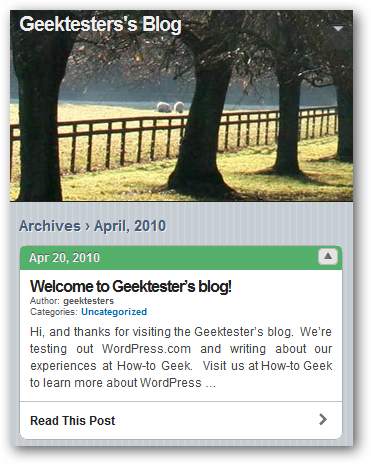
However, if you want to tweak WordPress and make your site just like you want, you’ll need to use the Self-hosted WordPress.org. If you’ve created a new WordPress site on your own server or hosting service manually or using an auto-installer such as Softaculous, you may be disappointed that your site looks the same on mobile browsers as it does on your computer. This makes it difficult to use on small screens.

Thankfully, you can easily get the same iOS style theme on your blog for free with the WPtouch plugin. Login to your WordPress Dashboard, and select Add New under Plugins on the left side menu.
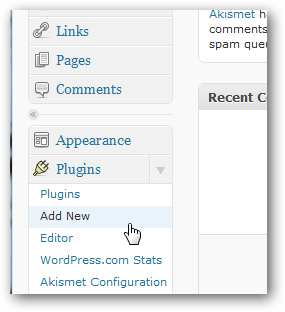
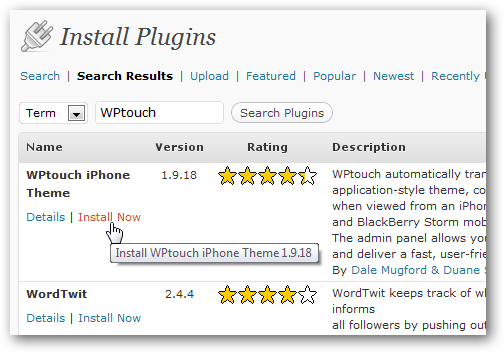
On this page, enter WPtouch in the search box.

Now install and activate the plugin as normal.
Your site will now have a nice theme that works great on modern smartphones and other mobile devices, but will still show your own normal theme to visitors using computers. If you’d like to preview how your new mobile theme looks on an iPhone, check out our article on Testing Mobile Websites in Safari for Windows.

Tweak WPtouch Settings
WPtouch works fine without any tweaking on most sites, but if you’d like, you can customize your mobile site and tweak WPtouch’s settings to get it working just like you want. To do this, click WPtouch under Settings on the left menu.
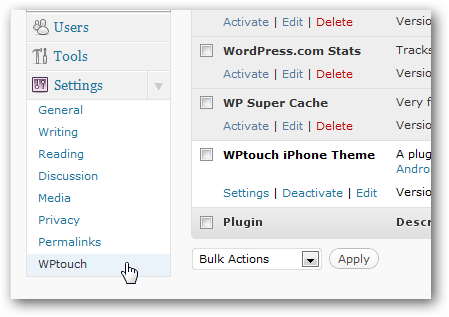
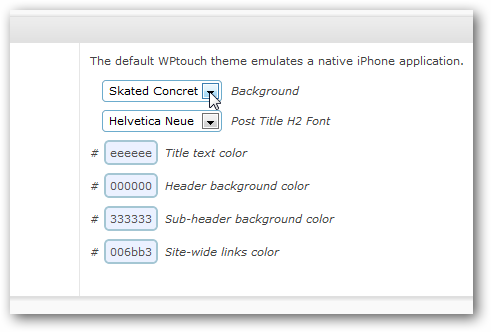
Here you can tweak many settings, including the mobile theme’s background, fonts, icon, and more.
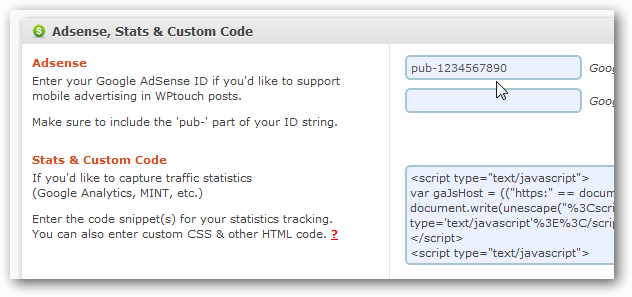
You can also add Google Analytics and Adsense to your mobile site, so you can monetize your traffic and know how many visitors you’re getting. If you need to find you Google Analytics code, here’s how you can quickly find it.
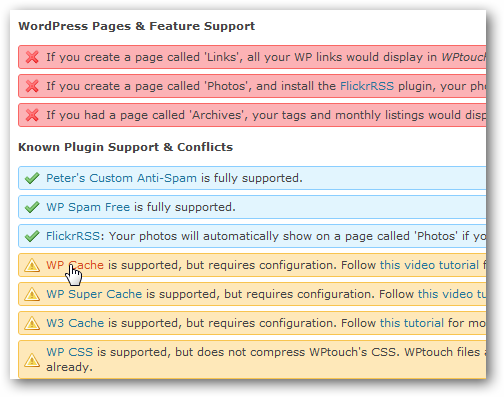
You may need to tweak settings in other WordPress plugins, including WP Cache and W3 Cache, to make them work with WPtouch, so be sure to check the list at the bottom of the settings page.
Here’s Techinch.com with a customized logo, menu, and background using WPtouch. Now your site looks just like you want, on PCs and mobile devices.

