To train for Mars, a return to the lunar surface is essential, according to the first man to set foot on the moon.
Yankees first team to hit 3 grand slams in 1 game

The New York Yankees become the first team in major league history to hit three grand slams in a game.
Toshiba Thrive Android 3.1 tablet available in Canada, cheaper pricing than originally announced

The Toshiba Thrive quietly found its way into Canadian retailers. This Android 3.1 tablet comes in 3 variations and price points: 8GB ($399.99), 16GB ($429.99) and 32GB ($499.99). When Toshiba announced the Thrive would be coming to Canada they stated different pricing: 8GB was $429; 16GB was $479 and the 32GB version was $579. So the price reduction is welcomed and Toshiba possibly is taking a note from the HP TouchPad.
Specs of the Thrive has it coming with a 1GHz NVIDIA Tegra 2 processor, 10.1-inch touchscreen display (resolution of 1280 x 800), Wi-Fi, a 2 megapixel front-facing camera and a 5 megapixel. This comes in black but the back covers can be swapped out in various colours: Blue Moon, Raspberry Fusion, Lavender Bliss, Silvery Sky and Green Apple.
Via: Best Buy
Related posts:
- Toshiba Thrive 10.1-inch Android tablet now estimated to be released August 19th
- Toshiba Thrive Android 3.1 tablet now available to pre-order, estimated release date is August 12th
- The Android 3.1 “Toshiba Tablet” coming to Canada this August
Jack Layton leaves Parliament Hill for last time

A crowd of Canadians watched, applauded and sang O Canada as late NDP leader Jack Layton’s casket was carried out of Parliament Hill Thursday afternoon.
Nuclear reactor research part of $10M deal

The Saskatchewan government will be spending $5 million over five years, working with Hitachi Ltd. on nuclear research — including some design work on a small nuclear reactor.
Remembering You’ll Soon Be Dead Is the Most Important Tool to Help Make the Big Choices in Life [Video]

“Remembering that I’ll be dead soon is the most important tool I’ve ever encountered to help me make the big choices in life. Because almost everything – all external expectations, all pride, all fear of embarrassment or failure – these things just fall away in the face of death, leaving only what is truly important. Remembering that you are going to die is the best way I know to avoid the trap of thinking you have something to lose. You are already naked. There is no reason not to follow your heart.” ~ Steve Jobs More »

Canadians lax about cellphone security

Less than half of Canadian cellphone and tablet users put password locks on the devices or adjust settings to limit the sharing of personal information stored on the devices, a poll commissioned by Canada’s privacy commissioner has found.
Americans wait longer to take marriage plunge

Americans are in step with the worldwide trend to wait longer to marry for the first time, taking that initial walk down the aisle six years later than they did four decades ago.
Search Google Maps out loud
Tired of typing? Without using your keyboard, you can now talk into Google Maps to look for places and get directions. If you’re using a Chrome web browser in the U.S. (English only for now), simply click the microphone icon and speak into your computer.

Click the mic and ask for a place to get started
Using voice search can make it easier to find hard-to-spell places (like Poughkeepsie or Liechtenstein) or simply get directions without typing (for example, say “Directions from Los Angeles to San Francisco”). Or if you’re interested in exploring the world through the Earth layer (using the plugin), you can just say where you want to go and fly over to that location directly within your browser!

Fly to places just by saying your query
If you didn’t already know, you can also use voice commands on Google.com, your Android device or on the Google app for your iPhone. Take a look at this video for desktop voice search to find out how voice actions can make your life easier.
Have fun talking out your searches on Maps!
Posted by Jed Burgess, Software Engineer


Escape from City 17 in Part Two of This Half-Life Fan Film

Two years ago, some dudes set the world on fire with the Half-Life 2 fan film Escape from City 17. Today, they return with part two of that film. Considering this 15-minute video only cost $250 to make, I think that’s two years well spent. This is a high-quality piece of no-budget filmmaking, for sure.
BlackBerry to run Android apps on future QNX devices?

One of the biggest gripes from BlackBerry users is the lack of apps, which is why RIM hopes to boost sales by adding Android compatibility in future devices — DroidBerry, anyone? According to Bloomberg, sources familiar with the matter say RIM may add support for Android apps on future QNX-based devices, enabling access beyond RIM’s relatively limited App World. The feature is said to go live in the QNX-powered PlayBook tablet by the end of the year, but there’s no word yet whether the 2012 line-up of QNX phones will get a Google-friendly makeover. Rumor has it that anyone who bought the most recent batch of BlackBerrys won’t get to have a taste of Gingerbread, Honeycomb or any other mouth-watering Android flavor for that matter. Guess they’ll have to settle for plain old vanilla.
BlackBerry to run Android apps on future QNX devices? originally appeared on Engadget on Thu, 25 Aug 2011 08:08:00 EDT. Please see our terms for use of feeds.
Permalink |  Bloomberg | Email this | Comments
EEE Pad Transformer gains Netflix support, minor fixes

This may be of no consequence to those of you who frequent XDA Developers, but obviously, not all of us are comfortable rooting Asus’ EEE Pad Transformer just to get Netflix support. Now you might never have to, thanks to a build lovingly named HTJ85B.US_epad-8.6.5.9-20110816. In addition to enabling sideloading support for the streaming service, this Honeycomb update provides a choice of cursor icons, improves boot times and adds the ability to enable or disable the virtual keyboard while docked. Hitting the update? Let us know how you fare in the comments.
[Thanks, Zack]
EEE Pad Transformer gains Netflix support, minor fixes originally appeared on Engadget on Thu, 25 Aug 2011 00:52:00 EDT. Please see our terms for use of feeds.
Permalink  Tablets Planet | Eeepc (translated), Droid-Life | Email this | Comments
BBM Music gets official for BlackBerry owners lusting after Spotify

Nothing warms our hearts quite like the thought of corporate suits and government workers pumping out the tunes of Iris DeMent and Amy Martin as they scurry throughout their busy days. As we’ve previously speculated, a new service for BlackBerry Messenger — dubbed BBM Music — has now become real official. For $5 per month, users may keep up to 50 songs in their personal library, which is kinda reminiscent of the wistful days filled with 128MB MP3 players. Fortunately, it gets better. A social component allows you to add BBM Music friends, which gives you access to their current 50 songs, too — and serves as a real incentive to grow your social circle. Once you get bored of your jam selection, up to 25 songs per month can be swapped out for new ones, and your current library can be stored locally on the handset. The new service begins today in closed beta for residents of the US, Canada and the UK, but more countries will be added down the road. Curious if yours made the list? Just hop the break for the full PR to find out.
Continue reading BBM Music gets official for BlackBerry owners lusting after Spotify
BBM Music gets official for BlackBerry owners lusting after Spotify originally appeared on Engadget on Thu, 25 Aug 2011 00:01:00 EDT. Please see our terms for use of feeds.
Permalink | | Email this | Comments
Union unhappy with education assistant cuts
The union representing education support workers in Saskatchewan says special needs in the classroom are growing while educational assistant jobs are being cut.
Steve Jobs resigns as CEO of Apple

A major development out of Cupertino: Apple CEO Steve Jobs has stepped down, the board naming Tim Cook as his replacement. The company said “Steve’s extraordinary vision and leadership saved Apple and guided it to its position as the world’s most innovative and valuable technology company.”
Steve himself published the following letter:
I have always said if there ever came a day when I could no longer meet my duties and expectations as Apple’s CEO, I would be the first to let you know. Unfortunately, that day has come.
I hereby resign as CEO of Apple. I would like to serve, if the Board sees fit, as Chairman of the Board, director and Apple employee.
As far as my successor goes, I strongly recommend that we execute our succession plan and name Tim Cook as CEO of Apple.
I believe Apple’s brightest and most innovative days are ahead of it. And I look forward to watching and contributing to its success in a new role.
I have made some of the best friends of my life at Apple, and I thank you all for the many years of being able to work alongside you.
Steve
Apple has confirmed that Jobs will stay on as Chairman. Full details in the PR after the break.
Continue reading Steve Jobs resigns as CEO of Apple
Steve Jobs resigns as CEO of Apple originally appeared on Engadget on Wed, 24 Aug 2011 18:35:00 EDT. Please see our terms for use of feeds.
Permalink | Apple (1), (2) | Email this | Comments
Facebook Is Going to Add Instagram-style Photo Filters to their Facebook App [Facebook]

There have been whispers that Facebook wanted to buy Instagram, but as that never went anywhere, Facebook now wants to kill Instagram. They’re adding photo filters to their Facebook app. More »

Your Bus Blowing Up Is the Perfect Way to Start the School Year [Video]

Sadly, summer’s ending and it’s time again to get back to those studies. But these kids were treated to one last bit of excitement. After their first day back, their bus exploded. Party! More »
Doing more with the +1 button, more than 4 billion times a day
In June we launched the +1 button for websites, making it easier to recommend content across the web. In July, the +1 button crossed 2 billion daily views, and we also made it a lot faster. Today the +1 button appears on more than a million sites, with over 4 billion daily views, and we’re extremely excited about this momentum.
It’s just the beginning, however, and today we’re launching two more features that make +1 buttons more useful for users and publishers alike.
Sharing with your circles on Google+
Clicking the +1 button is a great way to highlight content for others when they search on Google. But sometimes you want to start a conversation right away—at least with certain groups of friends. So beginning today, we’re making it easy for Google+ users to share webpages with their circles, directly from the +1 button. Just +1 a page as usual and look for the new “Share on Google+” option. From there you can comment, choose a circle and share.

The new +1 button on Rotten Tomatoes
+Snippets
When you share content from the +1 button, you’ll notice that we automatically include a link, an image and a description in the sharebox. We call these “+snippets,” and they’re a great way to jumpstart conversations with the people you care about.
Of course: publishers can benefit from +snippets as well. With just a few changes to their webpages, publishers can actually customize their +snippets and encourage more sharing of their content on Google+. More details are available on the Google Webmaster blog.
We’re rolling out sharing and +snippets globally over the next week, but if you’d like to try the new +1 button now, you can join our Google+ Platform Preview. Once you’re part of the Preview, just visit a site with the +1 button (like Rotten Tomatoes) and +1 the page. Thanks for all of your feedback so far, and stay tuned for more features in the weeks and months ahead!
Posted by Vic Gundotra, Senior Vice President of Engineering


The Google Docs app for Android now with Web Clipboard and in 46 languages
In April, we introduced the Google Docs app for Android, which allows you to access and create new docs on the go, directly from an app on your Android phone. Since then, we’ve continued to work on ways to improve your mobile experience, and I’m excited to share a couple of new updates that we hope will do just that.
Starting today, you can easily take pictures with your Android phone and insert them into a Google document, using the new Web Clipboard feature. Here’s how:
1. From the Docs widget on your phone, tap the camera icon.

2. Snap a photo then select Send to Web Clipboard and press OK.

3. Open any Google document from your computer. Click the Web Clipboard icon and select the item to paste into your doc.

A couple of other new features for the Android app include improved open and send options. You can open your documents with any compatible viewer application or send a doc as an attachment through email or another app on your phone.
Last but certainly not least, we’re making the Docs app available in 45 additional languages so more users around the world can access, share and edit on the go. Here’s an example of what the app looks like in German:
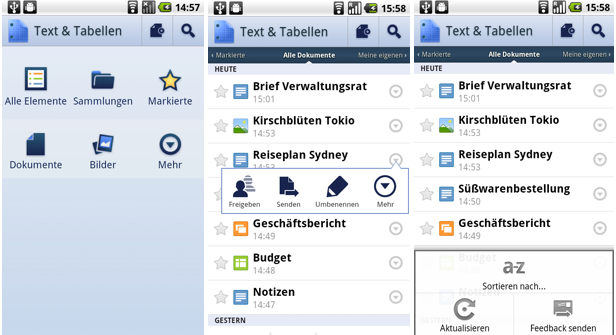
You can grab the app from Android Market and learn more by visiting the help center. As always, let us know what you think in the comments or on the forum.
Posted by: Tobias Thierer, Software Engineer

Bloomberg: BlackBerry PlayBook OS update with native email client and BBM coming in September

The BlackBerry PlayBook officially launched on April 19th, over 500,000 people jumped on the opportunity to own RIM’s first tablet. However, many users were wondering why they had to bridge their BlackBerry smartphone to get their email. During BlackBerry World 2011 RIM came through and gave us all a quick taste of what the email client will look like, basically exactly like it operates on BlackBerry smartphones. Execs said that the OS update will be available sometime this Summer (the Summer officially ends on September 22nd).
In the same report as Android coming to QNX-based BlackBerry devices, Bloomberg reports that “RIM plans to issue a PlayBook software upgrade in September that adds a dedicated e-mail program and BlackBerry Messenger instant-messaging applications, one of the people said. A PlayBook upgrade for the Android player may come later on in the year, two of the people said.”
Only a few more weeks!
Source: Bloomberg
Related posts:
- Video: This is how the native BlackBerry PlayBook email client will work
- aMail app will bring email to the BlackBerry PlayBook
- Bloomberg jumps on board with the rumours: “new iPhone in September”