Galaxy Tab 10.1 goes up for pre-order at J&R, joined by Galaxy S WiFi 5.0 and 4.0

Remember that little GT-P7510 project Samsung seems to have on the backburner? You know, the ultraslim Tegra 2 tablet that makes Honeycomb finally feel ready for public consumption? Yeah, well, that's gotten its pre-order papers now, courtesy of J&R. Pricing of the WiFi-only Galaxy Tab 10.1 matches the $500 for 16GB and $600 for 32GB that Samsung announced in March, and though delivery dates aren't listed, we'll go ahead and assume the promised June 8th launch remains on track. Also ready for pre-order at J&R today are Samsung's 8GB Galaxy S WiFi 5.0 and 4.0 media players, priced at $270 and $220, respectively, though the only info about availability that’s provided is a boilerplate “coming soon” note. Check out the source links for more details.

Galaxy Tab 10.1 goes up for pre-order at J&R, joined by Galaxy S WiFi 5.0 and 4.0 originally appeared on Engadget on Wed, 18 May 2011 03:09:00 EDT. Please see our terms for use of feeds.

Permalink Netbook News (1), (2)  |  sourceJ&R (10.1, 16GB), (10.1, 32GB), (Galaxy S WiFi 5.0), (4.0)  | Email this | Comments

Why Isn’t Google Chrome A Part Of Android?

Over the past couple of years covering Google, there’s one seemingly simple question that comes up again and again, that Google just can’t seem to answer. Why isn’t Chrome a part of Android?

Read the wrong way, that could seem like a deep question. But it almost never means “why isn’t Chrome OS simply merged with Android?” or the like. Most of the time, it’s simply a question wondering why Google’s very popular web browser is not a part of their very popular mobile operating system? After all, that OS has a browser (the aptly-named “Browser”), but it’s not Chrome. Why not?

Unsurprisingly, the question came up once again at Google I/O last week. During a panel with a bunch of engineers on the Chrome team, it was one of the first questions asked. The response? “It’s not something we’re talking about right now.” Ouch.

“I don’t know how to answer that,” the engineered continued. Okay…

Another team member, probably realizing those answers sounded both cryptic and harsh, chimed in. “The important thing at the end of the day is to make browsers better. While it’s not strictly Chrome, we share a lot of code with the Android team. We’ll share more over time.” Okay, that’s better. Still, a bit odd.

Based on my understanding, after having a number of discussions on this topic over the years, it would seem that boils down to a few things. First, the Android team is a completely separate team from the Chrome team. Second, it’s a branding issue that Google isn’t quite sure how to resolve. Third, the Android browser, while similar to Chrome, really isn’t Chrome.

The first and second issues are interesting because more and more, they’re related. As they showcased at I/O this year, Google now is fully backing two horses in the OS race: Android and Chrome OS. Each are made by two entirely different teams that don’t often mix with one another.

As Google executives kept saying over and over again when asked last week, the two OSes have different goals — and are going about things in completely different ways. While Chrome may have started out as a web browser, it’s now much more from an ideology perspective inside of Google. No one will admit this, but if they’re to ultimately succeed, they sort of have to believe that Android won’t. That makes it hard to work together.

When Android first launched in October of 2008, it seemed like either a small oversight or precautionary measure that the browser bundled with it wasn’t branded as Chrome. After all, Google’s browser had just launched in beta (on Windows) the month before. Assuming people liked it, you would have assumed that Google would transfer the branding over to use in Android, right?

Well people did like Chrome. A lot. And yet, Google never moved it over. This despite the fact that Apple did just that on the iPhone with its much less successful Safari browser. Meanwhile, Opera and Mozilla’s Firefox were committed to mobile versions of their popular browsers as well. But Google stuck with “Browser” for Android.

And now they may be stuck with it for good. The problem is that Chrome, for better or worse, is now associated with another product that is similar but different from Android — again, Chrome OS. Imagine if they start including a Chrome browser on Android tablets and then next year Chrome OS tablets launch. Consumers will wonder what the hell the difference is? (And this may already prove to be an issue on the PC/Chromebook side of things, we’ll see.)

All that aside, it is still important to remember that Android’s Browser really isn’t Chrome. The two are both based on WebKit and use Google’s V8 JavaScript engine, but there are dozens of other features that Google is trying to associate with Chrome that they couldn’t possibly squeeze into a mobile web browser (at least not yet).

The same issues are true with Apple’s regular Safari browser and their mobile one. But that browser generally seems to be less feature-focused, so the branding might not be as big of an issue. Plus, even if the two sides don’t work closely together inside of Apple (though it seems like they might), does anyone really believe there’s anyway in hell Steve Jobs would let the browser in iOS be called anything but Safari?

Back to Google, on the flip side of things, the Android team has their own wants and needs for the browser bundled with their software. And imagine if a problem on the Chrome team was stalling a new Android build? Or vice versa?

But with the launch of Honeycomb, Android’s Browser is now starting to look a lot more like Chrome as well, thanks to the tabbed browsing experience it offers. This will only lead to more questions. And it’s only a matter of time before users start demanding that elements are fully synced between the two (Chrome and Android’s Browser).

At that point, Google may have to consider this question yet again. Is it time to bring Chrome to Android?

[image via]

Microsoft customer satisfaction hits new high

Microsoft has been working hard to create top tier products that are well received from its consumers. After fumbling with Vista, Microsoft continues to climb in its customer satisfaction rating.

The rating information comes from American Customer Satisfaction Index (via Geekwire.com) and shows Microsoft’s upward trend in the consumer marketplace….

Summarize your data with pivot tables

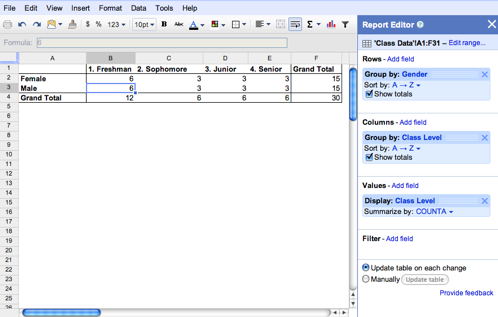
Starting today, we’re rolling out pivot tables in Google spreadsheets. Pivot tables make it easy to process and summarize large data sets in seconds. Check out the video below for a look at how pivot tables work in Google spreadsheets:

In essence, a pivot table does just that — it allows you to “pivot” or rotate data, thus looking at it from different angles and seeing a variety of patterns which may not be immediately obvious. Let’s take a very simple example of a list of students. This list includes a number of students and some information about them, including gender, class level, and major.


To create a pivot table, select your data and go to Data > Pivot Table Report. In the pivot table report editor, you can add fields to set your rows, columns, and values and can drag and drop the fields around within the editor. Here, we’ve used pivot tables to display the number of students in each class level by gender.


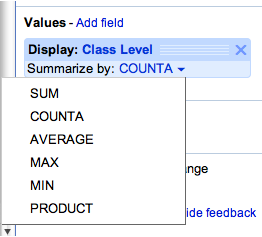
Fields in the Values section can be summarized using built-in formulas to sum, count, or otherwise calculate your data. In the example above the number of students in each class level was summarized via a simple count.


The filter section lets you specify exactly what data you want to be included in the pivot table. For example, we can choose to only count the students in certain extracurricular activities.


With each change, the pivot table is updated in real-time for both you and any collaborators. If you prefer to make changes in batches, you can switch to manual mode. In this mode, your changes won’t be saved until you select Update table.

You can try pivot tables out for yourself using this template or by using your own data set. Please note that pivot tables from Microsoft Excel can’t be uploaded to Google spreadsheets at this time.

We hope you’ll enjoy exploring pivot tables in Google spreadsheets and that they’ll save you time analyzing your data. Check out our help content for even more examples.

Posted by: Matt Ziegelbaum, Software Engineer

Acer Iconia Tab A500 and ASUS Eee Pad Transformer getting Android 3.1 updates in June

Well, that was fast. Almost immediately after Google unveiled Android 3.1, Motorola was first out of the gate with an update, and now, not even a week later, Acer and ASUS are following suit with plans to freshen up their respective tablets with the newly minted software. To recap, 3.1’s benefits include resizeable widgets, support for USB peripherals, and new Movies and Books apps, among other perks. Acer confirmed to us that it aims to start selling the Iconia Tab A500 with 3.1 next month, as well as upgrade existing units running Android 3.0. ASUS, meanwhile, has been touting the impending update for the Eee Pad Transformer on its Italian Facebook page. To which we say, grazie!

Acer Iconia Tab A500 and ASUS Eee Pad Transformer getting Android 3.1 updates in June originally appeared on Engadget on Tue, 17 May 2011 15:41:00 EDT. Please see our terms for use of feeds.

Permalink ThisIsMyNext  |  sourceASUS Italia  | Email this | Comments

NHL realignment: Where might Winnipeg go?

With buzz picking up this week that the owners of the Atlanta Thrashers are in talks to sell their franchise to Winnipeg-based True North Sports and Entertainment, a lot of hockey fans are already wondering what division the relocated team would play in next season. Here are a few ideas.

Study finds Netflix is the largest source of internet traffic in North America

In your daily Netflix news, the latest report on Global Internet Phenomena for spring 2011 from Sandvine has called out the movie service as the largest single consumer of bandwidth on the internet in North America. The last report in October suggested it made up around twenty percent of internet traffic during prime time, but this time around the stats say it accounts for 30% of traffic during prime time, and 22.2% of daily internet traffic. Sandvine gets the data from ISPs using its broadband technology and now foresees “Real-Time Entertainment” (which includes Netflix) shooting up over 55% of peak internet traffic by the end of this year. It also reports on net traffic from other regions, noting social networking outpaces YouTube traffic in Latin America, while European subscribers use twice as much data as North Americans. We’ll have to wait and see if these stats are waved in our faces to justify the next round of bandwidth caps or throttling, in the meantime you can click through for more stats or hear about it from Sandvine CEO Dave Caputo discuss them in a video embedded after the break.

Continue reading Study finds Netflix is the largest source of internet traffic in North America

Study finds Netflix is the largest source of internet traffic in North America originally appeared on Engadget on Tue, 17 May 2011 14:43:00 EDT. Please see our terms for use of feeds.

Permalink   |  sourceSandvine, YouTube  | Email this | Comments

How Big is a Yottabyte? [Infographic]

Unedited Cloud Heart on Blue Sky Free Creative CommonsThis year it’s become clear that data is scaling to such an degree that you have to change how you manage your desktop and your entire information architecture in order to not just manage your daily work but to succeed.

It’s the core issue of our day, one that’s that’s a top priority when planning to adopt a virtualized infrastructure that allows for people to access apps from tablets and smartphones.

The first step is to get a perspective on the size of the data. This infographic shows what a yottabyte represents in comparison to other terms for units of measurement. It may seem far out to think in such terms but considering projected storage requirements, the concept doesn’t seem so far fetched.

Sponsor

infographicyottabyte_thumb1.jpg

Discuss

10 Sexiest Assassins [Daily 10]

Murder for hire doesn’t have to be sexy, but it’s just more fun that way. And the best assassins are almost always sexy, using their sexual allure to confuse their prey and delight everyone else. More »

Android 2.3.4 update rolling out to Canadian Nexus S users

At the end of April Google announced that Android OS 2.3.4 would be available over the “next few weeks” for the Nexus One and Nexus S. This update gives video chat to Google Talk and Canadian Nexus S users are reporting that 2.3.4 has been slowly rolling out since this morning to Rogers, Bell, Telus […]

Related posts:

  1. Android 2.3.3 update now rolling out to Nexus S and Nexus One
  2. Nexus One Android OS 2.3 Gingerbread update “coming in a few weeks”
  3. Nexus One receives Android OS 2.3 Gingerbread upgrade arrives in Canada

Giant snake flees Mississippi floods

Morganza Snake.jpg

This photo, purportedly taken near Louisiana’s Morganza Spillway, is simultaneously horrifying and kind of amusing. The snake just looks so purposeful, with its head raised like that. As though it’s out running some errands, or on a morning commute.

That said, I kind of hope somebody spots the pixels that prove this image is a fake. Because the idea of giant snakes hanging out alongside American highways gives my feet a terrible case of the crawling willies.

Via Michael Pata