The Saskatchewan Roughriders have hired Greg Marshall as the Canadian Football League team’s new head coach.
“Windows 8” will run on ARM natively, Microsoft says
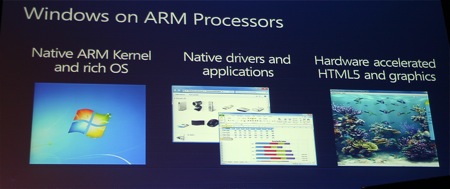
Microsoft is taking notice of industry trends, and told attendees Wednesday at the Consumer Electronics Show in Las Vegas that the next version of Windows would run on ARM chips. The move is an acknowledgement of the changing face of consumer electronics — that smart phones, tablets, and portable devices are indeed the future.
The move is also significant for another reason — up until now, Microsoft on ARM was relegated to the stripped down versions of Windows, either Windows Mobile, CE, or Embedded. Having the capability to run a full version of the operating system natively on these mobile processors opens up more possibilities for manufacturers in developing compact devices, the Redmond company believes.
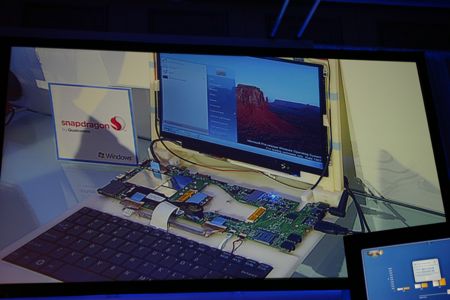
“We’ve reached a point in technology where everyone really does want everything from their computing experience,” Windows chief Steven Sinfosky said in explaining the decision. “Today’s demonstrations will highlight the work we have done on the architecture of Windows to enable the richness of the Windows platform to run natively on the ARM platform.”
Some manufacturers have already attempted to put Windows 7 on tablet devices, but the fact that the OS itself is still built for an x86 architecture does not make it optimal as it requires more battery life and power than can be fit into the smaller form factors of these devices effectively.
Other considerations are a native touch screen interface — something Windows 7 essentially lacks — and a user interface that works well with that type of input. It was not immediately clear if Microsoft also plans to make these necessary user interface tweaks as part of this new commitment.
Sinofsky was somewhat vague on bringing other critical applications — such as Office — to the ARM platform, only offering that Microsoft was “committed to making sure that Windows on [system-on-a-chip] architectures is a rich Windows experience.”
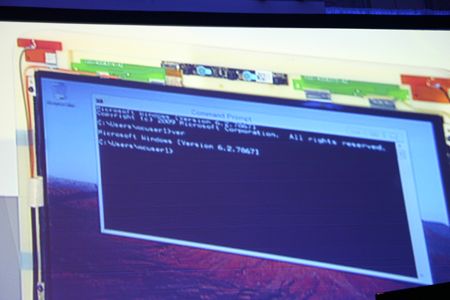
The Redmond company did not offer any guidance as to when Windows 8 (as it is thought to be called) may release, although it is likely not for another two years. That said, the question now becomes whether that time frame may be too late.
With the ever quicker pace of innovation in mobile computing, in two years ARM may be yesterday’s news, leaving Microsoft scrambling once again to keep pace.


Panasonic’s Android-based Viera Tablet unveiled at CES 2011

Panasonic has just revealed the Viera tablet at its CES 2011 press conference. What we know so far is that it’s Android based and will be available in 4, 7, and 10-inch sizes. Besides the difference in screen size, each of the tablets will feature identical hardware. Panasonic is positioning the device mainly as a TV companion. Using a feature called Viera Connect, tablet owners will have the flexibility to transfer content between the tablet and TV — or even view the same content simultaneously from different angles. The tablet will also function as a remote for controlling home theater components and content. Pricing in the US is unlikely to be announced in the near term, but further details related to its Japan launch will be revealed later today. Check out more images of the device in the gallery below.
Gallery: Panasonic VIERA Tablet hands-on


Continue reading Panasonic’s Android-based Viera Tablet unveiled at CES 2011
Panasonic’s Android-based Viera Tablet unveiled at CES 2011 originally appeared on Engadget on Wed, 05 Jan 2011 18:43:00 EDT. Please see our terms for use of feeds.
Permalink | | Email this | Comments
quote-book

Google shows off Android 3.0, the ‘Entirely for Tablet’ Honeycomb (video)

Well, look who just oozed into being, Google‘s latest flavor of Android, the tablet-friendly 3.0, Honeycomb. We heard talk that 3.0 would be exclusively for tablets, as in not for phones, and that looks to be played out with the text “Entirely for Tablet” seen early in the video. Perhaps the best thing to say is that this looks more or less nothing like Android. Sure, the browser is the same, and the Gmail app will be familiar to iPad users, but trust us when we say there’s a lot of lovely UI in the video above to admire…and a lot of glowly blue lights, too. Apparently we weren’t the only ones who saw Tron:Legacy on opening night.
Update: The video is back! It’s embedded below.
Gallery: Android Honeycomb images


Continue reading Google shows off Android 3.0, the ‘Entirely for Tablet’ Honeycomb (video)
Google shows off Android 3.0, the ‘Entirely for Tablet’ Honeycomb (video) originally appeared on Engadget on Wed, 05 Jan 2011 17:18:00 EDT. Please see our terms for use of feeds.
Permalink | | Email this | Comments
Rumor: Windows 8 to feature tile-based interface and app store
Details have emerged today about new features that may be found in the next iteration of Microsoft’s operating system, Windows 8.
According to blogger Paul Thurrott, Windows 8 may include an all-new user interface for products such as tablet computers. Dubbed “Mosh”, it’s thought the new UI will be based around…
Samsung’s Series 9 laptop is the Windows Macbook Air killer you’ve been waiting for
By Joe Wilcox, Betanews
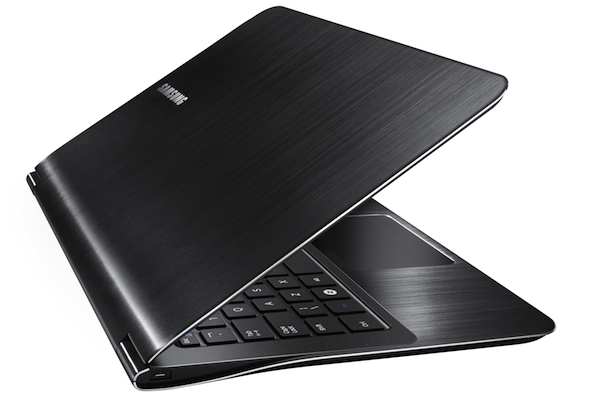
Second-generation Intel Core Family processors are here, and laptop manufacturers are wasting no time announcing new models. Samsung has the eye-popper of the Consumer Electronics Show (OK, so far), and it’s sure to make MacBook Air owners whine with envy (that is if they’re between Apple Kool-Aid fixes). Hell, I want one. The Samsung 9 Series packs big performance in a little package.
How little a package? The 9 Series has a “.64-inch profile,” (16.3 mm) according to Samsung. MacBook Air thickness ranges .11-.68 inches (3-17 mm) Both laptops weigh 2.9 pounds (1.73 kg). The two thin-and-lights feature 13.3-inch displays with 1366 x 768 resolution, DDR3 memory and no optical drive. But the 9 is two full Intel processor generations ahead of the Air, with second-generation 1.4GHz i5 Core processor compared to the aged 1.86GHz Core 2 Duo processor.
I often harp about the importance of good design and out-of-box experience. Perhaps Samsung gets it. “When designing a premium laptop like the 9 Series, Samsung wanted to offer an unforgettable experience without limitations. The 9 Series laptop successfully combines elegant styling, performance and ease of use in an ultra thin and lightweight package,” Scott Ledterman, Samsung’s director of Enterprise Business Division mobile PC marketing, said in a statement. Look at the photo and dare to disagree. But, first, please, wipe the drool off your existing laptop.
Full specs: 1.4GHz Intel Core i5 processor (2537M), with 3MB cache and turbo boost to 2.3GHz; 13.3-inch backlit-LED display (400 nit); 1366×768 screen resolution; 128GB sold-state drive; 4GB DDR3 memory; Intel HD GT2 integrated graphics; 3 watt (1.5W x 2) stereo speakers with 1.5 watt sub-woofer; USB 3.0; Bluetooth 3.0; 802.11b/g/n; WiMax; Windows 7 Home Premium or Professional (64-bit for both); 6.5 hours claimed battery life.
What will this beauty cost? Gulp, it starts at $1,599 (available in February), and with Samsung listing 128GB SSD storage as “max,” the configuration above will likely cost quite a bit more. There, 13.3-inch MacBook Air, which starts at $1,299, will have price advantage. The higher-end config is $1,599, with twice the storage but half the memory.
Would you buy the Samsung Series 9?
Welcome Home, Dear … Now Defend Yourself!

Now that’s love. Forget a hot dinner – what you’d want after a long day at work is a Nerf fight! – via The Daily What
Welcome Home, Dear … Now Defend Yourself!
Now that’s love. Forget a hot dinner – what you’d want after a long day at work is a Nerf fight! – via The Daily What
WATCH: Reading scores slipping?
A study suggests Saskatchewan students’ reading levels are falling, Adam Hunter reports.
N. Korea calls for talks with S. Korea
North Korea is calling for “unconditional and early” talks with rival South Korea to put an end to months of tensions, but Seoul quickly dismissed the offer as insincere.
Toshiba’s unnamed Tegra 2-powered Android tablet powers on!

Well, would you look at what we found hanging around Toshiba’s CES kick-off party. Okay, so Tosh’s still unnamed tablet wasn’t running Honeycomb like the final unit will, but Toshiba’s loaded Android 2.2 on there to give us a better idea of how it will work when it’s finally ready. There’s really not much we can say that we didn’t already say before — it’s still a very nicely made tablet and we’re really digging that rubberized back. As for the screen, the viewing angles were quite wide and Toshiba showed off its Resolution +, which will enhance video or photos on the fly to make them look more HDish. If you’re interested in seeing a bit more, hit the break for a short video.
Gallery: Toshiba 10-inch Android tablet


Continue reading Toshiba’s unnamed Tegra 2-powered Android tablet powers on!
Toshiba’s unnamed Tegra 2-powered Android tablet powers on! originally appeared on Engadget on Wed, 05 Jan 2011 02:20:00 EDT. Please see our terms for use of feeds.
Permalink | | Email this | Comments
Vizio Tablet hands-on preview

We just had our first in-depth experience with the Vizio Tablet, the company’s opening overture into the world of Android slates, and we’ve got to say — we like what we see. The device — which was just announced Monday afternoon along with the company’s new smartphone, the Vizio Phone — is still rather unfinished (the model we looked at was a hand-built device), but based on this early look, the company is moving down the right roads. We had a good chance to play around with the tablet, and we’ve got all the details, specs, and an in-depth video after the break!
Gallery: Vizio Tablet hands-on


Continue reading Vizio Tablet hands-on preview
Vizio Tablet hands-on preview originally appeared on Engadget on Wed, 05 Jan 2011 01:54:00 EDT. Please see our terms for use of feeds.
Permalink | | Email this | Comments
People Aren’t Really Buying Chrome OS Apps [Chrome Os]

After Google’s big reveal of their Chrome OS platform, it seems people aren’t so keen on paying for web apps. TechCrunch says that the most purchased paid app in the Chrome web store gets about 65 weekly purchases. Ouch. More »


Angry Birds Comes to Netbooks/Laptops

It’s shaping up to be a big week for everyone’s favorite sling-shooting fowl. Earlier today we took note of the fact that Angry Birds is set to hit the PlayStation Network. Now it seems that the wildly popular mobile gaming phenomenon will also be making its way onto laptops everywhere, courtesy of Intel’s AppUp store.
Rovio created an exclusive version of the game, which is available through the Intel store and AppUp storefronts from Best Buy, Best Buy Canada, Future Shop, Dixons, Asus, Croma, HSN, NewEgg, TigerDirect, and more. The app store runs on Windows XP and 7.
The PC version of the game is quite a bit pricier than its mobile counterpart, running $9.99 — though AppUp is offering a limited time discount of $4.99. Probably best to get on that, ASAP, considering all of the paid work you’re likely to miss playing the thing.
ASUS Eee Pad Slider and Transformer are here for those that can’t imagine using a tablet without a physical keyboard

Here they are: ASUS’s duo of Tegra 2-powered, 10.1-inch tablets with unique physical keyboards. Starting with the craziest of them, is the Eee Pad Slider (pictured on the left), which reminds us a lot of HTC’s old school Shift with its slide out QWERTY keyboard. The device is planned to run Google’s Honeycomb, sports a IPS, 1280 x 800-resolution display, and houses mini-HDMI and miniUSB ports as well as a microSD card slot. The 2.2-pound / .5-inch thick slab also has dual cameras — a 1.2 megapixel front-facing one and a 5 megapixel one with an LED flash on the back. We have to say we love the idea of always having that keyboard around, but if you don’t want to drag along a physical keyboard all the time, ASUS has something for you too. It’s the Transformer, and like the Eee Pad we saw at Computex, it’s a 10.1-inch tablet that will come with a laptop like dock with a full size keyboard and touchpad. The tablet part — like the Slider — will run Android 3.0 and packs a dual-core Tegra 2 processor, two cameras, and a 1280 x 800-resolution IPS display, however, the dock has an integrated battery that will keep the tablet running for 16 hours on a charge — the tablet on its own should last eight. We’re obviously aching in our seats here waiting to get these two in our hands so stay tuned for some crazy videos of the two in action — until then we leave you with the specs after the break.
Update: How much will it cost you to keyboard-ify your slate and how long will you have to wait? ASUS says the Transformer will run between $400 and $700 and the Slider from $500 to $800. Expect them in April and May respectively.


Gallery: ASUS Eee Pad Slider and Transformer


ASUS Eee Pad Slider and Transformer are here for those that can’t imagine using a tablet without a physical keyboard originally appeared on Engadget on Tue, 04 Jan 2011 17:33:00 EDT. Please see our terms for use of feeds.
Permalink | | Email this | Comments
Exclusive: LG Optimus Tab revealed? (updated)

Would you look at that. The device above could very well be the long rumored Optimus Tab we caught hanging out in the LG booth here in Las Vegas just moments ago. It certainly looked to be running Android 2.x beneath an 8.9 inch display but there’s obviously no way to confirm the Tegra 2 processor. Whatever it is, LG was not very happy to have it on video judging by their quick “hey buddy!” request to shut down our camera. Specifically, the tablet was spotted in the floorspace occupied by LG’s new series of WiFi-connected Thinq appliances sporting an LG home automation skin or app. We get a first glimpse of the tablet (or at least a tablet with a rear-facing camera) at about 10 seconds into the video posted after the break — it’s being held by a man who just used Thinq from his office to remotely feed his dog while watching the whole thing go down from the camera on his HOM-BOT robotic vacuum cleaner. Bizarre, we know, but strangely compelling. Of course, with Samsung’s Galaxy Tab already on the market receiving its fair share of accolades, you can’t expect its cross-town Korean rival to stay out of the market much longer. The only question we have (which LG wasn’t about to answer) is whether this is a general purpose Android tablet or if it’s dedicated to Thinq appliance management. We’ll know soon enough as it’ll certainly be unveiled this week.
Update: LG’s official twitter account says it’s the KT Identity Tab.
Gallery: Exclusive: LG Optimus Tab?


Continue reading Exclusive: LG Optimus Tab revealed? (updated)
Exclusive: LG Optimus Tab revealed? (updated) originally appeared on Engadget on Tue, 04 Jan 2011 17:00:00 EDT. Please see our terms for use of feeds.
Permalink | | Email this | Comments
Lenovo LePad tablet and IdeaPad U1 Hybrid return with Android 2.2 in tow

Remember last year at CES 2010 when Lenovo made a huge scene with the tablet / netbook U1 Hybrid, which ran Windows when docked and Lenovo’s Skylight Linux in tablet mode? And then Lenovo killed Skylight in favor of Android and put everything on hold? Well, it’s back — and we just got some serious hands-on time with production-ready Chinese versions of what’s now being called the IdeaPad U1 Hybrid with LePad tablet. Things have substantially changed for the better in the past year and since we saw a pre-pro model last month — in addition to Lenovo’s skinned version of Android 2.2 (called LeOS, sigh), there’s now a newer 1.3GHz Snapdragon in the LePad and an 1.2GHz Intel Core i5-540UM in the U1 base, with an optional i7 available. Switching from Windows to Android just requires disengaging the latch on the base — the flip to Android is basically instantaneous, while getting back to Windows takes a few seconds. The U1 base is much nicer than the unit we played with last year — it’s been restyled and features a chiclet-style keyboard and dimpled trackpad. Best of all, the LePad now features a 10.1 1280 x 800 capacitive multitouch display, instead of the floppy resistive unit we saw last year. Both pieces are pretty thin individually, but docked up it makes for a pretty chunky laptop — but you are getting two machines for the price of one.
Now for the bad news — the LePad will run for about $520 when it arrives in China this quarter, but the full U1 kit will run $1300. There’s also no US availability or pricing right now — and Lenovo told us the U1 won’t hit the States until it runs Android 3.0, so we could be waiting months while the company reskins the OS. And we might have to wait even longer for Lenny to retool the LePad to meet that supposed dual-core CPU requirement — but then, it’s already been a year. We can wait a little longer, we suppose. You know, for love. Video and PR after the break.
Gallery: Lenovo IdeaPad U1 Hybrid / Le Pad


Gallery: Lenovo U1 Hybrid with LePad hands-on


Continue reading Lenovo LePad tablet and IdeaPad U1 Hybrid return with Android 2.2 in tow
Lenovo LePad tablet and IdeaPad U1 Hybrid return with Android 2.2 in tow originally appeared on Engadget on Tue, 04 Jan 2011 16:44:00 EDT. Please see our terms for use of feeds.
Permalink | | Email this | Comments
INSANELY awesome solar eclipse picture | Bad Astronomy
Earlier today Europe, Asia, and Africa got to see a nice partial solar eclipse as the Moon passed in front of the Sun, blocking as much as 85% of the solar surface. The extraordinarily talented astrophotographer Thierry Legault traveled from his native France to the Sultanate of Oman to take pictures of the eclipse. Why there, of all places? Heh heh heh. It’ll be more clear when you see this ridiculously awesome picture he took:

Holy solar transits! Click to embiggen, which you really really should do.
Can you see why he traveled so far to get this shot? The silhouette of the Moon taking a dark bite out of the Sun is obvious enough, as are some interesting sunspots on the Sun’s face… but wait a sec… that one spot isn’t a spot at all, it’s the International Space Station! This was a double eclipse!
 That’s why Thierry sojourned to Oman; due to the geometry of the ISS orbit, it was from there that he had the best chance of getting a picture of the station as it passed in front of the Sun during the relatively brief duration of the actual solar eclipse. But talk about brief; the ISS was in front of the Sun for less than second, so not only did he have one chance at getting this spectacular once-in-a-lifetime shot, but he had only a fraction of a second to snap it!
To give you an overall idea of what you’re seeing here: the Sun is 147 million kilometers away (less than usual because this eclipse happened, coincidentally, very close to perihelion, when Earth was closest to the Sun). The Moon is 390,000 kilometers away. The Sun is about 400 times bigger than the Moon, but also about 400 times farther away, making them look about the same size in the sky. If you’re still having a hard time picturing the scale, take a look at the dark sunspot in the lower right of the big picture: it’s about twice the size of the Earth!
The space station, on the other hand, is 100 meters across (the size of a football field) and orbits about 350 km (210 miles) above the Earth’s surface. So the Moon was very roughly 1000 times farther away than the ISS when this picture was taken, and the Sun 400,000 times more distant. Yet all three lined up just right to make this extraordinary photograph possible.
Thierry has taken some of the most amazing pictures of the station passing in front of the Sun and Moon I’ve ever seen — his shot of the ISS and the Moon shortly before last week’s lunar eclipse was beautiful — but this one really stands out. It took an extraordinary amount of planning, scheduling, travel, and plain old good thinking to make this picture happen. Congratulations to him for getting it, and I thank him for sending it to me!
[More eclipse pictures can be found linked from Stuart’s Astronomy Blog as well as on the BBC’s Sky at Night Flickr pool of pictures.]
Related posts:
– When natural and artificial moons align
– ISS, Shuttle transit the Sun
– Check. This. Out. Amazing photo of the Sun!
– Shuttle and ISS transit the Sun
“I don’t pretend to know what love is for everyone, but I can tell you what it is for me; love is…”
“I don’t pretend to know what love is for everyone, but I can tell you what it is for me; love…