It’s official: Xbox 360 Elite Price Drop


Starting Friday, August 28th (tomorrow) the price of the Xbox 360 Elite is getting a one-hundred dollar price cut in the United States.

Here is how the new pricing breaks down:

Xbox 360 Elite $399.99 now $299.99*
Xbox 360 Pro $299.99 now $249.99*  While supplies last
Xbox 360 Arcade $199.99 $199.99*
    * (ERP) Estimated retail price in the United States

Betcha didn’t see that coming…did you ?

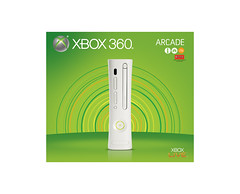
 New Xbox 360 Elite boxNew Xbox 360 Arcade box

In addition, we’ve rolled out some new packaging, that some of you may have already spotted in your local stores. I’ve uploaded pictures of the new packing images to my Flickr account you can take a peak.


Mininova Threatened With $1500 Fine For Each Link To an Illegal Torrent [Torrents]

Hugely popular torrent indexer Mininova has been slapped with a debilitating ruling, in the Netherlands: Within the next three months, the site has to remove all links to infringing torrents, after which it’ll be fined 1000 Euros for each one.

Mininova’s been working on a copyright filter for a while, but with the stakes so artificially high, it would need to be almost perfect to make operating the site worthwhile. This means that Mininova will either A.) Become the premier torrent indexer for Linux ISOs and public domain FLAC music, or B.) die.*

With two major torrent sites all but snuffed out in the last few weeks, there are only a few decent alternatives left. Although if you’re of a hardier type, there’s always Usenet. [Torrentfreak]

*Spoiler: It’s B.


Mininova Ordered to Remove the Only Torrents People Actually Use Mininova For [Torrents]

Hugely popular torrent indexer Mininova has been slapped with a debilitating ruling, in the Netherlands: Within the next three months, the site has to remove all links to infringing torrents, after which it’ll be fined 1000 Euros for each one. This means that Mininova will either A.) Become the premier torrent indexer for Linux ISOs and public domain FLAC music, or B.) die.*

With two major torrent sites all but snuffed out in the last few weeks, there are only a few decent alternatives left. Although if you’re of a hardier type, there’s always Usenet. [Torrentfreak]

*Spoiler: It’s B.


Mystery Android MID found out to be Rockchip-built concept, caught on video

We’ve been playing hide and seek with this peskily mysterious Android MID for a few weeks now, and it looks like at last some light has been shed on the situation. The device is actually just a concept built by Rockchip to display its new RK2808 chipset, which is capable of decoding 720p and apparently squeezing into incredibly attractive, Apple-aping form factors. There’s some action video which reveals that the hardware perhaps isn’t so capable of pumping a smooth web browsing experience to its 5-inch screen, but sometimes you can forgive a bit of clunky when faced with this much sexy. No word on plans to put the RK2808 into a real product, but it sure seems off to a nice, buzz-filled start. Video is after the jump, but you’d better be prepared to rock out.

[Via pocketables]

Continue reading Mystery Android MID found out to be Rockchip-built concept, caught on video

Filed under:

Mystery Android MID found out to be Rockchip-built concept, caught on video originally appeared on Engadget on Wed, 26 Aug 2009 11:10:00 EST. Please see our terms for use of feeds.

Read | Permalink | Email this | Comments

Gmail (Finally) Adds a Contact Chooser [Contacts]

Gmail’s auto-complete is convenient when you know exactly who you’re writing to, but adding lesser-known or oddly named contacts can be a pain. Gmail’s new pop-up contact chooser makes digging your contacts’ depths far less painful.

A click-to-pick contact chooser has long been a rare advantage of desktop email clients over Gmail in the interface department, and it's nice to see Gmail close that gap. Click on the To, CC, or BCC links in a compose window, and you can add contacts, or pre-sorted groups, to your message recipients—without having to save a draft, head to contacts, copy a name, then head back to drafts. Pick the wrong name? Click on the contact name again to remove them.

Most convenient of all is the search function in the contact chooser, and the ability to select all the results that come up from a particular search. That makes it easy to, say, pick everyone you know from the Rochester Institute of Technology by searching rit.edu and picking everyone who comes up.

The big irk that some are noting is that Gmail’s contact chooser opens in a new window, confounding Firefox users that have relegated new windows to tabs, and forcing those with pop-up blockers to set them to allow Gmail’s chooser through. If you’ve found a convenient work-around to the pop-up window, let us know in the comments.


Gmail (Finally) Adds a Contact Chooser [Contacts]

Gmail’s auto-complete is convenient when you know exactly who you’re writing to, but adding lesser-known or oddly named contacts can be a pain. Gmail’s new pop-up contact chooser makes digging your contacts’ depths far less painful.

A click-to-pick contact chooser has long been a rare advantage of desktop email clients over Gmail in the interface department, and it's nice to see Gmail close that gap. Click on the To, CC, or BCC links in a compose window, and you can add contacts, or pre-sorted groups, to your message recipients—without having to save a draft, head to contacts, copy a name, then head back to drafts. Pick the wrong name? Click on the contact name again to remove them.

Most convenient of all is the search function in the contact chooser, and the ability to select all the results that come up from a particular search. That makes it easy to, say, pick everyone you know from the Rochester Institute of Technology by searching rit.edu and picking everyone who comes up.

The big irk that some are noting is that Gmail’s contact chooser opens in a new window, confounding Firefox users that have relegated new windows to tabs, and forcing those with pop-up blockers to set them to allow Gmail’s chooser through. If you’ve found a convenient work-around to the pop-up window, let us know in the comments.


Turn Your Computer into a File, Music, and Web Server with Opera Unite

Want an easy way to share documents, photos, and other files with people over the web?  Now you can with Opera Unite which is a new service to be included with the Opera 10 browser.  Today we take a look the new Unite feature and what it has to offer.

According to their website, “Opera Unite is a collaborative technology that uses a compact server inside the Opera desktop browser to share data and services.”  Essentially what this service does is turn your computer into a server where you can share documents and photos, stream music, create a chat room, host your own website and a lot more.  You can make files available to the public or with a password protected invite link and the really cool thing is the person accessing it can use any browser they want.

Installation

The first thing you will want to do is install Opera 10 which at the time of this writing we used Beta 3 Build 1708.  The Unite feature is still in the Alpha stage of development and needs to be installed separately from the Opera Labs site (we included the link below).  In fact at this stage of its development you can install just the Unite feature, but being a curious geek I figured seeing how it will operate with the new version of the browser would be best.

2fullshot

To start using Unite you will be prompted to create create an Opera account.

4account

Customize settings and create a customized account based on where you will be using it from.

4

Advanced settings let you specify upload speeds, default port, and global visibility.

5advsettings

To complete the setup select a folder where you will keep the shared documents and files.

folder

You’ll access it from the sidebar and clicking the Unite tab.  Here you can turn the service on and off and there will be a list of other services you can add like Fridge, Media Player, Opera Messenger, Photo Sharing, The Lounge, and Web Server.

sidebar 

Unite Features

File Sharing allows you to easily share files and other documents.

sshot-2009-08-19-[20-39-43]

The Fridge is a neat place where others you invite can save notes on your computer.

fridge

Media Player lets you listen to your entire music collection anywhere there is an Internet connection.

music

Photo Sharing allows you to share photos with your friends and family without having to upload them to a separate service first.

photo

Each additional service or feature requires a quick installation…for example here we are installing Opera Messenger.

msgr

The Opera Unite Homepage will have a list of services that are running and it is where you will find the URL for friends can access the site.

unitehome 

You will probably want to set up separate directories for each of the services that you run to keep things organized an secure.  For instance you wouldn’t want everyone to access personal information in your My Documents folder.

6-driectory 

Here is an example of accessing another user’s Unite page where they’re sharing an eBook on their File Sharing page, you can view documents in the browser or download the file to your hard drive. 

sshot-2009-08-13-[14-07-39]

Conclusion

Opera Unite is a very cool feature that will be added to the new Opera Browser.  It allows anyone to become their own webmaster of sorts and makes it extremely simple.  One thing that raised concerns about this service is its level of security. According to their site and the Terms of Service, “Opera Unite runs in a “secured sandbox”, where only the files or folders you select can be accessed; nothing else on your computer is accessible to anyone else. You grant access to specified files, such as a directory of data you want to share, without allowing access to anything outside the specified area.”  Also, they do not keep a log of what files your sharing and do not claim any rights to it.  It is essentially up to you not to share unwanted data.

Opera definitely doesn’t get much love in the tech world but you might want to revisit it and check out the newest version as another alternative to Internet Explorer.   

Download Opera 10 Beta 

Download Opera Unite

Similar Articles Featured Wiki Articles
Latest Software Reviews Quick Linux Tips
Geek Arcade Popular Forum Threads

Snow Leopard Has Hidden Antivirus Talents [Rumor]

Well, this is int-er-est-ing: Early testers have come across what looks like a new antivirus function within Snow Leopard. Or to put it another way, Macs don’t need antivirus! Wait.

The new feature behaves like a cross between a traditional antivirus tool and the “Are you sure you want to open this?” warnings already present in Leopard. I doubt it’s doing any real-time heuristic scanning and it’s definitely not running as a visible app in the OS, but if it’s checking .PKG and .DMG files for malware before you run or mount them, well, that sounds an awful lot like what your average Symantec, AVG or Kapersky product is intended to do.

The first report came from the Intego blog, (they make Mac antivirus software) and it’s been corroborated by Snow Leopard testers over at the MacRumors forums. We’ll try to test this one out as best we can, but it’s looking like Apple may have slipped this ever-so-slightly unflattering feature into their new OS under the radar. [The Mac Security Blog, MacRumors]


Futurama Returning with Full Original Cast After All [Futurama]

How did we miss this news?! Thanks to the mighty power of nerd outrage, Futurama will be returning to TV with all of its original voices intact rather than with soundalikes.

Here’s the letter that was sent to anyone who harassed casting director Scott Muller:

Dear Futurama Fan,

Thank you for voicing your strong support for Futurama and the original voice cast. We appreciate the time you took to fire off a thoughtful and/or concerned and/or homicidal e-mail message to our casting director, Scott Muller. (Rest assured, not a single one of these e-mails reached the actual decision-makers at 20th Century Fox Television. For future reference, please note that Scott Muller is in fact one of Futurama’s biggest fans, and was instrumental in bringing about the return of the cast. Please hoist a bottle of Olde Fortran for Scott!)

Speaking of the cast returning… good news, everyone! The cast is returning! All of our series regulars are back in action for Season 6. Billy West, Katey Sagal, John DiMaggio, Maurice LaMarche, Tress MacNeille, Lauren Tom, Phil LaMarr, and David Herman are all on board and have already begun delivering their customary virtuoso performances. The all-new Futurama episodes are slated to air on Comedy Central beginning in June, 2010.

We are extremely grateful for the outpouring of support for the series. Your loyalty over the years has kept the show going through its original four seasons on FOX, its subsequent reincarnations on Adult Swim and DVD, and now its Bendiferous return to life on Comedy Central. See you in the (near) future!

Sincerely,

David X. Cohen & Matt Groening

The deal was sealed about 3 weeks ago, but somehow we missed it because of our myopic, obsessive focus on gadgets and only gadgets. Who won that election everyone was talking about last fall, anyways? [Thanks, Ivan!]


Own Your Domain Name & Aggregate All of Your Social Accounts with Chi.mp

Editor’s Note: Chi.mp is a free service, and we really like it, but this shouldn’t be considered an official How-To Geek endorsement.

Would you love to own your personal domain name, be able to blog, create photo albums, and aggregate all of your social accounts in one place? As impossible as it may sound, you can have all of that goodness in one place with Chi.mp (Content Hub & Identity Management Platform).

About Little Bit About Chi.mp

You may be asking yourself “What makes Chi.mp special?” or “What do I get with an account?”. What you get is:

  • Your own personal domain name free with your website
  • Blog posting
  • Photo albums
  • Aggregation of all of your social accounts
  • Contact book and management system
  • Multiple profiles with customizable privacy settings for each
  • Detailed personal profile building (amount of detail based on personal preferences)
  • Personal VCard
  • Choice of preset or custom themes
  • No ads
  • The entire service is free

It is extremely easy to get started with Chi.mp…simply enter the domain name that you would like to use in the form to see if it is available. If it is available, you can immediately start the simple registration/setup process for your new site. No waiting periods and definitely no hassle!

mp-01

Chi.mp is very straightforward in what your rights are and what you can expect from them. Notice that your personal data, information, and contacts are treated with respect. Another nice feature is that you are not forced to have advertising on your site unless you specifically desire it (that is very wonderful!).

mp-02

Set up the profile (or profiles) that work best for you. Chi.mp starts with a default set of three…Public, Work and Friends. Use what you need and create as many additional ones as you need or desire. You can set different levels of privacy for each particular profile that you have.

Note: The privacy settings are also available for your contacts.

mp-03 

Once You Have an Account

After you get your personal domain registered and start working on your new site, you will see the following message on the Dashboard page (default page when you log in to your account). This really does work as an all purpose type of website for you (terrific!).

mp-04

Here is a quick look at the menu toolbar that will at the top of your site while you are logged in. Each of these areas have a sub-menu toolbar to navigate through more options and settings for your site. Sub-menus are displayed below this menu toolbar.

mp-05

Aggregating Your Social Accounts

Chi.mp allows you to aggregate the feeds from all of your favorite social services into a single stream on the main page. Adding new feeds is very easy to do. Notice the “Add a Feed” option on the right side…you just might be surprised by what you can actually add in (very nice!).

mp-06

Here is what your services window will look like once you have added some services to your site. Notice the nice split between current services and the services that are available for you to add in. Current services also include icons to help differentiate between them.

mp-07

Blogging and Photo Albums

If you would like to add blog posts to your site, this is what you will see. There is a very nice excerpt option that you can use to create “teasers” for your posts (nice!). The post toolbar has a nice selection of commands available and even includes superscript and subscript commands.

Note: If you wish, you will be able to view your blog posts separately (i.e. http://your-name.mp/blog/)

mp-08

Want to create a new photo album? This is what you will see when creating one. You can easily select the profiles that blog posts and photo albums are viewable/available for.

mp-09

Themes

You can have a lot of fun customizing how your site looks…choose between picture backgrounds, solid color backgrounds, or use a custom theme.

mp-10

Here is an example of what a front page looks like with a picture background theme…

mp-11

And an example of a front page with a solid color background theme.

mp-12

Conclusion

Even though Chi.mp is still in the beta stage, it is already showing a phenomenal amount of potential as a way to centralize all of you internet activities. This is one web-service that is definitely worth taking a look at!

Links

Chi.mp Homepage

Getting started with Chi.mp Webpage

Check out Asian Angel and Mysticgeek’s sites below and join us for social networking, blogs and more!

Asian Angel @ Chi.mp

Mysticgeek @ Chi.mp

Similar Articles Featured Wiki Articles
Latest Software Reviews Quick Linux Tips
Geek Arcade Popular Forum Threads

Mysterious Android MID poses for yet more pics, reads Engadget

You know, if you’re trying to get our attention, there are worse ways to go about it than by releasing photos of a mystery gadget proudly displaying our homepage. And though there is no credible word yet on the origin of all these Android MID pics that keep making the rounds, there has been much speculation. As SlashGear points out, the device has more than a passing resemblance to the Wallet, which France’s eviGroup has been threatening to lay on the world since back in May (a 5-inch touchscreen device touted as “halfway between a cellphone and a TabletPC”). And if that isn’t enough, someone named focus3G has been furiously posting new pics of the thing on his Twitpic account for two weeks now — we’ve contacted him for an explanation to no avail (not yet, at least). But what do you think? Hit the gallery below, and let the speculation begin.

Read – Wallet MID gets closer to release, US launch possible
Read – Even more photos of unknown Android MID appear

Filed under: , ,

Mysterious Android MID poses for yet more pics, reads Engadget originally appeared on Engadget on Mon, 24 Aug 2009 13:03:00 EST. Please see our terms for use of feeds.

Permalink | Email this | Comments

Import Facebook Phone Numbers into Your Google Contacts [Contacts]

Android users, iPhone users (anyone using Google Sync, in fact), and Google Contacts users in general with Facebook friends who list their phone number in their profiles will love this:

Brad Fitzpatrick offers a Greasemonkey script that exports those phone numbers to AddressBookr and offers to add/merge them into your Google Contacts. Even though this was posted last November, I just gave it a test run and it worked like a charm. Thanks, Nick!

Smarterware is Lifehacker editor emeritus Gina Trapani’s new home away from ‘hacker. To get all of the latest from Smarterware, be sure to subscribe to the Smarterware RSS feed. For more, check out Gina’s weekly Smarterware feature here on Lifehacker.