The +1 button for websites: recommend content across the web

Since we started rolling out the +1 button in March, you’ve been able to recommend content to your friends and contacts directly from Google search results and ads.

But sometimes you want to +1 a page while you’re on it. After all, how do you know you want to suggest that recipe for chocolate flan if you haven’t tried it out yet?

Today, we’re releasing +1 buttons to the whole web. As a result, you might start seeing +1 appear on sites large and small across the Internet. We’ve partnered with a few sites where you’ll see +1 buttons in the near future:

Partner Logos

AddThis Mashable Huffington Post Rotten Tomatoes Nordstrom O'Reilly Reuters Washington Post Best Buy TechCrunch Bloomberg

You’ll also start to see +1 buttons on other Google properties such as Android MarketBlogger, Product Search and YouTube.

+1 is as simple on the rest of the web as it is on Google search. With a single click you can recommend that raincoat, news article or favorite sci-fi movie to friends, contacts and the rest of the world. The next time your connections search, they could see your +1’s directly in their search results, helping them find your recommendations when they’re most useful.

In the meantime, we’re continuing to roll out the +1 button for English-language searches on Google.com. If you want to +1 search results and search ads earlier, you can opt in through our experimental search site. To see recommendations from your friends and contacts in Google search, make sure you’re signed into your Google Account.

If you’re a webmaster, you can get the +1 button code and learn more about implementation on our +1 webmaster site.

We hope you’ll agree that +1 buttons across the web make it even easier for you to recommend content to your friends and contacts, and make search results even more helpful and relevant.

Posted by Evan Gilbert, Software Engineer, +1 Button

AMD confirms tablet-friendly Z-series APU, next-gen Trinity APU for bigger devices

AMD likes to take its time before stepping inside the ring, but it’s turned up at Computex with its gown off and mouthguard in. Its much-leaked Z-series Fusion APU (aka “Desna”) for tablet devices is now official and could well steal some of ARM’s thunder. Whereas ARM chips will get along with the next version of Windows, AMD’s Z-series is already tuned into the here-and-now. Its integrated dual 1Ghz Bobcat chips and Radeon HD 6250 graphics should allow the full Windows 7 experience on a tablet, from USB peripheral compatibility right down to XBOX 360 Media Extender functionality. What’s more, it drinks less than 6W of power so is significantly leaner than the 9W Ontario APU powering Acer’s Iconia W500 Windows 7 tablet. Additionally, AMD claims MSI has already made that leap with its new WindPad 110w (though we can’t be sure if the pre-release device we just handled was carrying a Z-series chip).

Meanwhile, AMD left any traces of shyness far behind as it went on to confirm plans for a range of A-series and E-series chips with which it hopes to tackle Intel’s dominance in the laptop and desktop spheres — right up to the level of the Core i7. This includes the leaked high-end quad-core A8 and, more surprisingly, a new Trinity APU. Looking way into the future, AMD intends Trinity to be a successor to the mid-range A-series Llano, which isn’t even out yet but is expected imminently. Unfortunately we have no concrete specs for the Trinity — AMD thought it was sufficient to wave the thing around at the press conference and declare it “2012’s best APU”. Depending on how you look at it, that’s either fighting talk or plain posturing.

AMD confirms tablet-friendly Z-series APU, next-gen Trinity APU for bigger devices originally appeared on Engadget on Wed, 01 Jun 2011 13:21:00 EDT. Please see our terms for use of feeds.

Permalink   |  sourceAMD, The Inquirer  | Email this | Comments

Chrome gaining ground on Firefox, IE drops

It looks as if Google’s aggressive TV advertising campaign for their Chrome browser is showing some signs of success if new browser share results are anything to go by.

According to CNet, Chrome is now being used by one out of every eight people on the Internet thanks to an increase…

Next PlayBook to have 10-inch screen, 4G radio, and white color option?

A 10-inch followup to the BlackBerry PlayBook seemed inevitable and indeed, tidbits about a rumored larger-screen version are starting to flow fast and furious. N4BB, which recently managed to spy the 9900 before it was unveiled, is citing anonymous sources who claim it will have a thinner bezel, a SIM card slot, a white color option, and, like the soon-to-be upgraded 7-inch version, 4G / WiFi connectivity. What’s more, these sources assure us this new PlayBook will have native email and calendar apps and be able to connect to BlackBerry Enterprise Server without the help of BlackBerry Bridge — a confounding quirk on the current model. That’s all well and good (and fairly realistic), though we’ll just have to wait until that rumored holiday launch — or a more unequivocal leak — to see what RIM has up its sleeves.

Next PlayBook to have 10-inch screen, 4G radio, and white color option? originally appeared on Engadget on Wed, 01 Jun 2011 11:39:00 EDT. Please see our terms for use of feeds.

Permalink NetbookNews  |  sourceN4BB  | Email this | Comments

Change Google Calendar’s default meeting length and more print options

Posted by Grace Kwak, Product Manager

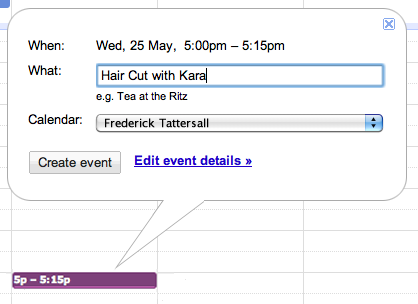
Today we’re adding two features that make it easier to customize Google Calendar. First, you can now change your default event length from the standard 30 minute slot. If you frequently create 15 minute meetings, for example, you can now make 15 minutes the default length for all your events. This way, you don’t need to click into the event page to change the duration every time.

You can change the default length of your events from the Calendar settings page. Next to the “Default meeting length” option, choose the length you’d like from the drop-down menu on the right. From there, you can also enable “Speedy meetings,” which automatically shortens events that are 30 minutes or longer to allow you to prep for your next meeting or get to your next appointment if you have a packed schedule.

Second, for those of you who still prefer paper and print your calendar, you can now select a specific date range in the print dialog box. Google Calendar will automatically format your printout for the date range you choose.

We hope you find these new customization options useful. Let us know what you think on Twitter (@googlecalendar) or in the Google Calendar Help Forum.

BlackBerry 7 gets an SDK, NFC, AR, other acronyms

BlackBerry 7 SDK Beta

BlackBerry 7 OS is coming soon but, to take advantage of all those fancy features like NFC and the digital compass (ok, some of them aren’t that fancy), devs are going to need some new APIs — enter the BlackBerry 7 Java SDK. Creators of BlackBerry apps can go download the beta of the new software development kit at the source link and start whipping up augmented reality browsers and 3D games, thanks to support for OpenGL ES 2.0. There’s nothing mind-blowing about RIM’s latest update, but we’re glad to see the corporate stalwart start to catch up to other smartphone OSes, and it’s only a matter of time before Layar and Quake hit the BlackBerry Bold 9900.

BlackBerry 7 gets an SDK, NFC, AR, other acronyms originally appeared on Engadget on Wed, 01 Jun 2011 10:30:00 EDT. Please see our terms for use of feeds.

Permalink   |  sourceBlackBerry  | Email this | Comments

Meet the New 5.25″ Optical Drive Standard: Slimmer, Slot-loading

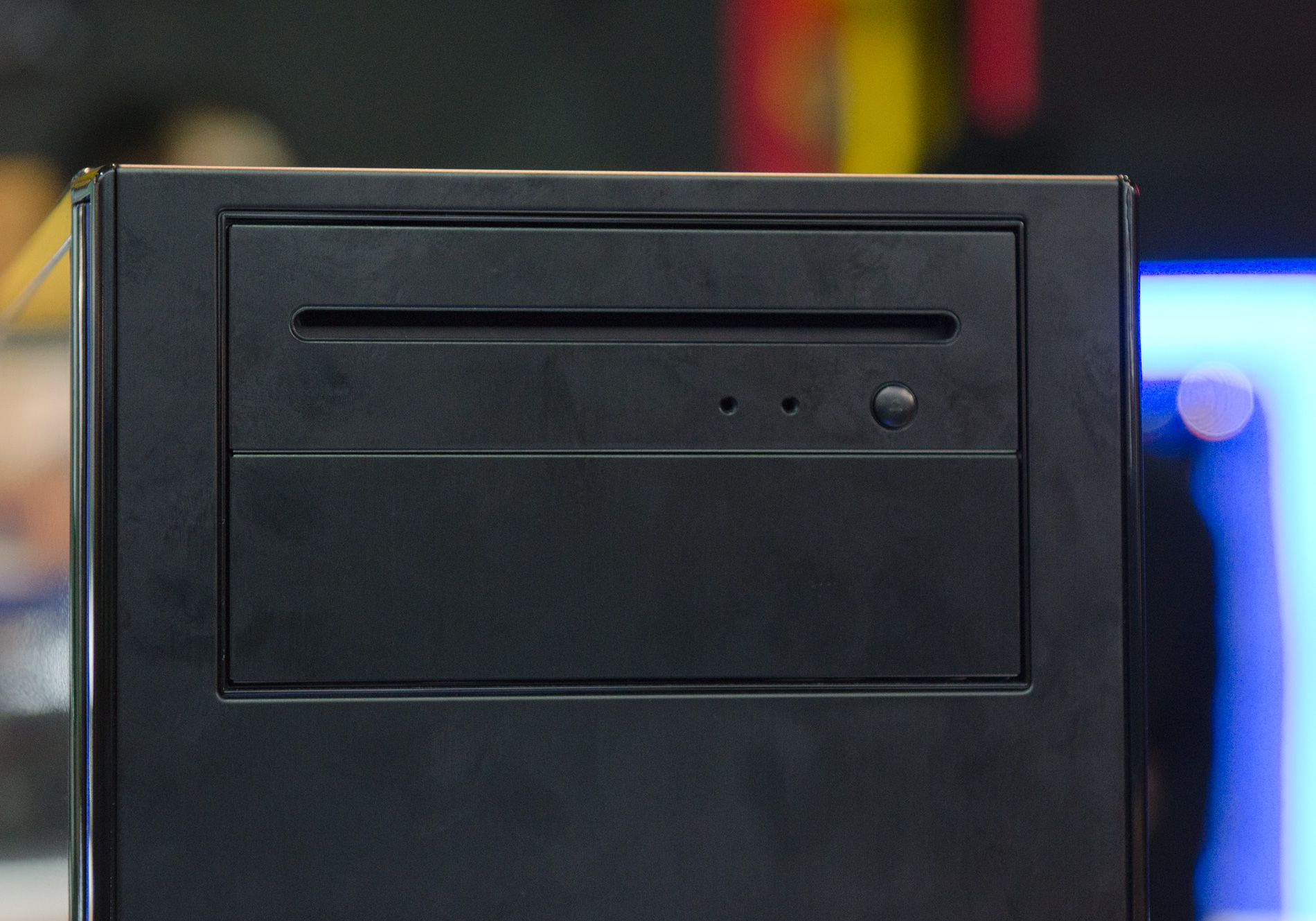
I was walking around the show floor today and caught a glimpse of Antec's Solo II chassis with a slightly different optical drive bay.

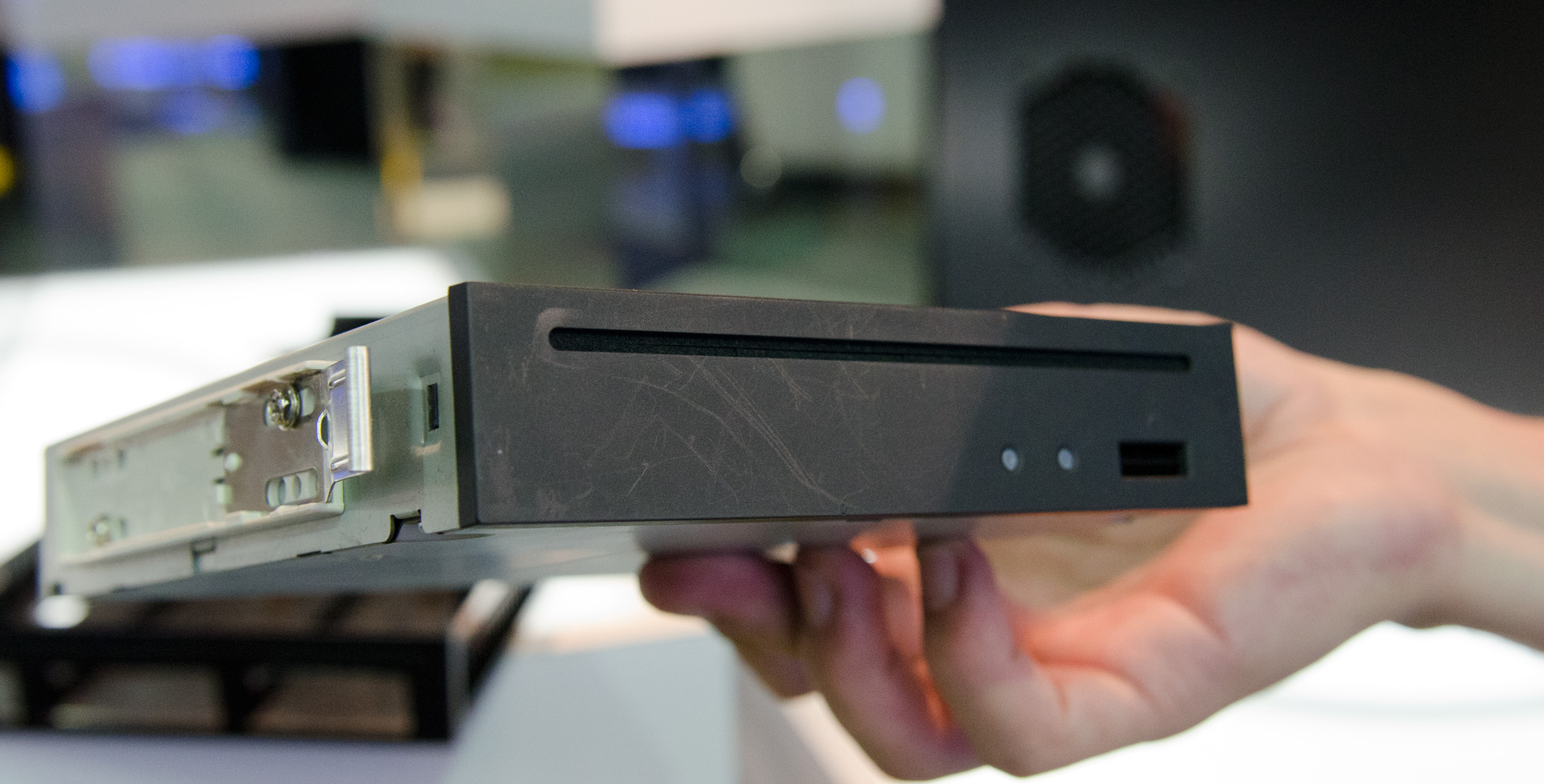
It turns out that there's a new optical drive standard being worked on in the industry. The standard is for slot loading drives with a half-height profile. The drives are still 5.25" wide, but they just aren't as tall as the older drives.

 
Cases that have a fold down optical faceplate won't work with these new drives, forcing case makers to adopt. This Solo II is an example of what a slot loading solution may look like.
 
 
Expect to see these new slot load drives to hit the market by the end of this year, along with cases to match.
 
{gallery 1110}

Canada can support 9 NHL teams: Sens founder

As the city of Winnipeg officially returned to the NHL fold and became Canada’s seventh team, former Ottawa Senators owner Bruce Firestone ruminated on a time when the league may even add two more Canadian hockey clubs.

Zinio comes to Android tablets, gives you 24 magazine issues for free


The iPad has yet to transform the publishing world as many expected it would, but some healthy competition from Android tablets should help to keep that process in motion. Zinio‘s reader app is now available on select Android 2.2, 2.3, and all 3.0 tablets, bringing Esquire, National Geographic, and 20,000 other magazine titles to the Motorola Xoom, Samsung Galaxy Tab 10.1, and a half dozen other devices. And, to kick off the launch, Zinio is picking up the tab on the most recent issues of 24 top magazines, as long as you download by June 15. Digital subscriptions are still often more expensive than their print counterparts, but at least Android tablet owners will have a safer place to hide their issues of Playboy.

Continue reading Zinio comes to Android tablets, gives you 24 magazine issues for free

Zinio comes to Android tablets, gives you 24 magazine issues for free originally appeared on Engadget on Tue, 31 May 2011 22:14:00 EDT. Please see our terms for use of feeds.

Permalink   |  sourceZinio  | Email this | Comments

The New Essential Apps May 2011 [Apps]

iPhones. iPads. Android. And Windows Phone 7! We’ve updated all of our essential apps lists to include a few forgotten favorites, some long awaited arrivals and, as always, even more amazing apps. Be sure to check out all the lists! More »


Toshiba announces Oak Trail-based WT310/C Windows tablet for Japan

We’d heard some rumors that Toshiba might be ditching its Windows 7 tablet plans to focus on Honeycomb, but it looks like that’s not the case — at least, not in Japan (and not for enterprise customers). The company has just officially announced its new Oak Trail-based WT310/C tablet for the country, which packs an 11.6-inch 1,366 x 768 display and runs Windows 7 Professional. In addition to that Atom Z670 processor, you can expect to get 2GB of RAM and 64GB of storage, an SD card slot for expansion, a 2 megapixel front-facing camera and a 3 megapixel ’round back, and an optional cradle that adds some extra ports. Still no word on a price, unfortunately, but this one should be available in Japan sometime next month.

Toshiba announces Oak Trail-based WT310/C Windows tablet for Japan originally appeared on Engadget on Tue, 31 May 2011 18:54:00 EDT. Please see our terms for use of feeds.

Permalink CrunchGear  |  sourceToshiba  | Email this | Comments

3 Labs graduations, 1 retirement

Posted by Maciek Nowakowski, Associate Product Manager

Today we’re excited to graduate three more features from the experimental testing ground of Gmail Labs. Superstars, Nested Labels, and Advanced IMAP Controls are now first-class citizens in the Gmail world, thanks largely to your feedback. We’re also retiring the Google Search box lab which was redundant with the “Search the Web” button that’s already in Gmail.

Superstars
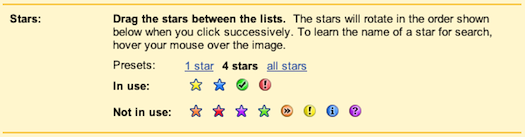
Superstars, one of the most popular Labs features, provides different types of stars in addition to Gmail’s basic one. You can assign a certain star to special conversations and use another as a visual reminder that you need to follow-up on a message later. You can now choose your own set of stars from Settings:


Once you’ve done that, the stars will rotate with each consecutive click on the star icon.


Nested Labels
Labels are a great way of organizing your email; nested labels give you the ability to organize labels hierarchically. Starting today, nested labels are enabled for everyone along with a couple of small improvements such as a sticky collapse/expand state and better editing options.


To start using them, you can either create a new sub-label from the dropdown menu on the left hand side or just move an existing label under another one using the edit option:


Advanced IMAP Controls
This Labs feature provided a very useful set of advanced controls for those of you who access Gmail through IMAP clients (e.g. Outlook, Thunderbird, or your iPhone’s native mail app). Now it’s easier to take advantage of features like syncing only selected labels or limiting the folder size limit to improve your IMAP experience.


True to the original spirit of Gmail Labs, we’ll continue to add new features, graduate some, and retire others, so keep trying them out and sending us your feedback.

Windows 7 installed on 1 in every 3 PCs in the world

Windows 7 has been out for almost two years now, and it doesn’t come as a surprise to many that it is now running on one in every three computers in the world, according to stats from StatCounter.com.

Windows 7 was released to manufacturing on July 22, 2009, where it was…