Search results for: “ban”

  • Bluetooth Headphone Battlemodo: The Best Isn’t the Best [Battlemodo]

    Chances are, your phone—yes, even your iPhone—supports Stereo Bluetooth, but not that many people actually use the feature. We’ve gathered up the best A2DP headphones to either a) figure out why, or b) ask, why not?

    The Problem

    Honestly, there are plenty of reasons to be uneasy about Bluetooth headphones: They run off battery power, so you need to be mindful of keeping them charged; they’re often styled strangely to accommodate the necessary wireless hardware; they’re more expensive than equivalent wired headphones; and most of all, they sound like crap. Or, so you’ve heard. You know, from other people, not with your ears. The colloquial “heard.” Er, you know what I mean.

    Perhaps even more than choosing the best Bluetooth headphones, the point of this little exercise is to figure out if A2DP, the technology, is even worth your time. After all, it isn’t really worth going to the trouble and expense of untethering your headphones if they barely qualify as headphones. So first, some background:

    The Advanced Audio Distribution Profile, or A2DP, is an umbrella term for the modern Bluetooth audio profile, meaning the standards by which Bluetooth devices send a receive audio. It complements the Headset Profile (HSP), which takes care of low-quality mono transmissions, like those to single-ear Bluetooth headsets, to provide the capability to listen to music without too much distortion. And that’s the crux of the A2DP problem, both real and perceived: It’s better than mono Bluetooth, to be sure, but is it as good as a wired headset? Or more realistically, is it close enough that it doesn’t really matter?

    Since A2DP audio is encoded and recompressed at the source, leading to (sometimes drastically) differing audio quality betwen devices, I paired a number of sources—an iPhone 3G, an HTC Hero, a unibody Macbook Pro—with a veritable stack of headphones to see if the end result, the sound that actually hits your ears, is worth the trouble. Here are the best five:

    The Headphones


    (Click the chart to enlarge)

    Sony DR-BT50

    Street Price: $125

    The only cup-style headphones included in this roundup, the Sonys serve as a sort of reference for sound quality, features, fit and comfort. Also: impracticality. If you’re planning on using a Bluetooth headphones as they’re generally understood to be intended, you’re probably not looking for bulbous headhuggers like this.

    That said! They’ve got by far the bassiest, clearest sound of the lot, and the included controls, though they can take a while for your fingers to map out, are more complete than any others. Using these headphones is a joy compared to most others, but only in a situations where they’re appropriate: Sitting on a sofa? At a PC? I don’t really know. Whatever they’re meant for, the lack of a USB charger corroborates the theory that they’re not really intended to be that portable.

    Far and away the best, most balanced sound; moderate noise isolation

    Wider set of controls than any other headphones, but probably more than you need, or your handset even supports

    They’re too big to exercise or travel with

    Motorola Motorokr s305

    Street Price: $40

    Something about this headset is immediately alarming. It feels cheap, it comes with very few accessories, it even looks a bit dated—it sort of feels like you've accidentally been handed a stray accessory, dropped out of a Motorola Rokr box, yearning to be reconnected to its parent phone. But seriously, give it a minute.

    You could find plenty of things to complain about with the s305s, but hell, I just don't want to: With these cheap, stripped-down headphones, Motorola shows that they understand the draw of A2DP better than anyone else. They sound fine—solid mids, relatively clear highs, adequate bass—without sounding overequalized; their fixed fit works well enough on most heads, without sacrificing weight or durability; they connect with ease, and offer minimal, though adequate, controls; they charge quickly via USB, for a playback period that'll outlast any workout session. And most of all, they're very, very cheap.

    Minimalist: easy to use and set up

    They’re gloriously cheap

    It feels light in the hand and on the head; it also feels a bit flimsy

    Jabra Halo

    Street Price: $120

    Nobody's going to dispute the Halo's stylishness, especially in this company—most of these headphones looks like they were designed in the late 90s (Why? No really—this doesn't make any sense) and many come in form-factors I haven't seen since I carried a Discman. For what it's worth, the Jabra's matte black, ultra-thin headband take on Bluetoothery is eye-catching, and there's nothing expressly wrong with it.

    Nor is there anything terribly wrong with the sound: It's abundantly clear, though not very bassy—something that could be pegged as much on the sometimes awkward fit of the Halo's earpads as on their actual drivers. I had the most pairing issues with the Halo, but they all mysteriously resolved themselves eventually—par for the course with Bluetooth, and less of a concern than you might think, since one they're paired to a device, they're paired to a device. Controls, aside from volume, which relies on a jumpy touchpad on the earpiece, were simple and intuitive. The price, I guess, is the only real kick in the balls from Jabra’s headphones: The street price is a hefty $120

    HEADPHONES FROM SPAAAAAAAAACE

    They’re comfortable, and it’s easy to forget you’re wearing them

    Too expensive for what you get

    Logitech Freepulse

    Street Price: $90

    Logitech's gone all-out with the Freepulse, and you'd be hard pressed to find a hardware feature—aside from USB charging—that these things don't list on their spec sheet. They've got by far the most versatile Bluetooth transmitter, meaning that they can be paired with just about any device comfortably. Controls are subtly built into the earpieces, but once they've been explored, they're easy to reach and utilize during exercise.

    I found the fit to be a bit strange, since these particular headphones, despite looking like a traditional wraparound headset, actually hang on your ears by means of floppy little rubber loops. They’re secure enough, sure, but they don’t exactly cram the drivers against your ear holes; hence lack of great bass. Oh and hey, no mic! These things aren’t cheap, so, uh, what the hell?

    Best Bluetooth transmitter of the bunch—fits just about any device

    They fit everyone fine, but nobody particularly well

    At this price, where’s the mic?

    iLuv i222

    Street Price: $60

    In a lot of ways, the i222 is a cheaper, newer equivalent to the Freepulse: Its design looks newer, albeit a little Bluetooth-headset-y, its feature set matches the Logitech’s almost point for point, and, crucially, it has a mic, because almost every A2DP-enabled playback device is, let’s face it, a phone.

    Interestingly, the iLuv’s battery life trumped even the most expensive headphones in my limited testing. My main cause for concern is a generally plasticky feeling: I can already see multiple areas of concern on the headset, and online reports go some way to confirming my worries about durability.

    Tons of features for the price, including a Bluetooth transmitter

    Build quality is a concern

    Post-Game

    If all these evaluations sound a little bit tentative, that’s because they are. Each headset evaluation was underscored by a fundamental discomfort with A2DP because, well, it’s not that good.

    Don’t get me wrong, it’s better than I expected, and a far sight better than you might predict if you were weened on Bluetooth earpieces. But the sound is flat, lacking in bass range and sacrificing detail on higher tones. And even if these headphones are specifically tuned for playing back Bluetooth streams, the few that include direct line-in support, like the Jabra Halo, give you a ready-made comparison between wireless and wired sound. Spoiler: It isn’t all that flattering for the ol’ toof.

    This casts A2DP headphones in a different light, not as a viable, wireless, futuristic alternative to regular headphones, but as a degraded, battery-hungry, expensive compromise. You buy them because you need something wireless—that's it. There's no other reason.

    The Winner

    As such, the headset I'm most comfortable telling people to buy is also the cheapest. There will be people who'll want something else—the Sonys are the best bet for, say, a PC gamer, and the iLuvs are an obvious choice if your music-listening devices don't actually support Bluetooth. But more than anything, I see A2DP headsets as a way to listen to music during a run, or on cable-averse exercise machines, as a way to listen to a charging device while you wander around a room, or as a way to merge your everpresent Bluetooth headset with your earbuds.

    For this, the Motorola s305s fit the bill: They’re light, functional and simple. They sound fine. They look OK. They sync with almost anything. They win because they do as much as you can ask of Bluetooth headphones, and they do it on the cheap.


  • Gretzky steps down as Coyotes head coach

    Wayne Gretzky stepped down Thursday as head coach of the bankrupt Phoenix Coyotes.

  • The Beginner’s Guide to Tricking Out Your WordPress Blog [WordPress]

    You took the leap and installed WordPress to host your own blog because you want complete control over how it looks and works. Now, it’s time to power it up, lock it down, and make your blog completely yours.

    What You’re In For

    With all the hype around cloud computing and no-configuration-required hosted services, you don’t hear about the joys of running great software on your own server very much. The fact is, if you’re just a casual user who doesn’t know if you’ll stick to blogging over the long haul, or if you don’t want to spend a little time maintaining WordPress, you should sign up for a hosted blog at WordPress.com or Blogger or TypePad. (Also, this tutorial is not for you.)

    But if you’re willing to keep WordPress updated religiously, you get access to a whole world of WP plug-ins that add features to your site, the opportunity to create and tweak custom WordPress themes, and a huge sense of accomplishment. In the most recent version of WordPress, keeping your installation up-to-date is a matter of clicking a link when you get notified to do so.

    Everything you need to know about installing WordPress is right here. Got it up and running? Let’s get to customizing.

    Initial configuration

    The first thing you want to do on your WordPress blog is set up a new author with administrative access. Don’t use the default “admin” user to write your posts; create your custom username and give it admin privileges. Then, log out of WordPress and back in as your new username. For security reasons, some folks like to delete the admin user completely (as some WordPress attacks have used it to do bad things to your blog). Once you’ve got your administrative account working, add other authors to the list of users who might be posting to your blog.

    Now it’s time to cruise through WP’s settings area and configure things just how you like ’em. First, set up your post permalinks to look prettier for both humans and search bots. WordPress’ default post permalink looks like http://example.com/?p=123. Instead, under Settings>Permalinks, select something like http://example.com/2009/09/welcome-to-my-blog.

    Next up, configure how you want comments to work on your blog. Under Settings>Discussion, you can enable comments and set other advanced options, like whether or not users have to be logged into your site to comment, or if comments should automatically close on posts after a certain number of days, if user avatars show up, or what words in a comment should automatically mark it as spam.

    Speaking of, spam comments is a ridiculously epic problem across the internet for all blogs, so how you set up comments will mean the difference between miserable hours spent gardening V14gRa and “check out my sexy webcam!!” comments or not. Coming from Lifehacker’s “must register to post here” model, I checked off “Users must be registered and logged in to comment.” If you don’t want to put up the registration hurdle in front of your commenters, make sure you install the Akisment spam-killing plug-in (more on that below).

    Must-have plug-ins

    Just like you can extend Firefox with feature-adding extensions, WordPress also has a pluggable architecture and a whole world of plug-ins that can soup up your blog. When you're logged into WordPress, click on Plugins, and search for the name of the plug-in you want to install (which you can do without involving your FTP client). You can also just search on keyword, too—to find Twitter related plug-ins, just enter Twitter. The plug-ins that you use will depend on how you want your site to work and look, but here are a few that every WP user can benefit from.

    WordPress Database Backup (Backup): Running your own server and database means that if things go wrong, it’s up to you to have a backup. This plug-in can email a full backup of your WordPress database on a schedule to an address you specify. I’ve had great success building my WordPress site locally with the backup this plug-in created; however, the other resident WP expert here on staff, The How-To Geek, recommends using the old-school cron job for "mysqldump -uUser -pPassword databasename > filename.bak" approach. No matter how you do it, make sure you’re backing up both your blog’s database and files. It’s worth consulting with your blog hosting provider about the best way for you to do this, too.

    FD Feedburner Plug-in (Feeds): Google-owned FeedBurner is a must-use for anyone who publishes RSS feeds, like your blog does. FeedBurner saves you bandwidth costs by hosting your blog’s feed and offers statistics about how many people are reading it; this plug-in will redirect your blog’s feed to FeedBurner for you.

    WordPress.com Stats (Stats): See what posts are most popular using this up-to-the-minute statistics plug-in, right inside your WordPress dashboard. WordPress.com stats doesn’t count visits to your own blog, and unlike the richer Google Analytics service, there’s no day-long delay to see what’s happening on your site. To run this plug-in, you have to get a WordPress.com API key (it’s free) and enter it into the plug-in’s settings.

    Search Meter (Stats): If you have a search box on your site, you’ll want Search Meter, a plug-in which shows you what readers are looking for and finding (or not) on your site. Search meter also offers widgets you can add to your site which show readers what other readers are searching for.

    WP SuperCache (Optimization): The first time a highly-trafficked site like Digg links to your blog, you’ll wish you had installed this plug-in, which maintains high-speed, database-call free “cached” copies of your WordPress pages on your server. Your site will run faster and won’t buckle under the strain of a lot of traffic if you’re caching it with this excellent plug-in.

    Akismet (Comments Spam killer): Because comment spam can get so bad, WordPress now ships with the Akismet spam filtering plug-in. Since I’m requiring user registration to leave comments on my WordPress blog, I don’t have any experience with how good Akismet is (and haven’t had any spam at all), but word on the street is it’s absolutely essential for sites with open comments. Like WordPress.com stats, Akismet requires a WordPress.com API key.

    Finally, to make your site as accessible to Google and other web search engines as possible, a few Search Engine Optimization SEO plug-ins help. I use All in One SEO Pack and Google XML Sitemaps.

    Make Your WordPress Theme Yours

    If you’ve got HTML and CSS chops, you can make your WordPress theme sing your tune. (For advanced stuff, some PHP skills come in handy, too.) First you want to start with a base theme. WordPress’ default theme is ok, but if you google “free WordPress themes” or take note of what themes sites you like already use, you’ll find an insane number of gorgeous and eye-catching site layouts. Picking your theme is one of the most fun (and most time-consuming) parts of setting up WordPress. It will be hard to choose!

    Once you've installed the theme you want by downloading the .zip file and putting it in your WordPress themes folder, you can dig into the CSS and markup and make it your own. WordPress offers a theme editor in its interface which lets you update files on the fly (under Appearance>Editor). While this is convenient, it's also dangerous if you hit the wrong key, save the file, and don't have a backup. My recommendation is to set up WordPress and your theme of choice on your own computer, edit it in your favorite text editor, and upload it to your live server when it’s perfect. I started my WordPress blog with Lucian Marin’s Journalist theme, and made it mine by adding color to the header and tweaking how comments look.

    If you’ve got patience and custom HTML you want to turn into a brand new WordPress theme, copy the default theme’s files into a new folder and get to hacking. The WordPress Codex is an invaluable resource for both starter reading and reference as you go. That is, when you get to the part where you’re thinking “WTF is wp_list_comments?”, Google it and you’ll find the function reference at the codex. It took me a full weekend of pretty intense theming work to get my first custom theme done and ready to go live, so give yourself some time, and most importantly, have fun with it. Here are some tips and links from my Twitter followers on creating a custom WordPress theme.

    Sidebars and Widgets, Oh My!

    The easiest way to customize your WordPress blog without digging into code or your FTP client is to do so with widgets. The latest versions of WordPress offer drag-and-drop custom modules you can add to and remove from your blog. When you’re logged into WordPress’ admin interface, under Appearance, click on “Widgets” to see what’s available and add and remove what you want on your site’s sidebar (or top bar or bottom bar, depending on where your theme puts it).


    Advanced trickery

    Here are a few more tips for advanced WordPress hackers who want to troubleshoot or try even more customization:

    • Use multiple custom sidebars: WordPress’ sidebar and widgets feature is very powerful and customizable; in fact, you can create and customize multiple sidebars or site zones to show up on different pages. (For example, the sidebar that shows up on a post page can look different than the one on the front page.)
    • Troubleshoot slowness and other problems with Firebug: Every web developer knows that the Firebug Firefox extension is absolutely essential when developing any site, and it’s true for WordPress, too. When my WP site went down because of multiple background 404’s doing resource-sucking searches, Firebug revealed the problem and so I knew how to fix it.
    • Use tags to display content differently: You can use conditional tags to display different types of content on your blog in different ways, like a short link or big photograph. I use has_tag to display “quick links” with smaller inline headlines on my front page by assigning the tag “brief.”
    • Set up a “staging” server: Once your blog’s up and running and live, you don’t want to make huge changes to it with the whole world watching. Set up WordPress on your local computer, hack away on your theme and/or plug-ins, then upload your changes when they’re complete and ready.

    This post only scratches the surface of WordPress customization possibilities. The good news is WordPress' open nature and huge community means that you can find the answer to almost any WP question hitting up Google—or in worst case, asking the forums. Special thanks to the author of this CSS Tricks post who also writes the excellent Digging into WordPress blog, which I referenced for this post.

    What did I miss? What are your favorite WordPress tricks, hacks, themes, plug-ins, security measures, and widgets? Shout ’em out in the comments.

    Gina Trapani, Lifehacker’s founding editor, loves herself a little WordPress hacking. Her weekly feature, Smarterware, appears every Wednesday on Lifehacker. Subscribe to the Smarterware tag feed to get new installments in your newsreader.


  • Office Web Apps to be offered free to all Windows Live users

    By Scott M. Fulton, III, Betanews

    Banner: Breaking News

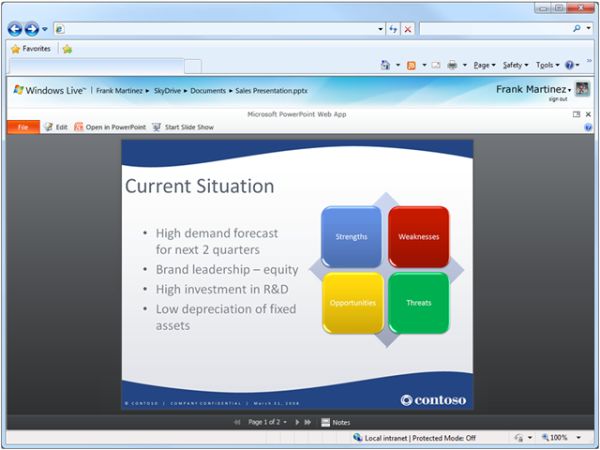
    This afternoon, a Microsoft spokesperson told Betanews that the company is now beginning the process of notifying selected participants that they have been accepted for inclusion in the company’s Technical Preview program for Office Web Apps. But in another huge example of burying the lead, a blog post that went live minutes ago from Windows Live General Manager Brian Hall states that the complete Web Apps suite, once officially released, will be “available” to all Windows Live users.

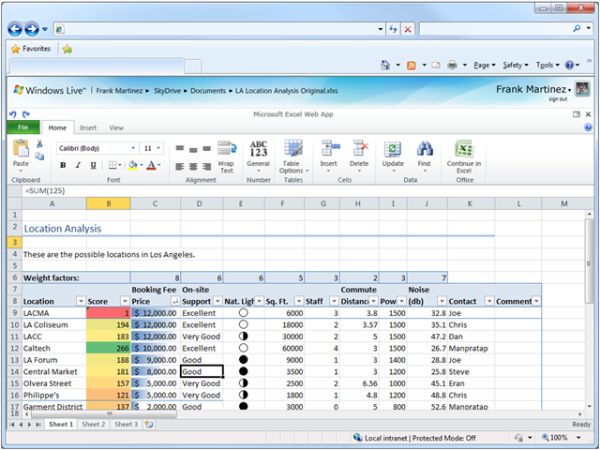
    As the spokesperson confirmed to Betanews, Hall’s implication is accurate: Everyday users of Windows Live services (which are already free) and who have SkyDrive storage on those services (the first 25 GB of which are free) will have the entire suite available for use from any modern Web browser. A video released today showed Excel Web App (that’s the formal name for it now) running on a Mozilla Firefox 3.5 browser, and on a Windows 7 platform. We’re still awaiting word on non-Windows browsers.

    There will be no cost, the spokesperson told us this afternoon, for users of Windows Live SkyDrive. When the Web Apps suite is released, all of them will notice the addition of a Documents tab, from which they’ll be able to launch Office documents. Word, Excel, and PowerPoint will be the first three in the suite, although Microsoft confirmed today that an online version of OneNote will be next.

    Here’s the specific quote from Hall: “Over time, as the final version is released, the Office Web Apps will become available to all 500 million+ users of Hotmail, Messenger, and other Windows Live services.”

    So how will Microsoft make money from this? Businesses will be able to subscribe to a version that the company spokesperson described as providing “more security and control.” Unlike Windows Live, this version will be hosted directly through Microsoft Online Services, where it’s presumed availability and uptime are guaranteed along with safety and stability.

    For business users — especially those that are already hosting SharePoint sites — there will be the ability to host Office Web Apps on their own sites, for their own users, potentially as an alternative to deploying the physical software on users’ computers directly.

    “All Office volume Licensing customers will have access to the Office Web Apps that they can run themselves on premises,” the spokesperson told Betanews. “This competitive differentiator is an example of the choice we are offering our customers. More than 90 million Office annuity customers will have access to Office Web Apps at launch.”

    Update ribbon (small)

    3:15 pm EDT September 17, 2009 · Betanews received some clarifications from Microsoft later in the day. First of all, additional storage space beyond the first 25 GB will not be available through Windows Live SkyDrive. That might have been a good extra source of revenue for the company for Office Web Apps users, but for now, the spokesperson told us Microsoft is merely considering leasing extra space in the future.

    Businesses that are looking for more useful storage options, the spokesperson suggested, may consider investing in SharePoint Online. There, multiple subscribing users are entered into a collective “pool,” the size of which is 250 MB per user.

    The spokesperson also confirmed information about platforms: The current build of Office Web Apps for the technical preview has been confirmed to run on Internet Explorer versions 7 and 8 (for Windows); Firefox 3.5 on Windows, Mac, and Linux; and Safari 4 for Mac (not for Windows). Google Chrome was not listed as a supported platform, perhaps for obvious reasons.

    That doesn’t mean users can’t give it a shot, we’re told: “If customers prefer to use another browser they should still give the Web Apps a try. While we cannot officially support all browsers, customers will not be blocked from using them. It is a goal of the Web Apps to have broad compatibility and reach,” the spokesperson said.

    PowerPoint Web App from the first Office Web Apps technical preview

    The first public demonstrations of Office Web Apps reveals a few more items than we saw demonstrated last year at PDC, though not many. Most notably, we see the full set of ribbon controls for PowerPoint Web App, which was not ready for prime time last October. We also see evidence that some of the incomplete Excel functions such as conditional cell formatting have been worked out, along with evidence that the “BackStage” — the replacement for the Office button in Office 2007 — now has a functional counterpart. An abbreviated menu bar (or rather, a category bar for items collected together by the ribbon) now contains a brightly-colored “File” category, which both resembles the BackStage control and also represents the old-style menu bar functionality from Office 2003 and earlier.

    A screenshot of Excel Web App from the first Office Web Apps technical preview.

    Copyright Betanews, Inc. 2009


    Add to digg
    Add to Google
    Add to Slashdot
    Add to Twitter
    Add to del.icio.us
    Add to Facebook
    Add to Technorati


  • Spiderman 4 – No Marriage No Morbius

    While one poorly created Spiderman movie seems to be enough to ward people off of the anticipation of a fourth film, I haven’t forgotten how much I loved the first two.

    So when I heard this news, I was actually more encouraged that they may learn from the mistakes of part 3 and move on in a positive way for part four. Dunst will be Mary Jane, but they will not focus on a wedding for the two yet. And Morbius, a rumoured villain for the next chapter will NOT be considered.

    Kirsten Dunst has been confirmed to return as Peter Parker’s sweetheart in the upcoming Spider-Man 4. However, rumours of wedding bliss for the couple in movie, slated for release on May 6, 2011, have been denied – or at least producer Todd Black maintains that he is unaware of such a plot event.

    The film’s producer have also shot down the possibility of Morbius, the Living Vampire as one of the villains in the upcoming film, but have hinted that the main villain “[has] a significant connection to the Big Apple.”

    Considering that Spiderman makes New York City his home, pretty much most of his significant rogues have some connection to the Big Apple. There is some speculation in the article that the Kingpin would make sense, but he was always a Daredevil villain first and foremost, and considering Fox still has the Daredevil rights (which include supporting cast like Electra, Bullseye and Kingpin) it is very unlikely that they would be steering toward such a faceoff.

    I also like the confirmation that Morbius is not in the film. With so much Vampire-mania going on right now, it would make sense that they would consider him for a front row seat on the bandwagon, but I never cared for Morbius and I think he would make a poor addition to the film cannon.

    Spiderman’s villians in the movies thus far have been biological or scientifically enhanced and that paralells his own origins. Even the alien symbiote was scientific in theory and not supernatural. I would prefer they continue with this trend and not cross over into mystical or paranormal characters.

    So that being said, who would fit the bill? Connors (The Lizard) was already introduced so that is only a matter of time, and I wouldn’t mind seeing an updated movie version of Vulture. I would also love to see Bruce Campbell take on Mysterio and upgrade himself from cameo whore to actual star, and get some massive actor (not wrestler) to play Scorpion or Rhino.

    Just not all in the same film.

  • Riders play a happy tune after humbling Bombers

    Banjo Bowl 6 was simply embarrasing all around for the Winnipeg Blue Bombers on Sunday as the Saskatchewan Roughriders strafed them for 55 points.

  • Microsoft Word allowed to stay on sale… for now

    Just as we predicted, Microsoft’s request to have that ban on sales of Word put on hold pending appeal of i4i’s XML patent victory has been granted. That means IT managers and excitable first-year college students can continue to happily throw down cash for the world’s most popular word processor, while the rest of us twiddle our thumbs waiting for either proceedings to resume on September 23 or Stevey Ballms to write the big check and make this whole case disappear forever.

    Filed under:

    Microsoft Word allowed to stay on sale… for now originally appeared on Engadget on Fri, 04 Sep 2009 00:17:00 EST. Please see our terms for use of feeds.

    Read | Permalink | Email this | Comments

  • The Summer Of 2009 Obituary: Wrapping Up The Summer Of Suck

    There is no other way to put it. The summer of 2009 was probably one of most disappointing summer movie seasons I can remember in a long time. Of the 47 or so movies that came into wide release this season, I can almost count on one hand the number of films I really enjoyed. At the beginning of the summer I predicted it would be about 14. Soooo wrongggggg.

    So as we come to a close, I thought I’d take some time to wrap up the summer of 2009 highlighting what I found to be:

    1) THE BEST MOVIES OF THE SUMMER

    2) THE MOST DISAPPOINTING MOVIES OF THE SUMMER

    3) THE “NOT GOOD BUT NOT NEARLY AS BAD AS YOU THOUGHT OR HEARD” MOVIES OF THE SUMMER

    and finally

    4) THE WORST MOVIES OF THE SUMMER

    So with that little intro out of the way… let’s proceed with this postmortem shall we:

    THE BEST MOVIES OF THE SUMMER

    2009-UP.jpg #1 – UP
    Hands down, no questions asked, easily and by far and away the very best movie of the summer of 2009 and of 2009 in general
    2009-Julie-Julia.jpg #2 – JULIE & JULIA
    Trust me, I’m as shocked as you are, but aside from “UP” there wasn’t another film this summer that so entertained me as this one. Meryl Streep MUST get nominated for an Oscar for this film. Touching, funny as hell and amazingly charming all at the same time. Fantastic story.
    2009-Trek.jpg #3 – STAR TREK
    Many thought it couldn’t be done (including me to be honest), but somehow they found a away to faithfully re-invent Star Trek in a way that was both nostalgic and fresh all at the same time. Such a great job. Can’t wait for the next one!
    2009-District.jpg #4 – DISTRICT 9
    Highlighted by a brilliant break out performance by Sharlto Copley and some of the summer’s best visual effects and action with dramatic tension, District 9 becomes the sleeper hit of the summer.
    2009-Hangover.jpg #5 – THE HANGOVER
    What initially looked like just another throw away comedy, The Hangover had us in stiches and finally may have given Bradley Cooper a shot at being a legit leading man in Hollywood.

    THE MOST DISAPPOINTING MOVIES OF THE SUMMER (not the worst, but high hopes leading to bad films)

    2009-Transformers.jpg #1 – TRANSFORMERS 2
    I’m still angry about this. The first Transformers is one of my all time favorite summer popcorn flicks… this one… just shit all over me. From the new Jar Jar twins, the leg humping robot, Devastator who didn’t actually fight anyone and just a general lack of doing anything right. If it wasn’t for some of the mind blowing effects and frantic action, I’d put this on the worst list instead of this one.
    2009-Funny-People.jpg #2 – FUNNY PEOPLE
    Before it opened I actually thought this film might have a chance at some Oscar hype. Not a chance. A dry and confused movie that had no sense of identity or direction populated with highly unlikeable characters who were unable to generate any sense of sympathy. Yes, it pretty accurately depicted the lifestyle of many comedians… but that doesn’t make it good. You can accurately depict the life of a parking attendant, doesn’t mean I want to pay to see it
    2009-Terminator.jpg #3 – TERMINATOR: SALVATION
    When we heard Batman decided to join the cast a wave of optimism flooded over the internet about this film. Trailers looked half decent too. Movie didn’t.

    THE MOST “NOT AS BAD AS YOU HEARD OR THOUGHT IT WOULD BE” MOVIES OF THE SUMMER (finding entertainment value where you didn’t think any would exist)

    2009-Ugly.jpg #1 – THE UGLY TRUTH
    Not going to say this is a great movie or anything silly like that, but I found myself laghing my ass off most of this film and walked out entertained. Much more than I was expecting. Line of the movie: “You wanna know the secret to finding Mr. Right ladies? It’s called a stair master”. So wrong… yet so funny.
    2009-Ghosts.jpg #2 – GHOSTS OF GIRLFRIENDS PAST
    Not even going to say this was a “good” movie… because it wasn’t overall. However, considering how horrible it looked, gotta say it had value. Was pleasantly surprised by how it turned out

    THE WORST MOVIE OF THE SUMMER

    2009-lost.jpg THE LAND OF THE LOST
    Worse than Year One. Worse than The Proposal. Worse than Bandslam. I swear it’s like they didn’t even try. Reconfirming yet again that Danny McBride is the most overrated actor in comedy today.

    So there is my little postmortem on the summer that was 2009. Such a let down. We can only cross our collective fingers and hope for better things next summer. Hope is a wonderful thing… till it punches you in the balls.

  • Balsillie sets Sept. 14 deadline for Coyotes deal

    Canadian billionaire Jim Balsillie has put together a revised proposal to purchase the bankrupt Phoenix Coyotes.

  • The Story of the Hilarious Photo Crasher Squirrel [Digital Photography]

    No matter how many times I see this photo—of a squirrel crashing Melissa and Jackson Brandts' photo opportunity at Lake Minnewanka, in Canada's Banff National Park—it always makes me laugh. The fact that it's 100% real definitely helps:

    I'm always the kind of photerrorist who just extends his arm to take self-portraits—often winning the Multiple Chin World Record—but this photo has convinced me that I need one of these portable tripod things for my trips. [Joby—Thanks OMGPonies!]


  • Backup and Search Your Friends’ Tweets with Google Reader [Twitter]

    Thanks to a combination of RSS magic and Twitter API, it’s possible to search the tweets of everyone in your Twitter network with Google Reader. Here’s how to do it.

    First, though, why would you want to do this? The native search tool provided by Twitter only tunnels back about a week and a half. Anything beyond that is lost in the ether. Thanks to a handy little tool created by Dave Winer, you can turn your follower list into an RSS feed and import that feed into Google Reader, which turns the data from the Twitter feeds into a search-friendly mountain of feed items. How do you do it? From ReadWriteWeb:

    It couldn't be much simpler. Just put your Twitter username into this link, instead of mine, and load it up in your browser: http://tw.opml.org/get?user=marshallk&folder=1

    It may take just a minute, but the end result will be an OPML file. You can either go up to your browser’s File menu and select “save as” or you can View Source and copy and paste the source of the page into a text document. Save it with a memorable name and either .xml or .opml as the file type. It’s really quite easy.

    Now if you want to put this puppy into Google Reader just log in, click on “manage subscriptions” and find the import/export button. Import that file into Google Reader and you’re ready to rock and roll!

    In our test of the service, we were able to mine all sorts of things from the feed we created. How much did our band of followers talk about Texas? Quite a bit more than we expected. Check out the full article at the link below for additional information or use the technique quoted above to jump right in. Have a favorite Twitter-centric hack of your own? Share it in the comments.


  • NHL wants Balsillie out of mix for Coyotes

    The NHL has asked a bankruptcy judge to throw out Canadian billionaire Jim Balsillie’s bid to buy the Phoenix Coyotes based on the league’s overwhelming rejection of him as a potential owner.

  • GM gets to dump its polluted sites

    When General Motors emerged from bankruptcy, it was freed of obligations for polluted properties that will require millions of dollars to clean up. GM’s unusual, government-engineered bankruptcy allowed the Detroit automaker to emerge as a new company — and shed billions in liabilities, including claims that governments had against GM for polluting

  • Twitter goes down in apparent denial of service attack

    By Tim Conneally, Betanews

    Twitter, the popular and ubiquitous (as long as you’re over 25) microblogging service was down for several hours on Thursday.

    “Attacks such as this are malicious efforts orchestrated to disrupt and make unavailable services such as online banks, credit card payment gateways, and in this case, Twitter for intended customers or users. We are defending against this attack now and will continue to update our status blog as we continue to defend and later investigate,” Twitter co-founder Biz Stone wrote in the site’s official blog today.

    The outage began at around 8:00 am EDT, and continued until around 11:00 am, when the Twitter Status Blog was updated to say, “Update: the site is back up, but we are continuing to defend against and recover from this attack.”

    The site is still difficult to reach, but has returned to a more stable state. Expectedly, the top trending topics on the freshly-restored site include “DDoS,” “Denial-of-Service,” “Twitter Status,” and the names of several Twitter clients such as TweetDeck, and UberTwitter which were also unresponsive this morning.

    Copyright Betanews, Inc. 2009


  • CrunchPad coming in November with built-in 3G connectivity, says Straits Times

    Last we heard, TechCrunch’s Michael Arrington wasn’t ready to talk about a timeframe for the release of his self-proclaimed “science project,” the CrunchPad tablet. That’s not the case for The Straits Times, however, who’ve published an article claiming that developer Fusion Garage is aiming to get the device out to the masses by November of this year, just in time for Christmas shopping. The Singapore newspaper got a sneak preview of the device, as well as some new specs. The tablet reportedly about 2.64 pounds, has a 1.6GH Intel Atom and 1GB RAM (which we knew), a USB port for keyboard and / or mouse, built-in WiFi and 3G connectivity, and a port for mobile broadband. Price is estimated around $400, a little bit more than the $300 he pegged in April, but it’s still being filed in the “unconfirmed” category for now — hopefully it comes out a little leaner when this thing goes official.

    [Thanks, David]

    Filed under:

    CrunchPad coming in November with built-in 3G connectivity, says Straits Times originally appeared on Engadget on Thu, 30 Jul 2009 23:22:00 EST. Please see our terms for use of feeds.

    Read | Permalink | Email this | Comments

  • LyricRat Names that Tune with Whatever Lyrics You Can Remember [Lyrics]

    Ever have a catchy tune stuck in your head but have no clue what the name of the song is, never mind who sings it? Enter web site LyricRat, who searches lyrics, finds the song, and then some.

    Hit up the site, enter the lyrics you know (or think you know), and click search. LyricRat will return the result, as well as some possible alternatives, along with the album info and even a sample of the song (all linking to Amazon.com). The site does well with lyrics commonly mistaken, too; we tried the commonly misheard lyrics to the song in the screenshot and LyricRat still got it right.

    What sets LyricRat apart from other search engines or even just a Google search is the ability to tweet your lyrics to @LyricRat and get almost-instant results with a link to the page on LyricRat for the full information.

    So while Google is still probably your quickest and easiest option, LyricRat is a fair alternative, especially for quick results on your cellphone via Twitter.


  • The Hidden Risks of Cloud Computing [Cloud Computing]

    Every day more users move their computing lives from the desktop to the cloud and rely on hosted web applications to store and access email, photos, and documents. But this new frontier involves serious risks that aren’t obvious to most.

    Photo by Dyanna.

    In an era of ubiquitous broadband, smartphones, and users who manage multiple computers and devices, it just makes sense to move your email, photos, documents, calendar, notes, finances, and contacts to awesome web applications like Gmail, Evernote, Flickr, Google Docs, Mint, etc. But transferring your personal data to hosted web applications has its potential pitfalls, risks that get lost in all the hype around cloud-centric new products like Google’s new Chrome OS or the iPhone.

    When you decide to move your data into the cloud, there are a few gotchas you should know about.

    Lesser Privacy Protection Under the Law

    To search your house or office (including documents stored on your computer’s hard drive), cops need to obtain a search warrant. To get to the information you’ve stored on a third-party’s web servers, they only need a subpoena, which is easier to obtain. This kind of search can also happen without your knowledge. The NY Times reports:

    Thanks in part to the Patriot Act, the federal government has been able to demand some details of your online activities from service providers – and not to tell you about it. There have been thousands of such requests lodged since the law was passed, and the F.B.I.’s own audits have shown that there can be plenty of overreach – perhaps wholly inadvertent – in requests like these.

    Some think that privacy advocates are actually conspiracy theorists and that in reality, no one in the government is reading your email. That may be true. Still, you should know that the legal process for a third party to access your data in the cloud is different than if it’s on your own computer. Photo by mujitra (´・ω・).

    Weak Security Systems That Are Too Easy to Break Into

    The government getting access to your data stored in the cloud is probably much less of a concern than someone illegally getting to it. Crappy web-based security systems—like weak password recovery workflows, phishing attacks, and keyloggers—present bigger security risks.

    Just last week hundreds of embarrassing and revealing internal company documents from Twitter were published online, obtained by a hacker who used Gmail’s password recovery mechanism to break into an employee’s personal Gmail account. This could have happened to anyone. (Two lessons to be learned from this particular intrusion: use strong and different passwords for every cloud app you log into, and make sure your alternate email account is NOT Hotmail.)

    In collaborative web applications that are built for groups—like Google Apps or any web-based project management software—the security concerns spread across everyone involved. The security of the entire system is only as strong as the weakest user's setup. Once one person's weak password is brute-forced or guessed, everyone's documents and information are at risk.

    Data Lock-in and Third-party Control

    Amazon reaches into customers’ Kindles and remotely deletes already-purchased books. Facebook launches Beacon, an advertising mechanism that collects and publishes information about what you do on external web sites on your Facebook profile (only to apologize and offer opt-out later). Apple denies approval for the Google Voice application in the App Store. Twitter doesn’t offer the ability to export more than 3,200 status updates. Flickr only lets you see the last 200 photos you uploaded if you don’t have a paid Pro account. MySpace and Facebook don’t immediately remove photos from their servers when you delete them. When you’re living in the cloud, you’re beholden to a third party who can make decisions about your data and platform in ways never seen before in computing.

    Server Unavailability and Account Lockout

    One of the biggest benefits of storing your data in the cloud is that you don’t have to worry about backing it up anymore. Big companies with hundreds of servers are more reliable than your little external hard drive, right? Yes. But servers do go down, and when you’re dependent on a web application to get your email or access that PowerPoint slideshow for the big presentation, there’s always the risk that your internet connection will go down, or that the webapp’s servers will. Offline technologies like Google Gears, decent export functionality, and a good backup system can ameliorate this particular concern, but not all systems offer those things.

    Getting locked out of your webapp account is another possible pitfall. The NY Times reports:

    Discussion forums abound with tales of woe from Gmail customers who have found themselves locked out of their account for days or even weeks. They were innocent victims of security measures, which automatically suspend access if someone tries unsuccessfully to log on repeatedly to an account. The customers express frustration that they can’t speak with anyone at Google after filling out the company’s online forms and waiting in vain for Google to restore access to their accounts.

    (If you’re worried about getting locked out of your Gmail account in particular, here’s one way to automatically back up your mail to your computer.)


    Don’t get me wrong: I personally am right on the cloud bandwagon with all of you. My web browser is the one app I run on my desktop at all times; I’ve entrusted the likes of Google, Apple, Amazon, and Yahoo with my data just like you have. The key is to know what you’re getting into when you make that choice, to ratchet up your personal security mechanisms (like alternate email addresses and password choices) and to lobby for better user protection by hosting providers in the cloud.

    That said, vote on your biggest concern about living in the cloud.

    What risk factor in the cloud worries you most?(polls)

    Have any of these issues (or something I didn’t include) kept you from using a web-based application? Have you fallen into any of the pitfalls of the cloud? Let us know in the comments.

    Gina Trapani, Lifehacker’s founding editor, is cautiously optimistic about the future of cloud computing. Her weekly feature, Smarterware, appears every Wednesday on Lifehacker. Subscribe to the Smarterware tag feed to get new installments in your newsreader.


  • Disable Automatic Web Page Refreshing [Firefox Tips]

    Firefox only (Win/Mac/Linux): Have you ever noticed how some web sites automatically reload the page every minute or two? It’s frustrating, unnecessary, and thankfully can be easily disabled in Firefox.

    While there could be some valid reasons for reloading the page, most of the time it's just a way to artificially increase pageviews—at the cost of your bandwidth and CPU cycles. To disable the automatic refresh, you can type about:config into the location bar, and then filter by the following setting:

    accessibility.blockautorefresh

    Once you’ve found it, simply double-click on the key to change the value to false true, and web pages won’t be able to reload the page. If you have the setting enabled but you’d like to make a single page refresh automatically, you can use the previously mentioned ReloadEvery extension. Thanks, Wilhelm!