Google+: 92, 93, 94, 95, 96, 97, 98, 99… 100.

For our international readers, this post is also available in Chinese, French, German, Italian, JapanesePortuguese, Russian and Spanish (Latin America, Spain). – Ed.

The Google+ project has been in field trial for just under 90 days, and in that time we’ve made 91 different improvements (many of which are posted here). Google+ is still in its infancy, of course, but we’re more excited than ever to bring the nuance and richness of real-life sharing to software. Today we’re releasing nine more features that get us that much closer.

+Hangouts: more places, more people, more to do

Hangouts uses live video to bring people together, face-to-face-to-face. And from day one, the community has shaped and stretched the feature in amazing ways—from cooking classes to game shows to music concerts. We’re determined to keep this momentum going, and to keep providing new ways to communicate in-person, so we hope you enjoy this week’s round of Hangouts improvements.

92. Hangouts on your phone
In life we connect with others in all sorts of places, at all different times. And the connections you make unexpectedly are often the ones you remember the most. We think Hangouts should keep pace with how you socialize in the real-world, so today we’re launching it on the one device that’s always by your side: your mobile phone. To get started, simply find an active hangout in the Stream, and tap “Join”:

Hangouts on your phone: Stream View (left), Green Room (center), Portrait Mode (right)

Hangouts currently supports Android 2.3+ devices with front-facing cameras (and iOS support is coming soon). The new mobile app is rolling out to Android Market today, so you can start hanging out at any time, from just about anywhere.

93. Hangouts On Air
Google+ users already use Hangouts to create intimate onscreen experiences—with family members, prayer groups, even people with certain medical conditions. But sometimes you want to speak to a large audience, or alternatively, view as a spectator. In these cases a public broadcast is what’s needed, so today we’re introducing Hangouts On Air.

The setup is simple enough: just start a normal hangout, and you’ll have the option to broadcast and record your session. Once you’re “On Air,” up to nine others can join your hangout (as usual), and anyone can watch your live broadcast:
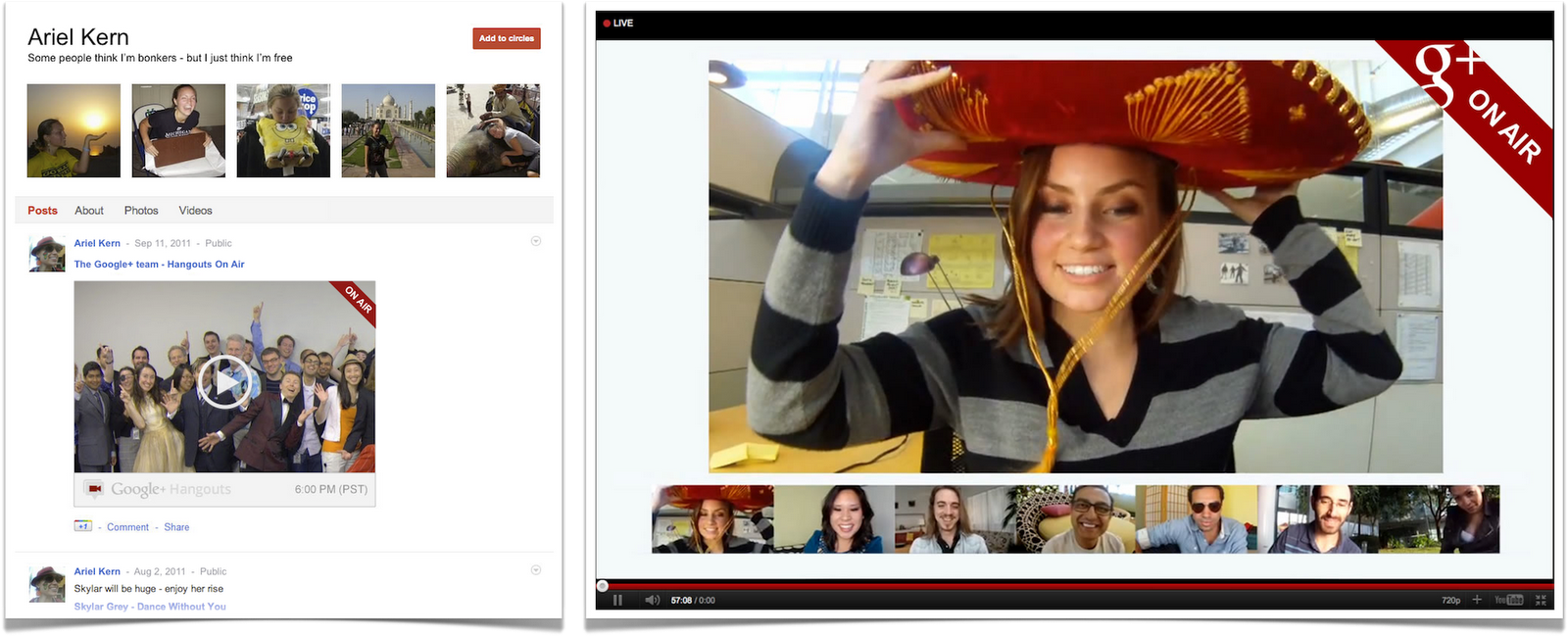
Hangouts On Air: Stream View (left), Full-screen Mode (right)

We’re starting with a limited number of broadcasters, but any member of the Google+ community can tune in. In fact: we’ll be hosting our very first On Air hangout with will.i.am on Wednesday night, September 21. For more information visit will.i.am’s or my profile on Google+.

94, 95, 96, 97. Hangouts with extras
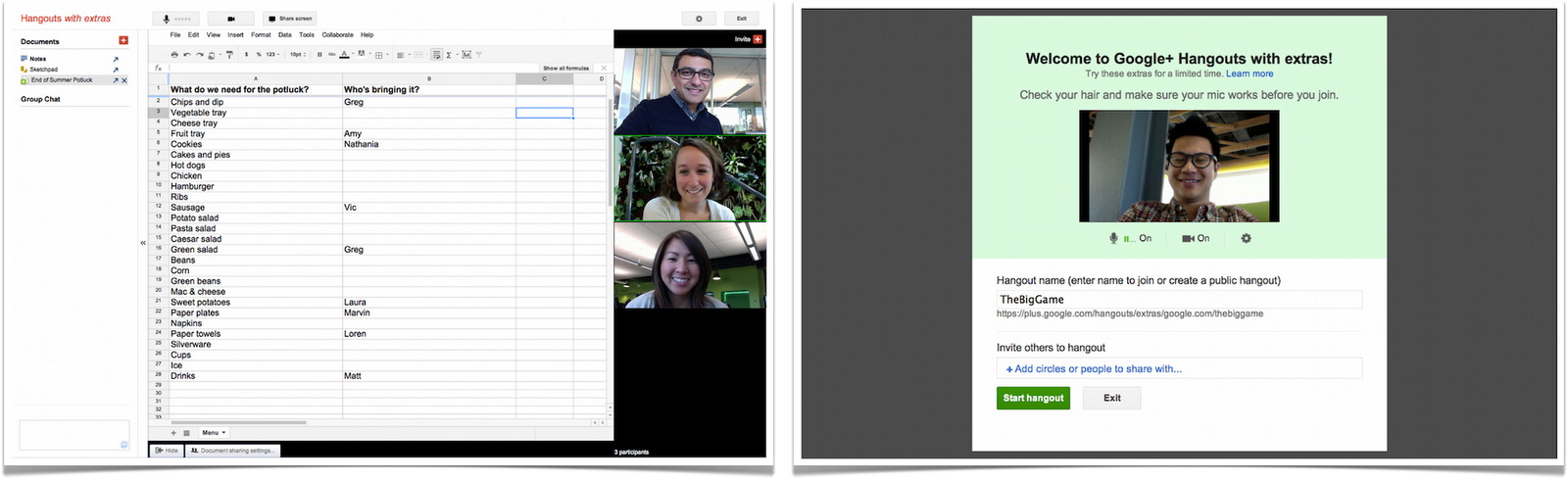
Spending time together goes hand in hand with actually doing things together. Dinner with family can easily turn into movie night at the local theater, for instance. And running into old friends can inspire anything from photo sharing to vacation planning. Hangouts has always included a basic set of in-room actions (like group chat and co-viewing of YouTube videos), but we want to make it easier to do a lot more. That’s why we’re previewing some extras, including:

  • Screensharing: for when you want to show off your vacation photos, your high score, your lesson plan or whatever else is on your screen
  • Sketchpad: for when you want to draw, doodle, or just scribble together
  • Google Docs: for when you want to write, plan or present something with others
  • Named Hangouts: for when you want to join or create a public hangout about a certain topic (like fashion or music or sports…) 
Hangouts with extras: Screensharing (left), Sketchpad (right)

Hangouts with extras: Docs (left), Named Hangouts (right)

The extras are still under construction, but we wanted to preview these features and get your feedback sooner versus later. So start a hangout, click “Try Hangouts with extras” in the green room, and let us know what you think.

98. Hangouts APIs
If field trial has taught us anything about Hangouts, it’s that the community is overflowing with creative individuals. So in the wake of last week’s Google+ API launch, we’re also releasing a basic set of Hangouts APIs. If you’re a developer who wants to build new kinds of apps and games (and who-knows-what-else), then you can find more details on the Google+ platform blog.

+Search: find the people and posts you care about

99. Search in Google+
You’ve been asking for it, and we’ve been busy building it, so today we’re bringing Google’s search expertise to Google+. Just type what you’re looking for into the Google+ search box, and we’ll return relevant people and posts, as well as popular content from around the web.

If you’re into photography, for example, then you’ll see other enthusiasts and lots of great pictures. If you care more about cooking, then you’ll see other chefs and food from around the globe. In all cases, Google+ search results include items that only you can see, so family updates are just as easy to find as international news.

Search in Google+: photography (left), cooking (right)

With more than 1 billion items shared and received every day, we’re excited to see how search will connect people through their posts on Google+.

+Everyone

100. Anyone can sign up for Google+—no invitation required.
For the past 12 weeks we’ve been in field trial, and during that time we’ve listened and learned a great deal. We’re nowhere near done, but with the improvements we’ve made so far we’re ready to move from field trial to beta, and introduce our 100th feature: open signups. This way anyone can visit google.com/+, join the project and connect with the people they care about.

Over the next day we’ll be rolling out all of these features globally. In the meantime, you can check out what’s next in Google+.

Posted by Vic Gundotra, Senior Vice President of Engineering

NVIDIA releases Kal-El white papers, announces a fifth ‘Companion’ core for less demanding tasks

We’ve known about Kal-El — the quad-core mobile processor from NVIDIA — for a fair amount of time, but a lot of the finer details have remained a secret as we’ve anxiously awaited its debut in tablets and smartphones. Fortunately, we have some reading material to bide our time as the company published white papers discussing benefits of the new CPU, and for the most part it’s what you’d expect: NVIDIA touts higher performance, better battery life and improved physics-based gaming when more cores are involved and working together.

What came as a surprise to us was the fact that this quad-core CPU actually utilizes five cores: in addition to the standard four main Cortex A9 high-performance cores, Kal-El throws in a fifth Cortex A9 “companion” core specifically designed to handle less demanding tasks in effort to minimize power consumption caused by active standby processes. How is it done? The Companion core’s max operating frequency gets capped at 500MHz, offering higher performance and greater efficiency per watt when running menial tasks such as push email, Twitter / Facebook sync, widgets, background apps and live wallpapers. This leaves the four main cores free to take care of the stuff it does best — games, web browsing, transcoding / editing audio and video, 3D, physics simulations and image processing, to name a few — allowing performance bumps of up to 50 percent when compared to Tegra 2. We can tell that quad-core devices are going to make us very, very happy. If charts and geeky stats brighten up your day like it does ours, head to the source to read the papers in their entirety.

NVIDIA releases Kal-El white papers, announces a fifth ‘Companion’ core for less demanding tasks originally appeared on Engadget on Tue, 20 Sep 2011 11:50:00 EDT. Please see our terms for use of feeds.

Permalink   |  sourceNVIDIA (1), (2)  | Email this | Comments

Logitech’s Harmony Link transforms your iOS device or Android phone into a universal remote (video)

Logitech isn’t exactly a stranger to universal remotes, and if you’ve been yearning for an Android or iOS aimed solution from the Swiss company, its new $100 Harmony Link should have you covered. The Link is a WiFi-enabled infrared puck and app combo, that allows you to control up to eight devices in your home theater from the comfort of your touchscreen sans pesky dongles or cases. After downloading a free app, pocket-sized iDevices and Android smartphones can act as universal remotes over your home network, while iPad users also get the benefit of personalized TV listings from Rovi. It’s similar in price and function to Peel’s Fruit, but drops the extra wireless dongle and adds a native iPad app. Notably, the Link can interface with multiple iPads at once, and Logitech’s also thrown in a mini IR blaster to make controlling your AV gear that much easier. If another one of your home theater dreams just came true, the Harmony Link is up for pre-order now from Logitech and due out in October. While you’re still here, there’s quick video overview past the break along with the the usual PR spiel.

Continue reading Logitech’s Harmony Link transforms your iOS device or Android phone into a universal remote (video)

Logitech’s Harmony Link transforms your iOS device or Android phone into a universal remote (video) originally appeared on Engadget on Tue, 20 Sep 2011 04:00:00 EDT. Please see our terms for use of feeds.

Permalink   |  sourceLogitech  | Email this | Comments

Canadians send 8 billion text messages a month, according to TELUS


Texting in Canada is still on the rise. The Canadian Wireless Telecommunications Association (CWTA) recently announced that in Q1 Canadians sent 18 billion text messages. March had the highest stats in history with just over 6 billion, or an average of 199 million messages per day.

Today, in response to a report that showed the average American adult sends/receives 41.5 text messages per day, TELUS has stated that Canadian text messaging is on the rise too. TELUS Communications Manager Shawn Hall said that based on their estimations the number of text messages Canadians now send on a monthly basis has skyrocketed to 8 billion, which represents 270 million per day. Currently there are over 24.5 million wireless subscribers in Canada.

Source: Vancouver Sun

Related posts:

  1. CWTA: Canadians sent 18 billion text messages in Q1 2011
  2. Canadians send 154 million text messages per day
  3. Canadians send over 135 million text messages a day

Google Wallet Launches for Android, Aims to Replace Your Wallet with Your Smartphone [Video]

We’ve known about Google Wallet for awhile but, until today, it hasn’t been available for use. If you’ve got an Android phone with near-field communication (NFC) technology, you can now make use of the Google Wallet smartphone app to store all sorts of things. They’ve launched a digital credit card with Citibank already, but you can create a virtual credit card with the app and fund it from other sources. Either way you’ll be able to pay by tapping your phone anywhere NFC payments are accepted. Additionally, you can store loyalty cards, product offers, and more. As an added bonus, Google will give you $10 on their pre-paid virtual credit card if you set up Google Wallet before the end of the year. More »


Lion security hole lets hackers change account passwords

OS X Lion has a serious security vulnerability allowing hackers to alter the password of any user account, writes security blog Defence in Depth. The OS reportedly allows non-root users the ability to view password hash data. As a consequence, an attacker can potentially use a basic Python script to glean a person’s password….


CTV Mobile launches live broadcasts, currently available only to Bell and Virgin customers


Bell acquired CTV and all their assets a year ago for $1.3 billion with the goal of accelerating “video growth across all three screens – mobile, online and TV”. Soon after they rolled out the ability to watch BNN on mobile devices and now they’ve gone ahead with live broadcasts of Grey’s Anatomy, The Amazing Race, Criminal Minds, Desperate Housewives, Pan Am and Whitney(?). All this falls under a new property of Bell Media called “CTV MOBILE” and it’s currently only available to Bell and Virgin customers… no word yet on if it’s an exclusive partnership or when Rogers, Bell, TELUS or any of the new carriers customers will be able to watch the shows.

Bell has 300,000 Mobile TV subscribers and this feature of course comes at a price, $5/month for 10 hours of Mobile TV data on smartphones and “Superphones”, tablets are $5 more per month.

Bart Yabsley, EVP, Content Sales and Distribution, Bell Media said “With CTV MOBILE, Bell Media is ensuring that viewers get Canada’s most-watched television programming on every screen, whenever and wherever they want to watch.”

Source: BellMedia

Related posts:

  1. Watch Super Bowl XLV live on you Bell/Virgin device
  2. CTV goes mobile with Bell “Live TV”
  3. Bell offers customers Stanley Cup Playoffs on mobile devices

Samsung Galaxy Tab 8.9 WiFi gets US pricing, 16GB model starts at $469

Samsung’s latest Android Tab has already gotten the in-box hands-on treatment from the blue shirts at Best Buy, but now we have official word on pricing for the 8.9-inch WiFi-only model, set to hit stores as soon as Thursday. Willing to settle for the 16GB flavor? Get ready to hand over $469 to take one of these slim slates home, or pull out another Benjamin to double capacity to 32 gigs — that beefed-up model will run you $569. You’ll also get Android 3.1 Honeycomb with “the freedom of TouchWiz,” a 3 megapixel camera on the rear with 2MPs up front, and a dual-core 1GHz processor. Check out our Tab 8.9 hands-on, or hit up the source link for the full feature rundown from Sammy.

[Thanks, Kevin]

Samsung Galaxy Tab 8.9 WiFi gets US pricing, 16GB model starts at $469 originally appeared on Engadget on Mon, 19 Sep 2011 10:21:00 EDT. Please see our terms for use of feeds.

Permalink   |  sourceSamsung  | Email this | Comments