This Is How You Should Quit Your Job At Taco Bell

The sign, a glorious product of put-upon employee rage, began tearing up the Internet this morning. Apparently, a Taco Bell employee near Buffalo, NY went out in style, changing the sign out front to say, “I QUIT – ADAM / F*** YOU :)” A local television station reports that the now-former employee reached his limit after working twenty-two days straight and being denied a day off for Independence Day. (Yes, NSFW language inside.)

Buffalo.com is still attempting to get a comment on the record from someone representing Taco Bell. Good luck with that.

adam.jpg

Employee announces he quit on sign [WIVB]
Taco Bell employee quits with gusto [Buffalo.com]

Employee announces he quit on sign: wivb.com

5 Ultimate Camera Apps for Your Android Phone

Lately, mobile phone pictures have become extremely common.  After all, it is the camera we carry everywhere. That phone also lets us share the photos on social networks and add cool effects to change the picture to our liking.

This article will take you through a series of apps that will cover taking pictures, editing them and organizing them.

Take Instant Shot With QikCam

When it comes to photography with our mobile phones, we are often in situations that we need to take a shot as quickly as possible.  Unfortunately, we miss the shot 8 out of 10 times, because it takes time to launch the camera app and by then, the moment we wished to capture is gone.

However, we now have a rescue in the form of QikCam. This is an awesome widget which you can choose to take a picture instantly. You just select the widget and the picture is taken. It does not require you to launch the application.

A single disadvantage stands in the form that no preview is available to select the capture area. In addition, it has several settings and social sharing properties.

Get Rid of the Shutter Sound

Sometimes the shutter sound gets annoying.  SilentCam is an app that serves as an alternate to your default application. Whenever you wish, launch this app and you get rid of your shutter sound.

Touch Up Your Photographs

Camera360 is the perfect app to touch up and add effects to your pictures. Its effects range from LOMO, Retro, Dreamlike, Art of Black and White, Back to 1839, Night Enhancement and HDR. It also has the Unique Funny Mode,  Unique Scenery Mode and Unique Tilt-shift and Color-shift Mode. Of course, it lets you share your edited pictures on Twitter and Facebook.

PicPlz is another such application which has a variety of filtering effects. It also lets you share your photos with the world on Flickr, Facebook, Twitter and more, directly from the app.

Organize Your Photos With QuickPic

QuickPic is the ultimate application to arrange your photos into albums instead of using the default picture browser.  It has really simple settings to create and browse your photo albums. The albums may be sorted by name, path, date or other albums.

Photo Gallery may also interest you.

Create Collage for a Portfolio

Photo Grid lets you create a collage of photos for between 3 to 9 photos. It helps you easily adjust the photos along with the their size and position in the frame.  Amazingly, it can also create an auto-collage of a selected list of photos.

Conclusion

I feel that I have given life to my Android Camera with these application. If you are a photo freak, you will definitely love the presence of these applications on your phone.

Image By Steve Keys

(By) Sandeep Agarwal is an engineer and tech fanatic who has a lot of appetite to explore hidden difficulties in technology drift. He loves to explore and devise the latest software and technologies.

Related Posts

Get More Out Of Your Toothpaste Tube

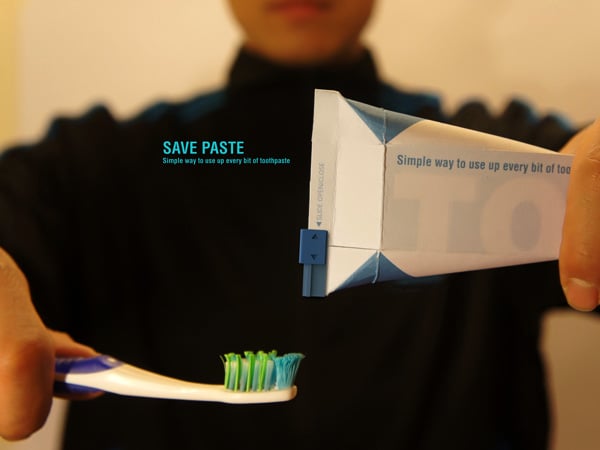
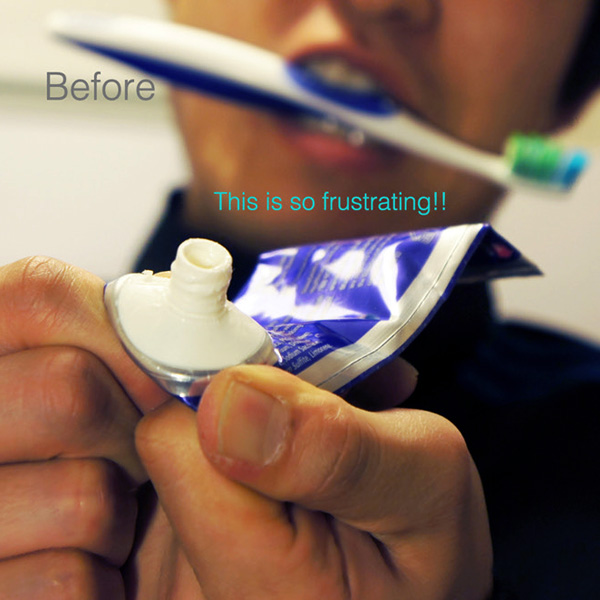
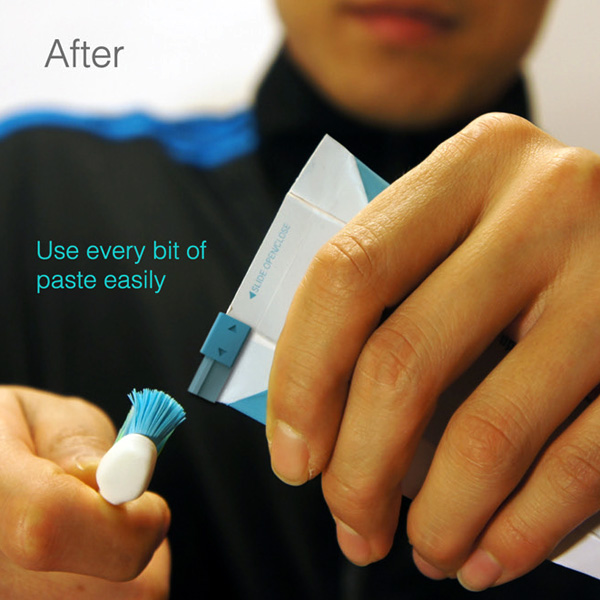
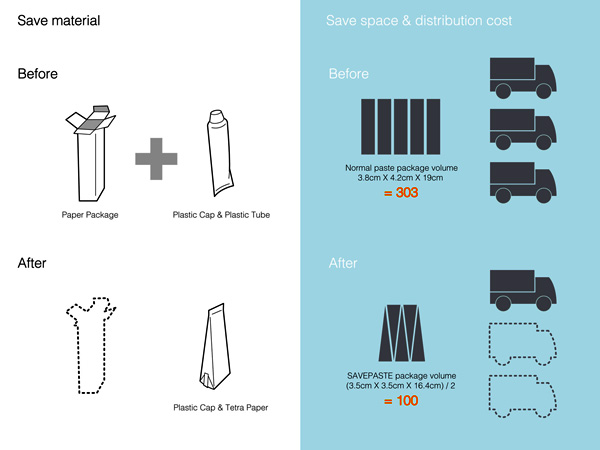
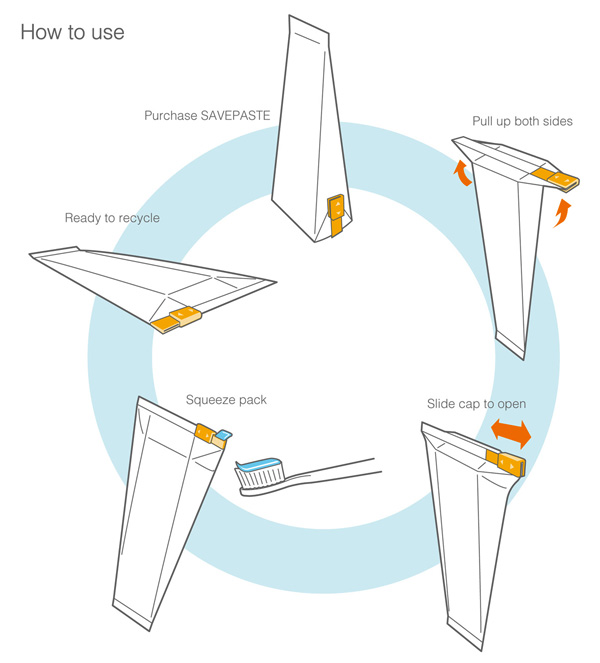
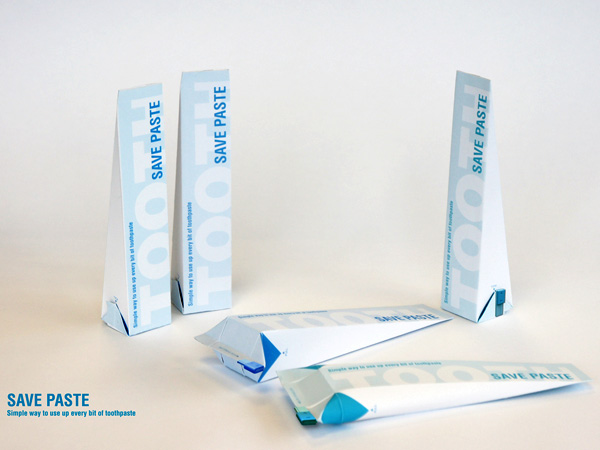
Here is another intriguing Toothpaste Packaging design that makes total sense. SavePaste has a three-point agenda: To eliminate the hard-to-squeeze dead space, minimizing toothpaste residue left inside the container; Reduce two packaging to one. It means we can reduce waste and manufacturing price plus encourage recycling. And finally, have a user-friendly design so that people easily adopt it. I think it’s a full score on all three fronts!

Designers: Sang Min Yu and Wong Sang Lee

———-

Yanko Design
Timeless Designs – Explore wonderful concepts from around the world!
Yanko Design Store – We are about more than just concepts. See what’s hot at the YD Store!

Adobe unleashes Flash Player 11 beta, now with 7.1 surround sound

Adobe unleashes Flash Player 11 Beta for Desktops, now with 7.1 surround sound

Another day, another beta. Adobe’s latest beta release of its desktop Flash Player — that’s version 11 — is now available for your downloading pleasure. This particular build brings with it Stage3D APIs, for “advanced” 2D and 3D rendering, 64-bit support, H.264 encoding, and 7.1 surround sound. We’re just hoping number 11 won’t bring all the flaws and subsequent fixes that have plagued previous versions. For more details, and to download the latest beta, click the source link below.

Adobe unleashes Flash Player 11 beta, now with 7.1 surround sound originally appeared on Engadget on Thu, 14 Jul 2011 18:32:00 EDT. Please see our terms for use of feeds.

Permalink It’s All Tech  |  sourceAdobe  | Email this | Comments

Page: growth on Google+ has been great, over one billion items shared

Page: growth on Google+ has been great, over 1 billion items shared

Wondering why Google+ ran out of disk space? Looks like it might be a casualty of growth: in today’s earnings call, Google CEO Larry Page revealed that since its launch, more than ten million people have joined Google+, sharing some one billion items every day. Those numbers not big enough for you? Then chew on this: that little +1 button? It gets clicked 2.3 billion times per day in its own right. It’s still a far cry from the 750 million users actively addicted to Facebook, but still, that’s a heck of a start.

Page: growth on Google+ has been great, over one billion items shared originally appeared on Engadget on Thu, 14 Jul 2011 17:19:00 EDT. Please see our terms for use of feeds.

Permalink   |   | Email this | Comments

ZIP and RAR support now available in the Google Docs Viewer

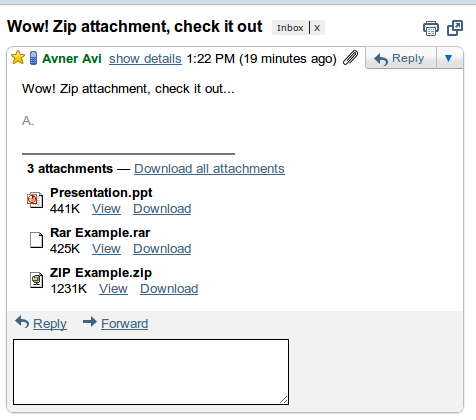
Downloading files that you only need to preview can create unnecessary clutter on your computer. While you can already use the Google Docs Viewer to view over 15 different file types without downloading them, today we’ve added support for archive file types ZIP and RAR. Now, if someone sends you a ZIP or RAR file in Gmail, you’ll be able to view its contents from within your browser by clicking on View.


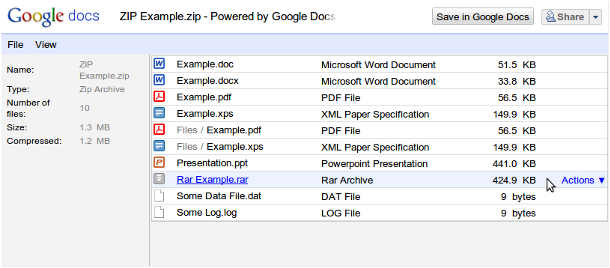
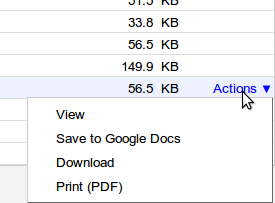
This will bring up a view that includes all of the files in the archive, the file types, and the size of those files.


When you hover over the list you can activate a menu by clicking Actions. You’ll be able to View items supported by Google Docs Viewer and Print (PDF) those that we offer PDF support. Save to Google Docs and Download appear for all files.


ZIP and RAR archives that are embedded inside other archives also work. For example, if you have a RAR file inside a ZIP file (like in our example above) you can just click on that file to access the embedded archive.

Go ahead and try the feature by viewing a ZIP file.

This feature extends to Google Docs for mobile, too. For each viewable file (including embedded ZIP or RAR archives) there is a link to view.


We hope this removes the need to download full archives when you only need to work on select items. We’re always adding more file types to the Google Docs Viewer — let us know what file types you’d like to see support for next in the forums.

Posted by: Avner Aviad, Google Docs Viewer team

Google announces Q2 earnings: $9.02 billion in revenue, $2.51 billion in net income

It’s everybody’s favorite time of year. Yup, the Q2 earnings results are coming in, and Google’s leading the pack, reporting $9.02 billion in gross revenue for the second quarter of 2011: a 32 percent increase over the same period in 2010. CEO Larry Page notes, that’s a “record breaking over $9 billion of revenue,” with net income reaching $2.51 billion, up from $1.84 billion in Q2 2010. Google’s various sites apparently made up 69 percent of the $9.02 billion in revenue, generating $6.23 billion — 2010 numbers were $4.50 billion. Operating expenses saw a notable increase over 2010, cutting into profits by $2.97 billion, up from $1.99 billion.

Larry Page has just announced some Android usage numbers, pointing out that 550,000 devices, rocking the little green robot, are being activated per day. That’s up from the 500,000 announced late last month. Android Market numbers are also up, with six billion total downloads.

Continue reading Google announces Q2 earnings: $9.02 billion in revenue, $2.51 billion in net income

Google announces Q2 earnings: $9.02 billion in revenue, $2.51 billion in net income originally appeared on Engadget on Thu, 14 Jul 2011 16:07:00 EDT. Please see our terms for use of feeds.

Permalink   |  sourceGoogle  | Email this | Comments

Fleet Commander – Awesome Multi-User Touchscreen Star Wars Game Demo [Video]

If you think you have seen the ultimate in gaming interfaces before now, then you will definitely love this. MS graduate candidate Arthur Nishimoto has put together a truly awesome looking multi-user touchscreen game demo drawing on Lucasarts’s Star Wars: Rebellion and Star Wars: Empire at War for the setting and inspiration.

From YouTube: Developed at the Electronic Visualization Laboratory (EVL) by MS graduate candidate Arthur Nishimoto, “Fleet Commander” explores how a real-time interactive strategy game that would typically rely on complex keyboard commands and mouse interactions be transferred into a multi-user, multi-touch environment.

Fleet Commander [via Dorkly Bits]

Learn more about the Project at Arthur Nishimoto’s Site (Fleet Commander Homepage)

The Beginner’s Guide to Shell Scripting 2: For Loops Setup SSH on Your Router for Secure Web Access from Anywhere How to Use EXIF Data to Learn From Master Photographers

SwiftKey X virtual keyboard launches for Android tablets, we go hands-on (video)

We’re no strangers to SwiftKey here at Engadget HQ, and today TouchType is launching a major new version of everyone’s favorite Android virtual keyboard — SwiftKey Tablet X for devices running Honeycomb, and SwiftKey X for devices running Android 2.x. Both applications improve upon the original by using TouchType’s Fluency 2.0 artificial intelligence engine, a unique predictive phrase system which learns how you write. New features include cloud learning, which analyzes how you type in Gmail, Twitter, Facebook, and text messages to predict phrases in your style, plus keypress technology which continually monitors your typing precision and adapts the touch-sensitive area for each key to improve prediction accuracy. SwiftKey now supports 17 languages (with more coming soon) and is smart enough to interpret three languages at once. There’s also a handful of other enhancements, including support for themes which allow users to customize the look and feel of the keyboard. And that split keyboard option we first encountered at CES? It’s there of course, in the tablet version.

We’ve been testing SwiftKey Tablet X on the Galaxy Tab 10.1 for a few days now, alongside SwiftKey X on a handful of phones (including the Nexus S and the EVO 3D), and it’s probably the best virtual keyboard we’ve used on Android yet. In fact, it’s now replacing the stock keyboard on all our HTC Sense-equipped handsets. Prediction accuracy improves quickly after you start using the keyboard, and we liked having the option to turn off the spacebar-triggered auto-completion of words and phrases. Another useful feature is the ability to display arrow / cursor keys on the phone version. The supplied themes are attractive (especially Neon), and the layouts are intuitive — although we’d have preferred the numbers to be arranged in a row instead of mimicking a numpad. Both applications are available today only for $1.99 in the Android Market. Regular pricing is $4.99 for SwiftKey Tablet X, and $3.99 for SwiftKey X. Take a look at our screenshot galleries below, and hit the break for our hands-on videos and more.

Continue reading SwiftKey X virtual keyboard launches for Android tablets, we go hands-on (video)

SwiftKey X virtual keyboard launches for Android tablets, we go hands-on (video) originally appeared on Engadget on Thu, 14 Jul 2011 09:00:00 EDT. Please see our terms for use of feeds.

Permalink   |   | Email this | Comments

Man builds turbine-powered Batmobile, brags about having the only one (video)

So you think you’re a huge fan of the Dark Knight, huh? Not so fast. Do you own a full-sized Batmobile? Yeah… we didn’t think so. But, auto restoration guru Casey Putsch does, and to launch himself further into super-fanboy status, he upgraded the engine with a Boeing turboshaft — snatched out of a naval drone helicopter. According to him, this makes his collector’s item one of a kind, in true Bruce Wayne fashion. Sure, these discarded movie props are usually powered by a standard 350 (especially the older models), but that wasn’t enough for a dude’s dude who appraises and designs all types of vehicles for a living. Mods were also made to the interior, including an iPad in the dash which serves as the avionics system and keeps track of the important GPS coordinates — you know, stuff you’d expect Lucious Fox to toss in to track villains and such. For a look at this beast in action, check out the video after the break; meanwhile we’ll try to figure out how to cram a jet engine into a Tesla Roadster.

Continue reading Man builds turbine-powered Batmobile, brags about having the only one (video)

Man builds turbine-powered Batmobile, brags about having the only one (video) originally appeared on Engadget on Thu, 14 Jul 2011 06:51:00 EDT. Please see our terms for use of feeds.

Permalink Autoblog, Tood Cooperider  |  sourcePutsch Racing  | Email this | Comments

Google’s Photovine sprouts official teaser, begins rollout later this month (video)

Were you all jazzed up and ready to plant your first Photovine, only to have those gardening dreams crushed by a barren three page teaser? El Goog’s Slide team isn’t quite ready for you to grab that spade, but it is willing to transcribe your digits for the service’s soft launch later this month. Judging by the brief demo, vines begin like a game of photo-sharing telephone: what starts as an innocent photograph of a “warm and fuzzy” pup, can easily transcend into friends sharing an equally snug and furry man. Sound like a party? See for yourself beyond the fold, and don’t forget to hit the source link to join the queue.

Continue reading Google’s Photovine sprouts official teaser, begins rollout later this month (video)

Google’s Photovine sprouts official teaser, begins rollout later this month (video) originally appeared on Engadget on Thu, 14 Jul 2011 01:17:00 EDT. Please see our terms for use of feeds.

Permalink Mashable  |  sourcePhotovine  | Email this | Comments