SaskTel already Tweeted that they will release the Samsung Galaxy S II. However, today they officially wrote it all down in a press release that it’ll be available “in the coming weeks”. The same formal info as Bell, but a couple differences. Missing from the SaskTel branding of this Android 2.3 device is the “4G” status (Bell will call it the Samsung Galaxy S II 4G). Next, Bell didn’t give any pricing but SaskTel did! No word on the no-contract price but the “Samsung GALAXY S II is available at any SaskTel Store or SaskTel Authorized Dealer for $79.99 on a three year voice and data term”. Perhaps this is what we’ll see Bell come in at too.
Well, lookie here! Seems that ThinkPad Tablet’s getting more real by the hour. For what it’s worth, Lenovo hasn’t exactly done a laudatory job keeping its next major Honeycomb tablet under wraps, but flaunting it in public? Now that’s just asking for it. According to ZTOP, the enterprise-centric Tablet will arrive within three to four weeks boasting Tegra 2 silicon, a 10.1-inch display (1280 x 800) and an optional folio / cover that might just steal the show. According to the report, it’s a leather-wrapped case that contains a full-on keyboard and optical tracking sensor, presumably using a USB connector to make the magic happen. Think Clamcase, but tailored for Lenovo. There’s no mention of a price on that one, but we’re guessing it ain’t gonna be tossed in gratis. Tap the source for one more look, and expect to hear more on the whole kit and kaboodle as July draws closer.
Mail dropped through door slots across the country on Tuesday as postal workers made a small dent in the millions of letters, bills and flyers that went undelivered during the rotating strikes and lockout at Canada Post.
It’s hard to argue with Google’s track record. The company has scored a hit in nearly every space in which it’s dabbled: search, email, ads, office software, etc. There’s always been one glaring exception to this rule, however: social networking. The company hasn’t made much of a dent in a world dominated by Facebook (and, once upon a time, MySpace and Friendster). For Google+, however, the company dove in with both feet, launching a multi-faceted service that brings a lot to the table with features like Circles, Hang Out, and Huddle. Is it enough to end Google’s streak of misteps in the social world? Join us as we take a dive deeper into Google’s latest attempt to find out.
Over the years we’ve made some significant improvements to our map style. This summer, we’re starting a new project to give you more map and simplify the overall look and feel. As part of a larger effort, Google is bringing you an experience that’s more focused, elastic, and effortless.
Whether you use Google Maps to discover new places, or to seek out destinations you know well and love, we hope you’ll find our updated look as familiar and reliable. It’s simple polish with focus on what’s most important—your map.
The best calendaring applications make it easy to add, manage, and remember appointments, so its no surprise the top five were all popular players. Last week we asked you which calendaring application you preferred when managing your appointments on your desktop. You answered, and we put the top five to a vote. Now we’re back to highlight the winner. More »
Starting today, you might begin noticing that things look a little different across Google products. We’re working on a project to bring you a new and improved Google experience, and over the next few months, you’ll continue to see more updates to our look and feel. Even our classic homepage is getting a bit of a makeover:
New Google homepage with a smaller logo and links moved to the top and bottom edges of the browser for a cleaner look
The way people use and experience the web is evolving, and our goal is to give you a more seamless and consistent online experience—one that works no matter which Google product you’re using or what device you’re using it on. The new Google experience that we’ve begun working toward is founded on three key design principles: focus, elasticity and effortlessness.
Focus: Whether you’re searching, emailing or looking for a map, the only thing you should be concerned about is getting what you want. Our job is to provide the tools and features that will get you there quickly and easily. With the design changes in the coming weeks and months, we’re bringing forward the stuff that matters to you and getting all the other clutter out of your way. Even simple changes, like using bolder colors for actionable buttons or hiding navigation buttons until they’re actually needed, can help you better focus on only what you need at the moment.
Elasticity: In the early days, there was pretty much just one way to use Google: on a desktop computer with an average-sized monitor. Over a decade later, all it takes is a look around one’s home or office at the various mobile devices, tablets, high-resolution monitors and TVs to see a plethora of ways to access the web. The new design will soon allow you to seamlessly transition from one device to another and have a consistent visual experience. We aim to bring you this flexibility without sacrificing style or usefulness.
Effortlessness: Our design philosophy is to combine power with simplicity. We want to keep our look simple and clean, but behind the seemingly simple design, use new technologies like HTML5, WebGL and the latest, fastest browsers to make sure you have all the power of the web behind you.
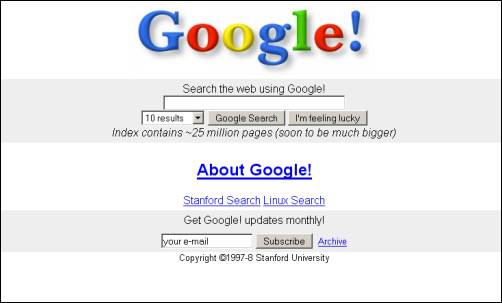
Constant revision and improvement is part of our overarching philosophy. For example, last year we introduced an updated look and feel to our search results, and if you compare the original Google homepage to today’s version, you’ll see that a makeover every so often can certainly be refreshing:
Original Google homepage in 1997
Starting today and over the course of the next few months, look for a series of design improvements across all our products, including Google Search, Google Maps and Gmail.
Posted by Chris Wiggins, Creative Director, Digital
You can blame Beau Hindman from Massively for this article and most likely my possible disappearance for the next few hours. After watching his live streaming of Gameloft’s Order and Chaos, he had to go and post an article detailing a new application for mobile devices that, aside from being productive, will let you play games on your mobile device from your PC.
Fresh on the heels of today’s Google+ announcement (and likely because of that announcement), the search giant just launched Google Takeout—an update to their previously mentionedData Liberation Front that allows you to export your data from several Google products in one simple download. Currently Takeout supports mass exodus from Buzz, Contacts and Circles (the latter of which is new to Google+), Picasa Web Albums, your Profile, and Stream (also part of Google+). More »
Rumours of the 10-inch BlackBerry “PlayBook 2″ had it potentially coming thinner, 4G/WiFi only and in black and white. This was expected to be released in time for the 2011 holiday season, but it now seems the plans have been completely scrapped. The reason is apparently due to RIM putting all their focus on producing some kind of BlackBerry “Superphone” that’s powered by their QNX OS (same as what’s in the PlayBook). No word on a possible release date but rumoured specs include the same single-core 1.2GHz processor that’s in the upcoming Bold 9900. Hopefully this gets bumped up to a dual-core processor because that’s what RIM co-CEO Mike Lazaridis said the “Superphone” would include. In addition, the upcoming Berry might come with a 4.3-inch touchscreen with a high res display that’s over 900+ pixels (iPhone 4 has a screen resolution of 640 x 960 pixels).
We want RIM to massively succeed and we’re hoping the upcoming devices over the next couple years will put them back on the positive track. Jim Balsillie, the other RIM co-CEO once stated that “we absolutely have a whole next generation of smartphones, so strategically we feel fantastic”… bring these on and others will feel fantastic too.
Social networking has long been Google’s white whale. The company has done plenty of dabbling in the space, releasing Orkut, which has failed to catch on in the US, and rolling out Buzz to the relative indifference of its massive user base. Announced today after seemingly endless leaks, Google+ represents a major push for the software giant. The service began showing itself to a smattering of users last night, as a black bar across the top of various of the company’s properties. A “+You” button on the far left of the bar currently brings you to the service’s landing page, offering a tour of the many features that fall under the Google+ umbrella. Get to know the services better after the break.
Among the most basic of human needs is the need to connect with others. With a smile, a laugh, a whisper or a cheer, we connect with others every single day.
Today, the connections between people increasingly happen online. Yet the subtlety and substance of real-world interactions are lost in the rigidness of our online tools.
In this basic, human way, online sharing is awkward. Even broken. And we aim to fix it.
We’d like to bring the nuance and richness of real-life sharing to software. We want to make Google better by including you, your relationships, and your interests. And so begins the Google+ project:
+Circles: share what matters, with the people who matter most
Not all relationships are created equal. So in life we share one thing with college buddies, another with parents, and almost nothing with our boss. The problem is that today’s online services turn friendship into fast food—wrapping everyone in “friend” paper—and sharing really suffers:
It’s sloppy. We only want to connect with certain people at certain times, but online we hear from everyone all the time.
It’s scary. Every online conversation (with over 100 “friends”) is a public performance, so we often share less because of stage fright.
It’s insensitive. We all define “friend” and “family” differently—in our own way, on our own terms—but we lose this nuance online.
In light of these shortcomings we asked ourselves, “What do people actually do?” And we didn’t have to search far for the answer. People in fact share selectively all the time—with their circles.
From close family to foodies, we found that people already use real-life circles to express themselves, and to share with precisely the right folks. So we did the only thing that made sense: we brought Circles to software. Just make a circle, add your people, and share what’s new—just like any other day:
+Sparks: strike up a conversation, about pretty much anything
Healthy obsessions inspire sharing, and we’ve all got one (or two, or three…). Maybe it’s muscle cars, or comic books, or fashion, but the attraction is always the same: it comes up in conversation, we immediately jump in, and we share back and forth with other fans. Often for hours. The trick is getting things started, and getting over that initial hump. Fortunately, the web is the ultimate icebreaker.
The web, of course, is filled with great content—from timely articles to vibrant photos to funny videos. And great content can lead to great conversations. We noticed, however, that it’s still too hard to find and share the things we care about—not without lots of work, and lots of noise. So, we built an online sharing engine called Sparks.
Thanks to Google’s web expertise, Sparks delivers a feed of highly contagious content from across the Internet. On any topic you want, in over 40 languages. Simply add your interests, and you’ll always have something to watch, read and share—with just the right circle of friends:
+Hangouts: stop by and say hello, face-to-face-to-face
Whether it’s inside a pub or on a front porch, human beings have always enjoyed hanging out. And why not? It’s how we unwind, recharge, and spend unscheduled time with old and new friends alike. Hanging out is deceptively simple though, and the nuance gets lost online.
Just think: when you walk into the pub or step onto your front porch, you’re in fact signaling to everyone around, “Hey, I’ve got some time, so feel free to stop by.” Further, it’s this unspoken understanding that puts people at ease, and encourages conversation. But today’s online communication tools (like instant messaging and video-calling) don’t understand this subtlety:
They’re annoying, for starters. You can ping everyone that’s “available,” but you’re bound to interrupt someone’s plans.
They’re also really awkward. When someone doesn’t respond, you don’t know if they’re just not there, or just not interested.
With Google+ we wanted to make on-screen gatherings fun, fluid and serendipitous, so we created Hangouts. By combining the casual meetup with live multi-person video, Hangouts lets you stop by when you’re free, and spend time with your Circles. Face-to-face-to-face:
+Mobile: share what’s around, right now, without any hassle
These days a phone is the perfect sharing accessory: it’s always with you, it’s always online, and it’s how we stay close with our closest friends. We didn’t want “just” a mobile experience, however, so with Google+ we focused on things (like GPS, cameras, and messaging) to make your pocket computer even more personal.
+Location, location, location
In life, the places we visit shape conversations in lots of meaningful ways. If we call John from the airport, he’ll likely ask about our trip. Or if Jane texts from a nearby restaurant, we might join her for dessert. With Google+ you can add your location to every post. (Or not. It’s always up to you.)
+Instant Upload
Getting photos off your phone is a huge pain, so most of us don’t even bother. Of course pictures are meant to be shared, not stranded, so we created Instant Upload to help you never leave a photo behind. While you’re snapping pictures, and with your permission, Google+ adds your photos to a private album in the cloud. This way they’re always available across your devices—ready to share as you see fit.
+Huddle
Coordinating with friends and family in real-time is really hard in real life. After all, everyone’s on different schedules, in different places, and plans can change at any moment. Phone calls and text messages can work in a pinch, but they’re not quite right for getting the gang together. So Google+ includes Huddle, a group messaging experience that lets everyone inside the circle know what’s going on, right this second.
Starting today Google+ is available on Android Market and the mobile web, and it’s coming soon to the App Store.
+You: putting you first, all across Google
That’s the Google+ project so far: Circles, Sparks, Hangouts and mobile. We’re beginning in Field Trial, so you may find some rough edges, and the project is by invitation only. But online sharing needs a serious re-think, so it’s time we got started. There’s just one more thing—really the only thing: You.
You and over a billion others trust Google, and we don’t take this lightly. In fact we’ve focused on the user for over a decade: liberating data, working for an open Internet, and respecting people’s freedom to be who they want to be. We realize, however, that Google+ is a different kind of project, requiring a different kind of focus—on you. That’s why we’re giving you more ways to stay private or go public; more meaningful choices around your friends and your data; and more ways to let us know how we’re doing. All across Google.
When your invite arrives we hope you’ll join the project. But it’s entirely up to +You.
Posted by Vic Gundotra, Senior Vice President, Engineering
Office 365 is live. Larger businesses will find savings compared to what they pay Microsoft now for PC software but hefty overhead compared to Google’s hosted productivity suite.
If you have kids and own a tablet, chances are you’ve passed it to the back seat on occasion, asking your five-year-old to help you navigate to the beach, or to beat an otherwise hopeless level in Angry Birds. Now, you can reward them with a tablet of their own. Available in green and pink, the $100 LeapFrog LeapPad Explorer includes a 5-inch, 480 x 272-pixel (16:9) touchscreen, 2GB of built-in storage, and a durable housing — but your 5-9 year old isn’t going to get caught up on specs. They will take notice to the built-in camera (with video capture), microphone, stylus, and accelerometer, however — all of which enable custom kid-friendly apps and educational games, including Disney Animation Studio, an interactive reader, and compatibility with over 100 downloadable apps and LeapFrog cartridges, which range in price from $5 to $25. There’s no wireless connectivity, so you’ll be tethering with Windows or Mac OS to download additional content, and to share your child’s creations with family and friends.
We’re certainly far outside LeapPad’s target demographic, but we did have a chance to go hands-on with the device earlier today, and felt that the tablet was solidly built, with a well-rounded feature set and sufficient expandability options — for a kids toy, of course. Games and apps took advantage of the Pad’s features, such as Roly Poly Picnic, which uses the accelerometer to navigate through a maze, spelling out simple, three-letter words along the way (like all apps and games, Picnic is adjustable based on your little one’s age and skill level). There’s also a video player (currently limited to 4:3 content), photo, and video capture apps. Shipping August 15th, the device doesn’t have a ton of horsepower under the hood — a 400MHz processor means apps won’t launch with the speed and grace of an iPad 2 — but for a $100 toy, the LeapPad will do just fine. PR and hands-on video are after the break.
Compared to your full-sized desktop keyboard, typing on your phone’s tiny software keyboard just plain sucks. Luckily, Android users can choose from a myriad of different keyboards, meaning you can find one that caters to your typing style. Here’s how to find the right one for you. More »
Microsoft Office 365, the company’s competitor to Google Apps, shed its beta label this morning. Microsoft published release notes and unveiled tiered pricing plans that start at $6/month per user for small businesses and ranges between $10 and $27/month per user for large enterprises depending on the features needed. More »