It’s been a long time coming — well only a year, which in the smartphone world is an eternity — but Samsung’s Galaxy S II is here. The phone, which has been touted as many grandiose things, including the iPhone’s main competitor, is a beast. What’s obvious is that Samsung learned from its many missteps and quality issues that plagued the often-vexing line of Galaxy S devices, and have improved on every major feature. With Bell launching the Galaxy S II along with several other Android “Superphones,” what sets the device apart? We’ll take you through the haves and havenots of this beautiful Android phone, so stick around.
Specs
– Android 2.3.3 with TouchWIZ 4 overlay
– 4.3” 480×800 pixel Super AMOLED Plus display
– 1.2Ghz dual-core Exynos processor with Mali-400MP GPU
– 1GB RAM / 16GB Internal Storage (2GB for apps)
– 8MP back camera / 2MP front camera
– 1080p video capture with anti-shake
– 21Mbps HSDPA / 5.76Mbps HSUPA
– WiFi a/b/g/n, Bluetooth 3.0, DLNA, WiFi-Direct, dual microUSB/HDMI out MHL port
– Stereo FM radio, native DivX playback
– 1650mAh battery
– 125.3 x 66.1 x 8.5 mm
– 116g
– GSM 850/900/1800/1900, HSPA+ 850/900/1900/2100
The Phone
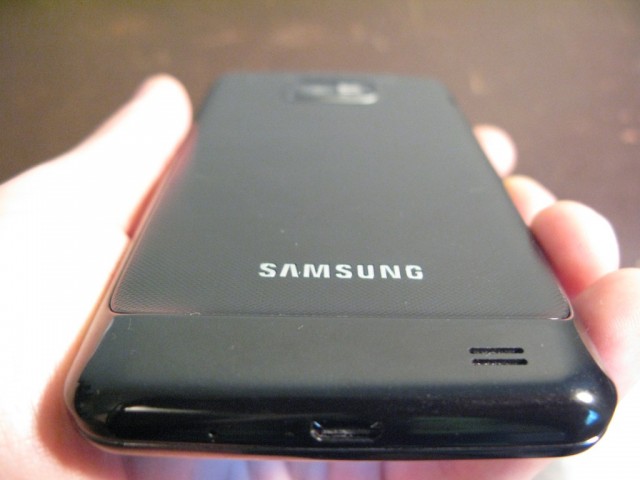
Firstly, the phone is thin. This has been mentioned before, but it needs to be put into context. Unlike the 4″ original, the sequel adds .3″ to the screen size, and that extra width and height could easily create problems for those with smaller hands. But since it measures 8.7mm at its thinnest point, the added width is hardly noticed. Indeed, when comparing it to a more modern phone like the Nexus S, which itself improves upon the design of the Galaxy S in many ways, the sequel actually seems smaller. This is quite a feat, and in a consumer market where looks are everything it’s important to recognize just how significant a victory this is for Samsung.
That the phone weighs 116g is a victory, too, but with featherweight comes feather materials, and the Galaxy S II is all plastic. Granted, thanks to the well-designed battery cover there is little to no creaking, but that doesn’t make up for the fact that the material feels underwhelming compared with many similarly-priced smartphones, including the recently-released HTC Sensation 4G, which is battling with the SGS2 for shelf space at Bell. Still, it feels solid and is a pleasure to hold.
The Galaxy S II incorporates many design elements from the original — the tactile home button and two capacitive buttons on either side; the right-side power button; the slight “chin” on the bottom — but they’ve squared it off, maturing the look somewhat. Samsung have also removed the garish chrome siding of the original Galaxy S that exuded the exact opposite of premium. Instead, the SGS2 is all black. The battery cover is a thin piece of plastic that I actually laughed upon first viewing. “This is going to snap so quickly,” I thought. But I quickly discovered that it is some sort of mutant plastic that can bend, almost in half, and retain its shape. It’s extraordinary.
The overall build quality of the Galaxy S II is good — not great, but good — which affords it a slimness that no other Android device can touch right now except for the Xperia arc, which lacks many of the same high-end internals.

To call the 4.3″ Super AMOLED Plus display the best on the market would be selling it short. It’s the best, period. Only Samsung could one-up itself so entirely as to make the previous best look merely good.
Getting the elephant in the room out of the way, yes the resolution stays the same at 480×800 pixels and, in fact, compared to the original Galaxy S the sequel has a lower pixel density. Should this matter? Maybe. In a market of qHD Android phones and Apple’s Retina Display the lower number of pixels is admittedly disappointing. But I’ve seen too many poor-quality qHD displays to acquiesce to its inherent superiority; the Galaxy S II makes up for its lower pixel count in numerous ways.
First, the colours. If there is one thing unparalleled about the Super AMOLED Plus technology, it’s the reproduction of colours. Super LCD may be slightly brighter, but it can’t hold a tail to the sheer vividness of AMOLED. And since the original Super AMOLED, Samsung has addressed the only major complaint: its graininess. The Galaxy S II manages to fit 12 subpixels into every pixel, as opposed to the original’s eight, eliminating the minor aliasing caused from not having a full RGB palette. As a result of having an equal number of red, green and blue subpixels, the Galaxy S II recreates colour in a way no other smartphone can touch. It’s difficult to appreciate until you view it in real life.
Along with superior colour, absolute white and absolute black look pretty great. Because AMOLED technology has no use for a separate backlight, black is merely a pixel turned off. Same with white: when viewing text, you feel like you’re reading from a piece of paper. Combined with the larger 4.3″ size, it makes for an excellent reading experience.
If there is one complaint to be lodged at the screen it is that the max brightness level doesn’t seem to be as high as similar devices. Though I don’t have the tools to measure maximum brightness, a subjective observation would put the Galaxy S II at 1/3 less max brightness (measured in nits) than the HTC Sensation. A look at Anandtech’s review of the Samsung Droid Charge, which uses the same 4.3″ SAMOLED+ display confirms this: a result of 283nits compared with 571 nits for the iPhone 4 and 397 nits for the Sensation. Due to the fusing of disply, digitizer and glass, the Galaxy S II loses less light to reflection, so it doesn’t appear as dark as it sounds, but it is occasionally difficult to see the display in the sunlight.

TouchWiz4
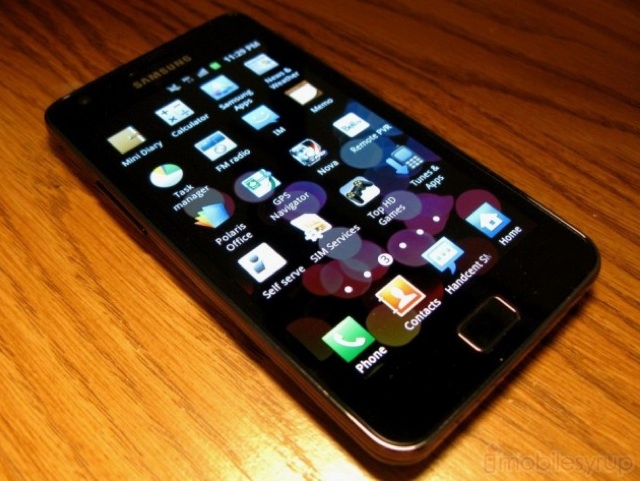
Before we broach benchmarks, in which the SGS2 does exceptionally well, I want to comment on the performance of the operating system in general. Running Android 2.3.3 atop Samsung’s TouchWIZ4 skin, there is much to be happy about. Improved in many ways of the original, the new TouchWIZ simplifies the task of organizing your apps and homescreens. The basis is similar to the stock Android homescreen/app drawer combination, but incorporates a lot of neat features. It’s easy to navigate between screens quickly by scrolling along the seven permanent “dots” above the shortcut bar, and pinching anywhere on the screen displays a star-shaped “helicopter” view similar to HTC Sense. Once in that view, you can drag and re-order any page in its entirety.
Widgets are now resizable, which is a huge plus (though only certain Samsung widgets) so you can resize your weather widget along a grid to 4×4 or 4×1 squares depending on how much stuff you want to see. Speaking of widgets, the regular tap-and-hold feature to bring up the Shortcut/Widget menu has been re-imagined to fit on the bottom shortcut bar, allowing you to reorganize your homescreens as you see fit without the slow touch-and-guess stock Android method. There are also a number of helpful, attractive widgets provided by Samsung including the Associated Press news service, and a very usable weather widget powered by AccuWeather. Resizing is easy and intuitive, and emphasizes the little touches made by Samsung to improve the overall experience.
They have also made extensive use of the accelerometer. Tilt the phone left or right when moving an app from one screen to another, and the icon will zoom through the homescreens. Samsung also makes use of tilting in the hardware-accelerated browser: with touch fingers, touch anywhere on the screen and tilt the phone up or down to zoom in or out of the web page. Both feel like gimmicks, but the latter is extremely useful.

The app drawer operates horizontally, an issue for fans of the vertical scroll like me, but that’s a minor complaint. A major complaint about the app drawer is that it is not sortable based on most-used apps, or even alphabetically. Your last-installed apps are installed on the right-most page, and that’s that. Similar to the homescreens, you can get into “helicopter” mode in the app drawer, too, and reassign pages in their entirety, which is helpful, but dragging individual apps from one screen to the next is something I hoped to leave behind in iOS.
There are two weather-based live wallpapers included with the phone, and they look nice enough, but I was hoping Samsung would include a couple that would show off the graphics capabilities of the GPU. Instead we have one that shows the weather from a beach perspective, and another showing weather from a wind perspective. Why phone manufacturers think people are so fascinated with weather is beyond me (see HTC’s Sense 3.0 for proof) but there it is.
Another nicety about the interface is that screenshot taking is built into the framework. Hold down the home button and press the power button, and you’ll hear a nice “click” and the screenshot is ready in your Gallery. Perfect.
From a usage perspective, apps load almost instantly, and there is nary a sign of lag when navigating through the various menus. TouchWIZ4 has a warm, almost saturated colour palette which is complemented by the beautiful screen. Along with adopting the general look of Gingerbread, Samsung has left the menus fairly stock and no worse for the wear as a result. This is Android we are talking about, and as much as manufacturers might want to differentiate themselves by putting the notification bar on the bottom or adding shortcuts to the lockscreen, in its unfettered state the OS is extremely capable, and more and more these superfluous additions seem like bloat. Samsung has struck the right balance of function and performance.

Performance
The Galaxy S II comes equipped with a dual-core 1.2Ghz Exynos processor and a Mali-400MP GPU. This Samsung-produced SoC has been widely touted as a capable competitor to nVidia’s Tegra2 offering which pervades so many modern Android phones, including Wind’s LG Optimus 2X, Bell’s own Motorola Atrix and all of the current crop of Honeycomb tablets.
As stated above, UI performance is all but perfect. I noticed no slowdown or stuttering of any kind. It’s difficult to appreciate without using it, but one gets a feeling of roominess from the SGS2′s performance that just isn’t there yet with other devices. What I mean by roominess is that understanding that no matter what you throw at it, and how much you multitask, this device can and will keep up. Sure, individual apps that are badly written and perform poorly on other devices will still perform poorly on this. But graphics-intensive applications like the 3D Gallery, which often taken upwards of 10-15 seconds to start displaying photos on other devices, are already there on the Galaxy S II. They’re just there. No loading, nothing. It’s incredible.
Similarly, Samsung is touting the camera performance of this device, but the miracle is how quickly the camera app opens. Touch the icon and it’s there, ready to shoot.
Many will remember the stuttering that would occur on the original Galaxy S Vibrant from time to time, especially when installing apps. It made it almost impossible to do anything else on the phone. Thankfully, Samsung has addressed this issue. You won’t likely even notice that you’re installing one, or several apps. This is the power of 1GB RAM.
Often the subjective benchmark of Android performance is how well a device plays back high-resolution, or graphic-intensive Flash inside the browser. While still imperfect, the SGS2 does an excellent job playing most movies and games, even YouTube movies at 720p.
Although I’m not as taken with Quadrant Benchmark Suite as I once was, I have to inform you that the Galaxy S II obtained a score consistently above 3000, often around 3200. This compared to 2500 on the Optimus 2X, which runs Tegra 2, and 1900 on the Sensation 4G. Granted, the Optimus 2X is clocked 200Mhz slower on each core, but the results are impressive nonetheless
Linpack measured a multi-threaded score in the range of 85-91MLOPS, compared to low 70s of HTC Sensation (Snapdragon 8260) and low 50s of the LG G2x (Tegra2). Suffice it to say, this CPU/GPU combination has some serious guts.

As you can see above, the SGS2 got a ridiculously fast 3354.2ms result on the Sunspider Javascript benchmark, which is twice as fast as the Sensation 4G.
Oh, and the device boots in less than 30 seconds. Boom.
Camera
The 8MP/2MP back/front combination is pretty potent. I found that photos came out sharp and slightly muted, so turn up the saturation a bit if you want a shot more akin to the iPhone 4. Detail is plentiful, and grain is kept to a minimum even in dark areas, though it certainly is present. Fine-grain options like ISO settings and exposure are available, and there is even an anti-shake option to prevent wasted shots. Effects such as grayscale and sepia are built into the app, and there are plenty of Scenes and Shooting modes, such as Action Shot, or Smile shot, to satisfy even the most staunch of tweakers. Curiously the ‘Review’ setting, indefinitely keeps the photo on the screen after it’s taken as opposed to disappearing after a couple seconds like on other phones. You either have to manually go back to the camera app, or turn off review altogether.
Video shot in 1080p is also quite good, and certainly welcome. Shooting at a healthy resolution of 1920×1088 pixels, results are generally free of artifacts, though panning over a scene from a stationary position produces some judder, which is to be expected from a mobile device. In good lighting it maintains a lovely 30fps, though that number dips slightly when there is heavy movement. The sensor gives us some excellent low-light results, certainly comparable to the Sony Ericsson Xperia arc, which we’ve been using as the benchmark for video capture on a phone, even though it maxes out at 720p.
One benefit of having a beefy processor is the speed at which the device can take shots. Both front and back still shots are lightning quick to focus and snap. All that’s missing is a dedicated camera button and the SGS2 would be a good substitute for your point and shoot. As it is, the device, while capable, is a little awkward to hold in one hand; we’d like it if the shutter button was a little wider, a little more sensitive to touch. The phone dropped out of our hands a couple times trying to peck at the screen.
The 2MP front-facing camera is also quite a decent performer. Though the device has not incorporated native video calling from Android 2.3.4, we hope it will get it in a future update. As it stands, stills are clear and bright under the right conditions and will do for all those times you don’t have a mirror nearby.


GPS
The Galaxy S series had problems with GPS. We’re not going to get into it. Google it. It was bad: phones couldn’t get a signal, or when they did, couldn’t maintain one. Or you’d be driving down the highway and it would suddenly think you were five miles away, and insist you turn around and head back the way you came. A software “fix” was apparently released, but the issue was primarily hardware-based and could not be rectified in many cases.
Well, I can with a smile on my face say that the GPS problems have been fixed on the Galaxy S II. I was usually able to get a satellite lock within a few seconds, though occasionally it took nearly thirty seconds. But it is accurate, and works well with Google Maps and Navigation, along with the myriad check-in services you like to use.
Network Speed, Call Quality and Connectivity
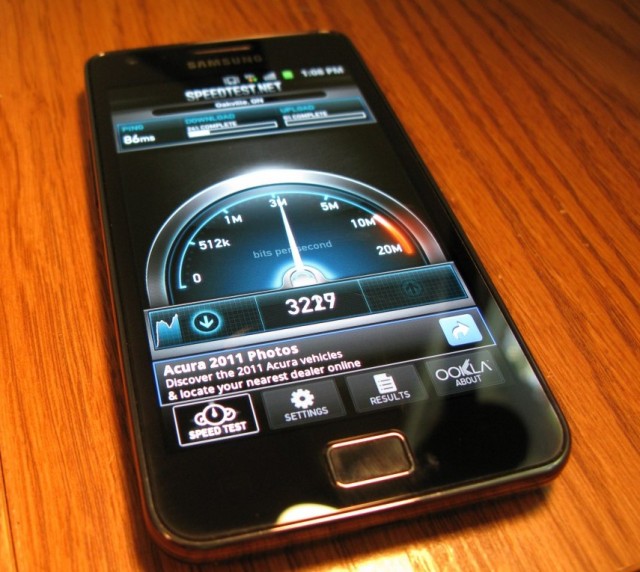
As I mentioned in the Sensation 4G review, Bell does well when it comes to speed and call quality. Despite containing a radio capable of pulling 21Mbps, in the Speedtest.net application, I hit a maximum of 2.9Mbps download and 2.2Mpbs upload, which is slightly slower than the Sensation in the downlink and minutely faster in the uplink. Though not consistent, these results were generally repeatable.
What truly impressed me, though, were the consistently low ping times I achieved, which, along with high data speeds, are the main boon to page loading times. While HSPA+ networks such as Bell’s can theoretically achieve maximum speeds of 42Mbps, high ping times are what set it apart from next-gen networks that use LTE technology. It’s good to know that Bell has done good work keeping ping times as low as possible.
I did hit a couple snags with data speeds. Occasionally, when loading a bandwidth-intensive website or downloading an app from the Android Marketplace, the device would drop its data connection completely. Some of the time it would return after a few minutes, and other times it would take a restart of the phone to get it back. In those instances, the APN settings (the address that connects the device to its carrier in order to route data traffic) simply disappeared, and would reappear upon reboot. Hopefully it is a localized issue with the device and not a software bug in Bell’s shipping software version, but we’ll have to wait until the device is released to confirm this.

The original Galaxy S series was criticized for weak call volume from the headset, and a poor external speaker. I can happily say that Samsung has improved both, but the former more than the latter. I was often impressed by the quality of voice calls, both to landlines and other cellphones. With little distortion and nary a dropped call, it was difficult to find an area around the GTA where the Galaxy S II didn’t have five bars of signal. The device also comes with a second microphone for noise cancellation.
The single back-located speaker is sufficient, but maximum volume is considerably lower than what is ideal to facilitate conference calls or even operate as a music speaker. While no better than most other modern smartphones, it’s a small disappointment in a phone that innovates in almost every other way. That being said, the audio quality from the single speaker is good enough to listen to your music.
I found the tonal quality from the headphone jack to be quite lacking. High-quality MP3s produced sibilant highs and demonstrably grainy lows, along with an overall lack of bass. Mid- to high-range, where the human voice is typically carried, was tucked away behind some sort of film. This was a disappointment compared to the generally-excellent quality of other Samsung devices which uses very high quality audio components.
The Galaxy S II comes equipped with some modern connectivity options: WiFi a/b/g/n and a Bluetooth 3.0 stack make for some quick data transfers. I was able to connect the device to my A2DP bluetooth stereo without issue, and sound quality was excellent. Unfortunately, Samsung didn’t see fit to provide the device with a SIP VoIP stack which ordinarily ships with Android 2.3. Though nothing a third-party application can’t fix, it would have been nice to see it present in the shipping ROM.

Some Nice Touches
There aren’t that many ways to differentiate an Android device anymore in terms of software, but Samsung tries pretty hard with some of its custom features.
There is Kies over WiFi, which connects to your WiFi network and allows you to wirelessly “connect” to your phone from any computer web browser. You can sync contacts and photos, transfer files and music, and “view” your device from the web.
Then there’s WiFi Direct, which will forgo the access point and connect directly to other compatible devices. This allows two phones, for example, to transfer pictures, music and other files between them without the need for a router hotspot to facilitate the connection. Not many products support this upcoming standard at the moment, but for those who find Bluetooth rather slow, it’s a nice feature to have.
For the keyboard aficionados, Swype is pre-installed on the device, and we couldn’t be more thrilled. We always found Samsung’s default keyboard to be a bit underwhelming, especially when it came to quick typing – stick with SwiftKey X or Smart Keyboard Pro for that, both available in the Marketplace – but things are much improved this time around. The keypad is multitouch-compatible now, and individual letters are larger and easier to press than before. Thankfully they have included in the top row of letters a way to enter numbers without pressing the Alt- button. Just hold down on any key in the top row and after a moment a number will appear. Very handy for passwords. Unfortunately Samsung didn’t see fit to include the much loved double-press-spacebar-for-period shortcut on its keyboard, much to our chagrin.
Samsung have also been good enough to include nearly 2GB worth of app storage onto the device, double what was included in the original Galaxy S. This also contrasts favourably with the HTC Sensation which ships with just over 1GB free application storage. And of course, since this is running Gingerbread, you can manually move over any apps to the SD card, though the device does not ship with one. Instead it comes with 11.5GB of built-in storage, partitioned for use as file storage: it cannot be used to store apps, unfortunately.
Apps A-Plenty
Samsung has included a number of useful apps with the Galaxy S II, and Bell has thrown some in, too, for (good) measure. When we first brought you news of TouchWIZ4, it was revealed that it would include four “hubs”: Social, Music, Readers and Game.
The first is a Samsung-built application that consolidates your social media accounts such as Twitter, Facebook, LinkedIn with your IM accounts such as GTalk and Yahoo! Messenger along with any email accounts you may wish to set up. Both a competent feed reader and email client, it is unlikely to replace any dedicated app you would use, but as a single app to devour your various social feeds it certainly is useful to have. Unlike Sony Ericsson’s Timescape, you can actually respond to Twitter and Facebook messages inside the application, though without a widget the app loses a lot of its usefulness.
The rest of the hubs are merely re-branded third-party applications: Music is a 7Digital-powered music store and player; Readers is a combo of Kobo eBookstore and reader, PressDisplay newspaper reader and Zinio magazine reader; Game is powered by mobage and is, as expected, a game store, filled to the brim with Gameloft fare that can be found in the Marketplace for less money. Avoid that one.
Bell’s offerings are identical to that of the Sensation, and its various Android phones before it. TV&Radio is an app that allows you to subscribe to various Bell content, including CTV, MTV, TSN, as well as some HBO and CBC shows for good measure. For $5/month per subscription package, which is charged via carrier billing to your Bell account, it is an intriguing and, for some, worthwhile addition. For others, it’s just going to be another app icon to delete from the home screen. Bell also throws in a couple game demos from Gameloft and a $10/month GPS Naviation app powered by TeleNav. All in all, there is very little bloatware compared to most American carriers, but it is frustrating that we have no choice to uninstall the apps, especially the game demos, which, if purchased from the app cannot be transferred to another device unlike those bought from the official Android Marketplace.

Quibbles and Foibles
Not all is perfect in the land of the SGS2. Besides the aforementioned problem with intermittently losing data, for which I am willing to give Samsung the benefit of the doubt and chalk it up to a hardware defect, there are a couple more rather vexing issues to contend with.
Samsung feels it is necessary to affix the Galaxy S II with a vibrating mechanism that has more in common with a high-powered vacuum cleaner than a smartphone. Certainly some would see this as a benefit – say, you’re a heavy sleeper, and need to be woken with a start – but for most people the intensity is excessive. When receiving an email, a text, or any notification for that matter, the device vibrates for over a second, with a fierceness rivaling vindictive. This would be OK if it was adjustable, but it’s not.
This extends, as well, to charging the device. When it reaches 100%, the phone issues its vibration like an attacking army, about an hour or so after I tend to drift to sleep. For the occasional time I forgot to put the phone on silent, I would startle awake, wondering who the heck was texting me at 1am. The other issue is the intensity of the vibration itself. Because it’s so intrusive, it’s difficult to leave your phone on your desk, or at a coffee shop, without distracting or alarming those around you.
Briefly, because for some it will be a non-issue and for others a big one, the Bell Galaxy S II forgoes the NFC option that ships with some international versions. While not the “game changer” as Google hyped it would be with the Nexus S, many handsets, including several upcoming BlackBerry handsets, and potentially the next iPhone, are going to be utilizing the low-powered data transfer technology for retail payments, money transfers and tag reading. Oh, and for those coming from a Nexus S, there is no CRT-off effect. Not sure why Samsung forwent this awesome Gingerbread inclusion, but it’s not there.

Battery Life
Do you want the good news or bad news first? Good news: the Galaxy S II has some of the best battery life of any Android device we’ve used. Its 1650mAh battery can easily last two days on a single charge when used judiciously, and should be a blessing for any frustrated Android user coming from a last-gen device.
Bad news? It’s still not good enough. While it can idle for several days without breaking a sweat, the Galaxy S II likes to eat up battery as much as the next (Android) device. Keep your background processes to a minimum, kill errant apps (I hate to admit it, but the included task manager did come in handy once in a while) and you’ll be very pleased with the results.
But, as I did, load the device to the brim with background updates such as Twitter, two push email accounts, Sugarsync and Google+, which independently sync in the background, and within 12-16 hours you’re in the red zone.
We musn’t fault Samsung for this, though. I’ve reviewed a lot of Android devices in my day, and they all behave the same. Even Google admits that errant apps can reduce apps significantly, yet the open nature of the operating system invites such opportunities. Apple certainly had good reason to only allow certain operations to continue in the background, and we hope that Google follows suit by tightening the noose around troublesome apps and their developers.
Hackability
In a word, yes. The Samsung Galaxy S II has an unlocked bootloader and, already, a vibrant developer community committed to eeking out every drop of performance from this beast. Already overclocked to 1.5Ghz, the device should have a very fruitful live for the myriad custom ROM “crackflashers” out there. Check out XDA-Developers for more information.
Conclusions
If you’ve made it this far, I’m impressed. Impressed that you’ve sat still long enough to read over 4000 words straight, and even more so that you haven’t run out to purchase the device. I’ve heaped a lot of praise on a phone that has had some incredibly high expectations – almost exceedingly so. For the most part, it surpasses all of them: this is the best Android phone ever released. By far. Samsung has made using Android a pleasure in a world where it’s often the complete opposite experience. From the lithe body to the gorgeous screen to the overall expediency of the OS, the Galaxy S II puts all other smartphones to shame.
But Samsung’s flagship isn’t without its problems. The build quality could definitely be better, especially when put next to HTC’s Sensation, which itself is a force to be reckoned with and no slouch in the performance category either. Where the Sensation trounces the SGS2 is in the screen resolution department; though the browser is smoother on the Samsung, the Sensation has more pixels and websites render more true to their desktop form. Less scrolling, more text.
It will be interesting to see how Bell markets both devices, as their price points are too similar to give one a clear advantage over the other. Each has some distinct advantages, and consumers will be drawn to one based on a number of factors – few approach a new smartphone purchase without having at least some history with the manufacturer or brand.
The Galaxy S series was a great success for Samsung, but it also had its fair share of problems, many of which have been resolved here. The Galaxy S II also improves upon the original in almost every way and it’s only been a year since the release.

One thing a number of people would like to know is whether this device will receive updates in an expeditious manner. The Galaxy S Vibrant, released in July 2010 on Bell, has yet to receive its Gingerbread update over a year later. Whether the carrier or manufacturer is to blame, this has left a bad taste in a lot of consumers’ mouths, whom I’m sure will be reticent to throw down their money on this upgrade, however tempting the product. Indeed, it may be expedient for Bell to release a statement committing to updating the Galaxy S II for at least 18 months, as was outlined at Google IO earlier this year.
But I have no doubt that, a year from now, many of us who decide to purchase a Galaxy S II will be very happy, even if its software has not changed much. Out of the box it runs every Android application with aplomb, and in a year from now, with the Galaxy S III on the horizon, it will probably hold up pretty well. The Android market is iterating very quickly — quad-core processors are expected early next year — but the SGS2 feels like we’ve hit a sweet spot.
So, the best Android phone ever released. The best smartphone experience ever. Sure, the next iPhone is on the horizon, along with a number of competing Android, BlackBerry and Windows Phone 7 devices. But Samsung has pre-emptively volleyed the first cannon. On it reads just four words: “Come and get us.”
The Bell Samsung Galaxy S II will be available for $169.95 on a 3-year term and $599.95 outright on July 21st. (Virgin will also be releasing this too.)
Rating: 9.5/10
Pros:
– Beautiful screen with excellent contrast levels, great colour saturation and white tone
– Fastest dual-core processor on the market. Extremely smooth performance
– Lovely form factor; light and easy to hold, despite the 4.3” screen size
– Nuanced improvements to Android with TouchWIZ 4
– Good battery life, especially with power-saving features turned on
– Improved multitouch keyboard, along with Swype pre-installed
– Hubs are useful and easy to use
– Camera quality is excellent; 1080p is smooth and artifact-free
– GPS works
– Easily rooted and moddable for custom ROMs and kernels
– Kies Air and DLNA support removes the need for a computer
Cons:
– Maximum brightness is lower than competitors
– Battery life sometimes lacking
– Low speaker volume
– Poor headphone audio output
– Plastic construction may be a turn-off for some
– No NFC module or SIP VoIP stack included
– No Gingerbread CRT effect
– Expensive
—-
Follow me on Twitter @journeydan and be sure to follow @mobilesyrup for all the latest news. Like us on Facebook, too!
Related posts:
- Bell makes it official, Samsung Galaxy S II 4G launching July 21st
- Bell Samsung Galaxy S II 4G will be $169.95 on a 3-year
- Android OS 2.2 upgrade available again for the Bell Samsung Galaxy S Vibrant


 Jethro Nededog