Watch A Tugboat Drag An Arctic Iceberg To Parched People Half A World Away [Video]

Since he was hired in the ’70s by Saudi prince Mohammad al-Faisal, French engineer Georges Mougin has tried to figure out a way to tow freshwater icebergs across the Arctic. Now, with 3-D tech, declassified satellite data, and tugboats, he might have cracked the way to quench the world’s thirst.

tugboat towing iceberg

There are 1.1 billion people in the world without clean drinking water. Meanwhile, billions of gallons of freshwater disappears uselessly into the ocean, the result of icebergs that break off from the ice caps of Greenland and melt into the salty mix.

Do you spot an inefficiency in the system here?

So did French engineer Georges Mougin. And that’s why he’s invented a system for towing icebergs across the ocean and straight to the world’s thirsty. Using 3-D technology, recently declassified satellite data, and the new science of oceanic forecasting, Mougin has created an elaborate method for hauling ginormous icebergs using a “skirt” and a tugboat.

It might sound outlandish, but Mougin has been trying to tap the icecaps for decades. In the 1970s, Mougin was enlisted by prince Mohammad al-Faisal, a nephew of the Saudi king, along with other engineers and a polar explorer, in a venture called “Iceberg Transport International.” Faisal planned on wrapping a 100-million-ton iceberg in sailcloth and plastic and tugging it from the North Pole to the Red Sea, though the cost was estimated at an exorbitant $100 million. For a swank conference on “iceberg utilization,” he even managed to ship, via helicopter, plane, and truck, a two-ton “mini-berg” from Alaska to Iowa, where the giant block of ice was chipped apart to chill delegates’ drinks. According to a Time report from October of 1977, Faisal predicted that he’d have an iceberg in Arabia “within three years.”

That didn’t happen. The Iowa iceberg conference erupted into discord over price and feasibility.

Thirty-five years later, though, Mougin thinks he can now succeed where Prince Faisal failed. Mougin partnered with a French design firm, Dassault Systèmes, which specializes in running elaborate 3-D simulations. Dassault had garnered some press after helping an architect explore a theory about the construction of pyramids. Mougin then got in touch with Cédric Simard, a project director at Dassault’s Systèmes, thinking, says Simard, “Well, if they can help that architect with the pyramids, surely they can help me with my iceberg project.”

And indeed they could. The team spent months gathering data and building a virtual simulation that they felt truly modeled the real world. There were many parameters: the boat’s fuel supply and the iceberg’s melt rate, on the one hand, and then the countless variables of the fickle ocean itself–sea currents, swells, winds, and so on.

What does towing an iceberg actually entail? Dassault gave us an exclusive look at some 3-D animated renderings. Here, then, is an illustrated guide on how to tow an iceberg.

Step one: You can’t just grab an iceberg any time of the year. “There is a season for harvesting icebergs, a bit like tomatoes,” says Simard with a laugh. You’ll want to consult a glaciologist.

Also, you’ll want an iceberg of the optimum size–not too big, but not too small–and shape. “When you think of icebergs, if you just ask people in the street, they think of icebergs with the shape of mountains.” But a craggy, irregular iceberg is the last kind you want, if you’re going to lug the thing across an ocean. You want a regular, table-shaped or “tabular” iceberg. That shape “truly facilitates towing,” says Simard, “and is known by glaciologists as the family of icebergs which presents the minimum risk of fracture.”

Once you’ve found the proper Titanic-buster, have your tugboat (yes, a tugboat–more on that later) deploy a floating geotextile belt–made rigid by a series of poles–around the target, effectively lassoing the iceberg.

[video_twistage 1]

The iceberg in the video above might not seem all that formidable. But recall the old saying
about icebergs and their tips.

Which brings us to step two: Deploy a geotextile “skirt” to snag
the bulk of the beast and to keep as much as possible from melting away. The skirt, which deploys down to 20 feet below the surface of the ice, creates a cushion of cold water around the iceberg, which helps slow melting. And below the surface, icebergs are smoothed by ocean currents, making it unlikely the skirt will tear as it protects its cargo.

[video_twistage 2]

And now the third and final step (theoretically): Tow that iceberg across the ocean before it melts away.

[video_twistage 3]

A tugboat actually can’t lug an iceberg all by itself; it’s a question of harnessing the sea’s natural forces. This is where satellite data and oceanic forecasting comes in. “Though it doesn’t look like this when on a boat, from a satellite’s perspective, [the ocean] looks like a big map of bumps and holes,” explains Simard. Navigating those pockets, like a mogul ski slope, would be the key–if the towing were possible at all.

And was it possible? Dassault Systèmes gathered all the data, built the 3-D world, and invited Mougin over as they pressed play on their simulation. On the first try, the results were disappointing. The iceberg got caught in a giant whirling eddy for weeks (of simulation time), melting away.

But Mougin was stoic: “When you’re an engineer, you have to measure your emotions,” says Simard. “When something fails, you always know there is a reason.”

The team had chosen a simulated launch date that wasn’t conducive to iceberg steering. If they adjusted the date by a few weeks, into a different part of the season, would the iceberg be able to escape that eddy? They altered that parameter, pressed play–and “it just worked,” says Simard.

The team even discovered that just a single tugboat could theoretically haul an iceberg. They say it’s like a nutshell towing a mountain–and yet it’s possible. For more details, Simard has been blogging of late on the wild scheme, or track down the documentary about Mougin’s Fitzcarraldian dream, which is so far only for French TV.

[youtube opChLhLMFmU]

Emboldened by the successful Dassault Systèmes simulation, Mougin is forging ahead with a plan to implement his dream in the real world–he announced a new company to the French press recently. The cost of iceberg transport have not been made public yet, but pilot programs–initially just try to tow a mini-iceberg a short distance, says Simard–are underway. And there is talk, at least, of a real-world trial in 2012 or 2013.

To the global thirsty, then, take heart: a mountain of water is looming on the horizon.

[Video and image courtesy of Dassault Systemes]

Follow Fast Company on Twitter. Email David Zax, the author of this post, or follow him on Twitter.

Twitter announces integrated photo-sharing service, improved search

Well, it’s not exactly a good day for anyone that placed their bets on a Twitter-linked photo service. As expected, Twitter today announced its own integrated photo-sharing service, which will launch “over the next several weeks” and let folks upload an image and attach it directly to their tweet from Twitter.com — the same functionality is also said to be coming to its official mobile apps “soon.” The service isn’t completely in-house, though — Twitter has partnered with Photobucket to actually host the photos. In more immediate news, Twitter has also announced that a “completely new version” of Twitter search is rolling out today. It promises to deliver more relevant results for searches and trending topics, as well as related photos and videos that will be displayed next to your results (which can also be browsed and explored in-depth). Head on past the break for a quick demo video.

Continue reading Twitter announces integrated photo-sharing service, improved search

Twitter announces integrated photo-sharing service, improved search originally appeared on Engadget on Wed, 01 Jun 2011 14:29:00 EDT. Please see our terms for use of feeds.

Permalink   |  sourceTwitter Blog  | Email this | Comments

Our plans to support modern browsers across Google Apps

(Cross-posted on the Google Enterprise Blog and the Gmail Blog)

For web applications to spring even farther ahead of traditional software, our teams need to make use of new capabilities available in modern browsers. For example, desktop notifications for Gmail and drag-and-drop file upload in Google Docs require advanced browsers that support HTML5. Older browsers just don’t have the chops to provide you with the same high-quality experience.

For this reason, soon Google Apps will only support modern browsers. Beginning August 1st, we’ll support the current and prior major release of Chrome, Firefox, Internet Explorer and Safari on a rolling basis. Each time a new version is released, we’ll begin supporting the update and stop supporting the third-oldest version.

As of August 1st, we will discontinue support for the following browsers and their predecessors: Firefox 3.5, Internet Explorer 7, and Safari 3. In these older browsers you may have trouble using certain features in Gmail, Google Calendar, Google Talk, Google Docs and Google Sites, and eventually these apps may stop working entirely.

So if it’s been a a while since your last update, we encourage you to get the latest version of your favorite browser. There are many to choose from:

As the world moves more to the web, these new browsers are more than just a modern convenience, they are a necessity for what the future holds.

Posted by Venkat Panchapakesan, Vice President of Engineering

Facebook for BlackBerry v2.0 (Beta 3) available for download in the Beta Zone


RIM has released another update to the Facebook for BlackBerry app. Version 2.0 Beta 3 is now available in the BlackBerry Beta Zone (you have to sign up to receive it). This update brings Wi-Fi support, the ability to delete comments and posts and a new new delete prompt. Nothing to big but a step closer to the final release. Grab it here in the Beta Zone.

Related posts:

  1. RIM releases the BlackBerry News Feeds beta
  2. Facebook 2.0 for BlackBerry images leak out
  3. BlackBerry Desktop Manager 2.0 for Mac now available for download

The +1 button for websites: recommend content across the web

Since we started rolling out the +1 button in March, you’ve been able to recommend content to your friends and contacts directly from Google search results and ads.

But sometimes you want to +1 a page while you’re on it. After all, how do you know you want to suggest that recipe for chocolate flan if you haven’t tried it out yet?

Today, we’re releasing +1 buttons to the whole web. As a result, you might start seeing +1 appear on sites large and small across the Internet. We’ve partnered with a few sites where you’ll see +1 buttons in the near future:

Partner Logos

AddThis Mashable Huffington Post Rotten Tomatoes Nordstrom O'Reilly Reuters Washington Post Best Buy TechCrunch Bloomberg

You’ll also start to see +1 buttons on other Google properties such as Android MarketBlogger, Product Search and YouTube.

+1 is as simple on the rest of the web as it is on Google search. With a single click you can recommend that raincoat, news article or favorite sci-fi movie to friends, contacts and the rest of the world. The next time your connections search, they could see your +1’s directly in their search results, helping them find your recommendations when they’re most useful.

In the meantime, we’re continuing to roll out the +1 button for English-language searches on Google.com. If you want to +1 search results and search ads earlier, you can opt in through our experimental search site. To see recommendations from your friends and contacts in Google search, make sure you’re signed into your Google Account.

If you’re a webmaster, you can get the +1 button code and learn more about implementation on our +1 webmaster site.

We hope you’ll agree that +1 buttons across the web make it even easier for you to recommend content to your friends and contacts, and make search results even more helpful and relevant.

Posted by Evan Gilbert, Software Engineer, +1 Button

AMD confirms tablet-friendly Z-series APU, next-gen Trinity APU for bigger devices

AMD likes to take its time before stepping inside the ring, but it’s turned up at Computex with its gown off and mouthguard in. Its much-leaked Z-series Fusion APU (aka “Desna”) for tablet devices is now official and could well steal some of ARM’s thunder. Whereas ARM chips will get along with the next version of Windows, AMD’s Z-series is already tuned into the here-and-now. Its integrated dual 1Ghz Bobcat chips and Radeon HD 6250 graphics should allow the full Windows 7 experience on a tablet, from USB peripheral compatibility right down to XBOX 360 Media Extender functionality. What’s more, it drinks less than 6W of power so is significantly leaner than the 9W Ontario APU powering Acer’s Iconia W500 Windows 7 tablet. Additionally, AMD claims MSI has already made that leap with its new WindPad 110w (though we can’t be sure if the pre-release device we just handled was carrying a Z-series chip).

Meanwhile, AMD left any traces of shyness far behind as it went on to confirm plans for a range of A-series and E-series chips with which it hopes to tackle Intel’s dominance in the laptop and desktop spheres — right up to the level of the Core i7. This includes the leaked high-end quad-core A8 and, more surprisingly, a new Trinity APU. Looking way into the future, AMD intends Trinity to be a successor to the mid-range A-series Llano, which isn’t even out yet but is expected imminently. Unfortunately we have no concrete specs for the Trinity — AMD thought it was sufficient to wave the thing around at the press conference and declare it “2012’s best APU”. Depending on how you look at it, that’s either fighting talk or plain posturing.

AMD confirms tablet-friendly Z-series APU, next-gen Trinity APU for bigger devices originally appeared on Engadget on Wed, 01 Jun 2011 13:21:00 EDT. Please see our terms for use of feeds.

Permalink   |  sourceAMD, The Inquirer  | Email this | Comments

Chrome gaining ground on Firefox, IE drops

It looks as if Google’s aggressive TV advertising campaign for their Chrome browser is showing some signs of success if new browser share results are anything to go by.

According to CNet, Chrome is now being used by one out of every eight people on the Internet thanks to an increase…

Next PlayBook to have 10-inch screen, 4G radio, and white color option?

A 10-inch followup to the BlackBerry PlayBook seemed inevitable and indeed, tidbits about a rumored larger-screen version are starting to flow fast and furious. N4BB, which recently managed to spy the 9900 before it was unveiled, is citing anonymous sources who claim it will have a thinner bezel, a SIM card slot, a white color option, and, like the soon-to-be upgraded 7-inch version, 4G / WiFi connectivity. What’s more, these sources assure us this new PlayBook will have native email and calendar apps and be able to connect to BlackBerry Enterprise Server without the help of BlackBerry Bridge — a confounding quirk on the current model. That’s all well and good (and fairly realistic), though we’ll just have to wait until that rumored holiday launch — or a more unequivocal leak — to see what RIM has up its sleeves.

Next PlayBook to have 10-inch screen, 4G radio, and white color option? originally appeared on Engadget on Wed, 01 Jun 2011 11:39:00 EDT. Please see our terms for use of feeds.

Permalink NetbookNews  |  sourceN4BB  | Email this | Comments

Change Google Calendar’s default meeting length and more print options

Posted by Grace Kwak, Product Manager

Today we’re adding two features that make it easier to customize Google Calendar. First, you can now change your default event length from the standard 30 minute slot. If you frequently create 15 minute meetings, for example, you can now make 15 minutes the default length for all your events. This way, you don’t need to click into the event page to change the duration every time.

You can change the default length of your events from the Calendar settings page. Next to the “Default meeting length” option, choose the length you’d like from the drop-down menu on the right. From there, you can also enable “Speedy meetings,” which automatically shortens events that are 30 minutes or longer to allow you to prep for your next meeting or get to your next appointment if you have a packed schedule.

Second, for those of you who still prefer paper and print your calendar, you can now select a specific date range in the print dialog box. Google Calendar will automatically format your printout for the date range you choose.

We hope you find these new customization options useful. Let us know what you think on Twitter (@googlecalendar) or in the Google Calendar Help Forum.

BlackBerry 7 gets an SDK, NFC, AR, other acronyms

BlackBerry 7 SDK Beta

BlackBerry 7 OS is coming soon but, to take advantage of all those fancy features like NFC and the digital compass (ok, some of them aren’t that fancy), devs are going to need some new APIs — enter the BlackBerry 7 Java SDK. Creators of BlackBerry apps can go download the beta of the new software development kit at the source link and start whipping up augmented reality browsers and 3D games, thanks to support for OpenGL ES 2.0. There’s nothing mind-blowing about RIM’s latest update, but we’re glad to see the corporate stalwart start to catch up to other smartphone OSes, and it’s only a matter of time before Layar and Quake hit the BlackBerry Bold 9900.

BlackBerry 7 gets an SDK, NFC, AR, other acronyms originally appeared on Engadget on Wed, 01 Jun 2011 10:30:00 EDT. Please see our terms for use of feeds.

Permalink   |  sourceBlackBerry  | Email this | Comments

Meet the New 5.25″ Optical Drive Standard: Slimmer, Slot-loading

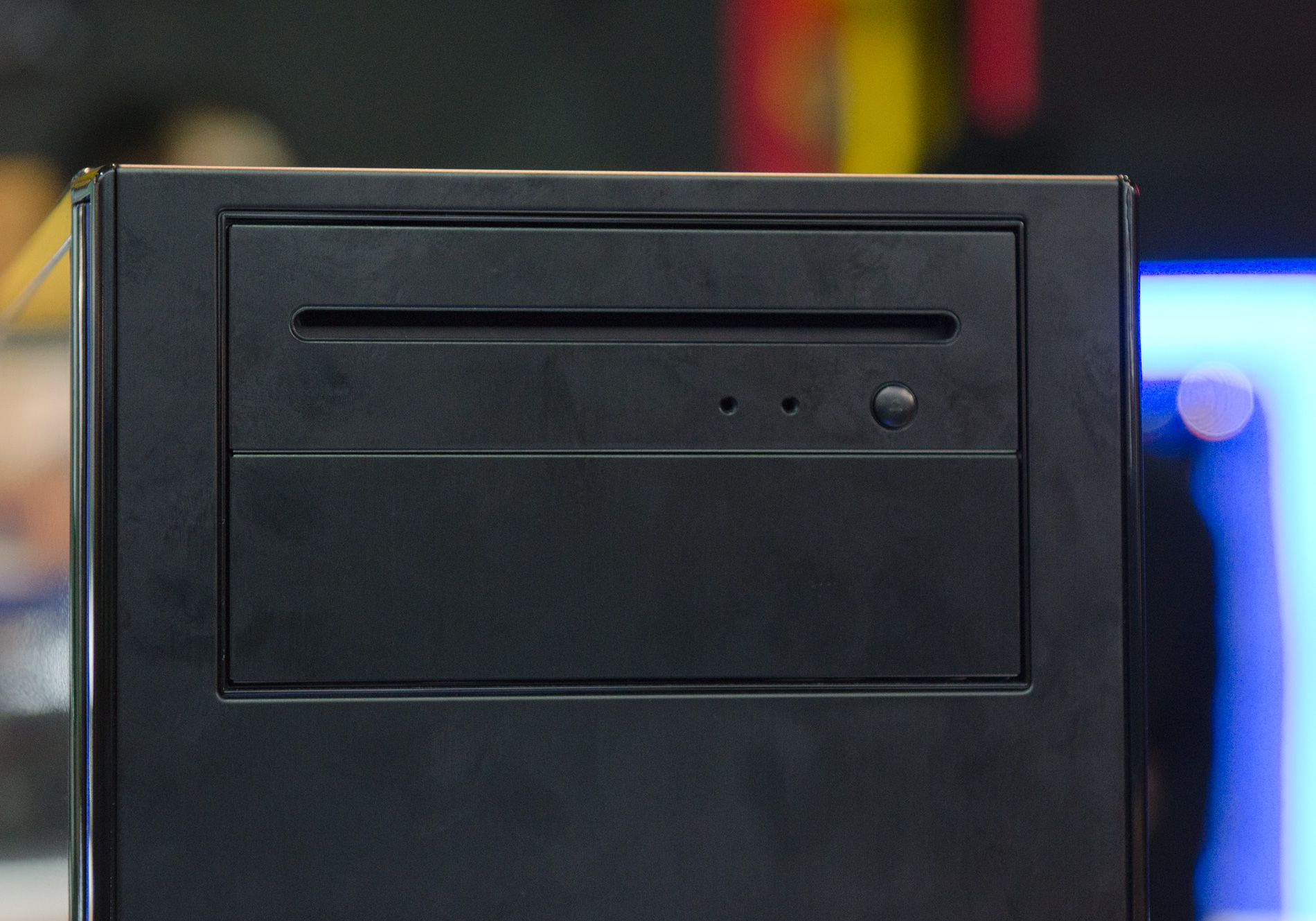
I was walking around the show floor today and caught a glimpse of Antec's Solo II chassis with a slightly different optical drive bay.

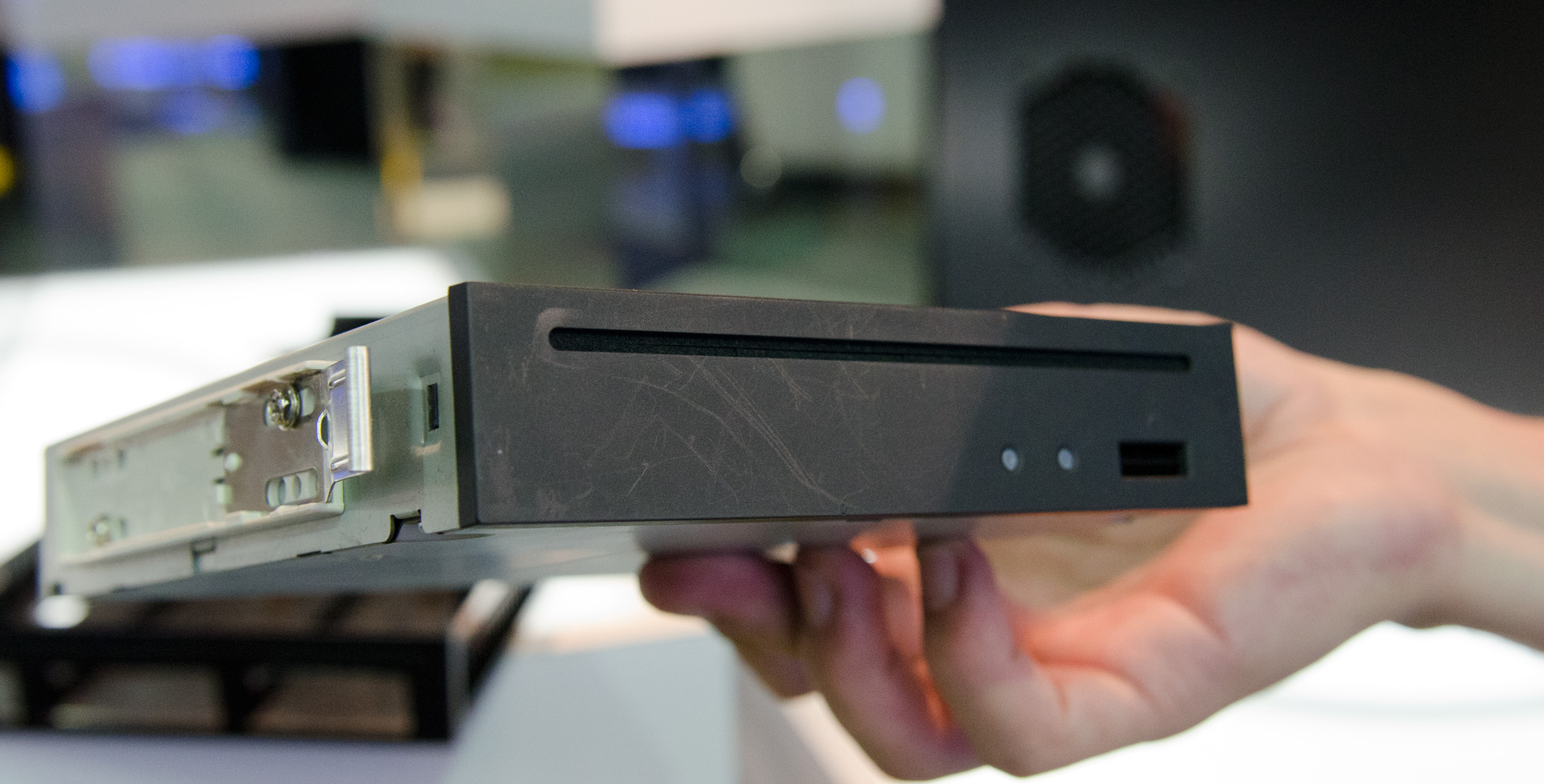
It turns out that there's a new optical drive standard being worked on in the industry. The standard is for slot loading drives with a half-height profile. The drives are still 5.25" wide, but they just aren't as tall as the older drives.

 
Cases that have a fold down optical faceplate won't work with these new drives, forcing case makers to adopt. This Solo II is an example of what a slot loading solution may look like.
 
 
Expect to see these new slot load drives to hit the market by the end of this year, along with cases to match.
 
{gallery 1110}

Canada can support 9 NHL teams: Sens founder

As the city of Winnipeg officially returned to the NHL fold and became Canada’s seventh team, former Ottawa Senators owner Bruce Firestone ruminated on a time when the league may even add two more Canadian hockey clubs.

Zinio comes to Android tablets, gives you 24 magazine issues for free


The iPad has yet to transform the publishing world as many expected it would, but some healthy competition from Android tablets should help to keep that process in motion. Zinio‘s reader app is now available on select Android 2.2, 2.3, and all 3.0 tablets, bringing Esquire, National Geographic, and 20,000 other magazine titles to the Motorola Xoom, Samsung Galaxy Tab 10.1, and a half dozen other devices. And, to kick off the launch, Zinio is picking up the tab on the most recent issues of 24 top magazines, as long as you download by June 15. Digital subscriptions are still often more expensive than their print counterparts, but at least Android tablet owners will have a safer place to hide their issues of Playboy.

Continue reading Zinio comes to Android tablets, gives you 24 magazine issues for free

Zinio comes to Android tablets, gives you 24 magazine issues for free originally appeared on Engadget on Tue, 31 May 2011 22:14:00 EDT. Please see our terms for use of feeds.

Permalink   |  sourceZinio  | Email this | Comments