• “Download map area” added to Labs in Google Maps for Android

    (Cross-posted on the Official Google Blog)

    One way we bring you new product features is through Google Labs—a collection of fun, experimental features you can turn on if you’re interested in the functionality. In fact, Google Maps itself started as a lab. In addition to our desktop Maps Labs, Google Maps for Android has a few tricks you can try out right from your phone. We’d like to introduce you to one new experimental feature, “Download map area,” but also remind you of two other ones we already have: “Scale bar” and “Measure.”

    Download map area
    When you’re visiting an unfamiliar location, Google Maps for mobile is great for getting an idea of how close you are to your destination, where streets and landmarks are in relation to each other, or just for getting “un-lost.” But what if you don’t have a data signal, or you’re abroad and don’t have a data plan? We say that if you use Google Maps for mobile, you’ll never need to carry a paper map again. The “Download map area” lab in Google Maps 5.7 for Android is a step in making that statement true even when you’re offline.

    Let’s say later you’re visiting Bordeaux during a trip to France. If you were to open Google Maps for mobile and zoom into Bordeaux without data coverage or wifi, you’d see the image on the left:
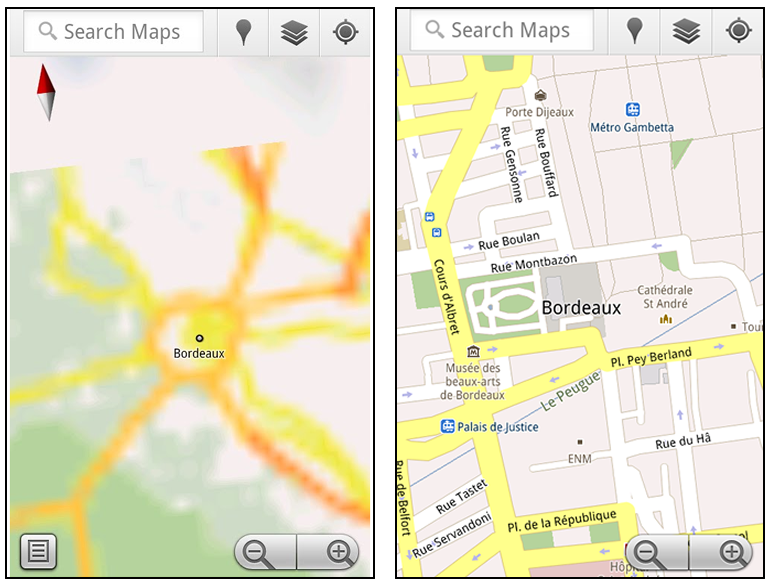
    Left: Bordeaux with no data or wifi. Right: Bordeaux with downloaded map area

    That’s not particularly useful when you’re trying to find out how close you are to the Cathedrale St. Andre. But a little advance planning and “Download map area” can help. Before you take your trip, while you still have access to WiFi or data coverage, you can open up any Places page in the world, click “More” to get the Place page menu, and download Google’s maps for a 10-mile radius.
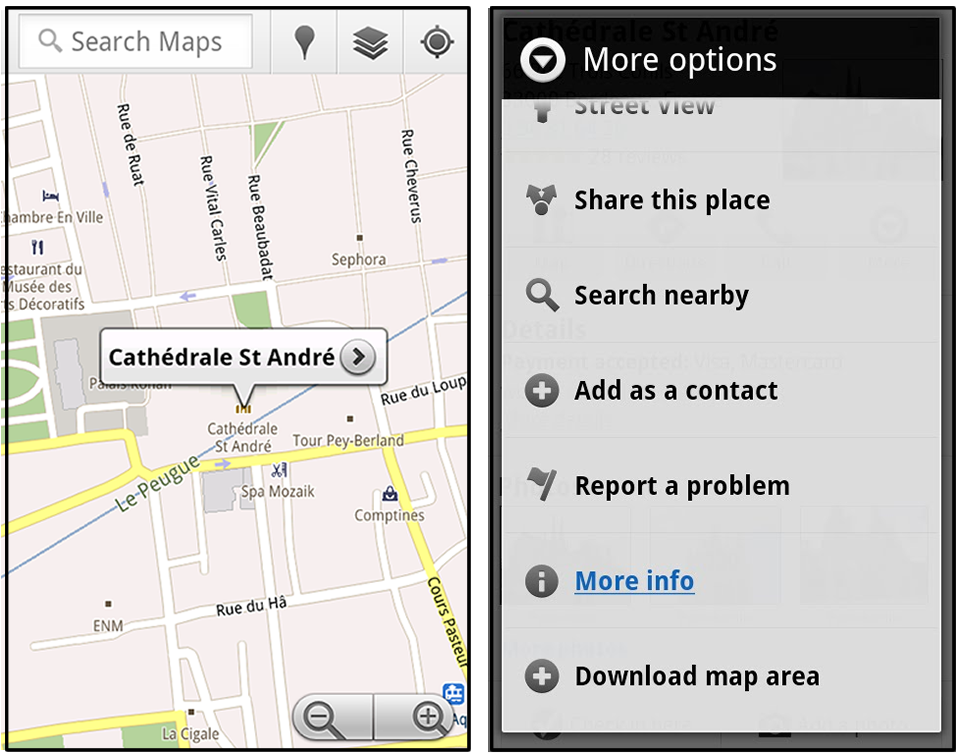
    Left: Tap a landmark to enter its Place page Right: Place page “more options” menu

    The download can take as little as a minute or two. This download stores only the base map tiles and the landmarks on the map, so you still need a data connection to see satellite view and 3D buildings, search for Places and get directions. But we hope the level of detail available will help you find your way!

    Left: Status screen for download. Right: Coverage of downloaded map area

    All your downloaded map areas can be managed in your Google Maps cache settings so you can delete maps you no longer need or if you want to free up storage. After 30 days, all downloaded map areas will be removed from your cache; they can be re-downloaded any time.

    Scale bar
    Google Maps has approximately 20 different zoom levels that range from a 2,000 mile scale to a 20 foot scale. With finger gestures making it really quick and easy to zoom in and out, sometimes it’s not always clear what zoom level you’re at. What might be just a few streets away can be quite a long walk depending on the scale. To help with this, you can turn on a scale bar, which updates based on your zoom level.

    Scale bar in the lower left

    Measure
    If you ever need to know the distance between San Francisco and New York (about 2602 miles) or between any other two points on the map, the “Measure” lab can help you out. Once it’s enabled, you’ll notice a tape measure icon just above the zoom buttons. After clicking that icon, you’ll be prompted to tap two points on the map and Google Maps will calculate the straight distance between those points (this direct distance is “as the crow flies”).
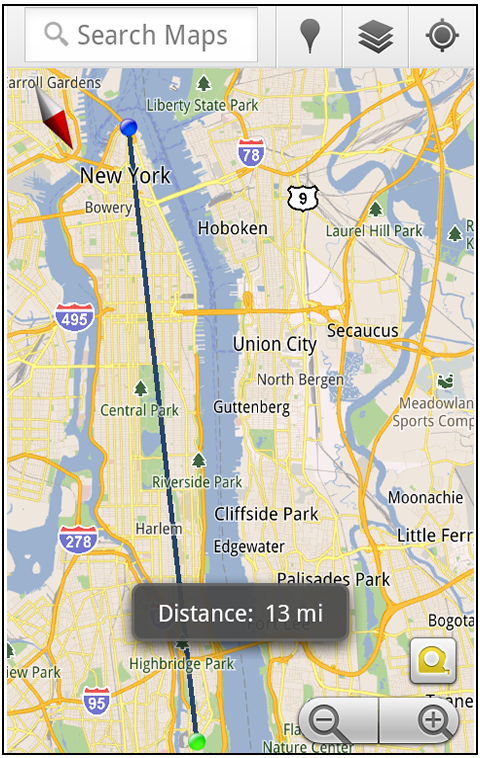
    Example of the “Measure” Labs feature

    To access Labs on your phone, press your phone’s menu button once in Google Maps, choose “More” and select Labs. On a tablet, click the menu button in the upper-right corner of Maps. The “Download map area” lab requires Android 2.1+ and the latest version of Google Maps. We look forward to bringing you more experimental features soon and hope you enjoy trying out Labs in Google Maps for Android.

    Posted by Chikai Ohazama, Director of Product Management, Google Maps for mobile

  • If This Time-Lapse Video Doesn’t Make You Feel Blessed Living On This Planet… [Video]

    …Well, my friend, nothing will. NOTHING. 30 hours of footage shot in Victoria, Australia, took Alex Cherney over a year to compile, but I’m sure you’ll nod your head in appreciation while viewing his majestic creation. More »


  • Steve Ballmer to deliver CES keynote, Windows 8 will be the real star

    Windows 8 and Steve Ballmer

    It’s hard to believe, but with the show still six months away, we’re already getting bombarded with CES-related e-mail. We do have one piece of intriguing news to report at this early stage of the game: Steve Ballmer is set to kick off the festivities with the preshow keynote on January 9th and it’s a safe bet the presentation will be loaded with Windows 8 goodness. Now, what exactly we’ll see when the reliably excitable Microsoft CEO takes the stage is still a mystery, but WinRumors‘ little birdies have been whispering about a public beta of the upcoming OS and demos of both Intel- and ARM-based tablets — predictable, but still exciting prospects. Check out the PR after the break.

    Continue reading Steve Ballmer to deliver CES keynote, Windows 8 will be the real star

    Steve Ballmer to deliver CES keynote, Windows 8 will be the real star originally appeared on Engadget on Thu, 07 Jul 2011 08:20:00 EDT. Please see our terms for use of feeds.

    Permalink   |  sourceWinRumors  | Email this | Comments

  • How To (Un)Lock Your PC By Being Nearby (With a Bluetooth Phone)

    banner-01

    Imagine: you walk into your room, sit in front of your computer, and it unlocks itself. You finish what you’re doing, walk away, and it locks itself. No, it’s not magic – it’s Bluetooth and it’s easy to set up!

    How To Skin Your XBMC for Fame, Glory, and Best Looking Media Browsing Around How To Encrypt Your Cloud-Based Drive with Boxcryptor HTG Explains: Photography with Film-Based Cameras

  • Google+ official invite system back up

    Google’s recently announced Plus social networking service has re-opened its doors to invites after temporarily shutting them down last week. While the site still requires you to be invited by someone who is in the service (hence it is not fully open to the public at the moment), if you…

  • Someday You Could Say Goodbye To Sunburn Pain [Science]

    You learn very quickly that most over the counter medicines only mask the agonizing pain of a sunburn for a short time. Medicines can’t remove this terrible discomfort, because, until now, scientists didn’t what caused it. More »


  • Men May Need More Cuddling Than Women [Study]

    According to new research, men may be mushier than they let on. A study found that men are more likely to be satisfied with their long-term relationships if there’s plenty of kissing an cuddling involved. Plus, men are more likely to say they’re happy with their relationships, while more women report being sexually satisfied. More »


  • Is this the LED Bulb that Will Conquer Incandescent Light Once and for All? [Desired]

    Switch Lighting believes they’ve got all the problems with LED lighting figured out. They say their bulb is efficient, relatively cheap and, most importantly, mimics the ambiance of a soft white lightbulb. And they’ve got Slate’s Farhad Manjoo sold on it. More »


  • Deal in the works for Sask. teachers

    The basic elements of a tentative agreement have been identified that will pave the way to a new contract for Saskatchewan’s 12,000 teachers, union and government officials say.

  • Google, Microsoft and Apple

    Google v microsoft v apple

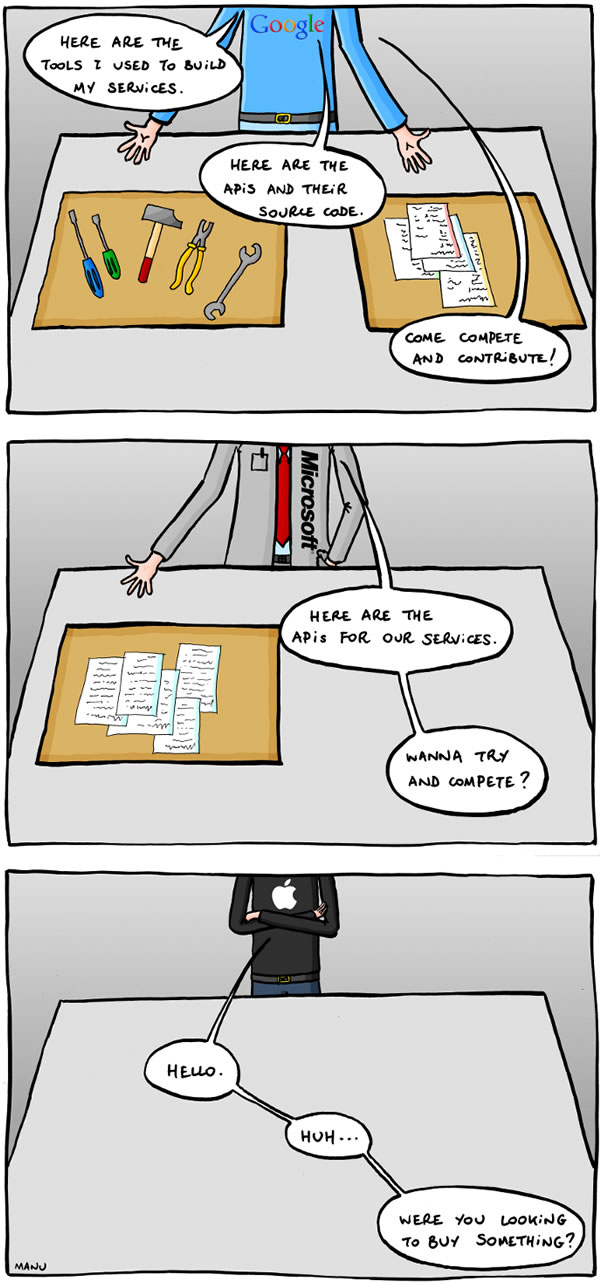
    To use a quote from The Simpsons: “It’s funny because it’s true.” While Apple stuff is pretty neat, I sometimes get that feeling that they see all programmers who don’t work for Apple as barely-tolerated, not-really-trusted “fourth-party developers”.

    This comic was created by Manu Cornet, the artist behind the comic org charts of the big tech companies.

    Update (Thursday, July 7th, 2011): Wow, there’s a lot of butt-hurt going on about this comic. Remember: it’s the comic artist’s opinion, not mine, and secondly, for the Apple fans — you do know that I work at Shopify, which has more Macs on display than the local Apple store and my desk look likes this, right?

  • Move2Picasa Exports All Your Facebook Photos to Google+ (aka, Picasa, Google Photos) [Webapps]

    Web service Move2Picasa migrates all your photos from Facebook to Google Plus. Just visit the site, log in with Facebook, and let it do its work. More »


  • Your Cheatsheet for Talking to the Police [Know Your Rights]

    Our friends at the Electronic Frontier Foundation have released a handy “Tips for Talking to the Police” cheatsheet intended to help you understand your rights, specifically in regards to searching your digital stuff. More »


  • Canada Post still slow to deliver

    One week after Canada Post employees were legislated back to work, many Canadians are still checking their mailboxes in vain.

  • Microsoft Live Essentials 2011 to get updated this week

    Windows Live Essentials 2011, the suite of small Windows programs from Microsoft, will be getting an update later this week with a number of improvements to many of the programs. In a blog post on the Microsoft web site, Microsoft team member Arthur de Haan goes over the updates. One…

  • A wife comes home after a night out with the girls…

    A wife goes out for a night with the girls, telling her husband she’ll be home around midnight.

    Midnight passes by, drinks are flowing, the girls are laughing and having a great time. At around 2:45 in the morning, drunk as hell, she finally gets a cab and makes her way back home.

    She gets to the front door and ever-so-gently nudges it open, not making a sound. She takes her shoes off, again not making a sound. Knowing her husband will give her hell for coming home so late and drunk, she’s quite proud of herself for being so stealthy.

    Just then, the cuckoo clock in the hallway goes off, cuckooing 3 times. Realizing he might wake up, she decides to cuckoo another 9 times. She smiles to herself, proud that she’d come up with such a clever solution on the spot. He’d never know the difference!

    That next morning during breakfast the husband looked at his wife, obviously hungover, and asked, “So… what time did you get in last night?”

    “Oh, right around midnight,” she replied. The husband didn’t seem disturbed at all, her plan had worked!

    “Well,” he said, “I think we need a new cuckoo clock.”

    “Why do you say that?” she asked.

    “Because last night the one we have cuckooed 3 times, then said ‘oh shit,’ cuckooed 4 more times, cleared its throat, cuckooed another 3 times, giggled, then tripped over the coffee table and farted.”

    submitted by godlovesninjas to funny
    [link] [279 comments]

  • LIVE: Casey Anthony to be sentenced in child-death case

    Casey Anthony could walk free Thursday after she’s sentenced for misdemeanour convictions in Florida, but the 25-year-old acquitted of killing her two-year-old daughter Caylee will likely forever be on trial in the court of public and legal opinion.

  • Skype comes to Facebook, and Facebook comes to Skype (update: available now!)

    It ain’t the first time Mark Zuckerberg has taken the stage to announce… something, but today’s shindig is resulting in “something” that’s a bit more exciting for the average user. As rumored, the world’s most notable VoIP service is set to become exceedingly integrated with the world’s most notable social network. Skype has just thrown up a teaser page for v5.3 for Windows (and v5.5 Beta), noting that Skype and Facebook will aim to provide “the best of both worlds.”

    Zuck is primarily announcing three main things today: group chat, a new way to chat (“an easier way to find someone who is online”) and Skype-enabled video chat. Oh, and the tiny, tiny fact that there’s now 750 million Facebook members. What’s notable is just how easy it is to fire up a group chat (or send transcripts to group members who miss out) and get a video call going using your existing Skype contact list. A single click is all it takes, and we’re told that it’ll be rolled out to everyone “over the next few weeks” in 70 different languages. The new chat design will be scalable based on your browser size, and the company made a point to mention that it’ll be listening closely to user input in order to iterate as it moves forward.

    Tony Bates stepped up to the plate, and noted that over 300 million videocall minutes a month are going through Skype, and at peak times, over half of its traffic is video. He also noted that the technology behind it was “tough” to construct, but somehow it managed to hammer this whole thing out in around six months via joint development. There’s also talk about future “paid products” in due time, and it’s strikingly clear that this partnership isn’t going to fade anytime soon. If you’re looking to take a dive yourself, hit up the source links below for the Windows applications, and wear that F5 button out over at Facebook’s homepage if you’re more of the “in-browser” type.

    Oh, and if you’re curious about mobile — video chat isn’t active on that front yet, and Mark’s not spilling any details on “when.” To quote him on a question of time tables: “We’ll see.”

    Update: Those on the web can get started right now. Of note, this forces open the familiar chat bar, so it doesn’t much look like you can hide from “those people” while attempting to find folks on Skype. Sadly, we’re also seeing that doing so can add loads of Facebook contacts to your Skype program, and there’s no real way to see that it’s happening until it’s too late. Clever, Mark.

    Update 2: We’ve spent a little time with both of the new options, and you can read up on our impressions here!

    Skype comes to Facebook, and Facebook comes to Skype (update: available now!) originally appeared on Engadget on Wed, 06 Jul 2011 13:24:00 EDT. Please see our terms for use of feeds.

    Permalink   |  sourceSkype (Twitter), Skype for Windows, Facebook  | Email this | Comments

  • Google Maps 5.7 for Android introduces Transit Navigation (Beta) and more

    (Cross-posted on the Official Google Blog)

    Today we’re releasing Google Maps 5.7 for Android. From Bangkok to Baltimore, we’ve added Transit Navigation (Beta), updated access to directions, better suggested search results, and a photo viewer to Place pages—all of which can help you whether you’re traveling to an unfamiliar part of town or visiting a city across the world.

    Transit Navigation (Beta)
    Google Maps Navigation (Beta) currently provides over 12 billion miles of GPS-guided driving and walking directions per year. Now, GPS turn-by-turn (or in this case, stop-by-stop) navigation is available for public transit directions in 400+ cities around the globe with Transit Navigation.


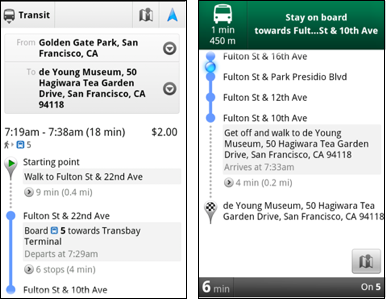
    Transit Navigation uses GPS to determine your current location along your route and alerts you when it’s time to get off or make a transfer. This is particularly helpful if you’re in a city where you don’t speak the language and can’t read the route maps or understand the announcements. After starting your trip with Transit Navigation, you can open another application or put your phone away entirely and Google Maps will still display an alert in your notification bar and vibrate your phone when your stop is coming up.

    Left: Transit directions without Navigation. Right: with Navigation

    Navigation alerts appear even if you switch to another app

    Now you can spend more time enjoying the sights out the window and less time worrying about how many stops are left, where you are along the route or whether you missed your stop. Since Transit Navigation relies on GPS signals, we recommend using this feature for above-ground transit.

    Updated Directions
    Now that we’ve improved our directions services, we wanted them to be incredibly easy to pull up on your screen. If you select the driving or walking icon and your route is supported by Google Maps Navigation, the Navigation icon will automatically appear so you can get access to step-by-step directions in one click. Note: this change is currently only in place for driving and walking and does not appear for public transit.

    One-click access to Navigation from directions

    We’ve also streamlined how you access directions from within a Place page. Before, clicking directions in a Place page would bring up options for “Driving Navigation,” “Walking Navigation” and “Directions.” Now, you’ll be taken straight to the map and see the new directions box shown above.

    Improved Search Suggest
    We’ve made two changes to search suggestions that improve their quality and speed. First, we’ve added category icons, so instead of all search suggestions displaying the same icon, the icon next to the listing will reflect the type of result. You’ll see a pin for a Google Places listing, a star for a starred Place or location, a clock for a previously used search term, a person for contacts and a magnifying glass for “anything else.”

    Two examples of search suggest with new icons

    Also, any place you got directions to or called directly from its Places page will be included as a suggestion for a relevant search. For example, if you recently received directions to the U.S. Post Office on Wilshire Boulevard, afterward, when you begin a search with [p] or [bou], that U.S. Post Office would appear as a search suggestion.

    Photo viewer for Place pages
    Since we released business photos for Place pages last October, millions of photos have been added to Place pages around the world. To enable you to view these photos on the run, a slick new photo viewer has been added so you can browse photos while deciding where to go.

    Left: Business photos in Place pages. Right: New photo viewer

    To start using Google Maps 5.7 for Android, download the update here. This update requires an Android OS 2.1+ device and works anywhere Google Maps is currently available. Learn more at our help center and have fun exploring, whether it be by car, transit, bike or foot.

    Posted by Chris Van Der Westhuizen, Software Engineer

  • Surplus for Chrome Puts Google Plus Everywhere You Browse [Downloads]

    Chrome: If you’re a Google+ user and want access to notifications and the ability to post or respond to your circles without having to switch to a Google site, this Surplus extension will do the trick. More »