Android devotees who've been coveting some of the iPhone's best apps for a while have been in for a treat these past few weeks—first Words With Friends came to the mix, and now Read It Later, an offline news caching reader, is finally available. Users can save documents through their browsers at work and read them offline on their phones. More »
![]()
Loonie hits 3-year high
The Canadian dollar hits its highest level since November 2007, driven by rising oil prices and concerns about spreading Middle East conflict.
New beginnings
Firefox 4 Release Candidate Now Available to Everyone [In Brief]
Windows/Mac/Linux: Mozilla dropped the Firefox 4 release candidate for developers yesterday, but as of this afternoon the release candidate is available for everyone to download and test out. More »
![]()
iPad 2 review
To say Apple’s iPad 2 is an easy tablet to review is somewhat of an understatement. The device, a follow up to last year’s wildly successful (and currently market-defining) iPad, is nearly identical when it comes to software, and though improved, closely related on the hardware side as well. With a 9.7-inch, 1024 x 768 display, the general size and shape of the device has remained the same, and though inside there’s a new dual core A5 CPU, more memory, and a pair of new cameras, most of the iPad 2’s changes are cosmetic. Still, the previous tablet soared far above most of its competitors when it came to the quality of both the hardware (if not its raw specs) and its software selection — something Apple still stands head and shoulders over its adversaries on. So this new model, a thinner, sleeker, faster variant of the original may not be breaking lots of new ground, but it’s already at the front of the pack. But is the iPad 2 worth an upgrade for those that took the plunge on the first generation? More importantly, does the device have what it takes to bring new owners into the fold? Those questions — and more — are all about to be answered in the full Engadget review, so read on!
Gallery: iPad 2 review hands-on
Continue reading iPad 2 review
iPad 2 review originally appeared on Engadget on Wed, 09 Mar 2011 21:01:00 EDT. Please see our terms for use of feeds.
Permalink | | Email this | Comments
Canadians lead world in internet use: report
Canadians are the most active users of the internet in the world, according to a new global report.
Taking Naps Could Boost Your Brainpower
To every nap lover’s delight, it turns out that sleeping may play a larger role in learning than previously thought.
Amazing fan-created, life-size reproductions of Appleseed weaponry [This Is Awesome]
Dan Sarkar, a self-described “Appleseed fanboi,” says he couldn’t live any longer in a universe without cool replicas of the guns we see in the series. More »
BlackBerry Playbook to feature 7digital’s 13 milllion track music store (update: video)
7digital and RIM are back in bed with news that the BlackBerry PlayBook will ship pre-installed with access to 13 million high-quality (320kbps) MP3 tracks from the London-based media company. At launch, the deal affects the US and Canada only, with more countries promised in 2011. PlayBook users will be able to search and preview tracks before purchasing with a discovery assist provided by 7digital’s music recommendation engine. The whole kit will be previewed this week at South by Southwest where we hope to get some hands-on time. Full press release after the break.
Update: RIM’s now also announced a new BlackBerry Podcasts app to go along with the music store, and it’s provided a video showing off both. Check it out after the break, and hit up the link below for some additional details.
BlackBerry Playbook to feature 7digital’s 13 milllion track music store (update: video) originally appeared on Engadget on Wed, 09 Mar 2011 16:38:00 EDT. Please see our terms for use of feeds.
Permalink
Electronista |
CrackBerry, Inside BlackBerry | Email this | Comments
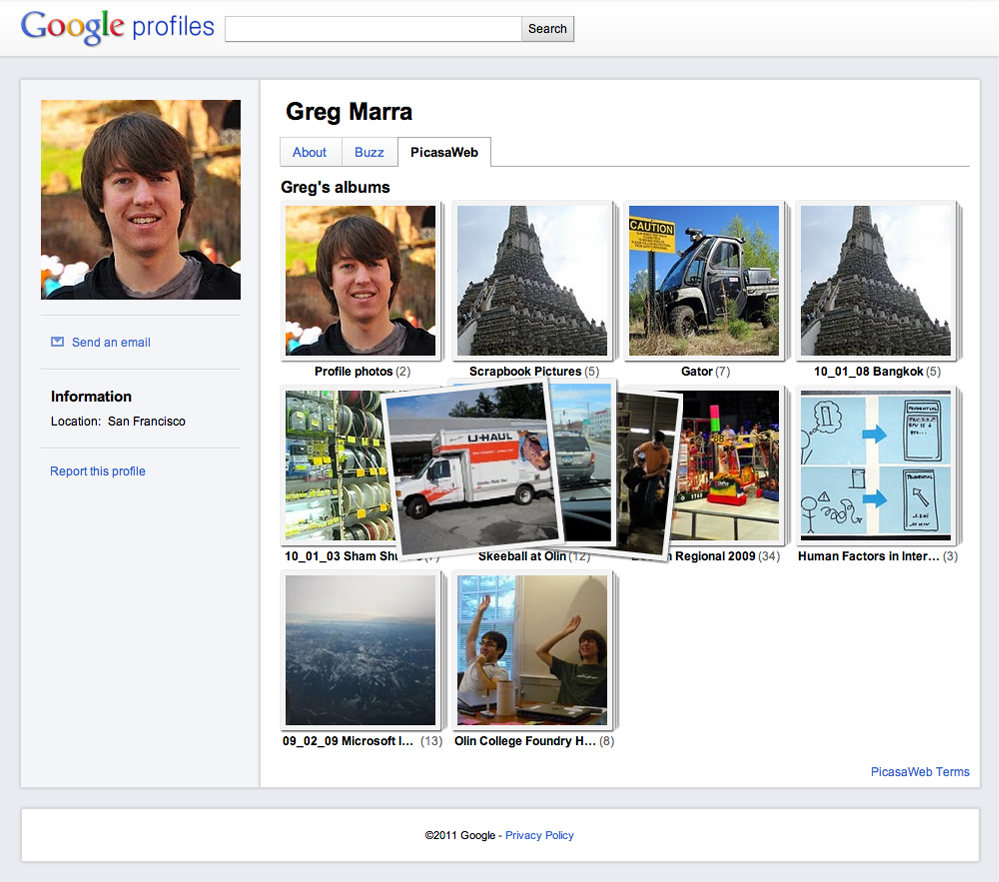
A more picturesque Google profile
Posted by Dave Cohen, Engineer Google Photos
Recently we updated Google Profiles to help you decide what the world sees when it searches for you. Your profile and scrapbook photos already make it easier for people to get to know you, but we want to do more to help you showcase your favorite pics.
Now you can add Picasa Web Albums to your Google profiles. By choosing to show the “PicasaWeb” tab, you will enable visitors to see your public albums. Private albums will remain visible to only the people you’ve shared them with directly.
Add Picasa Web Albums to your profile now by visiting profiles.google.com. We hope you enjoy this change, and be sure to let us know what you think in our forum. Happy posting!
Billable Makes Creating an Invoice Ridiculously Quick and Simple [Invoice]
If you need to create an invoice fast, Billable wants to help you out. All you need to do is visit the Billable site, edit the invoice template, and print. More »
![]()
Fun Fact of the Day

Fun Fact of the Day: Also, the word bed looks like a bed.
[@petergriffin / nerdvana / thd.]
Tagged: boobs, Fun Fact, Peter Griffin, Webcomic
![]()
Charlie Sheen Apologizes to Jon Cryer, Endorses Rob Lowe as ‘Men’ Replacement
Mark Cina
Plus, a new costar speaks out: “Ego-fighting,” “pain,” “actor’s sad condition” led to CBS show’s demise.
New in Gmail Labs: Smart Labels
Posted by Stanley Chen, Software Engineer
People get a lot of email these days. On top of personal messages, there are group mailing lists, social network notifications, credit card statements, newsletters you might have signed up for, and promotional email from a shopping site you used once months ago. Gmail’s filters and labels were invented to help manage the deluge, but while I have about 100 filters that triage and label my incoming mail, most of my friends and family have all their messages in a giant unfiltered inbox.
Last year, we launched Priority Inbox to automatically sort incoming email and help you focus on the messages that matter most. Today, we’re launching a complementary feature in Gmail Labs called Smart Labels, which helps you classify and organize your email. Once you turn it on from the Labs tab in Settings, Smart Labels automatically categorizes incoming Bulk, Notification and Forum messages, and labels them as such. “Bulk” mail includes any kind of mass mailing (such as newsletters and promotional email) and gets filtered out of your inbox by default (where you can easily read it later), “Notifications” are messages sent to you directly (like account statements and receipts), and email from group mailing lists gets labeled as “Forums.”

If you already use filters and labels to organize your mail, you may find that you can replace your existing filters with Smart Labels. If you’re picky like me and still want to hold on to your current organization system, Smart Labels play nice with other labels and filters too. On the Filters tab under Settings, you’ll find that these filters can be edited just like any others. From there, you can also edit your existing filters to avoid having them Smart Labeled or change whether mail in a Smart Label skips your inbox (which you can also do by just clicking on the label, then selecting or unselecting the checkbox in the top right corner).
Labs in Gmail are a great testing ground for experimental features, and we hope Smart Labels help you more effortlessly get through your inbox. If you notice a message that was automatically labeled incorrectly and want to help us troubleshoot, you can report miscategorizations from the drop down menu on each message (in doing so, you’ll donate the full message to our engineers so that we can improve the feature). Give it a try and send us feedback on how we can make it work better for you!
Space Shuttle Discovery returns from final trip, immediately begins search for final resting place
It’s a bittersweet occasion, really. Space Shuttle Discovery has just returned from the unknown that we call “space,” safely returning six astronauts and one zero Robonaut 2s to Earth after a 13-day mission. Discovery’s legacy stretches back 27 years, compiling 39 flights during that span and making an indelible mark on the history of American space exploration. This guy is also the first shuttle to be retired after NASA was rocked a few years back by the impossible-to-ignore budget crunch, and already museums and institutes (29 at last count) are lining up to lobby their case for capturing it. No question, having this 170,000 pound benemoth at your museum would likely benefit admission numbers, but it’s not like Discovery will be the only craft calling it quits in the near future. As of now, no decision has been made as to where it’ll wheel off to for the final time, but you can bet whoever lands it will make quite the scene.
[Image courtesy of Stephen Clark]
Space Shuttle Discovery returns from final trip, immediately begins search for final resting place originally appeared on Engadget on Wed, 09 Mar 2011 13:46:00 EDT. Please see our terms for use of feeds.
Permalink
Space, MAKE |
NASA, The New York Times | Email this | Comments
Great Scene from House MD – “Bombshells” (S7E15)
Microsoft sells 10 million Kinects, 10 million Kinect games
First it was one, then two and a half, then eight, and now we’re into double digits. Microsoft has announced that the company has sold its 10 millionth Kinect, surprising us all by making it the world’s fastest selling consumer electronics device according to Guinness, finding buyers for somewhere north of 10 million games, too. Now, we know what you’re thinking Mr. Cynical: “Each Kinect comes with a game and so of course M$ has sold 10 million titles!” Swallow that smug grin, because that’s 10 million standalone games sold, and while a 1:1 tie ratio is hardly approaching PS2 territory it’s certainly better than many had expected — especially you, Mister C.
Continue reading Microsoft sells 10 million Kinects, 10 million Kinect games
Microsoft sells 10 million Kinects, 10 million Kinect games originally appeared on Engadget on Wed, 09 Mar 2011 13:26:00 EDT. Please see our terms for use of feeds.
Permalink | | Email this | Comments
Microsoft confirms Internet Explorer 9 will launch on March 14th
We had a hint that Microsoft would be releasing the final version of Internet Explorer 9 on March 14th, and now the company has finally, officially confirmed it. That launch will coincide with a press event / party at SXSW, and downloads will be available starting at 9PM Pacific time (or midnight Eastern time). Wondering what’s in store? Then you can always check out our review of the beta version, or simply download it yourself, of course — suffice it to say, it’s no Internet Explorer 6.
Microsoft confirms Internet Explorer 9 will launch on March 14th originally appeared on Engadget on Wed, 09 Mar 2011 11:54:00 EDT. Please see our terms for use of feeds.
Permalink
ZDNet, Download Squad |
The Windows Blog | Email this | Comments
Super Mario Bros. gets modern sound effects, nostalgia ensues (video)

We can only wonder what’ll happen when you reach a certain score — you know, somewhere above 8000…
Super Mario Bros. gets modern sound effects, nostalgia ensues (video) originally appeared on Engadget on Wed, 09 Mar 2011 10:53:00 EDT. Please see our terms for use of feeds.
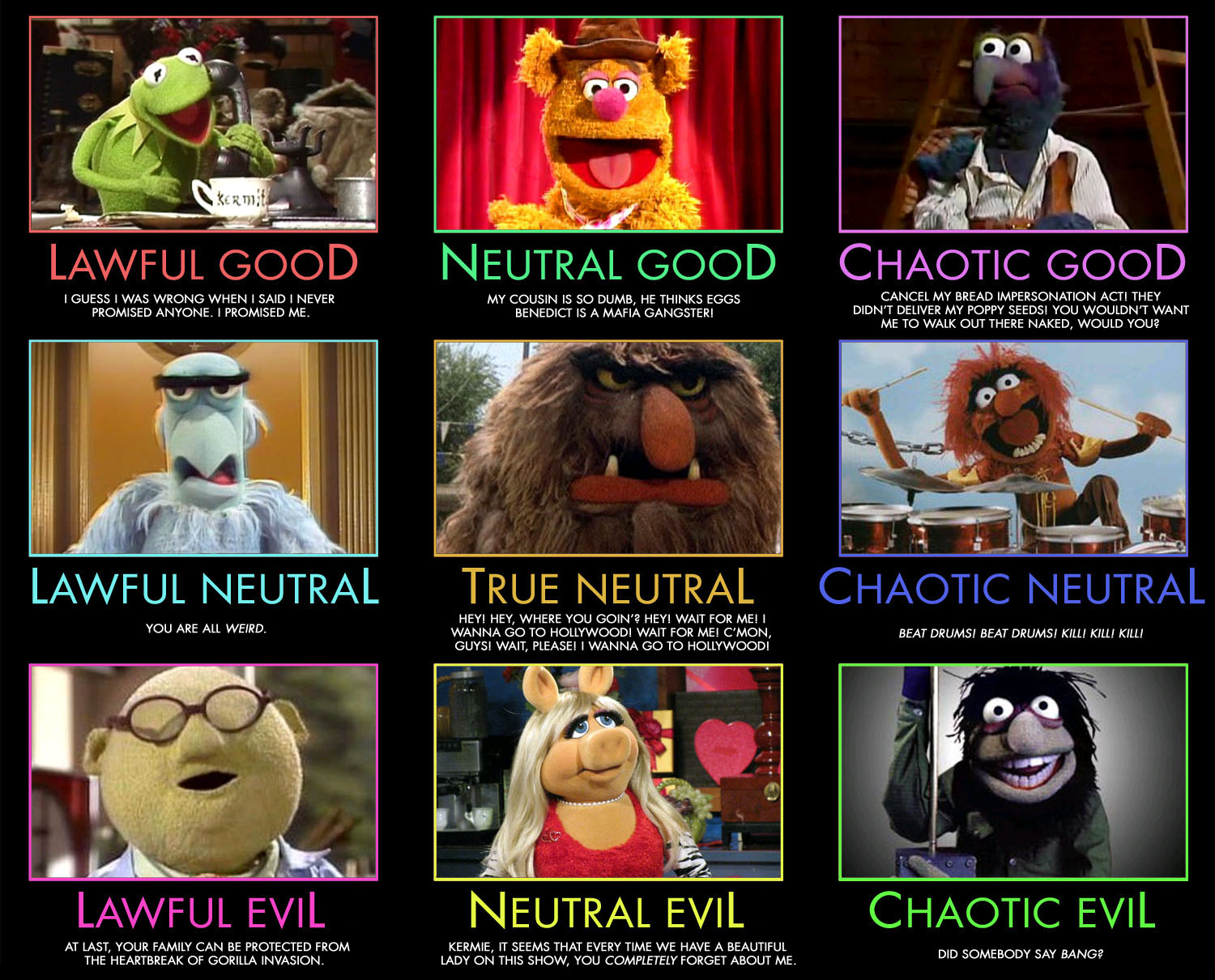
Muppet Alignment Chart
Well this is only the greatest thing in the world.
See other alignment charts at MightyGodKing via @erikteichmann