
Android: Google Maps on Android has always been great, but today's update brings it to a new level of awesome, adding 3D maps, compass mode, and offline caching so you can get anywhere you need to go—even without internet. More »


Reality Bites
Android: Google Maps on Android has always been great, but today's update brings it to a new level of awesome, adding 3D maps, compass mode, and offline caching so you can get anywhere you need to go—even without internet. More »

Facebook has announced its latest plans to assimilate our lives—facial recognition. In a few weeks, the social network will scan pics you upload and attempt to identify your friends—then tag them. It's OK, you can turn it off. More »

South Korea says it will conduct artillery drills similar to ones that prompted North Korea to shell a front-line island last month.
The Windows Live Team has launched a new website showcasing and organizing plugins for Photo Gallery, Movie Maker and Writer.
Photo Gallery plugins include, Inkubook (for creating professional looking photobooks), various uploaders (Facebook, Picasa, and Youtube) and other publishers for content management systems.
Movie Maker plugins are currently a little more limited,…
Dramatic video emerged Wednesday showing a Florida man who burst into a school board meeting with a gun, shooting point blank at the board members before being shot by a security guard.
A consumer protection group filed a class action suit against McDonald’s, Wednesday morning, claiming the toys included in Happy Meals bait and induce children to develop a preference for nutritionally poor foods.
Google has recently demoed an interesting WebGL application called Body Browser, which lets you explore the human body just like you can explore the world in Google Earth. Now you can try Google Body Browser before it’s added to Google Labs, assuming that you have a WebGL-enabled browser:
* WebGL is available, but not enabled by default in Chrome 8 (the latest stable version). Type about:flags in the address bar, click “Enable” next to “WebGL” and then click on “Restart now”. Please note that this is an experimental feature in Chrome 8.
* WebGL is enabled by default in Chrome 9 Beta, Chrome 9 Dev Channel, Chrome Canary Build and Firefox 4 beta.
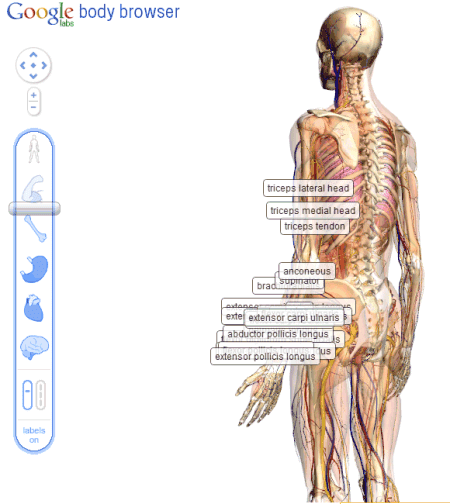
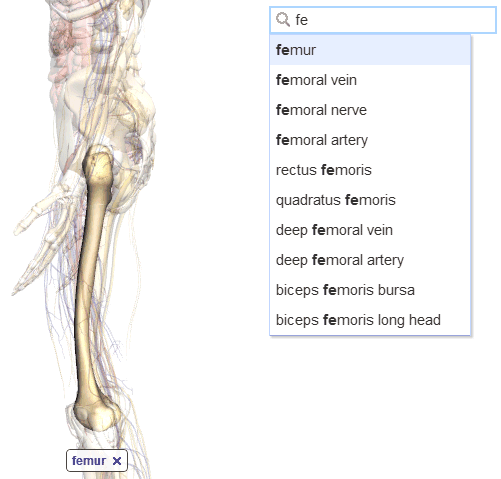
Damon Hernandez was surprised to notice that the application doesn’t require a plugin. “Unlike other web based medical applications I have seen, no Flash, Java, or other plugins are needed. This application will run on any WebGL supported browser. (…) Last year I got the opportunity to work on an open standards based web3D medical app for learning the bones of the body. After witnessing how that app really helped students learn the bones, I am sold on using web3D for medical education.”
Here’s Google’s demo:
{ Thanks, Juuso. }

This holiday, we wanted to enable the Chrome community to work together for a good cause. Starting today, we invite you to support five worthy causes by counting and “donating” the tabs you open in Chrome.

To find out more about this effort and the organizations we’re partnering with, visit google.com/chrome/intl/en/p/cause/.
Next week, we’ll be sharing the details of the good deeds you’ve enacted. In the meantime, browse away!
Posted by Sarah Nahm, Product Marketing Manager

Back pain, migraines and other chronic pain hinder about one in 10 Canadians aged 12 to 44, Statistics Canada says.

Focusing on work you really want to do is probably the best way to get more done. But for a small side benefit, try adding something sweet to your caffeine breaks. A new study shows glucose and caffeine could work better together. More »
 Facebook CEO Mark Zuckerberg has been named Person of the Year by Time magazine. Yep, Mark Zuckerberg. Not Wikileaks founder Julian Assange. Not imprisoned Chinese dissident Liu Xiaobo. Not even the Chilean miners. Mark Zuckerberg.
Time’s Lev Grossman wrote that Zuckerberg received the honor “[f]or connecting more than half a billion people and mapping the social relations among them; for creating a new system of exchanging information; and for changing how we all live our lives.” The inconvenient truth, of course, is that Zuckerberg basically did all that about six years ago, when he created Facebook. But he did have a movie made about him this year. And it was really good. Besides, Zuckerberg’s young, and young people use Facebook, and Time magazine wants to stay hip with the kids. So it totally makes sense. You can find Time’s full explanation here, and read about things you probably already knew.
Time Magazine Names Facebook’s Zuckerberg Person of the Year. Seriously. originally appeared on Switched on Wed, 15 Dec 2010 09:05:00 EST. Please see our terms for use of feeds.

Google Docs offers up to 1 GB of free space, but only file-by-file uploading. Amit Agarwal shows us how to use a free tool to upload entire folders of documents or images to your Docs space. More »

We’ve featured quite a few Windows downloads throughout 2010. Here’s a look back at the most popular free applications to help you tweak, customize, and enhance your Windows experience More »
Saskatchewan Roughriders slotback Andy Fantuz was scheduled to participate in a workout Tuesday with the Pittsburgh Steelers and has another session booked Saturday with the Minnesota Vikings.

For the first time, a man has been declared officially cured of HIV. The remedy may nearly have killed him, but it opens a door—just a crack—to hope that we may someday kill off the scourge for good. More »

[Image courtesy NASA/JPL-Caltech]
Voyager 1 will exit solar system soon, is so close to the void it can taste it originally appeared on Engadget on Tue, 14 Dec 2010 15:52:00 EDT. Please see our terms for use of feeds.
Posted by Amanda Camp, Software Engineer
There are many times in life when a do-over can come in handy. Perhaps you clicked “Send” on an email that was better left unsaid, or “Delete” on a contact before realizing you still needed it. Just like Gmail lets you unsend a message, you can now have a second chance with your contacts too.
We’ve added a new feature to Google Contacts that allows you to revert your contact list and undo any mistakes made up to 30 days in the past. Let’s say you accidentally deleted a bunch of contacts or wiped the contact data from your Gmail account by mistake while syncing to another device. Visit Gmail’s Contacts section, select “Restore contacts” in the “More actions” menu, and choose the time you would like to revert to.

Your contacts will be restored to exactly the same state they were in at that time — any contacts that didn’t exist then will be deleted and any that have since been added will be deleted. Don’t worry, you can always undo this change by restoring again if you didn’t get the time right.


This costume is amazing  It makes me want to go buy a can of green spray paint and a airsoft M14.
[ Many thanks to Jesse for emailing me the photo. ]
[Hat Tip: Inspire Me Now]


