We can think of a pretty good reason why Apple might have a head-start when it comes to Thunderbolt-capable machines, but Apple doesn’t actually have a timed exclusive on the technology, at least according to Intel PR. The company told us that while it’s currently targeting an early 2012 launch for Thunderbolt with other OEMs — whereas the new MacBook Pro has Thunderbolt right now — there’s nothing stopping other manufacturers from launching machines with the 10Gbps interconnect a good bit earlier if they so desire.
In related news, the first Thunderbolt peripherals have just been formally announced — the Promise Pegasus RAID array we saw spitting out 800MB / sec video streams, and the LaCie Little Big Disk. The former will come in four-bay and six-bay variants, topping out at 12TB of magnetic storage when it arrives in Q2, and the latter will boast a pair of Intel 510 Series SSDs — which, by the way, have yet to be formally announced — in RAID 0 for 500GB of storage in total. PR after the break.
Sorry Facebook stalkers–all 3.6 million of you. The popular social network has pulled the plug on Breakup Notifier, a recently introduced that promised to let you know when one of your friends changes their relationship status to single.
After a good round of online criticism (the word "creepy" was bandied about an awful lot), Facebook has apparently pulled the plug on the third-party app. Here's a note that the site sent to the app's creator, Dan Loewenherz,
To ensure positive user experiences on Platform, we run routine automated screens that take user feedback, machine learning and various algorithms into account and remove spammy applications. For example, if an application is making an inordinate number of stream.publish calls and receiving a large number of user reports, it may be removed by our automated systems to protect the user experience and the Platform ecosystem.
Facebook has since issued a statement to the effect that it didn't so much block Breakup Notifier as tweak it, in order to "provide a positive user experience." Here you go,
We have automated systems in place to ensure apps on Facebook Platform provide a positive user experience, and we’re currently looking into the issue with “Breakup Notifier”. Additionally, we did not block the “Blackmail Yourself” app. Some features were temporarily disabled this week as we worked with the developer to ensure the app complied with all of our policies, but it has been and continues to be accessible.
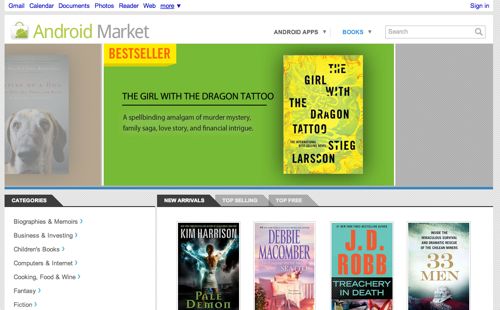
The Android Market has never had any specific ban on carrying and selling straight up text documents, and users could search through the market and find apps that were, in effect, standalone e-books. Now, however, there is a section dedicated specifically to e-books which currently features around 500 titles from publishers such as Simon and Schuster, Macmillan, W.W. Norton and Co., Hachette, and more.
The URL for the site, market.android.com/books, was discovered by Android Guys last week, and the site noted that URLs for /music, and /movies worked and resolved to the Android Market.
Thursday is the first day the /books URL began landing on a real market page.
Forget the distinctive glass bottle, most of the Heinz ketchup sold today comes in plastic containers. But a new partnership with Coca-Cola will soon see the company switching to something much more green: bottles made from plants.
Aptly called PlantBottle technology, the new material is nearly indistinguishable from regular plastic and remains 100 percent recyclable, but it’s made from 30 percent plant-based materials. Currently the process utilizes sugarcane from Brazil.
“The partnership of Coca-Cola and Heinz is a model of collaboration in the food and beverage industry that will make a sustainable difference for the planet,” Heinz Chairman, President and CEO William R. Johnson said in a statement. “Heinz Ketchup is going to convert to PlantBottle globally, beginning with our best-selling 20-ounce variety of Heinz Ketchup, which will reach consumers this summer.”
Coke has been using PlantBottle since 2009, while the first Heinz PlantBottles should be hitting store shelves in June, accompanied by the tag line “GUESS WHAT MY BOTTLE IS MADE OF?”
As a second-generation Indian who has grown up in the United States, I’ve developed a taste for great home-cooked Indian food, but not a knack for how to make it. Somehow my cooking efforts result in foods that taste over-spiced yet bland at the same time. My parents follow the art of cooking by intuition, where the right amount of each spice is measured out by gut feel, but that’s never worked very well for me. As a math geek and computer engineer, I prefer to work with concrete numbers and instructions, including when cooking, so today I’m very happy about a new feature that helps me find recipes online: Recipe View.
Recipe View lets you narrow your search results to show only recipes, and helps you choose the right recipe amongst the search results by showing clearly marked ratings, ingredients and pictures. To get to Recipe View, click on the “Recipes” link in the left-hand panel when searching for a recipe. You can search for specific recipes like [chocolate chip cookies], or more open-ended topics—like [strawberry] to find recipes that feature strawberries, or even a holiday or event, like [cinco de mayo]. In fact, you can try searching for all kinds of things and still find interesting results: a favorite chef like [ina garten], something very specific like [spicy vegetarian curry with coconut and tofu] or even something obscure like [strange salad].
In the past, you only had one way to specify your recipe searches—with the text you type into the Google search box. Now you can also filter search results based on your ideal ingredients, cooking time and calorie count using the recipe tools on the left hand side of the page. For example, I can now find vegetable biryani recipes (an Indian rice dish) that include cauliflower and take less than an hour to make:
We like to “eat our own dogfood” at Google—meaning we like to test our own products and features ourselves before releasing them for public consumption. With Recipe View, we’ve taken this more literally than usual. Here’s Google Chef Scott Giambastiani to demonstrate how he uses Recipe View to find great recipes for Googlers:
Recipe View is based on data from rich snippets markup, which we first introduced at Searchology in 2009. If you’re a recipe publisher, you can add markup to your webpages so that your content can appear with this improved presentation in regular Google results as well as in Recipe View. Recipe View is part of our ongoing efforts to enrich the search experience using structured data, and this release is an exciting technical milestone for our team since it’s first time we’ve built a brand new set of search tools based off of rich snippets data.
Recipe View is rolling out now in the U.S. and Japan, and we’ll be adding more countries in the future. We look forward to making further improvements and building more views so you can “slice and dice” your results for other types of searches as well. Bon appetit!
Of the dozens and dozens of Android device on the market, Samurai II: Vengeance was built for just two of them. So far. The game is believed to be the first major title developed independently for optimization on mobile devices running a dual-core processor.
Along with snappy Sandy Bridge processors and beefy GPUs, Apple’s new MacBook Pros have a superfast, versatile new I/O tech called Thunderbolt. Whazat? More »
Google’s rolling out a Recipes search filter into its web results, allowing last-minute dinner finders to sort by ingredients, cooking time, and calories, and using recipe sites’ own internal language to bring out the recipe you’re hoping to find. More »
Many of you already use Google Docs for editing your documents, but there are still many people that are tied to desktop applications and haven’t experienced the numerous benefits cloud applications to bring. To help bring more people to the cloud and take advantage of features that result, we’re happy to announce that Google Cloud Connect for Microsoft Office is now available to everyone. Google Cloud Connect is a free plugin that improves Microsoft Office 2003, 2007 and 2010 on Windows PCs. It adds simultaneous collaboration, revision history, cloud sync, unique URLs and simple sharing to the Microsoft Word, Excel and Powerpoint applications:
To learn more about how Google Cloud Connect can help businesses, check out the more detailed post on the Google Enterprise Blog.
Posted by: Shan Sinha, Google Apps Product Manager
Update: Many of you have also asked about availability for Macs. Unfortunately due to the lack of support for open APIs on Microsoft Office for Mac, we are unable to make Google Cloud Connect available on Macs at this time. We look forward to when that time comes so we can provide this feature to our Mac customers as well.
Certain extensions—like Gmail notifiers, for example—are great when your browser is running, but can't run when it's closed. Chrome's added a new feature that will let extensions stay open, even if you don't have any open browser windows. More »
So it’s perhaps not the most original moniker that Apple and Intel could have chosen, but it’s here just the same. After years of waiting Apple has launched its implementation of Intel’s Light Peak standard and it’s called Thunderbolt. It’s making its appearance on new MacBook Pro models and it’s promising 10Gb/second transfer rates. That’s dual-channel, too so you’ll get 10Gb/sec both to and from your devices. Apple suggests this will be useful for external RAID arrays, Gigabit Ethernet adapters, and also mentions support for “FireWire and USB consumer devices” along with HDMI, DVI, and VGA over DisplayPort. Apple expects that Thunderbolt will be “widely adopted as a new standard for high performance I/O,” but we think the USB 3.0 crew might have a thing or two to say about that. Full PR is embedded below.
Update: Intel has thrown up its page on the technology, and it looks like the Light Peak name is officially no more. Intel indicates this speed will be enough to transfer a full-length HD movie (roughly 10 – 20GB in size) in less than 30 seconds. Intel also reinforces that this is compatible with existing DisplayPort devices and it also uses the PCI Express protocol for enhanced compatibility. Daisy-chaining will be possible, along with bus-powered devices, and cables can be made using either optical or electrical construction.
Want to get your hands on the HP Pre 3, Veer, and the TouchPad? Sadly you can’t at this point, but you can see them doing their respective things in the video below. Our editor-in-chief Joshua Topolsky made another visit to Jimmy Fallon last night with a all of HP’s upcoming toys, as well as the Motorola Atrix and the Xoom tablet too. It’s all embedded below, so make with the clicking.
Do you ever wish for an easier way to show your uninitiated friends what you mean when you say Android is growing? Well, here’s the video for you: a Google-produced map of the world that throbs with Android activations over time, highlighted by some truly eye-opening flourishes in the immediate aftermath of marquee handset launches. The Google guys have even given us handy countdown timers — “Droid launch in 3, 2, 1…” — and broken things down by continent for easier viewing. Only thing missing is a soundtrack, so just have your Tron: Legacy OST loaded up and ready before jumping past the break.
Oh yes, the world’s first Android Honeycomb tablet really is here now. As Verizon announced earlier, you can snag a Motorola Xoom for $599.99 with a two-year contract, or splash out $799.99 for just the LTE-ready device. Alas, the WiFi-only version is nowhere to be seen just yet, but maybe some will show up in the stores later if not tomorrow, so hold on to your personal hotspot devices and keep believing. Either way, in case you’re still indecisive over this 10-inch goodness, maybe our review will help.
[Thanks to everyone who sent this in]
Update: Verizon’s been in touch to inform us of a policy change: customers who purchase the off-contract Xoom will now no longer need to be on a month to month plan. That said, we still see “Month to Month” as a compulsory option at the time of updating this post.
ZDbox for Android is an “all-in-one” toolbox app that makes it easy to find out what’s going on in your phone and gives you full control of different tasks. Those who geek out to numbers, fret not, ZDbox gives the exact battery percentage and traffic usage (with alerts!). If you want to set a do not disturb time range, lock some apps (like Gmail or messaging) or batch uninstall others, you can do that too. The interface is simple enough where you won’t have to learn new things to do new things. It’s still in beta, but has been working pretty well for me. [XDA Developers via Mobiputing] More »


 AppleHeadlines |
 LaCie, Promise | Email this | Comments



 So it’s perhaps not the


