Skip to content

.::REALITYRECALL::.

Reality Bites

  • Home
  • About
  • Contact
  • Sign up for imagery update alert

    Users in the Google Earth forum often ask about the age of satellite imagery and when the content will be updated. While we aren’t able to tell you in advance when our imagery will be updated, we can now notify you after new images are added to an area that you’re interested in.

    With our Follow Your World application, you can register points on the globe and we’ll send you an email update whenever the imagery is updated there.

    In just three easy steps, you can add points such as your hometown, your college football stadium, or just about any place on Earth. And since Google Earth and Google Maps share the same imagery, this tool is equally handy for enthusiasts of both products. Follow Your World also provides a handy dashboard to manage your subscriptions.

    Whether you’re an armchair geospatial enthusiast, or you frequently use aerial imagery from Google Earth or Google Maps in your work, we invite you to give this new app a try so you’ll be the first to know.

    Posted by Jeral Poskey, Google Earth support team

    January 27, 2011
  • How will the government react when we detect alien signals from space? [Alien Contact]


    Click here to read How will the government react when we detect alien signals from space?

    Some astronomers think detecting an extraterrestrial radio signal is a matter of when, not if. What goes on in the immediate aftermath of such a discovery? Here’s what happened the last few times we thought we’d heard from E.T. More »

    January 27, 2011
  • Microsoft announces Q2 earnings: $6.63b profit, Xbox revenue up 55%, Windows down 29%

    Microsoft just announced it’s had itself a solid second quarter, posting an $6.63 billion profit on record revenues of $19.95 billion. That’s more or less about the same as last year, when it racked up a $6.66 billion profit on $19 billion in revenue — and while the numbers look stable and Redmond managed to slightly beat estimates, things are changing fast underneath the bottom line: strong Kinect and Xbox 360 sales drove Entertainment and Devices Division revenue up 55 percent to $3.6 billion, but Windows and Windows Live revenue fell nearly 30 percent to $5.05 billion. That means the revenue gap between Microsoft’s consumer device business and the Windows business is now just some $1.3 billion, compared to $4.8 billion this time last year — and it undoubtedly explains why Xbox got top billing at Ballmer’s CES keynote this year, after traditionally being ignored, and why Microsoft is moving Windows to ARM as the mobile and tablet spaces heat up.

    As for Windows Phone 7, there’s nary a peep, even though Microsoft was just crowing about moving 2 million licenses yesterday — we’re taking that to mean the infant OS hasn’t had any meaningful impact on revenue yet. We’re going to jump on the call at 5:30PM ET, we’ll let you know if anything good happens.

    Update: Corrected the profit numbers: it’s a $6.63b profit and a $8.17b operating income, not a $8.17b profit.

    Update 2: As noted by our friend Michael Gartenberg, Microsoft’s Q210 Windows division revenue was boosted by the inclusion of $1.71 billion in deferred Windows 7 upgrade sales and OEM pre-sales, so if you take those out, the gap between Windows and Xbox went from 3.1 billion in Q210 to 1.3 billion this quarter, and Windows sales are down 8 percent. It’s not a huge change for the big picture, but it’s worth noting the revenue deferral in context — Microsoft moved cash around so it would have a huge launch quarter for Windows 7, and now things are evening out.

    Microsoft announces Q2 earnings: $6.63b profit, Xbox revenue up 55%, Windows down 29% originally appeared on Engadget on Thu, 27 Jan 2011 16:15:00 EDT. Please see our terms for use of feeds.

    Permalink   |  sourceMicrosoft, Detailed Earnings  | Email this | Comments

    January 27, 2011
  • More control over comments on shared items

    Shared by Terren

    It’s been a long time since google has done any updates to Google Reader…would like to have seen more then just this.

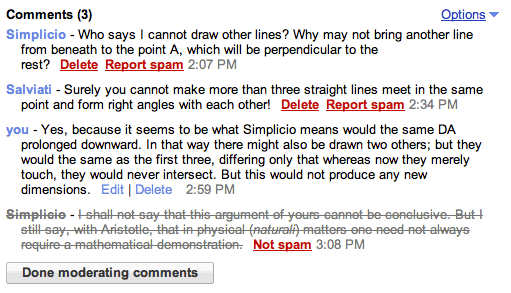
    Options menuAs some of you have noticed, we’ve recently enhanced Reader’s commenting abilities, via an “Options” menu that is present for all conversations about shared items. You can now get a link to the equivalent conversation in Google Buzz, which is handy for passing around a funny thread. If it’s your shared item, you can disable comments entirely, if for example the conversation was about a topic whose time has passed.

    Additionally, you can now moderate comments within Reader. If the conversation is on an item that you shared, you have the option to remove comments directly. For all conversations, you can report comments as spam.

    Comment moderation

    We hope these changes will help you keep an elevated level of discourse about shared items. As always, if you have any questions or comments about these new features, please head over to our help forums, or send us a message on Twitter.

    January 27, 2011
  • Google Acquires Fflick, Plans to Add a Social Discovery Component to YouTube

    YouTube is confirming on their blog that Google has acquired the Fflick social movie service. The $10 million purchase, according to TechCrunch, will eventually give YouTube a new social discovery component to the service which will crawl popular social networks to glean popular videos shared amongst friends and the web in general. Previously, Fflick crawled Twitter’s public timeline to […]

    January 27, 2011
  • Qwiki Is Like a Mini, Visually-Rich Wikipedia That Reads to You [Webapp]


    Click here to read Qwiki Is Like a Mini, Visually-Rich Wikipedia That Reads to You

    Qwiki is a new webapp that helps you learn about virtually anything, but aims to inform you quickly by reading the articles to you while showing you a slideshow of pictures while you listen. More »


    January 27, 2011
  • The Massively Intimidating Size of the Internet Visualized [Internet]


    Click here to read The Massively Intimidating Size of the Internet Visualized

    The internet! We’ve all spent enough time burrowing down the rabbit hole to know that it’s really, really big. But it’s not until you give its manifold parts some perspective that you understand how truly massive it is. More »


    January 27, 2011
  • Resistance is futile against the sweet "Star Trek Girl" song [Video]


    Click here to read Resistance is futile against the sweet "Star Trek Girl" song

    Created by Meekakitty, “Star Trek Girl” single is poised to be the biggest hit at 2011’s San Diego Comic Con. It’s hard not to get hooked on this cute little ditty, so grit your teeth and get in step. More »

    January 27, 2011
  • Facebook Working on Tablet-Friendly Version of Site

    facebooklogo.jpg

    Given the popularity of Apple’s iPad and the veritable glut of devices coming from companies like RIM, Motorola, Toshiba, et al, it’s only logical that a site as popular as Facebook would be working on a tablet-optimized version of its site.

    The social network’s CTO Bret Taylor confirmed as much during a recent interview, stating, simply enough, “We need to make a tablet version of Facebook. It’s something we’re working on right now.” Fair enough, Bret.

    Now, such an admission doesn’t mean that the company is necessary working on a native iPad app (though, again, we’d be surprised if such a thing didn’t surface in the next year), but Facebook may–much to Apple’s approval, no doubt–be working an HTML5 version of the site. “Long term we think a lot of apps will be written in HTML5,” said Taylor.

    Facebook has apparently been “cautious” about fragmentation–or, at the very least, having its team spread thin with a proliferation of different device platforms. “The iPad was a casualty of that internally,” Taylor added.

    January 27, 2011
  • Google begins censoring autocomplete results for BitTorrent, RapidShare and other Big Media profanity

    Tried searching for “BitTorrent,” “RapidShare,” “uTorrent,” “MegaUpload” or even “Ubuntu torrent” lately? Good luck finding a Google domain that’ll autocomplete those results for you. Presumably caving to pleading from the MPAA and / or RIAA, El Goog has quietly begun to censor the results it shows when typing the above terms. Needless to say, the aforesaid companies aren’t too keen on the new procedures, and strangely enough, a number of other sites that would typically be grouped into this same category — MediaFire, 4shared and HotFile — remain on the cleared list. Hit the source link if you’re looking for loads of responses from companies angered with Google’s move, and feel free to reset your homepage to Bing, Yahoo or any other search engine who has yet to bend. You know, if you’re feeling rebellious.

    Google begins censoring autocomplete results for BitTorrent, RapidShare and other Big Media profanity originally appeared on Engadget on Thu, 27 Jan 2011 10:24:00 EDT. Please see our terms for use of feeds.

    Permalink Digg  |  sourceTorrent Freak  | Email this | Comments

    January 27, 2011
  • The Most Important Person Is the One that Keeps Your PC Running [Comic]

    3

    Fixing people’s computers usually makes them appreciate you more, though this might be a little too far.

    Got an opinion to share? Click here to join the discussion


    Discover Card Motiva Application

    Latest Features How-To Geek ETC
    • How To Create Your Own Custom ASCII Art from Any Image
    • How To Process Camera Raw Without Paying for Adobe Photoshop
    • How Do You Block Annoying Text Message (SMS) Spam?
    • How to Use and Master the Notoriously Difficult Pen Tool in Photoshop
    • HTG Explains: What Are the Differences Between All Those Audio Formats?
    • How To Use Layer Masks and Vector Masks to Remove Complex Backgrounds in Photoshop
    • Use Your Chart-Drawing Skills to Win a Free Chrome Cr-48 Notebook
    • Brighten Your Desktop with the Best of Bing: China Theme for Windows 7
    • AU Seinfeld – Jerry the Great’s Quest for World Domination [Video]
    • Ylmf OS is a Windows XP Styled Linux System
    • Facebook Updates to Support Total Session HTTPS
    • iDOS Loads Classic DOS Games on Your iOS Device

    January 27, 2011
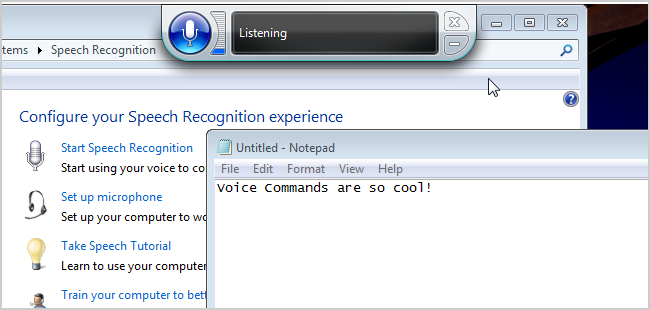
  • The How-To Geek Video Guide to Using Windows 7 Speech Recognition

    Ever get the desire to control your computer, Star Trek-style? With Windows 7’s Speech Recognition, it’s easier than you might think.

    Microsoft has been working on its voice command steadily over the years. XP introduced it, Vista smoothed it, and 7 has it polished. It’s strangely not advertised as a feature, even though other voice command and speech recognition programs are hundreds of dollars. It may not be as perfect as some of them, but there’s definitely something amazing about vocally telling your computer to do things and it actually working

    Latest Features How-To Geek ETC
    • How To Create Your Own Custom ASCII Art from Any Image
    • How To Process Camera Raw Without Paying for Adobe Photoshop
    • How Do You Block Annoying Text Message (SMS) Spam?
    • How to Use and Master the Notoriously Difficult Pen Tool in Photoshop
    • HTG Explains: What Are the Differences Between All Those Audio Formats?
    • How To Use Layer Masks and Vector Masks to Remove Complex Backgrounds in Photoshop
    • 10 Weird Gaming Records from the Guinness Book
    • Use Your Chart-Drawing Skills to Win a Free Chrome Cr-48 Notebook
    • Brighten Your Desktop with the Best of Bing: China Theme for Windows 7
    • AU Seinfeld – Jerry the Great’s Quest for World Domination [Video]
    • Ylmf OS is a Windows XP Styled Linux System
    • Facebook Updates to Support Total Session HTTPS

    January 27, 2011
  • More U.S. Soldiers Killed Themselves Than Died in Combat in 2010

    Infographic, US Soldeir deaths, Military, Veterans, Afghanistan, Iraq
    For the second year in a row, more American soldiers—both enlisted men and women and veterans—committed suicide than were killed in the wars in Iraq and Afghanistan. Excluding accidents and illness, 462 soldiers died in combat, while 468 committed suicide. A difference of six isn't vast by any means, but the symbolism is significant and troubling. In 2009, there were 381 suicides by military personnel, a number that also exceeded the number of combat deaths.

    Earlier this month, military authorities announced that suicides amongst active-duty soldiers had slowed in 2010, while suicides amongst reservists and people in the National Guard had increased. It was proof, they said, that the frequent psychological screenings active-duty personnel receive were working, and that reservists and guardsmen, who are more removed from the military's medical bureaucracy, simply need to begin undergoing more health checks. This new data, that American soldiers are now more dangerous to themselves than the insurgents, flies right in the face of any suggestion that things are "working." Even if something's working, the system is still very, very broken.

    One of the problems hindering the military's attempt to address soldier suicides is that there's no real rhyme or reason to what kind of soldier is killing himself. While many suicide victims are indeed afflicted with Post Traumatic Stress Disorder after facing heavy combat in the Middle East, many more have never even been deployed. Of the 112 guardsmen who committed suicide last year, more than half had never even left American soil.

    "If you think you know the one thing that causes people to commit suicide, please let us know,” Army Vice Chief of Staff General Peter Chiarelli told the Army Times, "because we don't know what it is."

    January 27, 2011
  • PSP successor is official, codenamed ‘NGP’ (Next Generation Portable)

    Mock it up, talk it up and leak it out all you want, only Sony has the power to actually bring the so-called “PSP2” into the world — and that moment has come. The “sequel” to the PlayStation Portable was made official today (like, just now!) during a press event in Japan, looking every bit as — well, that thing looks like the PSP, doesn’t it?

    Codenamed “NGP” — that’s “Next Generation Portable” Entertainment System — the device has been designed with five core tenets buzz phrases in mind, according to Sony: Revolutionary User Interface; Social Connectivity; Location-based Entertainment; Converging Real and Virtual; and PlayStation Suite Compatibility.

    But what does that mean? For starters, the new hardware features dual analog sticks; a 5-inch OLED display (with 960×544 resolution — four times the PSP’s); a front touchscreen and rear touchpad (woah!); 3G, WiFi, Bluetooth and GPS; and, for good measure, the same six-axis motion system that propels the Move, plus a three-axis compass — oh, and we can’t forget the front and rear cameras (those come standard these days). Of course, the NGP plays games, too, which will be offered on new flash memory-based cards (so long UMD!) that feature added storage for DLC and game saves.

    The NGP is coming this holiday season.

    Update:
    Complete hardware specs, provided by Sony, are posted after the break.

    Continue reading PSP successor is official, codenamed ‘NGP’ (Next Generation Portable)

    JoystiqPSP successor is official, codenamed ‘NGP’ (Next Generation Portable) originally appeared on Joystiq on Thu, 27 Jan 2011 01:32:00 EST. Please see our terms for use of feeds.

    Permalink | Email this | Comments

    January 27, 2011
  • Travel The Oregon Trail and Find Carmen San Diego On Facebook in Early February

    I’ve never played a Facebook game. I once signed up for ESPNU College Town, but then I didn’t touch it.

    I might have found the Facebook game for me, though, because Blue Fang and The Learning Company are set to release new versions of Where in the World is Carmen San Diego and The Oregon Trail on Facebook. The Oregon Trail will be out on February 2, which is six days from now, and Carmen San Diego will hit a week later on February 9.

    This word comes from Blue Fang dev Darius Kazemi, who was extremely excited to share this with the world, as he should be.

    It’s important to note that these are not the same version of these titles you’re used to. But that’s totally cool, because we’ve all played this s–t so much we need them to be changed up a bit. And, naturally, they’re going to incorporate some social bulls–t since it’s Facebook. Oh, and here are some trailers that’ll let you know what you’re in for.

    I wonder if the power of nostalgia is enough to topple Cityville.

    via Edge

    January 26, 2011
  • Flames’ Conroy expected to retire

    Popular Calgary Flames centre Craig Conroy is expected to announce his retirement from hockey on Thursday.

    January 26, 2011
  • Desktop notifications for emails and chat messages

    Posted by Andrew Wilson, Software Engineer

    Many of us are guilty of constantly switching back to Gmail to check for new messages. And if you’re like me, you’ve probably missed an important chat message because you weren’t looking at your Gmail window when it came in. If you use Google Chrome, these days can be over since we just launched HTML5 desktop notifications which display pop-ups whenever a chat message or new email arrives.


    To turn them on, click on the Settings link in the top right corner of Gmail and scroll down to the “Desktop Notifications” section. If you just want to get notified about chat messages, or if you use Priority Inbox and only want to get notifications for important messages, you can customize your settings from there too.


    This functionality is currently only available for people using Google Chrome, but we’re working to make notifications part of the standard Web platform.

    January 26, 2011
  • Confused Puppy


    January 26, 2011
  • Screenshot Tour of Android 3.0 Honeycomb, Built for Tablets [Screenshot Tour]


    Click here to read Screenshot Tour of Android 3.0 Honeycomb, Built for Tablets

    Google gave us a glimpse of Android 3.0 Honeycomb earlier this year, but today they released more details on the upcoming OS. Here’s a look through what we can expect. Spoiler alert: It’s awesome, and it fixes many of Android’s biggest annoyances. More »


    January 26, 2011
  • Android 3.0 Honeycomb preview emulator hands-on

    So we’ve just installed Google’s first public-access preview of its tablet-focused Android 3.0 Honeycomb operating system, an early build of the platform’s SDK that features “non-final” code and APIs; it’s intended primarily for developers who want to get a head start on making their tablet app dreams come true, but naturally, we needed to install it and take it for a test drive ourselves. Here are our quick observations:

    • Like Android SDK emulators before it, Honeycomb’s is extremely slow — nearly to the point of uselessness in this case. We’ll give them a mulligan since this is a preview build, but seriously, we wouldn’t recommend installing this unless you enjoy pulling your hair out.
    • There appears to be some sort of orientation bug that prevents us from going landscape, which is what we really wanted. Sorry about that! We’ve shot the video sideways and rotated all of our images; if we’re able to figure it out or a newer build is released with orientation properly working, we’ll update.
    • The browser looks great — specifically the UI, which is going to make desktop browser users feel right at home perhaps more than any other tablet browsing experience to date. As with the rest of the emulator, it was too slow to really use — and it kept crashing on us — but we’re digging the look.
    • The system for adding and managing widgets is a joy to use — it makes your entire desktop accessible from a single screen, and we like the amount of detail you can preview for each widget before deciding whether to use it and where to place it.
    • In general, the window animations and screen transitions seem cool, but none were smooth or fast enough in the emulator to know for sure. Jury’s still out until this gets faster or we’re using Honeycomb on actual tablets.
    • We’re not in love with the dim, squashed segmented display that Google is using for the time in the lower right; we’re hoping there are plenty of alternative fonts available.

    Since the emulator doesn’t provide a “Google experience” build with access to the Android Market, Gmail, or other “branded” Google apps, we weren’t able to deep-dive on how real-world applications are going to look on the platform — but with any luck, Motorola’s Xoom should be shipping within a few weeks. In the meantime, check out a video after the break!

    Update: We’ve figured out the orientation trick — you need to uncheck automatic orientation in Settings, then flip the emulator from landscape to portrait (counterintuitive, we know). We’ll be updating the media as soon as we can!

    Update 2: Second video (in the correct orientation this time!) added after the break.

    Gallery: Android 3.0 Honeycomb preview emulator hands-on

    Continue reading Android 3.0 Honeycomb preview emulator hands-on

    Android 3.0 Honeycomb preview emulator hands-on originally appeared on Engadget on Wed, 26 Jan 2011 16:56:00 EDT. Please see our terms for use of feeds.

    Permalink   |   | Email this | Comments

    January 26, 2011
←Previous Page
1 … 588 589 590 591 592 … 735
Next Page→

.::REALITYRECALL::.

Reality Bites

Twenty Twenty-Five

Designed with WordPress