Xbox 360 Limited Edition Halo: Reach Bundle
 Today at Comic Con in San Diego, we announced the Xbox 360 Limited Edition Halo: Reach bundle which will be available September 14th when Halo: Reach launches.
Designed by Bungie, the Xbox 360 Limited Edition Halo: Reach Bundle includes all the features of the newly designed Xbox 360 console, such as a 250 GB Hard Drive and the fastest built-in Wi-fi. Additionally, you’ll receive two Limited Edition Wireless Controllers and a standard edition copy of Halo:Reach. The bundle will be available for US $399 in limited quantities and only while supplies last.
Bungie unboxes the console for you
Edit: The bundle is now available for pre-order along with the special edition controller and wireless headset
Stan Lee’s Three New Superheroes Sure to Provide Stan Lee With More Painful Acting Moments [Comics]

Stan Lee, that guy with bit parts in all the superhero movies, unveiled three new superheroes at ComicCon: Soldier Zero, Starborn and The Traveler. More »

TRON Legacy Trailer Premieres at ComicCon

Okay, it’s a little off the video game beat, but only a little. If you’re not psyched for December’s big event film TRON Legacy, well you should be. The sequel to one of the first video-game movies looks amazing and this trailer shows so much promise. What caught my eye was the digital recreation of the younger Jeff Bridges (Flynn).
Those who haven’t seen the original film should understand how groundbreaking the visuals were in the 1980′s. seeing them upgraded with modern CGI and green-screen techniques is awesome. Anyway.. watch and see…
Microsoft reports $4.5b in profit, a record $16.04b in revenue

This time last year, almost to the day, Microsoft saw its first annual sales decline in history. Things are looking much better now, with the company reporting a record $16.04 billion in revenue, a 22 percent year-over-year increase for its Q4 revenue ending June 30th. In fact, revenue is up across all divisions, with Windows and Windows Live seeing the biggest uptick (43.5 percent to $4.55 billion) followed by Entertainment and Devices (27.3 percent to $1.6 billion). Operating income, on the other hand, paints a different picture of E&D, showing a $172 million loss for this quarter (compared to $141 loss in Q4 last year), but looking over the entire fiscal year, the home of Xbox and Zune this year did $679 million in operating income — a sizable jump to the $108 million from 2009. The overall operating income for the company is $5.93 billion this quarter (net income $4.52 billion), a 49 percent increase over last Q4, and $20.36 billion for the year (18 percent compared with fiscal 2009).
We know you’re interested in comparisons, so we’ll just go ahead and break it down for ya: the gang in Redmond is still beating Apple in both revenue ($16.04 billion vs. $15.7 billion) and profit ($4.52 billion vs. $3.25), but that margin feels smaller than it used to. Enough to keep the rumored pressure off Ballmer? Frankly, we don’t even think biplanes could knock the man off the top of a tower, but Windows Phone 7 has a lot to prove, and fast. Microsoft is hosting a webcast of its report later today — usually much ado about nothing, as far as we’re concerned, but we’ll listen in and let ya know if anything interesting pops up.
Update: Some interesting Xbox 360 statistics. 1.5 million consoles were sold this last quarter. Xbox Live has 25 million members, and for the first time since its inception, the revenue from the Marketplace exceeded subscription revenue.
Microsoft reports $4.5b in profit, a record $16.04b in revenue originally appeared on Engadget on Thu, 22 Jul 2010 17:14:00 EDT. Please see our terms for use of feeds.
Permalink |  Microsoft | Email this | Comments
Flood victims get preliminary cheques
The Saskatchewan government has issued cheques totalling $3,000 to nearly 950 flood victims in three communities.
Help Prevent Stutter in Video Streams in VLC & Windows Media Player
When watching a video that’s streaming across your home network, it’s annoying to get the “stutter effect”. With a simple tweak in VLC and Windows Media Player we can help prevent this annoyance.
There could be other factors that cause network video streams to stutter, such as the type of hardware you’re using or streaming wirelessly. But before you go out and spend a bunch of money for a full Gigabit network, a simple setting change to the read buffer cache in VLC or WMP can definitely help.
Increase Caching in VLC
To change the buffer cache size in VLC click on Media \ Open Network Stream.
![sshot-2010-07-21-[23-51-33]](http://www.howtogeek.com/wp-content/uploads/2010/07/sshot20100721235133.png "sshot-2010-07-21-[23-51-33]")
At the bottom right of the screen, check Show extended options.
![sshot-2010-07-21-[23-53-12]](http://www.howtogeek.com/wp-content/uploads/2010/07/sshot20100721235312.png "sshot-2010-07-21-[23-53-12]")
Now increase the number in the Caching field. By default ours was set to 200ms and we bumped it up to 500ms or 0.5 seconds. When done click the Play button.
![sshot-2010-07-21-[23-54-58]](http://www.howtogeek.com/wp-content/uploads/2010/07/sshot20100721235458.png "sshot-2010-07-21-[23-54-58]")
Now you should be able to enjoy your video stutter free.
![sshot-2010-07-22-[00-04-52]](http://www.howtogeek.com/wp-content/uploads/2010/07/sshot20100722000452.png "sshot-2010-07-22-[00-04-52]")
Windows Media Player
To increase the read buffer in Windows 7 Media Player open it up and click “Alt+T” to bring up the menu and go to Tools and click on Options.
![sshot-2010-07-22-[00-09-58]](http://www.howtogeek.com/wp-content/uploads/2010/07/sshot20100722000958.png "sshot-2010-07-22-[00-09-58]")
Now click on the Performance tab and under Network buffering change the buffering from using the default (which is 5 seconds) to a larger number. Notice in WMP it’s not in milliseconds like VLC so just increase it to whatever works best. When you’re done click OK.
![sshot-2010-07-22-[00-12-50]](http://www.howtogeek.com/wp-content/uploads/2010/07/sshot20100722001250.png "sshot-2010-07-22-[00-12-50]")
Now you should be able to watch your favorite streaming video content on Media Player without any stuttering in the feed.
![sshot-2010-07-22-[00-14-18]](http://www.howtogeek.com/wp-content/uploads/2010/07/sshot20100722001418.png "sshot-2010-07-22-[00-14-18]")
Windows Media Player 11
You can also do this in WMP 11 in XP and Vista following the same process…
![sshot-2010-07-22-[00-46-38]](http://www.howtogeek.com/wp-content/uploads/2010/07/sshot20100722004638.png "sshot-2010-07-22-[00-46-38]")
![sshot-2010-07-22-[00-48-25]](http://www.howtogeek.com/wp-content/uploads/2010/07/sshot20100722004825.png "sshot-2010-07-22-[00-48-25]")
Conclusion
If you’re annoyed by stuttering when streaming video over your network, changing these settings can help. You’ll probably have to experiment a bit with the caching until you get it where you want it. You should be able to do this in other video players as well, just read the products documentation. Depending on how much you increase it by, it may take videos longer to startup, but you should be able to enjoy stutter free video!

| Similar Articles | Productive Geek Tips |
Windows Phone 7 Handsets Coming From Asus, Dell, HTC, and More [Windows Phone 7]

Looks like Microsoft’s solidified their official partner lineup for this year’s Windows Phone 7 launch. We’d already known Samsung and others were in the mix, but looks like HTC will be pumping out Microsoft-powered handsets as well. More »
Root the Droid X to Remove All Its Bloatware [Crapware]

The latest Verizon-pushed Android phone, the Droid X, has a huge screen, some pretty decent hardware—and lots of unnecessary, non-removable apps pre-loaded that you can't kill off. Despite claims of being non-root-able generally locked down, Android hackers have done just that, allowing owners to entirely wipe away the promotional apps they don’t want. That’s what you get for now, but expect interface replacements and other goodies to come along with time. [AllDroid via BoingBoing] More »

Run Android on Your Netbook or Desktop
Would you like to try out Google’s Android OS on your netbook or desktop? Here’s how you can run Android from a flash drive and see how fast Android can run on real hardware!
Install Android On Your Flash Drive or Memory Card
First, make sure you have a flash drive or memory card inserted into your computer with around 256MB or more storage space. Remove any files you may need off of the drive, so you can use it to run Android on your computer.
Now you’re ready to download and setup Android on your drive. Head over to the Android x86 download page (link below), scroll down to the StableRelease section, and click View under android-x86-1.6-r2.iso. This will start the iso file downloading to your computer.

In the mean time, head over to the UNetbootin site (link below), and download it as well.

Once your downloads are complete, run UNetbootin. Click the bullet beside Diskimage, then click the “… “ button and select the Android ISO file you just downloaded. Finally, select the correct flash drive or memory card in the menu on the bottom, and click Ok.
![sshot-2010-07-21-[22-57-53]](http://www.howtogeek.com/wp-content/uploads/2010/07/sshot20100721225753.png)
UNetbootin will now copy the files to your flash drive. This may take a few moments, depending on your flash drive’s speed.
![sshot-2010-07-21-[22-57-58]](http://www.howtogeek.com/wp-content/uploads/2010/07/sshot20100721225758.png)
Once it’s finished, it will ask if you wish to reboot. If you want to go ahead and run Android, you can click Reboot; otherwise, just exit and run Android from your flash drive when you want.
![sshot-2010-07-21-[22-58-11]](http://www.howtogeek.com/wp-content/uploads/2010/07/sshot20100721225811.png)
If you want to try Android on a computer that has a CD/DVD drive, you could just burn the ISO to a disk and boot from it. Netbooks don’t have CD drives, and even on a desktop, it can be nice to not waste a CD just for this. If you want to burn it to a disk, you can do it easily from Windows 7 or with a free program such as ImgBurn.
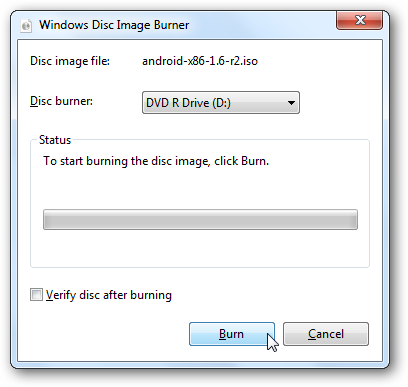
Using Android-x86 On Your Computer
Now you’re ready to run Android on your netbook, laptop, or even a full desktop computer. Simply reboot your computer with the USB drive, and select to boot from it. Not all computers will automatically boot from a USB device, so you may have to press F2, F10, or another key, depending on your computer, and change the Boot options in the bios.
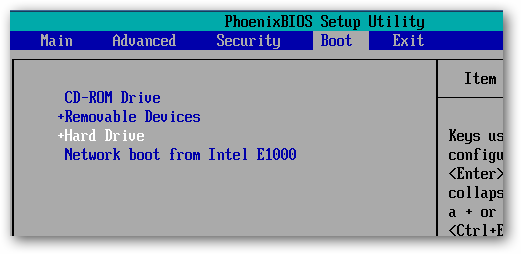
Now, when you boot from the USB drive, select Live CD – Run Android-x86 without installation.
![sshot-2010-07-21-[21-34-59]](http://www.howtogeek.com/wp-content/uploads/2010/07/sshot20100721213459.png)
You’ll see a text prompt for a few moments as Android begins to load.
![sshot-2010-07-21-[21-35-31]](http://www.howtogeek.com/wp-content/uploads/2010/07/sshot20100721213531.png)
Then you’ll see the Android boot screen, though we only saw it for a moment, as our computer booted really fast into Android.

After a couple seconds, you’ll see the Android desktop … on your netbook or computer! You can quickly access one of the apps on the home screen, or open the menu to see more options.

Click and hold to open a context menu, such as to change the background or add a desktop widget.
![sshot-2010-07-21-[21-52-49]](http://www.howtogeek.com/wp-content/uploads/2010/07/sshot20100721215249.png)
Or, press your mouse’s right button to open a menu, such as to open a new tab in the browser.

It works very good as a quick way to get online; the Android browser is actually quite capable for normal browsing, and worked very well in our tests. With a 10 second or less boot time, you may enjoy using this as an alternate to Puppy Linux or other light distros for a quick way to get online securely.
![sshot-2010-07-21-[21-52-13]](http://www.howtogeek.com/wp-content/uploads/2010/07/sshot20100721215213.png)
You can even install new applications with the included AndAppStore, though these will only be installed while this Android session is running. If you reboot your computer, you’ll only see the default applications and settings again.
![sshot-2010-07-21-[22-37-48]](http://www.howtogeek.com/wp-content/uploads/2010/07/sshot20100721223748.png)
Android x86 supports all of the hardware, including cameras and Wi-Fi, on several Netbooks and laptops; check the link below to see if yours is supported. In our test, our camera wasn’t supported, and we additionally had to connect to the internet via Ethernet since it didn’t detect our Wi-Fi card.
![sshot-2010-07-21-[22-38-13]](http://www.howtogeek.com/wp-content/uploads/2010/07/sshot20100721223813.png)
For the most part, Android was very responsive, but anything that would fade out the desktop such as opening a dialog box or a menu would run very slowly and even make the mouse feel jerky. Additionally, we couldn’t get it to boot on our desktop with an AMD processor. You could install Android to your hard drive, but we wouldn’t recommend it considering the limitations and issues it has. But, it is very fun to play with from a flash drive or memory card, and you may even feel adventurous enough to try installing it. Be warned, though; this isn’t for the weak of heart!
Conclusion
If you’re curious about how Android works and would like to try it out on a real machine, this is a great way to see how fast a mobile OS can be on a netbook or desktop. We wish it was more stable and could actually store programs and settings on the flash drive, but it did work as a nice substitute for Puppy Linux or other light, Live CD distros. It runs much faster on a real computer than in the emulator. Since you’re running it from a flash drive, you don’t have to worry about messing anything up, so go ahead and try it for research or fun.
Or, if you’d rather just try out Android from inside Windows, check out our articles on How to Test Drive Android in the Android Emulator and How to Enable the Android Market in the Emulator to try out the best Android has to offer.
Links
See if Your Netbook or Laptop is Fully Supported
| Similar Articles | Productive Geek Tips |
Three External (And Fast) USB 3.0 Drives Compared
 The first USB 3.0-based external hard drives aim at eliminating the USB 2.0 bottleneck (that hovered around 30 MB/s) with enough bandwidth to outperform the fastest mechanical disks. A-Data, Buffalo, and WD do battle for maximum performance.


Universal Serial Bus – Hard disk drive – Western Digital – Hardware – Storage
Ask the Readers: Star Trek – Kirk or Picard? [Poll]
The debate on who is or what makes one starship captain better than the other is pure classic geekness at its best. This week we want to know who you think is the better starship captain…Kirk or Picard.

Captain Kirk: A man of action who is not afraid to bend or break the rules and does not believe in the “no-win scenario”, James Kirk was the first student to ever defeat the Kobayashi Maru test at Starfleet Academy. He became Starfleet’s youngest captain when he received command of the Enterprise and is known for being rather possessive of the starship.
Captain Picard: He is well known for his fondness of detective stories, Shakespeare, and those ever present cups of Earl Grey tea. He holds to a high moral standard and excels at diplomacy, debate and military strategy. Captain Picard also pursues archeology as a hobby.
Let us know who you think the best starship captain is!
How-To Geek Polls require Javascript. Please Click Here to View the Poll.
| Similar Articles | Productive Geek Tips |
Use Ctrl+Shift+Click to Open Programs as Administrator in Windows 7 [Windows 7]

Windows 7: Everybody knows that you can right-click any application to launch it as administrator, but what you might not know is there’s an even quicker way you can trigger administrator mode. More »
Yorkton flood-damaged items draw thieves
RCMP say they have received dozens of calls about the theft of flood-damaged goods taken from yards since Yorkton was swamped three weeks ago.
NHL rejects Kovalchuk contract: reports
The National Hockey League has rejected Ilya Kovalchuk’s 17-year, $102-million US contract with the New Jersey Devils.
Researcher will enable hackers to take over millions of home routers

Cisco and company, you’ve got approximately seven days before a security researcher rains down exploits on your web-based home router parade. Seismic’s Craig Heffner claims he’s got a tool that can hack “millions” of gateways using a new spin on the age-old DNS rebinding vulnerability, and plans to release it into the wild at the Black Hat 2010 conference next week. He’s already tested his hack on thirty different models, of which more than half were vulnerable, including two versions of the ubiquitous Linksys WRT54G (pictured above) and devices running certain DD-WRT and OpenWRT Linux-based firmware. To combat the hack, the usual precautions apply — for the love of Mitnick, change your default password! — but Heffner believes the only real fix will come by prodding manufacturers into action. See a list of easily compromised routers at the more coverage link.
Researcher will enable hackers to take over millions of home routers originally appeared on Engadget on Wed, 21 Jul 2010 06:33:00 EDT. Please see our terms for use of feeds.
Permalink  Forbes, Ars Technica | Black Hat 2010 | Email this | Comments
ARM and TSMC team up for tinier 20nm Cortex SOCs
 It’s no secret that ARM ideas are powering much of the mobile revolution these days, but the company doesn’t print its own systems-on-a-chip, that duty gets outsourced to silicon foundries — like TSMC, who just got all buddy-buddy with the firm to transition future smartphone chips to the 28nm and obscenely tiny 20nm high-k metal gate processes. (We’re not sure what this means for GlobalFoundries, who had a similar deal earlier this year.) As per usual with a die size reduction, ARM chips will see higher speed and have decreased power consumption, but since 20nm is (relatively) unexplored territory it could be years before chips hit the market. PR after the break, or hit the more coverage link for further explanation by an ARM VP of Marketing.
Continue reading ARM and TSMC team up for tinier 20nm Cortex SOCs
ARM and TSMC team up for tinier 20nm Cortex SOCs originally appeared on Engadget on Wed, 21 Jul 2010 05:02:00 EDT. Please see our terms for use of feeds.
Permalink | | Email this | Comments
Regrowing body parts closer to reality
Scientists in Toronto are trying to crack the secrets of regeneration to trigger the human body to grow tissues and organs damaged by disease.
HP Slate 500’s Leaked Specs Confirmed On HP’s Own Site [Hp Slate]

Several of the HP Slate 500’s leaked specs have been confirmed today, including that it will run Windows 7 Premium, sports an 8.9-inch touch screen, has a 1.6 GHz processor and 1 GB of RAM, and that it has two cameras—video and still. New: it's Energy Star certified. Still unconfirmed: whether it's capacitive touch, what the graphics card is, and how it scores on battery life. [HP and Energy Star via Ubergizmo] More »
Apple Q3 2010 by the numbers: Record quarterly revenue tops $15.7 billion
By Joe Wilcox, Betanews
Today, Apple set the stage for a historical competitive upset: Exceeding Microsoft revenue during the same quarter. Cupertino, Calif.-based Apple’s quarterly earnings again blew past Wall Street consensus, which already were $1.55 billion to $1.75 billion higher than company guidance. Apple also exceed quarterly revenue consensus estimates for Microsoft, which announces fiscal 2010 results on Thursday. I first posted about Apple revenue exceeding Microsoft revenue in April and again in June, not once but twice.
After the bell, Apple reported $15.7 billion revenue and net profits of $3.25 billion, or $3.51 a share. A year earlier, Apple reported revenue of $9.73 billion and $1.83 billion net quarterly profit, or $2.01 per share. Revenue rose 61 percent year over year and earnings by 78 percent. Fiscal 2010 third quarter ended June 26, 2010. By the way, analyst revenue consensus for Microsoft is $15.27 billion.
Three months ago, Apple forecast revenue between $13 billion and $13.4 billion, with earnings per share ranging between $2.28 and $2.39. Analyst average estimates were much higher than Apple guidance: $14.75 billion revenue and $3.11 earnings per share. Apple blew past the Street. Again.
Apple exceeding Microsoft, should it happen this quarter, would be more symbolic victory — representing the shift from the PC era to the cloud-connected mobile device era. The reasons why are more substantive: iPad and iPhone. During fiscal third quarter, Apple opened up a completely new line of business that generated $2.17 billion in new revenue. Additionally, despite all the fuss over so-called “Death Grip,” Apple sold 3 million iPhone 4s during the quarter. Combined, iPad and iPhone accounted for nearly 48 percent of fiscal third quarter revenue.
For fiscal 2010 forth quarter, Apple forecasts $18 billion in revenue and $3.44 earnings per share. Apple’s guidance beats current analyst consensus for Microsoft revenue by more than $2 billion during the same quarter, which would be Microsoft’s fiscal 2011 first. Apple plans to defer about $175 million during the current quarter until fiscal 2011 Q1– related to free cases the company will offer to iPhone 4 owners.
In a statement, Apple CEO Steve Jobs said: “It was a phenomenal quarter that exceeded our expectations all around, including the most successful product launch in Apple’s history with iPhone 4. iPad is off to a terrific start, more people are buying Macs than ever before, and we have amazing new products still to come this year.”
Q3 2010 Revenue by Product
- Desktops: $1.3 billion, up 15 percent from $1.13 billion a year earlier.
- Portables: $3.1 billion, up 40 percent from $2.2 billion a year earlier.
- iPod: $1.55 billion, up 4 percent from $1.5 billion a year earlier.
- Music: $1.2 billion, up 27 percent from $958 million a year earlier.
- iPhone: $5.33 billion, up 74 percent from $3.06 billion a year earlier.
- iPad: $2.17 billion; no comparable — new product.
- Peripherals: $396 million, up 16 percent from $340 million a year earlier.
- Software & Services: $646 million, up 22 percent from $530 million a year earlier.
Apple’s gross margin was 39.5 percent, with the margin decline significantly less than guidance given 3 months ago. Apple ended the quarter with $45.8 billion in cash, up from $41.7 billion a quarter earlier.
Apple ended fiscal Q3 with normal inventory levels for Macs and iPod. However, iPad and iPhone supplies are seriously constrained, with Apple ending the quarter with a big backlog. “In the scheme of things, it’s a good problem to have,” Apple COO Tim Cook said during a conference call with financial analysts late this afternoon. “We’re selling everything we can make currently,” he later emphasized. “My phone is ringing off the hook for people that want more supply.”
iPhone. Apple shipped — what company executives really mean by sold — 8.4 million iPhones worldwide during fiscal third quarter. If not for inventory adjustments between new iPhone models, shipments would have been about 225,000 higher. That number does not include lost sales to the backlog.
A year earlier, Apple shipped 5.21 million iPhones. Apple shipments into the channel are usually several million units higher than numbers released by Gartner, which measures actual sales. However, the backlog means that shipments more closely equal sales. During the quarter, iPhone was available from 154 carriers in 88 countries. The average selling price for iPhone was about $595.
Wall Street analyst average estimate was 8.5 million units, with some analysts lowering estimates following Apple’s July 16 announcement of 3 million iPhone 4s sold. The smartphone is backordered between two to four weeks. Revenue rose 74 percent year over year, giving the biggest boost to Apple’s quarter. The smartphone and supporting services accounted for about 33 percent of total Apple revenue, down from 41 percent the previous quarter.
Q3 2010 Unit Shipments by Product
- Desktops: 1 million units, up 18 percent from 849,000 units a year earlier.
- Portables: 2.5 million units, up 41 percent from 1.75 million units a year earlier.
- iPod: 9.4 million units, down 8 percent from 10.2 million units a year earlier.
- iPhone: 8.4 million units, up 61 percent from 5.21 million units a year earlier.
- iPad: 3.27 million units; no comparable — new product.
Computers. Apple shipped 3.47 million Macs during the quarter, up from 2.6 million units a year earlier. Wall Street consensus ranged from about 2.7 million to 3.5 million units worldwide, with consensus around 3.2 million.
Last week, Gartner and IDC released preliminary second calendar quarter PC shipment data. In the United States, Apple shipped 1.75 million computers, for 24.7 percent year-over-year growth, according to Gartner. However, IDC put Apple shipments lower, at 1.62 million, with growth a much lower 15.4 percent.
Q3 2010 Revenue by Geography
- Americas: $6.3 billion, up 39 percent from $4.47 billion a year earlier.
- Europe: $4.16 billion, up 66 percent from $2.5 billion a year earlier.
- Japan: $910 million, up 63 percent from $560 million a year earlier.
- Asia Pacific: $1.83 billion, up 160 percent from $703 million a year earlier.
- Retail: $2.6 billion, up 73 percent from $1.5 billion a year earlier.
Apple ranked fourth in the United States, moving back up one place, with 9.8 percent market share, up from 9.1 percent a year earlier, according to Gartner. But IDC put Apple’s market share lower — 8.8 percent, up from 8.6 percent year over year. Just two years ago, Apple had risen to third place in US PC shipments. Gartner and IDC won’t tabulate Apple’s worldwide ranking until the final figures are released, and generally the information is not publicly available.
iPod. Apple shipped 9.4 million iPods during fiscal third quarter, down from 10.2 million a year earlier. Analyst consensus for Q3 was around 9.4 million units. While units declined, revenue rose 4 percent from a year earlier. ASPs declined about $7, in part because of a back-to-school promotion giving away iPod touch with new Macs.
Q3 2010 Unit Shipments by Geography
- Americas: 1.36 million units, up 18 percent from 1.15 million units a year earlier.
- Europe: 914,000 units, up 46 percent from 626,000 units a year earlier.
- Japan: 129,000 units, up 19 percent from 108,000 units a year earlier.
- Asia Pacific: 394,000 units, up 71 percent from 230,000 units a year earlier.
- Retail: 677,000 units, up 38 percent from 492,000 units a year earlier.
iPad. Apple shipped about 3.27 million iPads during the launch quarter. Analyst consensus was about 3 million units. The tablet was available in 10 countries, and the ASP was $640. About half of Fortune 100 companies are testing or deploying iPad, the company revealed during today’s conference call. The product added $2.17 billion new revenue.
Retail. Revenue rose 73 percent year over year, with Apple retail stores selling 677,000 units, compared to 492,000 a year earlier. Apple opened seven new stores in the quarter, for a total of 293 retail outlets worldwide. There was an average 288 stores open in the quarter, with average revenue of $9 million. Apple retail stores had 60.5 million visitors during the quarter up 27 percent year over year. Apple plans to open 24 new stores during fiscal Q4.
[Editor’s Note: This was a live document posted at 4:45 p.m. EDT and completed at 6:15 p.m. — following Apple’s quarterly earnings call.]
Copyright Betanews, Inc. 2010


Apple – IPhone – Steve Jobs – Wall Street – Microsoft