
In a strong argument for the existence of alternate realities, according to this purported 1987 Star Trek: The Next Generation casting sheet Wesley Snipes was once a front-runner to play Geordi La Forge. UPDATED: More »

Reality Bites
In a strong argument for the existence of alternate realities, according to this purported 1987 Star Trek: The Next Generation casting sheet Wesley Snipes was once a front-runner to play Geordi La Forge. UPDATED: More »
NORAD is downplaying an incident this week that saw two CF-18s shadow a pair of Russian military aircraft as they flew within 56 kilometres of Canadian soil.
 The wireless display revolution carries on with the Link Wireless A/V Extender announced today by Imation. Able to project HD video output from your computer to your high-def television or projector, the Link is fully compatible with both Windows XP or greater, and at least Mac OS 10.4.
Ricky Gervais and Stephen Merchant’s new UK series “An Idiot Abroad” has released its trailer. The show will…
Full story at The Live Feed
(Cross-posted from the Gmail Blog)
Gmail voice and video chat makes it easy to stay in touch with friends and family using your computer’s microphone and speakers. But until now, this required both people to be at their computers, signed into Gmail at the same time. Given that most of us don’t spend all day in front of our computers, we thought, “wouldn’t it be nice if you could call people directly on their phones?”
Starting today, you can call any phone right from Gmail.
Calls to the U.S. and Canada will be free for at least the rest of the year and calls to other countries will be billed at our very low rates. We worked hard to make these rates really cheap (see comparison table) with calls to the U.K., France, Germany, China, Japan—and many more countries—for as little as $0.02 per minute.
Dialing a phone number works just like a normal phone. Just click “Call phone” at the top of your chat list and dial a number or enter a contact’s name.

We’ve been testing this feature internally and have found it to be useful in a lot of situations, ranging from making a quick call to a restaurant, to placing a call when you’re in an area with bad reception.
If you have a Google Voice phone number, calls made from Gmail will display this number as the outbound caller ID. And if you decide to, you can receive calls made to this number right inside Gmail (see instructions).
We’re rolling out this feature to U.S. based Gmail users over the next few days, so you’ll be ready to get started once “Call Phones” shows up in your chat list (you will need to install the voice and video plug-in if you haven’t already). If you’re not a U.S. based user—or if you’re using Google Apps for your school or business—then you won’t see it quite yet. We’re working on making this available more broadly—so stay tuned!
For more information, visit gmail.com/call.
Update Aug 26: This has now been rolled out to everyone in the U.S. If you don’t see the feature yet, try logging out of Gmail and signing back in.
Posted by Robin Schriebman, Software Engineer


Now approaching its third year online, Adobe’s Web-based photo editing suite Photoshop Express underwent a significant redesign which launched Wednesday. Adobe Photoshop Express Editor, Organizer, and Uploader are included in the refresh.
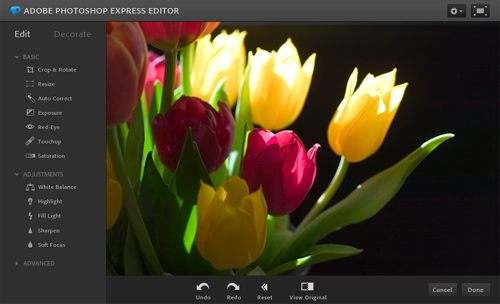
Firstly, a Photoshop.com account is no longer needed to use Photoshop Express Editor. Users can simply navigate to the Web app, upload photos directly from their local drive, edit and change the photos, and then save them back on their local storage. Previously, an account was necessary, and photos were uploaded to online storage first before they were edited. This is still an option, as Photoshop.com members can still store and share photos online as well as create albums, but it’s no longer the only way to use the Editor.
Secondly, the Photoshop Express Uploader client application has been streamlined to make the desktop experience a bit more like the experience in Photoshop Elements, or in the Photoshop Express app for iOS and Android. The Uploader handles JPEG, PSD, and various RAW format files and automatically syncs them with a Photoshop.com account.
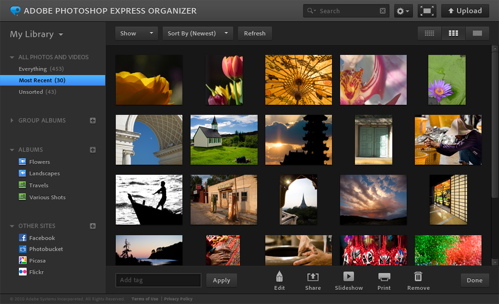
Finally, Photoshop Express Organizer and personal galleries have a new layout and design, which Adobe says are the result of user requests. Now, photo descriptions and comments are more visible, and images can be shared on standalone pages with more comprehensive EXIF data and the ability to leaf through pictures in “filmstrip mode.”
“All of our customers, from high-end professionals to more casual photo enthusiasts, want to do more with their digital photos on the web and on different devices,” said Matt Domenici, director of product
management for online and mobile digital imaging at Adobe. “We’ve redesigned our Photoshop Express online apps to make it easier and faster to work with photos online and then share them broadly.”
Copyright Betanews, Inc. 2010


photoshop.com – Adobe Systems – Adobe Photoshop – Image editing – Graphics

Microsoft’s gotten a little carried away with its Internet Explorer 9 excitement and posted an early screenshot of the browser up on its Russian site. The post and the image have since been diligently pulled, but not before Mary-Jo Foley managed to snag the pictorial evidence. What’s new to see? A resoundingly minimal interface, that’s what. The Chrome comparisons should be raining down thick and heavy if this snapshot is anything to go by, as Microsoft has done a fine job of ridding its browser from pesky menus, consolidated its controls into a few icons in the top right, and combined the search and address bars into one. Of course, given the earlier leak of screenshots, those menus could still just be hiding somewhere nearby, ready to spring at us. Another similarity to Chrome (and Firefox and Safari) is the new ability to “tear off” tabs from one window and reposition them independently. We’ll see how closely the Beta aligns to what we see here when it debuts for real on September. 15.
Internet Explorer 9 makes cameo appearance on Microsoft Russia site originally appeared on Engadget on Wed, 25 Aug 2010 11:35:00 EDT. Please see our terms for use of feeds.
Permalink |  ZDNet | Email this | Comments

Windows/Linux (with Chrome): By default, Google Chrome exits the entire program when you’ve closed the last tab. Chrome extension Last Tab Standing prevents this from happening by opening an empty new tab page when you close your last tab. More »

Qilroy
Qilroy (pronounced as in ‘Kilroy was here’) allows you to start and join social networking conversations anywhere in the world.
To start using Qilroy simply type in a location (or let Qilroy discover it for you). You will then be presented with a stream of Twitter and Facebook messages from your location. You can join in any of the conversations by signing in with your Twitter account, your facebook account or a Qilroy account.
As well as the real-time stream of the latest messages you can view nearby messages on a Google Map. Using the map you can zoom into a location and view the latest messages posted from people at that location.
________________


Tech news site CNET reports that Google is testing voice calling directly inside Gmail, with free calls to the U.S. and Canada and very cheap international calls. Google hasn’t confirmed anything, but CNET’s screenshots (like the one above) look pretty convincing. The article also says its unclear whether the new feature would act as an extension of Google Voice (the popular one-number-to-rule-them-all service) or as a completely separate entity. The meaty part: More »
An official announcement from Mozilla has yet to make its way to the official beta site, but we can report that Mozilla have selected the 3rd build candidate as beta 4.
There will be one final beta version in September, before Mozilla signs off on Firefox 4 which is scheduled to…
The Virtual Autopsy Table from NorrköpingsVisualiseringscenter on Vimeo.
A consortium of Swedish tech and medical interests have banded together to develop a Virtual Autopsy Table. It’s a large touch-screen table that can utilize data from CT and MRI scans to allow doctors investigate all your hidden inside nook and crannies, scalpel-free.
The multi-touch interface allows doctors or researchers to virtually peel away various layers of body tissue as they digitally spelunk into the patient’s body. Of course, “Autopsy” is just one of the potential uses of the technology which will also aid in pre-surgical planning, examination, and educational uses.

Before the end of the year, three 3DTVs from Toshiba not requiring cumbersome glasses to get the full effects are expected, after using something similar to Sharp’s parallax barrier tech, as seen in the Nintendo 3DS. More »

Recognize those bits and bobs? By now you should. It’s Samsung’s upcoming Galaxy Tab and it’s on the loose right now in China with ifanr to thank for this round of pics. Better yet, in addition to images that would seem to confirm Android 2.2 and a GT-P1000 model number, the site has also passed along the tipster’s own impressions. First off, and this should be no surprise to anyone who’s ever owned a Samsung product (eh hem, Galaxy S), the Galaxy Tab is very plasticky and much lighter than the iPad. Ifanr‘s tipster also confirms a 1,024 x 600 pixel resolution packed into that 7-inch display on a device that’s much thicker than the Dell Streak. Other “confirmed” specs are a 3.2 megapixel camera, 3G network, and built-in “ebook” app that’s supposedly one of the best the tipster’s ever used on an Android device. Of course, while this aligns with specs we heard about earlier, this device looks to be very much a prototype (where’s the silver ring around the bezel) so don’t take this as the final word on the matter, ok? One more image after the break.
Continue reading Samsung Galaxy Tab P1000 gets wild with Android 2.2
Samsung Galaxy Tab P1000 gets wild with Android 2.2 originally appeared on Engadget on Tue, 24 Aug 2010 04:34:00 EDT. Please see our terms for use of feeds.
If you’ve ever accidentally triggered a system shutdown and then suddenly changed your mind, here’s the simple trick to tell Windows to abort the shutdown and let you get back to goofing off.
Note: This isn’t a new trick to most serious geeks, but it’s something useful that quite a few people don’t know.
So there you are, minding your own business and wasting time on Facebook, when Windows pops up a message telling you that you need to reboot right now… and you accidentally choose Restart now.

While you’re learning new stuff, you should check out our article on how to Prevent Windows Update from Forcibly Rebooting Your Computer, to make sure that Windows doesn’t automatically restart on you while you’re away from your keyboard.
To prevent Windows from shutting down on you, just type in shutdown /a into the Start menu search box, and then use the Ctrl+Shift+Enter shortcut key combination to run the command as administrator—of course, if you’ve already disabled UAC you can just hit the Enter key.

If you already have an Administrator mode command prompt window open, you can just type it into there instead, if Windows hasn’t closed it already.

There you go. You’ve learned something new—or maybe you already knew it already, in which case I’m not sure why you are reading this line.


Now that’s a handy magic trick: Observe! This lot, empty but for the world’s largest augmented reality marker. Astonish! As a towering skyscraper flickers to life in its place. Wonder! At just how big a camera they must have needed. More »
Adding science to years of anecdotal claims, scientists find that dieters who drink two cups of water before meals lose more weight.

Alex Shane lives on a sailboat. One night he noticed his faucet running. No big deal for landlubbers. But boaters have to pump in every gallon of fresh H20 themselves, so wasting water is unacceptable. More »
The classic time-travel action/adventure trilogy is headed to home theaters this fall!

Man, you just can’t hide your gadgets from curious onlookers these days. Case in point: Samsung’s Galaxy Tab was innocently doing some testing rounds through Sydney recently, only to be happened upon by the Electronista scribes, who diligently videotaped it — seemingly without the knowledge of the tablet’s possessor. The video confirms what we already know, it’s a 7-inch tablet, it’ll be driven by an Android, and it looks very much like a giant cellphone. The Samsung employee described it as “awesome” and very different from the iPad’s experience, while the UI apparently looked very responsive. Go after the break to see for yourself.
Continue reading Samsung’s 7-inch Galaxy Tab gets spied in the wild (video)
Samsung’s 7-inch Galaxy Tab gets spied in the wild (video) originally appeared on Engadget on Mon, 23 Aug 2010 10:31:00 EDT. Please see our terms for use of feeds.
