Skip to content

.::REALITYRECALL::.

Reality Bites

  • Home
  • About
  • Contact
  • App Inventor for Android

    App Inventor is a new tool in Google Labs that makes it easy for anyone—programmers and non-programmers, professionals and students—to create mobile applications for Android-powered devices. And today, we’re extending invitations to the general public.

    For many people, their mobile phone—and access to the Internet—is always within reach. App Inventor for Android gives everyone, regardless of programming experience, the opportunity to control and reshape their communication experience. We’ve observed people take pride in becoming creators of mobile technology and not just consumers of it.

    For the past year, we’ve been testing App Inventor in classrooms around the United States, and we’ve found that it opens up the world of computer programming to students in new and powerful ways. David Wolber, professor of computer science at the University of San Francisco and part of the initial pilot program, says “students traditionally intimidated by technology are motivated and excited to program with App Inventor.” One student from Professor Wolber’s class told us: “I used to think that no one could program except CS people. Now, I’ve made dozens of applications for the Android phone!” Another student, who struggles with dyslexia, was inspired by App Inventor to take more computer science classes and is now learning Python. Check out this video to hear more about App Inventor for Android at University of San Francisco.

    Visit our site to learn more about App Inventor and see sample apps. To request an invitation, fill out this form and you’ll soon be on your way to building mobile applications. And check out the video below to see how it works. We can’t wait to see what you create!

    Posted by Mark Friedman, Google Engineer

    July 12, 2010
  • Windows 7-based HP Slate referenced at WPC 2010, Ballmer says ‘hardcore’ tablet push coming

    Is this the answer to the question we posed back in mid-June? Maybe. While we’re still unsure if Hewlett-Packard has a webOS-based tablet in its pipeline, those on-again / off-again Windows 7 rumors may finally be nearing an end. On the homepage of this year’s Microsoft Worldwide Partner Conference — which kicks off in earnest today in Washington, D.C. — there’s a pane of Windows 7 slates that are on deck for this year. Er, a pane with vendors promising Win7 slates this year. Sure enough, HP’s logo is front and center, right alongside the likes of Sony, Dell, ASUS, Panasonic, Onkyo, Toshiba, MSI, Samsung, Lenovo and Fujitsu. We’ll be keeping an ear to the ground for more, but for now, feel free to let your imaginations run wild. It’s Monday, after all.

    Update: During the event’s opening keynote, which was headed by none other than Microsoft CEO Steve Ballmer, the bigwig confirmed some of what’s pictured above: Windows 7 slates will be arriving this year. Interestingly, he never mentioned HP by name (despite teasing us gently at CES with an apparent mystery device), but he did note that devices would be available at various price points and in a variety of form factors — “with keyboards, touch only, dockable, able to handle digital ink, etc.” We already knew as much from being overwhelmed by prototypes at Computex, but it’s good to get the word straight from Ballmer himself. Now, to see if anyone’s actually interested in buying a desktop OS on a mobile form factor…

    Update 2: Seems Ballmer’s drinking his own Kool-Aid in a serious way, and not just on the tablet front. He noted that Microsoft will be giving consumers “a set of Windows-based devices that people will be proud to carry at home and will fit the kinds of scenarios enterprise IT’s trying to make happen with the phone form factor,” and that Microsoft would be “working vigorously” to “drive enterprise IT and consumers.” Furthermore, Steve affirmed that the tablet sector is “terribly important” for his company, and that it’s “hardcore about this.” He didn’t shy away from calling the range of Windows 7-based tablets coming out “over the next several months” ones that would be “quite impressive,” but honestly — what else would you expect him to say?

    Windows 7-based HP Slate referenced at WPC 2010, Ballmer says ‘hardcore’ tablet push coming originally appeared on Engadget on Mon, 12 Jul 2010 09:51:00 EDT. Please see our terms for use of feeds.

    Permalink Twitter [simchabe]  |  sourceWPC 2010  | Email this | Comments

    July 12, 2010
  • Sync Your Google Chrome Bookmarks, Theme, and More

    Do you regularly use Google Chrome on multiple computers?  Here’s how you can keep almost everything in your browser synced easily in Google Chrome.

    Google Chrome offers a very simple way to keep your bookmarks, settings, theme, and more synced between different computers running Chrome.  This can help you keep the same browsing experience on your desktop, laptop, and work computer, or even between your Windows, Linux, or Mac OS machines.  All you need is a Google account, such as your Gmail, and the Chrome browser installed on multiple computers.  Here’s how to set it up.

    Setup Sync in Google Chrome

    To get started, click the wrench button in Chrome and click Set up sync.

    sshot-2010-07-05-[23-58-03]

    Alternately, click Options, and then select the Personal Stuff tab in the Options window, and the select Set up sync.  Note that this is the only way to open it in the new Chrome 6 dev release.

    sshot-2010-07-06-[00-00-15]

    Now, enter your Google account and password in the popup, and click Sign in.

    sshot-2010-07-05-[23-58-25]

    After a few moments, you’ll see a confirmation that your browser is now synced with the cloud.  Now, if you want to have your bookmarks and more sync with Chrome on another computer, repeat the above steps on that computer, and the bookmarks and theme from the first computer will be merged with Chrome on the second.  You can sync as many computers as you like this way.

    sshot-2010-07-05-[23-58-49]

    Change Sync Settings

    If you’d rather only sync some things from Chrome, such as your Bookmarks, click the Synced entry in wrench menu or open the Options dialog as above.

    sshot-2010-07-06-[00-01-27]

    Click the Customize button to choose your settings.

    sshot-2010-07-05-[23-59-19]

    If you’re running the default release version of Chrome, you can currently choose to sync your Bookmarks, Preferences, and Themes.  Uncheck any items you don’t want to sync, and then click Ok.

    sshot-2010-07-05-[23-58-33]

    If you’re running the Chrome 6 dev version, you’ll have more synchronization options, including the ability to sync form data and extensions.  You can switch to the dev version of Chrome if you like; check out our tutorial on Switching Between Release, Beta, and Dev versions of Chrome.

    image

    If you’ve chosen to sync themes, Chrome will inform you when a new theme is installed via sync.  If you don’t want to keep the synced theme, click Undo to revert to your default or previous theme.

    sshot-2010-07-05-[15-50-19]

    Turn Off Chrome Syncing

    If you want to stop Chrome from syncing with your other browsers, open the Options tab as before and select

    sshot-2010-07-06-[00-24-14]

    Click the Stop syncing button on the popup, and now Chrome will stop updating your changes with the cloud.  Note that you will need to turn of syncing on all computers you’ve setup to sync.

    sshot-2010-07-05-[23-59-30]

    Access Your Chrome Bookmarks From Any Browser

    Syncing your bookmarks and more keeps your browsing experience consistent across your computers and operating systems.  But, what if you’re browsing from a friend’s computer or a public computer?  Actually, Chrome syncing will still help you stay productive.

    When Chrome syncs your bookmarks between browsers, it also saves them to your Google Docs account.  Once you’ve setup bookmark syncing in Chrome, login to your Google Docs account.  Select the Google Chrome folder to see your bookmarks.

    sshot-2010-07-05-[22-49-00]

    Now you can browse your bookmarks and even organize them by folders.  If you wish to open a bookmark, simply click the

    image

    Sometimes, Google Docs doesn’t seem to redirect to the bookmark correctly.  If you receive a 404 error, go back to Google Docs and right-click on the bookmark you want to open.  Click Show Details to see the actual address.

    image

    You can preview the page in the Details page from Google Docs, or click Open to open the site directly.

    image

    Or, if you’d like to download all of your bookmarks, select the folder, click More actions, and select Export.

    image

    Click the download link in the box, and Google Docs will save all your bookmarks in an HTML file and let you download it as a zip file.  Once it’s downloaded, you can unzip the HTML file and then look at your bookmarks or import them into another browser.

    image

    Conclusion

    Whether you regularly use Chrome on multiple computers or on multiple OSs installed on the same computer, Chrome Sync makes it easy to keep your browsing experience consistent everywhere.  Since you can also access your synced Chrome bookmarks anywhere with Google Docs, it’s a great idea to sync your bookmarks even if you only use Chrome on one computer.  We’d love to see tabs sync so we could open tabs on one computer and continue using them on another, but perhaps we’ll get this later in a future release.

    Links

    Download Google Chrome

    Access Your Google Docs Account

    Got an opinion to share? Click here to join the discussion

    Similar Articles Productive Geek Tips
    • Enable Vista Black Style Theme for Google Chrome in XP
    • Get Easy Access to Your Google Bookmarks in Chrome
    • Access Your Bookmarks with a Toolbar Button in Google Chrome
    • Reduce Bookmarks in Chrome to Toolbar Icons
    • Find Similar Websites in Google Chrome
    • Script Suggestion: Turn Off Music If Inactive 5 Minutes
    • TouchFreeze Alternative in AutoHotkey
    • The Icy Undertow Desktop
    • Windows Home Server – Backup to LAN
    • Use This Bookmarklet to Easily Get Albums
    • Use AutoHotkey to Assign a Hotkey to a Specific Window
    Latest Software Reviews Tinyhacker Random Tips
    • Acronis Disk Director 11 Home
    • HippoRemote Pro 2.2
    • Xobni Plus for Outlook
    • All My Movies 5.9
    • Automate Downloads from Rapidshare, MegaUpload, etc with MDownloader
    • Enhance Windows 7 with Preme
    • How to Fix the Windows 7/Vista Startup
    • Add “Up to Parent Folder” button in Windows Explorer
    • ‘The Illinois’
    • Text to Voice Adds Speech to Highlighted Text (Firefox)


    July 12, 2010
  • Sask. farmers’ woes won’t spike prices: prof

    The massive Prairie flooding in late spring and early summer won’t be felt in the world’s food supply, a Saskatchewan agriculture expert predicted.

    July 11, 2010
  • Canada Day Flood in Yorkton, SK (Video 5)

    July 11, 2010
  • Canada Day Flood in Yorkton, SK (Video 4)

    July 11, 2010
  • Canada Day Flood in Yorkton, SK (Video 3)

    July 10, 2010
  • Google Quietly Invests Over $100 Million in Zynga, Readying Google Games [Google]


    Click here to read Google Quietly Invests Over $100 Million in Zynga, Readying Google Games

    Whoa. TechCrunch reports that Google has invested between $100 and $200 million in Zynga, the social gaming behemoth behind Farmville, Mafia Wars, and others, in preparation for the launch of Google Games later this year. More »


    Google – Zynga – Searching – Search Engines – Mafia Wars

    July 10, 2010
  • Canada Day Flood in Yorkton, SK (Video 2)

    July 10, 2010
  • RIM’s Blackberry Tablet might be seven inches, feature dual cameras and 1GHz CPU?

    The rumor mill’s been churning out quite the picture of RIM's Blackberry tablet over the past several months, and it's a research analyst who's most recently picked up the brush — Ashok Kumar of Rodman & Renshaw, to be precise, who anticipates a 7-inch touchscreen device with a 1GHz processor, plus front- and back-facing cameras for video chat. Since that's a good 1.9 inches smaller than the slate rumored a couple months back, this latest spiel fills us with doubt… but hey, it’s not like we had confirmation that RIM was even producing such a device, anyhow. It may be a while before we find out for sure, as Kumar told investors that even should the company succeed in an attempt to move up the schedule, the device still wouldn’t launch until the end of the year.

    RIM’s Blackberry Tablet might be seven inches, feature dual cameras and 1GHz CPU? originally appeared on Engadget on Sat, 10 Jul 2010 17:27:00 EDT. Please see our terms for use of feeds.

    Permalink MobileBurn  |  sourceCNET  | Email this | Comments

    July 10, 2010
  • Canada Day Flood in Yorkton, SK (Video 1)

    July 10, 2010
  • Blazing UFO Causes Chinese Airport Closure [Ufo]


    Click here to read Blazing UFO Causes Chinese Airport Closure

    I’m not saying there were aliens flying whatever buzzed Hangzhou airspace earlier today. But there’s no question that it was an object, that it was flying, and that it’s as yet unidentified. And yet it looks awfully familiar up close: More »


    UFO – Paranormal – Organizations – United States – Directories

    July 9, 2010
  • Canada churns out 93,000 new jobs

    Canada’s economy added an astounding 93,000 jobs in June, pushing the unemployment rate below eight per cent and taking overall employment to within 14,000 jobs of pre-recession levels.

    July 9, 2010
  • YouTube moves solidly into the future by supporting 4K content

    It’s funny — we remember the day that YouTube began supporting plain ole HD like it was yesterday, and we’re guessing today will hang in our memory banks for quite awhile, too. Over at the VidCon 2010 conference, YouTube officially announced support for videos shot in 4K (a reference resolution of 4096 x 3072), which means that the famed online clip portal now supports “resolutions from 360p to 4,096p” (their words, not ours). Granted, only a handful of humans even have access to a 4K camcorder, and 4K projectors aren’t exactly simple to find (or afford), but we couldn’t be happier to see YT staying way ahead of the curve here. If you’re up for putting a severe strain on your broadband connection (and just pretend that your monitor can actually support a legit 4K feed), feel free to hit that first source link and attempt to watch any of those videos at their “Original” resolution. Godspeed.

    [Thanks to everyone who sent this in]

    YouTube moves solidly into the future by supporting 4K content originally appeared on Engadget on Fri, 09 Jul 2010 18:04:00 EDT. Please see our terms for use of feeds.

    Permalink   |  sourceYouTube, YouTube Blog  | Email this | Comments

    July 9, 2010
  • Olympics cost B.C. $925M

    The 2010 Winter Olympic Games cost the B.C. government $925 million to stage and host, according to the latest figures released on Friday, but the tally does not include billions in additional costs associated with the Games.

    July 9, 2010
  • PlayStation Blu-ray 3D update arrives in September; 3D photo, PlayTV and YouTube support to follow

    Just in case you weren’t really sure how deep into this 3DTV thing Sony is, senior director of Sony Europe Mick Hocking announced the PS3’s update for Blu-ray 3D movie playback will be released in September — but it won’t stop there. Expect future firmware upgrades that give the PS3 3D rendering for photos (.mpo files), any broadcasts it can pick up on PlayTV, and even YouTube videos. Not running out the door to buy one yet? CVG reports the rest of the presentation was devoted to extolling the virtues of 3D to hardcore gamers in racing games, God of War, or LittleBigPlanet. Demos so far haven’t completely convinced us the PS3 is capable of rendering games in high enough resolution to satisfy, but if Fat Princess 2 features a good 3D implementation, someone hide our credit cards, please.

    Filed under: Gaming, Home Entertainment

    PlayStation Blu-ray 3D update arrives in September; 3D photo, PlayTV and YouTube support to follow originally appeared on Engadget on Fri, 09 Jul 2010 16:26:00 EDT. Please see our terms for use of feeds.

    Permalink   |  sourceCVG  | Email this | Comments

    July 9, 2010
  • After five years, 64-bit editions of Windows make up nearly half of install base

    By Tim Conneally, Betanews

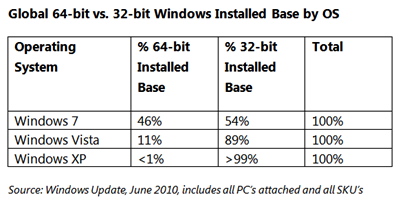
    64-bit editions of Windows have been available to OEMs and consumers for five years, and they have finally begun to exhibit command over the PC market, Microsoft reported today.

    64-bit Windows install base June 2010

    By June 2010, 46% of all PCs running Windows 7 were running the 64-bit edition. Three and a half years after Windows Vista launched, only 11% of users have installed the 64-bit version, considerably fewer than Microsoft claimed in 2008 when product manager Chris Flores told us “20% of new Windows Vista PCs in the U.S. connecting to the Windows Update were 64-bit…”

    Irrespective of Vista’s performance, Microsoft evangelist Chris LeBlanc says there are certain factors contributing to the growth of 64-bit editions right now.

    First, the cost of memory has dropped significantly in the last five years, a majority of processors are 64-bit enabled, and more compatible hardware and software is available today. Secondly, companies such as Intel are upgrading their internal systems to the 64-bit architecture.

    Gartner predicted last year that as much as 75% of all enterprise PCs will be running 64-bit editions of Windows by 2014.

    “On the surface, it would appear that the most obvious time to perform a move from 32-bit to 64-bit would be during an operating system migration (such as from Windows XP to Windows 7). Many companies feel that, if they don’t make the move now, they may have to wait until Windows 8 or potentially Windows 9 before another opportunity arises,” Gartner’s research said.

    Copyright Betanews, Inc. 2010


    Add to digg
    Add to Google
    Add to Slashdot
    Add to Twitter
    Add to del.icio.us
    Add to Facebook
    Add to Technorati


    Windows Vista – Microsoft – Operating system – Microsoft Windows – Windows XP

    July 9, 2010
  • Ad-Aware Adds Antivirus, Scheduled Scans to Free Version [Updates]


    Click here to read Ad-Aware Adds Antivirus, Scheduled Scans to Free Version

    Windows only: After fading from the spotlight a bit, spyware removal tool Ad-Aware keeps rolling out improvements like faster scans and Outlook integration. Now, they’ve also added the long-awaited virus scanning and automatic scheduler to the free version. More »


    Ad-Aware – Security – Malicious Software – Detection and Removal Tools – Windows

    July 9, 2010
  • AIDS vaccine hunt turns ‘exciting’: scientist

    Researchers have discovered two powerful antibodies that neutralize most known strains of the AIDS virus in laboratory testing.

    July 9, 2010
  • Apple’s iPhone 4 antenna bug may not be fixable

    Although it promised that a firmware update would solve the so-called "grip of death," Apple has now admitted that the solution is not so simple, and in fact may not even be possible.

    read more

    July 9, 2010
←Previous Page
1 … 639 640 641 642 643 … 728
Next Page→

.::REALITYRECALL::.

Reality Bites

Twenty Twenty-Five

Designed with WordPress