Touchscreen HP Pavilion dv3 leaks out, brings dm1 ultraportable and Core i7 dv8 along for the ride

Well, well, what’s this? We were just sent what looks like a rough draft of HP’s Winter 2009/2010 consumer catalog, and it’s got details on three as-yet-announced machines. The most interesting is the Pavilion dv3 with TouchSmart, which has a 13.3-inch touchscreen, but there’s also confirmation of that previously-leaked Pavilion dm1 11.6-inch CULV thin-and-light and the monster Pavilion dv8 with an 18.4-inch screen and a new mobile Core i7 processor. That’s a pretty strong lineup to back the new Envys, we’d say — and for whatever reason, we’re fascinated by this new trend of sticking touchscreens on regular laptops. We’ll see if the dv3’s TouchSmart 3.0 build is any more usable or sensible than Lenovo’s take on the idea soon enough, we hope — for now, check out the whole catalog in the gallery.

[Via Engadget Spanish; thanks, Marc]

Filed under:

Touchscreen HP Pavilion dv3 leaks out, brings dm1 ultraportable and Core i7 dv8 along for the ride originally appeared on Engadget on Mon, 28 Sep 2009 23:26:00 EST. Please see our terms for use of feeds.

Permalink | Email this | Comments

Archos 9 confirmed for October 22nd with $499 price tag

We heard the Archos 9 tablet was due alongside Windows 7, but just in case you were worried that preposition would be stretched to the limits of its definition, the company made clear at IDF that October 22nd was the target, making it day and date with Microsoft’s latest OS. As for US price, it’s a better-than-expected (at least as far as UK currency conversions go) $499 for the ultra-thin tablet. Mark your calendars accordingly, the diehards in the audience have less than a month to prepare their bank accounts. Now if only Archos would do something about that maladjusted resistive touchscreen

[Thanks, Anthony]

Filed under:

Archos 9 confirmed for October 22nd with $499 price tag originally appeared on Engadget on Mon, 28 Sep 2009 19:11:00 EST. Please see our terms for use of feeds.

Read | Permalink | Email this | Comments

Car Review: Ford Taurus Makes High-Tech Affordable

10Taurus_90.jpg

The 2010 Ford Taurus gives you many of the high-technology pieces of a full-size $75,000 European or Japanese luxury sedan for half the price. For about $40,000, you can drive a big, comfortable highway cruiser with active cruise control, blind spot detection, rear cross traffic alert, butt-massinging seats, the excellent Sync Bluetooth and music control system, and free Mayday calling. What you don’t get is BMW-crisp handling on back roads, or Lexus-perfect fit and finish in the cockpit. In a week driving the Taurus, I found it poised on long trips and got mileage in the upper 20s.

The 2010 Ford Taurus is a slab-sided, high shouldered vehicle with a fussy front grille measuring 203 inches long (the photo above is about the best angle possible), a bit longer even than a Cadillac Escalade. This is the sixth generation, the previous one being the short-lived 2008-09 model called the Ford Five Hundred (the name was based on Ford's sales expectations). This is a vastly better car than the Five Hundred in every way except that the back seat is now slightly less spacious, since the roof was lowered two inches and the rear seat was also lowered two inches.

High Tech, Moderate Prices
Much of the technology Ford has developed or licensed this decade is on the Ford Taurus. Some you can’t see, such as high-strength steel for better crash protection and even more effective sound insulation. Here are other key pieces of technology:

Adaptive cruise control with collision alert. This $1,195 option developed in conjunction with Delphi paces the car ahead of you, speeding and slowing as it does, but never exceeding a pre-set speed. There are only two downsides compared to ACC on other cars costing $2,000-$2,800: Some not all high-priced ACC cars use two radars, one for low speeds and short range, that lets the car go all the way to zero and then back up to speed. The Ford active cruise control  stops at 20 mph (Ford earlier said 35 mph, but I found it works down into the teens). Also, the ACC active and radar lock indicators are small and buried in an instrument panel that is hard to read in daylight. If a car ahead decelerates faster than ACC probably can handle, a 14-LED panel flashes a collision alert, which translates to meant that you usually can avoid a collision by braking hard.

Blind spot detection. Ford calls it Blind Spot Information System (BLIS) with Cross Traffic Alert. As with other systems, if a car comes up in your blind spot, an indicator flashes in the outside mirror, more vigorously if your turn signal is on (suggesting you're about to change lanes). CTA uses the same sensors to look for oncoming traffic when you're backing out of a parking lot; a loud alert sounds if it sense cross traffic.  Ford BLIS offered no audible alert (their being annoying but hard to ignore) or a steering wheel shaker (not annoying to most people, equally hard to ignore). It's only part of a package where it adds an estimated $400-$500 in cost.

Fillerless gas cap. A self-sealing flap inside the filler neck (that is pushed aside by the gas nozzle) and a rubber gasket around the filler door eliminate the need for a screw-off gas cap. This sounds minor. It is. Until you drive away and leave (left) the gas cap on the roof, or failed to secure tightly. Without a fully sealed gas cap, the check engine light comes on and the car runs poor.

Navigation. Ford’s $1,995 navigation system sourced from Xanavi includes voice input (of course), traffic information, weather, sports scores, ski conditions, gas prices, and movie listings. The navigation part works quite well, with one exception: The system is slow to update, so if there are quick turns one after the other, the display doesn’t keep up. Before the first turn, memorize the next one as well. If you don’t order navigation, Sync provides a rudimentary navigation feature of just text prompts and voice commands: better than nothing when you don’t know where you’re headed. The display does a good job integrating multiple bits of information on one screen (map, audio settings, entertainment information) though the Xanavi systems on Nissan and Infiniti do it better still. And some views gave you the music source and satellite channel but not the name of the song being played. There’s a nice split screen view that gives you most a map, plus smaller screens for audio and climate control.

Multi-contour active motion seats. One of the options packages provides ventilated as well as heated front seats, which is a blessing on warm days (no matter how good the air conditioning), and I’ve also found it an effective tool to help your overall comfort and alertness on long drives. More exciting is the active seat feature, which you don’t see on many cars outside the high-end luxury category. Ford calls it Multi-Contour Seats with Active Motion and charges just $595; BMW has a similar feature, driver side only, on its awesome BMW 750Li. It massages your thighs while you drive, which eliminates the frozen butt syndrome when you drive too long without stretching.

Ford Sync. It's standard on the two upper models, Limited and SHO, and includes an evolving list of Sync features: handsfree Bluetooth phone calling, USB access to iPods and other music devices, voice control (which continues to improve), and now 911 Assist, which calls for help (no monthly charge) in a crash if your Bluetooth phone is connected and survives the accident. As I've used more Sync cars and as Ford has improved  Sync, the continuous speech commands work quite well. Say, "Play Artist Kings of Leon," and Sync knows what to do.

My Key. My Key lets you program a key given to teens to restrict the top speed, limit the radio volume, and set speed-warming chimes. It also limits access to the radio until after seat belts are buckled.

Not every Ford innovation is on the 2010 Taurus. Of particularly interest to urban dwellers is Active Park Assist, which lets you drive slowly down a city street. Press a button on the console and the car sense for and alerts you when it passes a space big enough to get into. You pull up ahead of the spot, put the car in reverse, put your foot on the gas, and the sensors and Ford’s electric power steering do the rest. It debuts on the Lincoln MKT and MKS.

Driving Impressions vs. a $110,000 BMW
The week before I drove the Ford Taurus, I drove a BMW 750Li that was chock full of options, cost a bit over $110,000, and is probably the world’s best car, certainly the best when it comes to having the most technology. Ford comes up short in three areas: handling on twisty country roads, the quality of the instrument panel and switchgear, and the seats. Nobody’s going to knock off BMW on ride comfort with a $30,000 car, especially on back roads, and when you stepped on the throttle, the BMW leaped forward, supremely poised, while the Ford lurched ever so slightly sideways at first, owing to so much power on the front as well as rear wheels. (On a front-drive car, this is called torque steer, and I felt a bit of it even on this all-wheel-drive model that appears biased toward power up front.) Ford’s instrument panel suffers from reflections, poor contrast between needles and backgrounds, and the steering wheel buttons (the same on every Ford and Lincoln) are same-size chiclets you can’t tell apart. These are things that don’t cost a lot of money to fix. The Ford seats without the massage feature on long trips felt passable but never awe-inspiring; the best asset of the seats is that they’ll fit virtually all American backsides no matter how large.

Cruising the highway, the 265-hp V6 engine and six-speed transmission provided plenty of power without stepping up to the turbocharged 365-hp Ecoboost-engined Ford Taurus that raises the price by $4,000, or $6,000 vs. the costliest front-drive Taurus Limited. The center stack LCD display was competent except some of the text was small and poorly contrasted (orange on blue) and this was no match for BMW’s 10.4-inch display. But then the Taurus had paddle shifters; this BMW didn’t. BMW’s back seat room was only slightly better. BMW’s rear sunshade option provides shades in each rear door plus the back window; Ford still offers a rear sunshade. Also, no surprise, it was a lot more fun getting in the BMW each day, where the Taurus was one more nice, new car with no rattles and clear carpet mats. One is transportation, the other shows you’ve arrived even before you get there.

Both provide Sirius satellite radio. Ford’s came free; BMW’s was $595. I could not, for the life of me, notice better sound coming from the BMW satellite radio chipset and decoder. I bet you couldn’t, either. Both use Nuance algorithms for voice control. With Ford Sync, you can speak commands in sentences; BMW gets that (called one-shot destination entry) beginning with 2010 models, as does Mercedes-Benz, which decided to offer it only in Europe.

There’s no way the average buyer would have these two cars, Taurus and 750Li, in the same consideration set. But still: Ford especially among American automakers is bringing down the cost of technology that buyers want for comfort, entertainment, and safety.

Ford’s Web Site: Your Kid Could Do Better
Buying a Taurus can be confusing if you want to shop online. Equal blame accrues to the site design and the disjointed way Ford sets up the online build-your-own process. With Taurus, you have to choose among four models – SE ($25,995 with freight, no options), SEL, Limited, SHO – with increasing features sets, and then choose among four grab-bag options packages rather than individual options. One such option pack, called Rapid Spec 301A, comprises branded floor mats, heated and cooled front seats, a rear power sunshade, and heated rear seats, and you’re left to figure the linkage among floor mats, heated front seats, and a sunshade for the rear window. Finally, in a small section of the web page, you fine-tune by choosing individual options that aren’t parts of packages except it also lists options you don’t to choose since they were parts of the packages, and every time you choose an option, the list animates, bounces around, and a couple seconds later settles down, Tetris style. If websites could be diagnosed for attention deficit disorder, ford.com should be started on 30 milligrams of Ritalin immediately, with a follow-up visit in six weeks.

A fully equipped, ford.com-built, all-wheel-drive SEL much like the one I tested ran $41,025 albeit, I thought, but without the blind-spot detection and cross-traffic alert that I believed I ordered as part of a package. Wait, it was included. It’s just that the final view doesn’t detail the parts of Rapid Spec 303A (where the BLIS option resides) but does have zero-dollar amount on a line you do see for BLIS (better perhaps to say PKG or INCL than wonder if a $0 price means it’s not ordered). This web site confusion is trouble for Ford because an increasing number of car shoppers don’t like the baffle-the-buyer atmosphere that pervades too many dealerships, so they do their pre-buying online and only for the final step set foot inside a showroom. A confusing website may send shoppers elsewhere. Incredibly, Ford ranks slightly above average (15 of 36 brands) on the latest J.D. Power Manufacturer Web Site Evaluation Study.

Should You Buy?
The 2010 Ford Taurus is one of Ford’s finest offerings in years. Combined with the Ford Flex crossover, Ford Fusion especially in hybrid form, and the long-overdue 2010 reworking of the Ford Focus for the U.S., Ford has a credible lineup. Add to Ford’s value proposition the first-class cockpits of the sibling Lincoln offerings, and you can see why Ford didn’t need federal bailout money.

As to whether you should buy: A Taurus provides a lot of creature comfort, technology, and safety, at a reasonable price, especially if you stick with the front- not all-wheel drive versions and save $2,000. With its high shoulder line and smallish (not tiny) side windows, it’s an attractive and winning alternative to the Chrysler 300. It’s also a valid competitor to the spacious Buick LaCrosse. Most buyers will find the 2010 Taurus roomier in back than a Honda Accord and about the same as a Toyota Avalon. (Up front, they’re about the same.) The toughest competition for the Ford Taurus will be against the full-size, rear-drive Hyundai Genesis sedan, which has plenty of passenger room, Lexus levels of fit and finish, lots of technology options (Ford has more), and a price that won't top $40,000 with a V6 engine.

If you target the Taurus and it’s for highway cruising, consider the active cruise control, the package with blind spot detection, and the active seat option. The extra price you pay — $41,025 tops for an all-wheel drive SEL if you find (it’s not easy) and check every option — will be quickly repaid on comfort over the life of the car. If you owned some of Ford’s less leading lights a decade ago – say the Ford Windstar or Ford Escort, as I did – it’s hard to believe this is the same car company. Ford has bailed itself out.

Bluetooth Headphone Battlemodo: The Best Isn’t the Best [Battlemodo]

Chances are, your phone—yes, even your iPhone—supports Stereo Bluetooth, but not that many people actually use the feature. We’ve gathered up the best A2DP headphones to either a) figure out why, or b) ask, why not?

The Problem

Honestly, there are plenty of reasons to be uneasy about Bluetooth headphones: They run off battery power, so you need to be mindful of keeping them charged; they’re often styled strangely to accommodate the necessary wireless hardware; they’re more expensive than equivalent wired headphones; and most of all, they sound like crap. Or, so you’ve heard. You know, from other people, not with your ears. The colloquial “heard.” Er, you know what I mean.

Perhaps even more than choosing the best Bluetooth headphones, the point of this little exercise is to figure out if A2DP, the technology, is even worth your time. After all, it isn’t really worth going to the trouble and expense of untethering your headphones if they barely qualify as headphones. So first, some background:

The Advanced Audio Distribution Profile, or A2DP, is an umbrella term for the modern Bluetooth audio profile, meaning the standards by which Bluetooth devices send a receive audio. It complements the Headset Profile (HSP), which takes care of low-quality mono transmissions, like those to single-ear Bluetooth headsets, to provide the capability to listen to music without too much distortion. And that’s the crux of the A2DP problem, both real and perceived: It’s better than mono Bluetooth, to be sure, but is it as good as a wired headset? Or more realistically, is it close enough that it doesn’t really matter?

Since A2DP audio is encoded and recompressed at the source, leading to (sometimes drastically) differing audio quality betwen devices, I paired a number of sources—an iPhone 3G, an HTC Hero, a unibody Macbook Pro—with a veritable stack of headphones to see if the end result, the sound that actually hits your ears, is worth the trouble. Here are the best five:

The Headphones


(Click the chart to enlarge)

Sony DR-BT50

Street Price: $125

The only cup-style headphones included in this roundup, the Sonys serve as a sort of reference for sound quality, features, fit and comfort. Also: impracticality. If you’re planning on using a Bluetooth headphones as they’re generally understood to be intended, you’re probably not looking for bulbous headhuggers like this.

That said! They’ve got by far the bassiest, clearest sound of the lot, and the included controls, though they can take a while for your fingers to map out, are more complete than any others. Using these headphones is a joy compared to most others, but only in a situations where they’re appropriate: Sitting on a sofa? At a PC? I don’t really know. Whatever they’re meant for, the lack of a USB charger corroborates the theory that they’re not really intended to be that portable.

Far and away the best, most balanced sound; moderate noise isolation

Wider set of controls than any other headphones, but probably more than you need, or your handset even supports

They’re too big to exercise or travel with

Motorola Motorokr s305

Street Price: $40

Something about this headset is immediately alarming. It feels cheap, it comes with very few accessories, it even looks a bit dated—it sort of feels like you've accidentally been handed a stray accessory, dropped out of a Motorola Rokr box, yearning to be reconnected to its parent phone. But seriously, give it a minute.

You could find plenty of things to complain about with the s305s, but hell, I just don't want to: With these cheap, stripped-down headphones, Motorola shows that they understand the draw of A2DP better than anyone else. They sound fine—solid mids, relatively clear highs, adequate bass—without sounding overequalized; their fixed fit works well enough on most heads, without sacrificing weight or durability; they connect with ease, and offer minimal, though adequate, controls; they charge quickly via USB, for a playback period that'll outlast any workout session. And most of all, they're very, very cheap.

Minimalist: easy to use and set up

They’re gloriously cheap

It feels light in the hand and on the head; it also feels a bit flimsy

Jabra Halo

Street Price: $120

Nobody's going to dispute the Halo's stylishness, especially in this company—most of these headphones looks like they were designed in the late 90s (Why? No really—this doesn't make any sense) and many come in form-factors I haven't seen since I carried a Discman. For what it's worth, the Jabra's matte black, ultra-thin headband take on Bluetoothery is eye-catching, and there's nothing expressly wrong with it.

Nor is there anything terribly wrong with the sound: It's abundantly clear, though not very bassy—something that could be pegged as much on the sometimes awkward fit of the Halo's earpads as on their actual drivers. I had the most pairing issues with the Halo, but they all mysteriously resolved themselves eventually—par for the course with Bluetooth, and less of a concern than you might think, since one they're paired to a device, they're paired to a device. Controls, aside from volume, which relies on a jumpy touchpad on the earpiece, were simple and intuitive. The price, I guess, is the only real kick in the balls from Jabra’s headphones: The street price is a hefty $120

HEADPHONES FROM SPAAAAAAAAACE

They’re comfortable, and it’s easy to forget you’re wearing them

Too expensive for what you get

Logitech Freepulse

Street Price: $90

Logitech's gone all-out with the Freepulse, and you'd be hard pressed to find a hardware feature—aside from USB charging—that these things don't list on their spec sheet. They've got by far the most versatile Bluetooth transmitter, meaning that they can be paired with just about any device comfortably. Controls are subtly built into the earpieces, but once they've been explored, they're easy to reach and utilize during exercise.

I found the fit to be a bit strange, since these particular headphones, despite looking like a traditional wraparound headset, actually hang on your ears by means of floppy little rubber loops. They’re secure enough, sure, but they don’t exactly cram the drivers against your ear holes; hence lack of great bass. Oh and hey, no mic! These things aren’t cheap, so, uh, what the hell?

Best Bluetooth transmitter of the bunch—fits just about any device

They fit everyone fine, but nobody particularly well

At this price, where’s the mic?

iLuv i222

Street Price: $60

In a lot of ways, the i222 is a cheaper, newer equivalent to the Freepulse: Its design looks newer, albeit a little Bluetooth-headset-y, its feature set matches the Logitech’s almost point for point, and, crucially, it has a mic, because almost every A2DP-enabled playback device is, let’s face it, a phone.

Interestingly, the iLuv’s battery life trumped even the most expensive headphones in my limited testing. My main cause for concern is a generally plasticky feeling: I can already see multiple areas of concern on the headset, and online reports go some way to confirming my worries about durability.

Tons of features for the price, including a Bluetooth transmitter

Build quality is a concern

Post-Game

If all these evaluations sound a little bit tentative, that’s because they are. Each headset evaluation was underscored by a fundamental discomfort with A2DP because, well, it’s not that good.

Don’t get me wrong, it’s better than I expected, and a far sight better than you might predict if you were weened on Bluetooth earpieces. But the sound is flat, lacking in bass range and sacrificing detail on higher tones. And even if these headphones are specifically tuned for playing back Bluetooth streams, the few that include direct line-in support, like the Jabra Halo, give you a ready-made comparison between wireless and wired sound. Spoiler: It isn’t all that flattering for the ol’ toof.

This casts A2DP headphones in a different light, not as a viable, wireless, futuristic alternative to regular headphones, but as a degraded, battery-hungry, expensive compromise. You buy them because you need something wireless—that's it. There's no other reason.

The Winner

As such, the headset I'm most comfortable telling people to buy is also the cheapest. There will be people who'll want something else—the Sonys are the best bet for, say, a PC gamer, and the iLuvs are an obvious choice if your music-listening devices don't actually support Bluetooth. But more than anything, I see A2DP headsets as a way to listen to music during a run, or on cable-averse exercise machines, as a way to listen to a charging device while you wander around a room, or as a way to merge your everpresent Bluetooth headset with your earbuds.

For this, the Motorola s305s fit the bill: They’re light, functional and simple. They sound fine. They look OK. They sync with almost anything. They win because they do as much as you can ask of Bluetooth headphones, and they do it on the cheap.


Microsoft confirms no Windows 7 restrictions on netbooks

Microsoft announced that they have removed the netbook restrictions that previously prevented OEM and ODM from installing any version of Windows 7 on their netbook. The lifted restriction means OEM and ODM can install Windows 7 starter on a netbook, and that the three application restriction has been removed as per consumer's request. "OEMs and ODMs have the choice to install any version of Windows on a netbook," a Microsoft UK spokesperson said. "[But] Starter is an entry version and doesn't have many of the consumer or business features.

Read full story…

Auto Shutdown Lets You Schedule Tasks Upon Download Completion [Downloads]

Firefox: If you hate leaving your computer running until you return because a download needs to be completed, Auto Shutdown will shut down the computer, among other tasks, when the download completes.

Auto Shutdown has a large list of commands for various operating systems. You can easily tell Auto Shutdown to power down your computer, hibernate/sleep, or even execute an external command—you could for instance, have Auto Shutdown run the update package you're downloading once the download is complete.

Auto Shutdown is free and works wherever Firefox does.


Windows 7 coming to netbooks in all its myriad flavors

It would seem that the humble netbook owner’s Windows 7 options just keep improving as the grand new OS comes closer to release. After plans to limit netbooks to running three apps at a time were thankfully scrapped, Microsoft has now confirmed with us that it is going to allow OEMs to splash any version of Windows 7 they desire onto their Atom-powered miniature laptops. That’s right, you can totally rock Windows 7 Ultimate and Aero visualizations on a machine that can handle neither. Joking aside, it’s pleasing to see the Redmond brain trust steer clear of arbitrary limitations on customer choice.

[Via GadgetMix]

Filed under: ,

Windows 7 coming to netbooks in all its myriad flavors originally appeared on Engadget on Mon, 28 Sep 2009 05:42:00 EST. Please see our terms for use of feeds.

Read | Permalink | Email this | Comments

Website rates best and worst cellphones by radiation output levels — how does yours stack up?

You’re surely aware that your cellphone bleeds radiation into your face the whole time you’re on the phone with your mom, best friend or lover, right? Yes, it’s a fact we try not to think about most of the time, but now there’s a tool out there on the internets for the more reality-facing folks among us. The Environmental Working Group’s launched a website dedicated to rating cellphones on their radiation output alone. Ranking highly (meaning they put out the lowest levels of radiation) are the Motorola RAZR V8, and AT&T's Samsung Impression. In fact, it seems that Samsung is cranking out the healthiest phones these days! Phones with poor showings includes T-Mobile’s myTouch 3G and the Blackberry Curve 8830. So hit the read link and tell us, how does your phone rate?

[Via bookofjoe]

Filed under:

Website rates best and worst cellphones by radiation output levels — how does yours stack up? originally appeared on Engadget on Sun, 27 Sep 2009 08:27:00 EST. Please see our terms for use of feeds.

Read | Permalink | Email this | Comments

Phoenix’s New Laptop BIOS Boots Windows 7 in 10 Seconds [Laptops]

That’s Windows 7, not a mini-Linux OS like Splashtop. It’s also from a powered-off state, not sleep mode. Pretty impressive. And much of that speed comes from turning on a laptop’s devices (hard disk, ports, etc) in just 1 second.

Phoenix's Instant Boot BIOS is UEFI based, which means it can turn on those devices simultaneously to hit that roughly 1 second mark. Regular BIOS types—used by most current notebooks—turn on devices one at a time. That's why it takes up to 10 seconds before the operating system even gets the chance to load.

In this demo from the Intel Developer’s Forum, a Lenovo T400s boots a usable Windows 7 desktop in about 10 seconds. It’s also helped by a solid-state hard disk, a clean install without any crap-ware, and by not running fancy Aero graphics. Bottom line: Nice, but I’d like to see more of a real world scenario.

Phoenix says it can improve that time further with tweaks specific to individual laptops. It didn’t say if any big names had signed the tech up, but I’m thinking some will. Waiting for your laptop to load is an inconvenience we’ve learned to live with, but I’d pay a little extra to make it a thing of the past. What about you? [LAPTOP Magazine and GottaBeMobile]


France May Regulate Photoshopped Photos

In France, where the premium on beauty and image is high as can be, a newly proposed law may be the first hint of a movement against the unabashed vanity which has become its trademark.
French lawmakers, concerned about the adverse effects that images of digitally-enhanced celebrities may have on the country’s collective body image issues, have introduced a law that would require airbrushed photos to carry a disclaimer revealing their inauthenticity. The Telegraph reports that the legislation, if passed, would cover photos in newspapers, magazines, political campaigns, and even art photography. The tag accompanying any altered picture would read, “Retouched photograph aimed at changing a person’s physical appearance.”

Continue reading France May Regulate Photoshopped Photos

Filed under:

France May Regulate Photoshopped Photos originally appeared on Switched on Fri, 25 Sep 2009 14:18:00 EST. Please see our terms for use of feeds.

Read | Permalink | Email this | Comments

End of the road for Fleury

Theoren Fleury's fairytale comeback with the Calgary Flames is over.

The National Hockey League team confirmed Friday that the 41-year-old has been released from his try-out.

“I believe Theoren did a great job and should be proud, especially considering all the factors including age, time away from the game and lifestyle change,” said Flames general manager Darryl Sutter. “This is not a hockey story; it’s a life story. Our agreement with Theoren was that he had to be one of our top six wingers and there were never any intentions of assigning him to the American Hockey League.”

For the second day running, Fleury was not on the ice during Flames practice Friday. On Thursday, the team said he missed out due to "maintenance" after playing three games in four nights.

“I am very thankful to Darryl and the Flames organization for following through on the commitment to provide me with this opportunity,” Fleury said in a statement. “I said in the beginning that no matter what the outcome, this would be a success story. I intend to take the next few days to review this experience and make decisions with my family regarding next steps in my life.”

When contacted by the Herald Friday morning, Fleury said he didn't want to comment further and needed time to digest the news before facing the media.

Fleury's comeback bid got underway Sept. 10 when he received the all-clear from commissioner Gary Bettman and thirty-six hours later, he accepted a tryout offer from his hometown Flames.

In four pre-season games, the five-foot-six winger picked up four points and was plus-four. He scored the winning shootout goal in his first game back, against the New York Islanders.

On Thursday, Flames coach Brent Sutter hinted that the Fleury fairytale may be coming to an end.

"He's certainly done a good job and, yet, there's a lot of good players here," said the Flames' new bench boss. "The pace of the game is going to pick up 10-fold here starting next week. So let's just see what happens." 

It's unclear whether Fleury has any offers from other National Hockey League teams.

The Flames play their final pre-season game Saturday against the Canucks and still need to trim their roster before next Thursday's season-opener, also against the Canucks.

Archos 9 release announced at IDF, October 22nd, $499

archos 9 The title says most of what you need to know. Archos has announced the official launch for the Archos 9, which will be on October 22nd in two colors (white and black), and the unit will run $499! Here are the specs:

  • Atom Z510 1.1GHz CPU
  • 1024×600 9” resistive touchscreen
  • 1GB of RAM
  • 60GB HDD
  • Windows 7 Starter
  • 4 hours of battery life
  • 800 grams

I have to say that I’m really impressed with that price. I couldn’t see the Archos 9 going anywhere if it were $600+, and $499 is a great surprise.

Check out Chippy’s recent hands-on with the 16mm thin device.

Related posts:

  1. Chippy goes hands-on with a video overview of the sleek Archos 9! One of the more intriguing devices that we’ve been…
  2. Archos 9 and UMID M2 picture sets Chippy’s spent a lot of time bringing us some quality…
  3. Archos 9 hands-on at Gizmodo. Positive. It’s only an early hands-on of the Archos 9 (they’ve…

How to Create a System Image in Windows 7

The new backup utilities in Windows 7 are actually pretty impressive and creating an image will be possible in all versions. Today we take a look at creating a backup image of your machine without the need for a third party utility like Ghost or True Image.

You just just finished installing a fresh copy of Windows 7 on your computer and have it set up to your liking. One of the first things you should do now is create an image of the disc so in the event of a crash you will be able to restore it to its current state. An image is an exact copy of everything on the drive and will restore it back to its current state. It’s probably best to create an image when everything is clean and organized on your system. This will make the image file smaller and allows you to restore the system with a smooth running set up.

Creating an Image in Windows 7

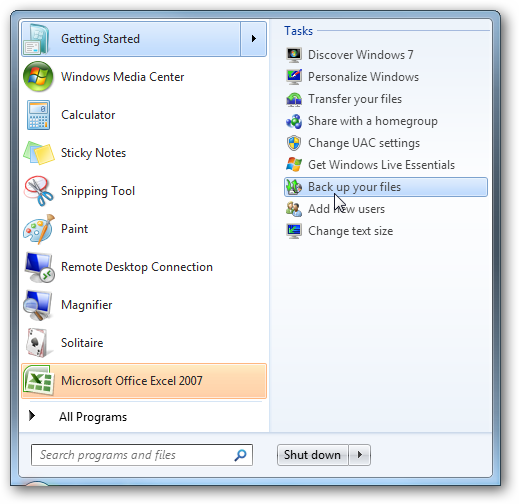
Click on Start go to Getting Started and then select Back up your files.

1-img

Next click on the Create a system image hyperlink.

2-img

Decide where you want to save the image. You can choose an external drive, burn to multiple DVD’s, or store it on a network location.

3-img

You can include other drives if you want as well but remember that will add to the size of the final image.

4-img

At the confirmation screen notice the amount of space the image may take. If something doesn’t look right you can still go back from this point and make adjustments.

5-img

A progress meter is displayed while the images is created and backed up. In this example a disk of about 15GB in size took under 20 minutes backed up to an external drive. Times will vary depending on your system and where you’re backing it up to.

6-img

After the process is complete you get the option to create a system repair disc which you should do and make sure to save it in a secure location.

7-img

8-img

When it comes time to restore the image, you will be able to use the System Recovery Options to get the system back.

27

Image in Windows Vista

Vista Ultimate, Business, and Enterprise allow you to create an image, but Vista Home and Home Premium users do not have the option. The process is similar in Vista, type backup into the search bar and click on Backup and Restore Center.

25 

Then click on Back up computer and the wizard will guide you through the process.

26 

Conclusion

This is a extremely handy feature and it actually works well. It is also nice that the feature will be available in each edition of Windows 7 instead of just the higher end versions. This will save you some money in not having to spend $50-80 on a third party utility. You should create an image when everything is fresh on your system so the image is not too large and the essentials of you machine can quickly be restored. For instance I created an image after a fresh install and putting Office 2007 and a few of my most commonly used programs. The entire image came in around 10 GB which is easily stored on an external drive or a few DVD’s.

Similar Articles Featured Wiki Articles
Latest Software Reviews Super User Daily
Geek Arcade Popular Forum Threads

Intel Core i7 Mobile Unleashed, Benchmarks Prove Fastest Laptop Processor EVER [Intel]

Laptops got a hell of a lot faster today. We’ve been waiting for Intel to bring out its mobile version of Core i7 and today it did. The benchmarks are in and they say it’s fast. Really freaking fast.

Just like the Core i7 chip for desktops, the mobile version (formerly called Clarksfield) is meant for handling heavy computing tasks — gaming, video editing, and other programs that require faster processing speed.

What makes the chips so fast and oh so capable? The quad-core family of processors use Intel’s Turbo Boost Technology, which can accelerate the processor clock speed up to 75 percent when you need more power. Basically the processor will change the clock speed depending on your power consumption, the processor temperature and the number of cores being used. That is just a primer and we promise to have a more in depth Giz Explains soon.

But what does it all mean in terms of improvement? LAPTOP Magazine found out that the fastest 2.0 GHz Intel Core i7 920QM CPU (there are two other versions with lower clock speeds) “shredded through every benchmark record” in the books. When tested against other dual core and quad core laptops the Core i7 model tore it up every time. It wrecked the synthetic benchmarks, but also cut down video transcoding times and kicked ass on frame rates while playing Far Cry 2. Hit up the link below for more detailed charts and scores.

You will have your choice of Core i7 mobile lappies with ones arriving today coming soon from Dell, Toshiba, ASUS and Alienware, HP. While some are super high end, others are actually reasonably priced. [LAPTOP Magazine, Intel]