The 2011 Ford Mustang GT is getting some major upgrades this year, including a new 5.0-liter 412-horsepower engine, and that’s enough to make it the pick for the pace car of the 2010 Daytona 500. It is the first Ford car picked to pace the race in 40 years.
HP shows off ‘wall of touch’ concept, touching optional

We’re not quite sure why HP didn’t bother setting one of these up at CES, but the company’s so-called “wall of touch” is apparently already in use by a handful of companies in prototype form, and HP has now shown it off to The Wall Street Journal. Interestingly, while you’re welcome to touch the wall all you want, you don’t actually have to, as it makes use of a camera-based system and a magnetic strip to detect where you’re pointing and when you near the wall. Of course, HP is mostly pitching this one towards companies intending to use these in public spaces (Continental Airlines has one of the first at the Houston Airport), but HP does say that if there’s enough interest it will turn it into a “mainstream product” — albeit a mainstream product that costs anywhere from “a couple thousand dollars” to $100,000 for something with more advanced features like HD video conferencing. Head on past the break for a quick video overview.
Continue reading HP shows off ‘wall of touch’ concept, touching optional
HP shows off ‘wall of touch’ concept, touching optional originally appeared on Engadget on Tue, 19 Jan 2010 15:20:00 EST. Please see our terms for use of feeds.

Star Trek 2009 Gag Reel
Read Kindle Books On Your Computer with Kindle for PC
Do you already own a Kindle or thinking about purchasing one? To day we look at a free E-Reader app from Amazon that allows you to purchase and read books from the Kindle Store, and makes syncing your computer and Kindle easier.
Note: Windows Only. Mac version coming soon.
Kindle for PC
This handy E-Reader is completely free and installs quickly.

Once it’s ready to go, you’re prompted to sign into your Amazon account. If you don’t have an account and don’t care to sign up for one, you can continue without registering.

After signing in you will see the user interface with a couple of balloon tips to get you started. The interface is very slick and intuitive compared to other E-Readers out there.

After you have a book loaded, you’ll get navigation controls, bookmarking, and “Go To” which lets you jump to a particular section of the book.

There are 10 different font sizes available.

You can bookmark any page in the book as well.
![sshot-2010-01-18-[00-45-10]](http://www.howtogeek.com/wp-content/uploads/2010/01/sshot20100118004510.png "sshot-2010-01-18-[00-45-10]")
You can navigate through the pages with your mouse or simply use the arrow keys.

You can access the Jumplist on the Windows 7 taskbar and choose from recent books and other options.

Click on the Menu option on the upper right to access settings, sync items, manage your registered Kindle, and send feedback about the app.

Because it’s in Beta the developers want to hear from you how they can improve it.

Buy and Download a Book
To browse the Amazon store, click on Shop in Kindle Store from the Kindle for PC interface.

When you find something you like, click on the Buy now with 1-click button and make sure its set to deliver to your Kindle for PC.

Then on the order confirmation screen click on the Go to Kindle for PC button to pull up the E-reader.

The Home page of the Kindle comes up and you’ll see what books have been downloaded and can monitor the download progress of the one you just bought.

Notice in the lower left corner of the reader you’ll see that it’s synching and checking for new items.

Another cool thing about the Whisperync feature is it lets you go to the last page you read of a book on the PC, a kindle device, or the iPhone app. So no matter where you read your books, there won’t be the hassle of finding where you left off.

You can sync and check for new items at any time from the button next to the Menu.

Once you start getting a larger collection of books, you can sort them by Title, Author, and Most Recent.

It’s still in Beta, and there isn’t a search feature or the ability to make annotations yet, but overall it works pretty well and is easy to use.

Conclusion
As of this writing it will run on XP, Vista, and Windows 7 but they have a Mac version on the way. Amazon does say the ability to create notes, search, and rotate images in the near future. Another thing to mention is it can make use of the Windows Touch feature in Windows 7, so if you have a touch screen laptop it essentially turns it into a free Kindle too. If you’re holding off on buying a Kindle and want to get a feel for how it all works, Kindle for PC is a good way to get started.

| Similar Articles | Productive Geek Tips |
| Latest Software Reviews | Tinyhacker Random Tips |
RMR: A Message From Transport Canada
Yawnlog Tracks Your Sleep Habits, Helps You Pinpoint Problems [Health]
 Sometimes the best way to find behavior patterns is to plot them out on a graph. Yawnlog helps identify your sleep problems by displaying your snooze data in chart-form.
To get started with the web-based sleep tracking service, sign up for a free account. You can start entering sleep data right away, including backdating entries to include info from nights past. Record the approximate time you fell asleep, the time you woke up, and the quality of your sleep each night; Yawnlog will do the rest. You can even add notes to each entry if you want to keep track of variables like how medication you’re taking might be affecting your slumber.
Yawnlog gives you an overview of your daily and average sleep debt (if any), as well as an average of how much you sleep per night and how close you are to meeting your nightly sleep goals. To see how your numbers compare, Yawnlog lets you connect with other users so you can see how much sleep time you get compared to your friends. You can make your profile and data public so others can find you, or mark it private so it’s accessible only to you.
Yawnlog isn’t as robust as some of the other sleep tracking apps we’ve mentioned, but it’s a great way to get some insight into what affects your sleep and what kinds of overall slumber habits you’re developing.
Yawnlog [via Fried Beef]

Xbox Live May Kill Cable With Live Streaming Sports From ESPN [Xbox Live]
 While you never necessarily needed cable, the one gap in internet video service has always been the lack of live sports. According to the NY Times, Microsoft and Disney are looking to change that, bringing ESPN to your Xbox Live.
Xbox Live users can already access dated content via Netflix, but this move towards live streaming would be a major one towards killing off cable once and for all. Especially since it targets a dedicated audience (sports fans) that has significant overlap with Xbox Live’s built-in gaming community.
The set-up would be similar to that of ESPN 360, which is already available from some ISPs. It would be based on a per-subscriber fee, and would include live streams of sporting events and possibly also interactive games that incorporate the ESPN brand. We’ll update with more details if and when they’re available. [NY Times]

Now You Can See Through Buildings Like Batman Bin Suparman [Augmented Reality]
Taking a hint from how the F-35 demon helmet maps multiple video feeds into a 3D space, a Carnegie Mellon University team has created an augmented reality car system to see through any massive obstacle. The objective: Avoid car collisions.
The system takes video from two cameras and mixes them into one, creating the illusion of being able to see through any object. A video processing system compares the feed from one of the cameras—installed in the car—to the other camera—installed on a street. By identifying common points between the two sources, the software can distort the street camera's video feed to match the driver's view. The matching perspective video gets projected onto the windshield, allowing the driver to see through walls in a natural, seamless way.
The Carnegie Mellon team, lead by Yaser Sheikh, thinks that the system could be easily implemented by tapping into the CCTV camera networks available in most major cities.
I’m glad to see that someone is thinking about making CCTV useful for everyone. On the other side, I wonder why people spend time creating these absurdly useful, accident-preventing augmented reality systems, instead of working in making a software like iNaked (NSFW) a reality. Get on the with the program, people. You need to get your preferences right. [New Scientist—Thanks Jimmy Flores]
“Legion” Trailer HD
“The Book of Eli” Trailer #2 HD
“Cop Out” Trailer HD
Learning Windows 7: Manage Power Settings
In XP you probably already know how to manage the power settings for your system on a laptop or desktop. Today we take you through how to manage power settings and create custom plans in Windows 7.
There are new power management options that you can set up in Windows 7 compared to XP. You might want to change plans to save battery power on your laptop, or reduce energy consumption on a desktop at home or the office. Here we will look at how to manage and tweak the power plans, and how to create custom plans as well.
Power Settings
To access power plan options, type power settings into the search bar in the Start Menu and hit Enter.

The Power Options screen opens and from here you can select from three predefined plans–Balanced, Power saver, or High performance.

Click on Choose what the power button does and you can tweak several options such as Requiring a password on wakeup and what the power button on the computer does. If you set When I press the power button to Do nothing, you won’t have a problem with the PC shutting down when you accidently hit the power button.

To change any one of the predefined power plans click on Change plan settings.

Then you can change the amount of inactive time before the monitor is turned off or the computer goes into Sleep mode.
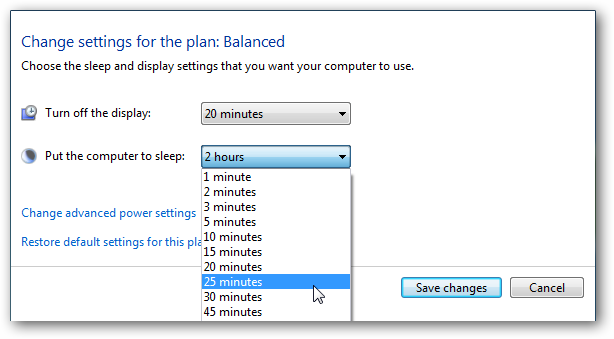
If you want to revert back to the default settings, simply click on Restore default settings for this plan.

Custom Power Plan
To create a custom plan, click on Create a power plan from the Power Options section.

In the Create a power plan window a predetermined plan that is closest to what you want, and give the plan a name.

In the next screen select the sleep and display settings you want to use and click the Create button.

After your plan is created you’ll see it under the preferred plans list.

If you click on Change advanced power settings, there are several options you can tweak. These settings should only be used by advanced users, as if you turn off the wrong thing, your computer may not function correctly. Choosing between the predetermined settings should be adequate for most users.

If you are having issues where your laptop is draining too much battery power, or you want to check the overall efficiency of power usage on your computer, check out our article Use PowerCfg in Windows 7 to Evaluate Power Efficiency.
![sshot-2010-01-14-[21-59-31]](http://www.howtogeek.com/wp-content/uploads/2010/01/sshot20100114215931.png "sshot-2010-01-14-[21-59-31]")
Conclusion
Windows 7 makes it easy to manage power settings for different computing situations. If you find your computer mysteriously shutting down or going into sleep mode, this should also help you determine why it is happening.
We also have a few other articles related to power management in Windows you might be interested in:
Disable Power Management On Windows 7 or Vista
Create a Shortcut or Hotkey to Switch Power Plans
Change the Windows 7 or Vista Power Buttons to Shutdown/Sleep/Hibernate
| Similar Articles | Productive Geek Tips |
| Latest Software Reviews | Tinyhacker Random Tips |
Avatar vs Modern Warfare 2: Billionaire Earnings Fight! [Movies]
 Avatar, the soon king of movies, vs Modern Warfare 2, the king of videogames. Here’s a look at how their earnings stack up by the numbers. The biggest surprise? Modern Warfare had a significantly larger ad budget. [Business Management]
Fleury files criminal complaint against James
Former NHL star Theoren Fleury confirmed Thursday that he has filed a criminal complaint against his former junior hockey coach Graham James.
Google makes HTTPS default for Gmail
Google has announced on the Official Gmail Blog that they have begun rolling out default https settings to all Gmail accounts. For users that don't want this setting, or if it causes some sort of connectivity issues through someone's firewall, the feature can always be disabled. Here's how it will work… "If you've previously set your own https preference from Gmail Settings, nothing will change for your account. If you trust the security of your network and don't want default https turned on for performance reasons, you can turn it off at any time by choosing 'Don't always use https' from the Settings menu." Google is doing this to protect people's private data from being sniffed by third parties.
Gmail Making Secure Https Connections a Default [Security]
 Gmail has long offered a more secure connection option over Https, and two years ago let users set it themselves as a default. Now Google is making https the default setting for all Gmail accounts, unless you flip it back.
Given their recent security episode in China, and the ever-expanding realm of devices and portals users can get at Gmail from, it’s probably a smart step forward to gently goad users into using a more secure connection standard. Google notes that, although using https creates a slight latency, they believe the trade-off is worth it.
If https presents a problem in your particular IT environment, you can still switch it off in your Settings. Here’s Google’s explanation:
If you’ve previously set your own https preference from Gmail Settings, nothing will change for your account. If you trust the security of your network and don’t want default https turned on for performance reasons, you can turn it off at any time by choosing “Don’t always use https” from the Settings menu. Gmail will still always encrypt the login page to protect your password. Google Apps users whose admins have not already defaulted their entire domains to https will have the same option.
Google also notes that Offline Gmail users who weren’t already using https as a default may see some issues, but they suggest a work-around.
Does a default https present problems for your own Gmail account? Happy to see the security struggle moving a step forward? Tell us your take in the comments.
Default https access for Gmail [Official Gmail Blog]
Google threatens China over massive cyber attack
Google has threatened to halt operations in China after identifying a "highly sophisticated and targeted attack" against its corporate infrastructure.
Facebook Adds Comment Reply by Email [Social Networking]
 Frequent Facebook users get a handful of emails from the social networking service every day alerting them of new comments, but replying to these comments always required clicking over to Facebook—until now. Facebook users can now respond directly to comments via email. Handy—especially for folks whose workplaces block the 'book. [Facebook Blog]
Best DVD-Ripping Tool: Handbrake [Hive Five Followup]
 It’s frustrating to not be able to get your DVDs onto your portable devices or media server. Last week we looked at the best tools for ripping your DVD collection and we’re back to announce the winner.
Handbrake led by a healthy margin and took home 34% of the vote and with good reason. It’s free, cross-platform, and has grown easier to use with each new release. Following Handbrake was DVD Shrink">DVD Shrink (23%) and DVD Fab">DVD Fab (15%). Rounding out the Hive Five was AnyDVD (11%) and DVD Decrypter (13%). It’s worth noting that as awesome as Handbrake is, it doesn’t include any tools for actually circumventing DVD encryption, so you’ll need to pair it with one of the other solutions in the Hive Five. Check out the full Hive for additional information about each contender.
Have a topic you’d love to see covered by the Hive Five? Send us an email at tips @ lifehacker.com with “Hive Five” in the subject line and we’ll add it to the list!
iTunes pricing is out of control
By Joe Wilcox, Betanews
Succinctly stated: You pay more.
Apple has a reputation for charging more for most everything, while often delivering less than competitors. Any Windows PC-to-Mac laptop pricing comparison is example enough. The Windows computer typically comes with higher-resolution display, more system memory and beefier storage than comparatively-priced Mac portable.
However, iTunes store has long been the exception to Apple higher pricing. Right from its Spring 2003 opening, iTunes store offered affordable singles and albums — hey, who could complain about 99 cents or $9.99, respectively? But recently, iTunes pricing has gotten wicked crazy, following last year’s institution of variable pricing. I got to taste the insanity early this afternoon, when finding a new album selling for about 8 bucks more for the iTunes digital download than the CD sold by Amazon.
What the frak?
Is It Rain or Shine?
It’s New Music Tuesday, when I rush online to survey the releases. O.A.R. has a new live album, “Rain or Shine,” which immediately caught my attention. But my enthusiasm skidded to a halt when looking at the iTunes price: $24.99. Yeah, there are 37 tracks, but 25 bucks — or $1.29 per track? At the per-track price, the album would cost more than $49. For the full album, per-track price savings, someone else might bow before the great Apple god in gratitude. I’m an ingrate. I looked to AmazonMP3 for a better price — and couldn’t find it. Amazon’s digital download store doesn’t list the album. But the retailer carries the CD, with all 37 songs for $16.99. That’s 5 bucks off the list price, which is still less than what iTunes charges.
Apple isn’t just charging more, it’s doing so for a comparatively inferior product. Music fans can argue the merits of AmazonMP3’s 256kbps MP3 encoding compared to Apple’s 256kbps AAC. But there’s no argument about lossless, uncompressed Compact Disc Digital Audio format and its 1,411kbps bitrate.
I’ve known for sometime that iTunes charges more than AmazonMP3 for many albums or singles, but this was my first encounter with pricing substantially above a CD. In April 2009, when Apple instituted variable pricing, I blogged: “What Apple Variable Pricing Means to You.” I did numerous pay-more comparisons between AmazonMP3 and iTunes stores. Apple pay-more pricing was already in effect for most newer or popular tracks.
I wondered if perhaps “Rain or Shine” is a fluke, which is how I came to write this post. The first question: Does Amazon offer the album for substantially less than other retailers? Answer: No. F.Y.E. lists “Rain or Shine” for $14.99, but store club members only pay $13.49. Holy Heck, Batman, not only does the music retailer charge $2 to $3.50 less than Amazon, but $10 to $11.50 less than iTunes!
Apple’s Pay-More Pricing
What about other albums? Black Eyed Peas’ “The E.N.D.” is $10.99 from iTunes. Amazon sells the CD for $9.49. However, CD buyers get a $3 AmazonMP3 store song credit, effectively lowering the price to $6.49. Whoa, Amazon’s digital download version of “The E.N.D.” is only $5.99, or four bucks less than iTunes. Apple charges $1.29 for each individual track, compared to 99 cents each from AmazonMP3.

Deluxe version of Lady GaGa’s “The Fame Monster” costs $13.99 at iTunes for 24 tracks. Amazon charges $14.99 for the 22-track CD or $11.99 for the digital download album. So iTunes is the sweeter deal, right? Maybe not. People buying the CD get a $3 credit for AmazonMP3 store, effectively reducing cost of “Fame Monster” to $11.99 — two bucks and two tracks less than iTunes. Another cost difference: iTunes again charges $1.29 for each individually purchased track from “Fame Monster,” and the two additional tracks are only available with the album purchase. By comparison, AmazonMP3 charges 99 cents a track.
Owl City album “Ocean Eyes” is $9.99 from iTunes with two additional tracks available only with the album version. Amazon charges the same price for the 12-track CD, but the $3 AmazonMP3 store credit effectively reduces the price to $6.99. However, AmazonMP3 charges even less, only 6 bucks for digital download version of “Ocean Eyes.” Once again, Apple charges a buck twenty-nine for individual tracks compared to AmazonMP3’s more appealing 99 cents.
Apple’s music pricing isn’t all bad. Ke$ha’s “Animal” is $6.99 from iTunes or AmazonMP3, and both digital download stores charge $1.29 for each individual track. Amazon sells the CD for $7.99. However, Amazon offers $3 digital download credit for “Animal,” effectively lowering the price to $4.99.
Pay More, Pay Less
 I’ve long observed that Apple justifies charging more by offering a little more — and sometimes less than competing stores. It’s Marketing 101 stuff. For example, OneRepublic’s “Waking Up (Deluxe Version)” is $12.99 from iTunes for 15 tracks (the standard album has 11 songs). Amazon and F.Y.E. don’t offer this version of the CD, which Amazon partners sell for $17.99 or more. So, iTunes is the cheaper option. However, Amazon sells the “Waking Up” non-deluxe CD for $7.99, or $2 less than iTunes. Once again, Amazon’s $3 song credit applies, effectively reducing the album’s cost to $4.99. Amazon’s digital download version costs $5, with 12th track “Mercy,” which isn’t available from iTunes. Once again, Apple charges $1.29 for each individual track and Amazon just 99 cents. So the standard album or singles cost more from iTunes.
In comments, someone is sure to assert that Amazon tax and shipping raises CD-to-digital download pricing in Apple’s favor. Amazon doesn’t charge tax in most states and offers a free 3-to-5 day shipping option. However, Amazon’s Prime service, which costs $79 a year, provides free two-day shipping or one-day shipping for an extra $3.99 per item. Prime can be shared with four separate accounts, so if you’ve got roomies or family members the annual fee is effectively less. I love Prime.
There’s no point paying Apple more when there are cheaper alternatives. I regularly buy songs from iTunes store, but typically find better prices — and more aggressive daily deals — from AmazonMP3. But following today’s surprising cost comparison for “Rain or Shine,” I’ll consider more CDs compared to digital albums, particularly those sold by iTunes. I ordered the new O.A.R. CD from Amazon while writing this post but before checking F.Y.E. pricing. Even $16.99 was too much to pay, although that $3 credit helps soften the extra paid to Amazon over F.Y.E.
Should you pay more?


