Five Best DVD-Ripping Tools [Hive Five]

You pay good money for your DVDs, but they’re hardly the only format you need these days. These five ripping tools ensure you can back them up, keep them on your media server, and load them on your favorite portable player.

Photo by jonasj.

Earlier this week we asked you to share your favorite DVD-ripping tool. We tallied up the votes, and now we’re back to highlight the five most popular tools used by Lifehacker readers to rip, backup, and encode their DVD collections.

DVD Shrink (Windows, Free)


DVD Shrink is a free and capable ripping tool that excels at, as the name would imply, shrinking DVDs. DVDs come in two common formats: DVD-5 (4.7GB) and DVD-9 (8.5GB); the Reauthor mode in DVD Shrink helps you to ditch disc extras and strip most larger DVDs down to fit into a standard (and less expensive) DVD-5 disc. DVD Shrink does a good job handling many protection schemes, but hasn’t been updated to remove some of the newest schemes.

DVD Fab (Windows, $50)


DVD Fab is a commercial DVD ripper that supports the removal of all current DVD copy protections. In addition to being current on protection schemes, it boasts a large array of options for stripping and repacking your DVDs once the copy protection is removed. You can rip the entire disc, rip only the main movie, or split it into pieces—among other options. Like DVD Shrink, DVD Fab also supports compressing DVD-9 discs to fit on DVD-5 discs.

Handbrake (Windows/Mac/Linux, Free)


Handbrake is a DVD-ripping tool with a strong emphasis on not just ripping media but recoding it for playback on computers, portable devices, and other non-disc based systems. Handbrake can help you convert DVDs and other MPEG-based video into MP4 and MKV files. You can tweak settings like video frame rate and audio codec playback to your heart’s content with Handbrake, and even batch encode all your media at one time to make filling up your iPod or other device relatively painless. The one major shortcoming of Handbrake is that it doesn’t have any copy protection removal tools built in, which means you may occasionally need to use a 3rd-party stripping tool to prepare your DVD for conversion.

AnyDVD (Windows, $60 per year)


AnyDVD is another commercial entry in this week's Hive Five. It's not cheap, with a one year license running $60—although the multi-year discounts quickly stack up—but it can boast that it stays on top of current protection and encryption schemes to make sure you're never locked out of your own discs. In addition to stripping protections from the disc, it also has the ability to control DVD playback speed so that DVDs played on media center computers will play slower and quieter, and it allows you to remove things like forced subtitles, warning screens, and disc material you don't want.

DVD Decrypter (Windows, Free)


Although DVD Decrypter hasn’t been updated since 2005, it still works on a significant number of DVDs and has a strong following resulting from both its original user base and new users who find it cuts through the copy protection on their current DVDs protected with CSS, Macrovision content protection, region codes, and other hindrances.


Now that you’ve had a chance to look over the five most popular DVD-ripping tools as nominated by Lifehacker readers, it’s time to cast your vote for the tool you like best:

Which DVD-Ripping Tool Is Best?(trends)

Have a favorite that wasn’t featured or a tip for ripping DVDs? Let’s hear about it in the comments. If you have an idea for a future Hive Five send us an email at tips @ lifehacker.com with “Hive Five” in the subject line.


Why Zippers Have YKK On Them

The YKK stands for Yoshida Kogyo Kabushikikaisha. In 1934 Tadao Yoshida founded Yoshida Kogyo Kabushikikaisha (translated Yoshida Industries Limited). This company is now the worlds foremost zipper manufacturer, making about 90% of all zippers in over 206 facilities in 52 countries.

Boxee Box interface demo video

We’re already gone hands-on with the Boxee Box and its sweet QWERTY RF remote, but now that we know there’s a dual-core Tegra 2 in there it’s time for a little interface demo with founder Avner Ronen. First things first: yes, it ran Hulu in the browser — but the network connection on the show floor was acting up, so we couldn’t demo it very well. Avner tells us the built-in browser IDs itself as essentially standard Mozilla, so we’ll have to see if Hulu goes out of its way to block it –it’s definitely still possible, but it’ll take some work. Apart from that minor drama, we’ve got to say we’re incredibly impressed — the interface was lightning fast, the remote’s keyboard felt great, and we’re liking the Facebook / Twitter integration, which mines your feeds for videos posted by your friends and displays them on the home page. Avner tells us he thinks D-Link will be “aggressive” with that under-$200 price point when the Box launches in Q2, and there’ll be tons of content partners at launch. Video after the break!

Continue reading Boxee Box interface demo video

Boxee Box interface demo video originally appeared on Engadget on Fri, 08 Jan 2010 18:41:00 EST. Please see our terms for use of feeds.

Permalink   |   | Email this | Comments

Phaneuf responds to trade talk

He might live a Hollywood lifestyle but Dion Phaneuf says he's happy in Calgary.

And at Friday's morning skate, he dismissed any rumours floating around that he'd demanded a trade.

"I've never asked for a trade and I'm very happy here," said the 24-year-old defenceman after several reports surfaced online. "That hasn't even crossed my mind. For you to be asking these questions today, it's a huge surprise but I understand you have to report on it."

Phaneuf, who is dating Calgary-born actress Elisha Cuthbert, has been linked with a trade since he was reportedly overheard having a heated discussion with head coach Brent Sutter last month.

But Flames general manager Darryl Sutter on Thursday shot down the rumours surrounding his young defenceman.

"Whoever makes up that stuff is not doing anything," Sutter told the Herald. "We've worked really hard at building a top young defence in the league and our intention is to keep them, so that's (rumours) just from somebody who didn't have anything to do on that day.

"There are no rumours, believe me," reiterated the GM. "I don't know where that comes from."

On Friday, Phaneuf claimed he hadn't heard the rumours about a trade or him submitting a trade request.

"To be honest with you, I haven't heard anything about it until today when you brought it up to me," said Phaneuf. "Those are people sitting behind a computer and writing what they'd like to see happen with our team.

"Each and everyone has their opinion and I respect that but with regards to any talk of that, that's the first I've heard of it and I'm not going to say much about that."

Early this morning, the Flames called up Jamie Lundmark from Abbotsford to fill in for injured Craig Conroy, whom the team could re-activate on Monday according to Brent Sutter. Lundmark replaced Jason Jaffray, who was sent back to the Heat on Thursday.

Lundmark, if you recall, had joined the squad for six dates in November to take injured Rene Bourque's place. Making tonight's game, oh, about the umpteenth time he's been back.

"I don't know how many times it's been up and down but I'm definitely used to it," said Lundmark, a veteran of over 250 NHL games, 84 of which have been with Calgary. "The biggest thing is not to get away from my game, play simple. Come up here, play hard, use my skill when I can, and try and put some points on the board when I can."

Not that he's been having difficulty with point production. The Edmonton native is second in scoring with the Abbotsford Heat with nine goals, 12 assists in 32 games.

During his last stint, Lundmark was put on the top line with Jarome Iginla and Olli Jokinen. In a short time, he made a good impression and picked up three points (including a game winner at Detroit and a shoot-out winner at Columbus) in six games.

Looks like he'll take Curtis Glencross' spot on left-wing with Iginla and Daymond Langkow tonight. And with that, here are the rest of the Flames lines:

Lundmark-Langkow-Iginla

Glencross-Jokinen-Bourque

Dawes-Nystrom-Moss

Sjostrom-Boyd-Prust

And the defence:

Regehr-Phaneuf

Giorodano-Bouwmeester

Pardy-Sarich

Also, Curtis McElhinney will get the start tonight, likely to give Miikka Kiprusoff a night off to prepare for Saturday's game in Vancouver against their Northwest Division rivals, the Canucks.

– Morning skate report by Kristen Odland, Calgary Herald

Is It This Easy to Pull Straight Nude Pics From Airport Scanners? [NSFW] [Nsfw]

The Drudge Report has an image of a woman from an airport scanner up right now. It’s scandalous enough as is, but it’s shockingly easy to make it look even more like a normal nude photograph.

Reader Sigfried discovered that by simply inverting the image in Photoshop, you restore the photo to a more realistic tint. Of course, we’re not sure where this image came from or if it’s an accurate example of what these machines produce. But if so, let me just deliver a message to all you airport security workers out there: I just got out of a cold pool, I swear.


MSI shows off 10-inch Android tablet running new Tegra chipset

Tablet-ed out yet? We didn’t think so. MSI has a 10-inch Android tablet on display at CES here. There aren’t many details (like price, release date and internals), but we do know it’s running one of those new Tegra 2 chips. Up front there’s a pretty nice 10-inch capacitive display, which is plenty responsive. Like other tablets we’ve been seeing, the device is a bit thicker and heavier than we’d like, but hopefully that paves the way for some substantial battery life. We might still not know the “why,” but the “how” is certainly coming together.

MSI shows off 10-inch Android tablet running new Tegra chipset originally appeared on Engadget on Fri, 08 Jan 2010 14:24:00 EST. Please see our terms for use of feeds.

Permalink   |   | Email this | Comments

Survey: Xbox 360 Most Used Console

A survey conducted by U.S. research firm Nielsen has revealed Microsoft’s Xbox 360 is currently the most played console in terms of total usage minutes, coming in at 23.1 percent. Sony’s PlayStation 2 came in second at 20.4 percent, and the Nintendo Wii at third with 19 percent.

MSI dualscreen e-reader hands-on (update: video!)

We have been hearing about dualscreen laptops (and readers) for too long now, but it’s MSI to be the first to show off a real working unit. And it’s everything we have ever dreamed of — well kind of. Though MSI is calling this dual 10-inch screen device an e-reader, it’s really a netbook with two screens since it’s got an Atom Z Series processor and Windows 7 Home Premium. But it’s how the two screens work together that we can’t get out of our minds. Hit the break for some more impressions and to see this crazy thing on video.

Continue reading MSI dualscreen e-reader hands-on (update: video!)

MSI dualscreen e-reader hands-on (update: video!) originally appeared on Engadget on Wed, 06 Jan 2010 21:46:00 EST. Please see our terms for use of feeds.

Permalink   |   | Email this | Comments

Chelios arrested for DUI

Chris Chelios was arrested and charged with driving under the influence and speeding on Dec. 28 in a Chicago suburb, it was reported on Tuesday.

How To Remove Antivirus Live and Other Rogue/Fake Antivirus Malware

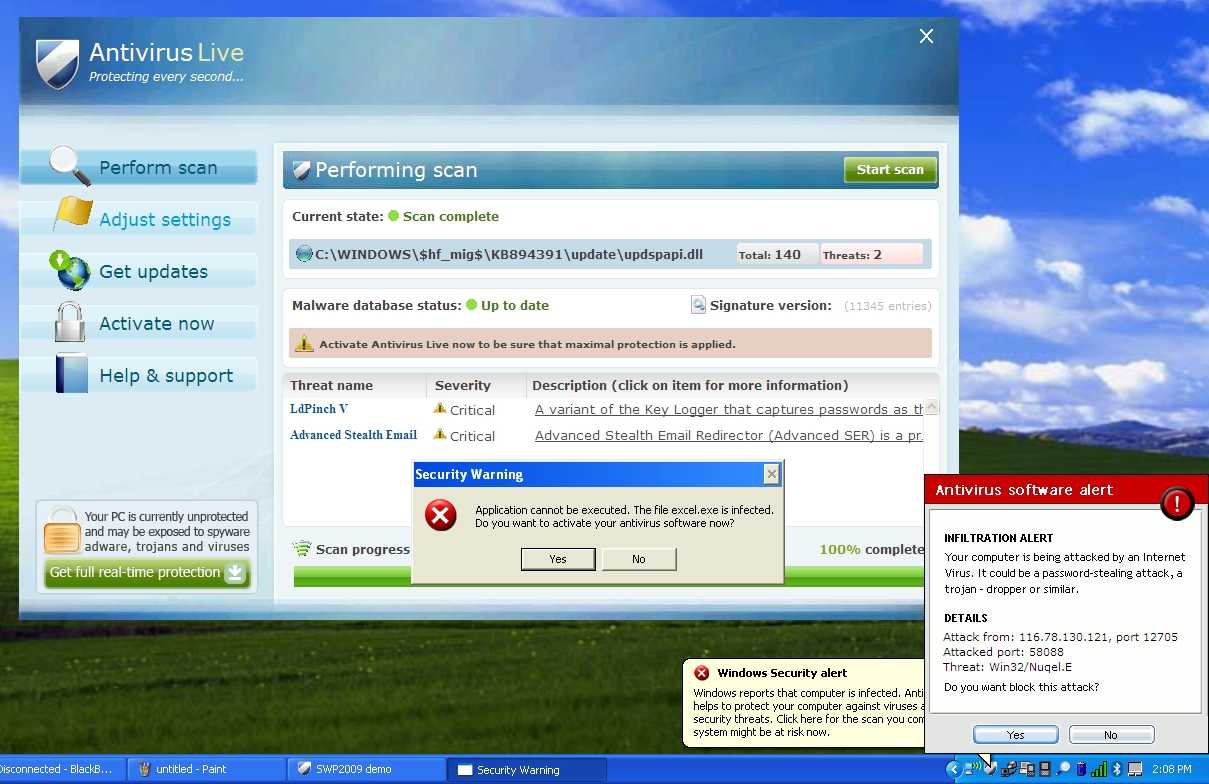
If you’ve got a PC infected by the Antivirus Live virus, you’ve got a tough job ahead of you to remove it. And we’ve got the instructions to help.

Antivirus Live is one of many fake antivirus applications that are really rogue viruses that take your computer hostage—then they tell you that your computer is infected by viruses, and you have to pay them to get rid of the fake viruses that aren’t really there. It’s a huge problem, and they are not easy to remove, because they block virtually everything you try and run, including real anti-malware tools.

Rogue/Fake Antivirus Live

Removing Rogue Fake Antivirus Infections

There’s a couple of steps that you can generally follow to get rid of the majority of rogue antivirus infections, and actually most malware or spyware infections of any type. Here’s the quick steps:

Note that some malware will block you from using safe mode. That usually requires another set of steps that we won’t cover here.

Let’s Remove Antivirus Live

The first thing you’ll want to do is reboot your computer, and hit the F8 key right before Windows starts loading (you can hit it a bunch of times). Then select the Safe Mode with Networking option.

image

Before you do anything else, you’re going to need to fix the internet connection to work, because Antivirus Live changes IE to use a fake proxy server that prevents you from getting to anything else—and will also prevent you from installing and updating a real anti-malware software.

image

Now you’ll want to install SuperAntiSpyware (linked above), which you have hopefully downloaded via another computer already, but safe mode with networking should allow you to download and install it.

Once you load it up, it’s going to do some analysis…

image

Then you’ll see the full application screen, where you’ll want to use the Check for Updates button to make sure you have the latest definitions. Once you’ve done that, click the Scan your Computer button.

image

Select your primary drive at least, though you should pick all the drives, and then click the Perform Complete Scan button. 

image

It’ll run for a long time, detect a bunch of stuff, and then you can proceed through the wizard to actually removing it all…

image

Once it’s all done, you can reboot the PC again (just make sure to go back into Safe Mode again).

image

Next you’ll want to install Malwarebytes, make sure to check the Update tab for the latest definitions, and then perform a full scan of your system.

image

Malwarebytes will find even more malware that SuperAntiSpyware missed (seems like you always need more than one util to get it all). Just be sure to click the Remove Selected button to get rid of the rest.

image

At this point you’ll want to reboot your system, and then install Microsoft Security Essentials and run another full scan. Can’t hurt to be too cautious!

Note: If you used a thumb drive at any point during this process, you should make sure and scan that as well—I’ve had viruses hop over to the thumb drive, ready to infect the next machine.

Similar Articles Tinyhacker – Tiny Geek Hacks
Latest Software Reviews Super User Daily

Iomega v.Clone App Portable-izes Your Entire PC [Virtualization]

It’d be easy to get knotted up in jargon describing v.Clone, so let’s stick with the concept for now: It’s a syncable, complete image of your PC, which you can boot run from basically any other PC. And it’s free.

To anyone who’s used mainstream backup software, this probably sounds too good to be true. In a way, yes, it is. But the tradeoff is minimal, and the payoff is more than worth it. Here’s the deal:

v.Clone EMC owns Iomega, which makes portable hard drives. EMC also owns VMWare, which makes virtualization software around. v.Clone is essentially a portable installation of VMWare, meaning that you can plug your v.Clone-loaded Iomega portable HDD into most any Windows computer, run the app, and boot into your saved virtual machine. The secret, though, lies in what you're booting into—namely, a perfect copy of your main PC.

In other words, v.Clone lets you make a full copy of your primary PC—including apps, media, settings, etc—to a VMWare image, run said copy from other Windows-based computers, and upon reconnection with the primary PC, sync any changes you made while running the virtual machine back to your main PC. Likewise, any changes you've made on your host PC can be synced to your virtual machine, so your v.Clone image is more or less a virtualized, up-to-date clone of your main PC. We haven't been able to try it out yet, but Iomega assures us that the whole system isn't as ass-slow as it sounds like it could be, because the syncing process is incremental—if you only change a few things on your virtualized image, syncing it with your host PC won't take more than a few minutes.

There are a couple of catches here: the software may be called v.Clone, but it’s not creating a traditional, raw image clone. If your main PC faceplants and destroys itself, your v.Clone image will let you salvage your data, but it won’t let do a full restore, like Norton Ghost or Time Machine. And despite the fact that portable HDDs are all exactly the same, this software will only work with Iomega drives. But still, kinda genius! (If you happen to this particular brand of totally commodified product!)

v.Clone is available for owners of Iomega USB portable hard drives, including the full eGo and Prestige lines. [Iomega]


Astonishing Burj Dubai Opening Fireworks Will Boggle Your Mind [Fireworks]

Forget about any Olympics inauguration ceremonies or any Fourth of July: The Burj Dubai is the tallest building in the world, and it got the highest fireworks too for its opening ceremony. So colossal you’ll think they are destroying it.

The tower—which officially is 2717 feet tall (828 meters)—was inaugurated today, and the developers launched it with all they got. The people who attended the ceremony couldn't stop cheering in awe. I don't blame them. Watch the whole video to see the lighting effects just before the final fireworks. They look designed by aliens.