Eee Pad Slider shipping now, Archos 80 G9 hits pre-order status

Archos 80 G9

It’s practically raining tablets these days, and two more just hit the market. Of course, the Asus Eee Pad Slider and Archos 80 G9 were announced some time ago, but now you can finally handover your hard-earned paper for one of these Android 3.2-sporting devices. The Slider is already available from a variety of outlets, including New Egg and Amazon, starting at $479, while the G9 is up for pre-order direct from Archos starting at just $299. If you need a reminder of what to expect from the latest Honeycomb slates you should check out our hands-on coverage before hitting those source links and loading up your shopping cart.

[Thanks, BH]

Update: Well, looks like a few of those Archos 80 G9s are shipping earlier than expected. A reader wrote in to let us know he “pre-ordered” a trio of them yesterday and they actually arrived today. He sent in the receipt (which we won’t be sharing) along with a pile of photos and even a video as evidence. Check it out below.

[Thanks, Andrew]

Continue reading Eee Pad Slider shipping now, Archos 80 G9 hits pre-order status

Eee Pad Slider shipping now, Archos 80 G9 hits pre-order status originally appeared on Engadget on Wed, 21 Sep 2011 12:04:00 EDT. Please see our terms for use of feeds.

Permalink   |  sourceArchos, New Egg, Amazon  | Email this | Comments

Adobe’s launching Flash Player 11, Air 3 bringing HD video and 3D gaming to all

While we’ve had access to Adobe’s Flash Player 11 in beta form for months, the company announced it will finally get official, along with Air 3, next month. Among the many new features included are support for accelerated 2D and 3D graphics with a claimed 1,000 times faster performance than Flash Player 10 and Air 2. That’s enough to enable “console-quality” gaming on both computers and connected TVs and on mobile devices (Android, iOS, Playbook) with a pre-release version of Flash 11 (a production release you can take on the go is expected in “the near future”). Other new options include allowing developers to package Air 3 along with their apps in a single install, HD video quality on multiple platforms including iOS, DRM for video rentals, 64-bit support and more. Check out Adobe’s pitch to developers with a press release and demo videos after the break, including a look at the hit iPad game Machinarium which was built with its tools.

Continue reading Adobe’s launching Flash Player 11, Air 3 bringing HD video and 3D gaming to all

Adobe’s launching Flash Player 11, Air 3 bringing HD video and 3D gaming to all originally appeared on Engadget on Wed, 21 Sep 2011 07:15:00 EDT. Please see our terms for use of feeds.

Permalink   |   | Email this | Comments

Google Voice enters internal testing across Europe, international launch on the horizon?

Lather up your vocal cords, Europe, because it looks like Google Voice is on its way over. That’s according to the company’s European Director of Business Development, Jens Redmer, who told The Next Web yesterday that Google is taking “concrete action” to expand the service to the Old World. Redmer later confirmed that he’s currently conducting internal tests with Voice, adding that its voicemail transcription feature has performed particularly well within Europe. He stopped short, however, of offering a precise launch date, saying only that the service’s release would hinge upon legal and regulatory issues, rather than any technical obstacles. Now that the train has rolled into the testing phase, though, it may only be a matter of time before it arrives at the station.

Google Voice enters internal testing across Europe, international launch on the horizon? originally appeared on Engadget on Wed, 21 Sep 2011 04:24:00 EDT. Please see our terms for use of feeds.

Permalink   |  sourceThe Next Web  | Email this | Comments

By the end of this year 2 million Canadian households will have replaced their landline for a cellphone, report says

The pay phone used to be on every block temping you to drop in a quarter, or at last gasp requesting you to slide in a prepaid card. Now, this once common way of communicating is almost history and it seems the home phone will eventually follow a similar path.

A recent poll by StatsCan reported that 13% of households have ditched their home phone to exclusively use a cellphone, this number is up from 8% in 2008. In a report today by The Convergence Group they not only forecast the new entrants to capture 4 million subs by the end of 2014, but it’s also their belief that more Canadians will forgo a home phone and simply use a cellphone. The main reason is due to the continued decrease in monthly voice plans. It’s estimated that by the end of this year two million Canadian households will have replaced their landline for a cellphone. “Lower wireless voice prices are spurring wireless substitution, which we forecast will grow to 26% year- end 2014, from 15% year-end 2011″

Note: There is a poll embedded within this post, please visit the site to participate in this post’s poll.

Source: Convergence Group
Via: CBC

Related posts:

  1. Stats Can says the number of Canadian households relying on cellphones as their only telephone service stands at 6.4 per cent – up from 5.1 per cent last year. The agency says 72 per cent of households have at least one cellphone, up 5% in the past year.
  2. StatsCan: 78% of Canadian households have a cellphone
  3. Report: “New Entrants’ will have 4 million or 12% of Canadian wireless subs by year-end 2014″

Windows 8’s Metro UI Isn’t Very Good Without Touch, But That Doesn’t Really Matter [Opinion]

Windows 8’s new Metro UI is designed for tablets, but you’ll get it on every Windows 8 PC. Five days into using Windows 8 nonstop, I’ve made up my mind: despite Microsoft’s efforts, Metro really isn’t that enjoyable to use with a mouse and a keyboard. Luckily, that’s not going to stop Windows 8 from kicking butt, whether or not it’s finger-friendly. Here’s why. More »


comScore: iPhone 4 most popular smartphone in Canada, Android now has 19% market share


The Canadian Wireless Telecommunications Association (CWTA) had their “Technology Showcase” in Ottawa today, I attended and there was some good info. A great deal of the focus was around mobile payments and healthcare. Something that’s always been missing for those interested in the Canadian mobile scene are Canadian-only stats. A small glimmer of hope came a few months ago when marketing research firm comScore released March statistics. RIM was the runaway leader with 42% of the smartphone OS market share in Canada.

Today, Bryan Segal, VP of Sales at comScore, hammered the lunchtime crowd with some very welcomed stats. His presentation was titled “The Canadian Mobile State of the Nation” and it’s based July 2011 data, representing 20,111,000 subscribers. Here’s some takeaways:

Operator Share:
Rogers: 27%
Bell: 25%
TELUS: 25%
Koodo Mobile: 4%
Virgin Mobile: 4%
Fido: 4%
Other: 11%

Apple iPhone dominates in Canada – at least in the top 10 handsets. Installed base and basically every age group. comScore states that the top handset is the iPhone 4 16GB version with 763,320 of them active, followed by RIM’s BlackBerry Bold 9700 with 420,558. In 3rd place is the talk and text LG Rumour 2 with 373,606. Breaking it down, Apple has four of the top 10 and makes up 1,776,697 of installed top 10 devices, while RIM has 1,564,868. As for age group, the iPhone is number 1 in every group.

Probably the most exciting slide is the smartphone OS, which is very telling from their March 2011 stats. Six months later comScore is reporting that Canadians are shifting towards Android… RIM falls 4% to 38% market share, Apple stays the same at 31% but Google’s Android picked up and gained more adopters and now has 19% market share in Canada (up from 12%). What’s even more surprising the leader of Android in Canada – by a huge margin – is HTC with a massive install base of 78%, followed by Sony Ericsson, Motorola, Samsung and LG – personally I thought Samsung would be first, or at least second as they had great success with the Galaxy lineup.


Related posts:

  1. ABI Research: Android will have 45% of the Smartphone market share by 2016
  2. Report: Android to capture almost 50% market share by the end of 2012
  3. ABI Research: Android captured 46.4% of the Q2 smartphone market share

Google+: 101, 102, 103, 104, 105, 106, 107…

We started the Google+ project to help make online sharing more like real-world sharing. Of course, in life we increasingly share on the go, so over the past ~90 days we’ve developed Google+ apps for Android, iOS and the mobile web.

During this time we’ve made lots of improvements to the project, and in fact, the team just announced its 100th new feature overall (open signups). But our work is far from done, and today we’re bringing seven additional Google+ features to your mobile device.

Hangouts on your mobile (a.k.a. feature #92

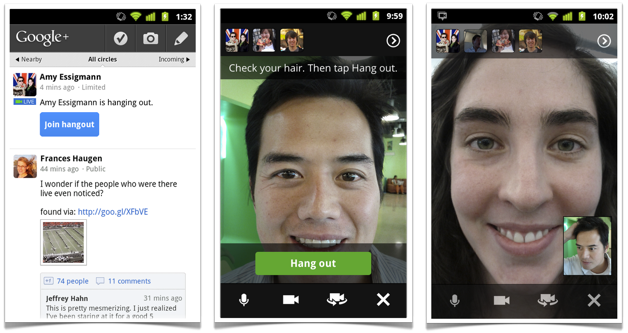
Seeing someone face-to-face is one of the most important ways you can connect with them. Unfortunately we’re often too busy, too far away, or too unpredictable to make meetups a regular occurrence. That’s why we’re making Hangouts available on phones with Android 2.3+ and front-facing cameras (iOS support coming soon). Just find an active hangout in the Stream, and you can join your friends face-to-face-to-face:

Hangouts on your phone: Stream View (left), Green Room (center), Portrait View (right) 

101, 102, 103. You asked for it 

We take your feedback very seriously, and we do our best to deliver your most-requested features as quickly as possible. So today we’re launching three more things you’ve been asking for in Google+ mobile:


  • Improved SMS support. Users in the US and India can now post to Google+, receive notifications, and respond to group messages via SMS (with more countries on the way). To start texting, just verify your phone number in Google+ settings. 
  • Improved +mentions support. To add someone in your circles to a conversation (or simply get their attention), you can now +[their name] inside a post or comment. 
  • +1’ing comments. When you read a great comment in the Stream, you can now +1 it directly from your iOS device (with Android coming soon). 
    SMS (left), +mentions (center), +1’ing comments (right)

104, 105, 106. Giving you more choices 

The most important part of Google+ is you, so we want to make sure you have meaningful ways to personalize your experience — from selecting just the right people to share with, to switching between the app, the web, and SMS as you see fit. Today we’re excited to bring three new options to mobile users:

  • Edit your profile photo. You can now put your best face forward, from where you happen to be. Just visit your profile, click edit, and you can choose or take a new picture. 
  • Customize your notifications. Some notifications may be more important than others, especially when you’re on the go. Now you can decide which ones you see (or not) on your phone. 
  • Make some room. If you’re taking lots of photos, or installing lots of apps, then internal storage can sometimes shrink. That’s why you can now move the Google+ app to SD storage on Android devices. 
 Edit your profile photo (left), Notification settings (center), Move to USB (right) 


107. So long Huddle, hello Messenger (and hi there, photos) 

As we move from limited field trial to open beta, we’re renaming Huddle to Messenger. More importantly, we’re adding new functionality to Messenger that makes group communication even more fun: photo sharing. So now when you’re sitting down for a meal, or kicking back on vacation, you can show your circles what’s happening, right this second:

Messenger: Homescreen (left), Choosing a Photo (center), Posting a Photo (right)  


We hope you enjoy today’s round of Google+ mobile features. There’s plenty left for us to do, so we’ll keep listening, and working to make your mobile experience that much better. In the meantime, you can try the new app (on Android and the mobile web today, and on iOS soon), and let us know what you think.

 Posted by Punit Soni, Google+ Mobile PM

Google+: 92, 93, 94, 95, 96, 97, 98, 99… 100.

For our international readers, this post is also available in Chinese, French, German, Italian, JapanesePortuguese, Russian and Spanish (Latin America, Spain). – Ed.

The Google+ project has been in field trial for just under 90 days, and in that time we’ve made 91 different improvements (many of which are posted here). Google+ is still in its infancy, of course, but we’re more excited than ever to bring the nuance and richness of real-life sharing to software. Today we’re releasing nine more features that get us that much closer.

+Hangouts: more places, more people, more to do

Hangouts uses live video to bring people together, face-to-face-to-face. And from day one, the community has shaped and stretched the feature in amazing ways—from cooking classes to game shows to music concerts. We’re determined to keep this momentum going, and to keep providing new ways to communicate in-person, so we hope you enjoy this week’s round of Hangouts improvements.

92. Hangouts on your phone
In life we connect with others in all sorts of places, at all different times. And the connections you make unexpectedly are often the ones you remember the most. We think Hangouts should keep pace with how you socialize in the real-world, so today we’re launching it on the one device that’s always by your side: your mobile phone. To get started, simply find an active hangout in the Stream, and tap “Join”:

Hangouts on your phone: Stream View (left), Green Room (center), Portrait Mode (right)

Hangouts currently supports Android 2.3+ devices with front-facing cameras (and iOS support is coming soon). The new mobile app is rolling out to Android Market today, so you can start hanging out at any time, from just about anywhere.

93. Hangouts On Air
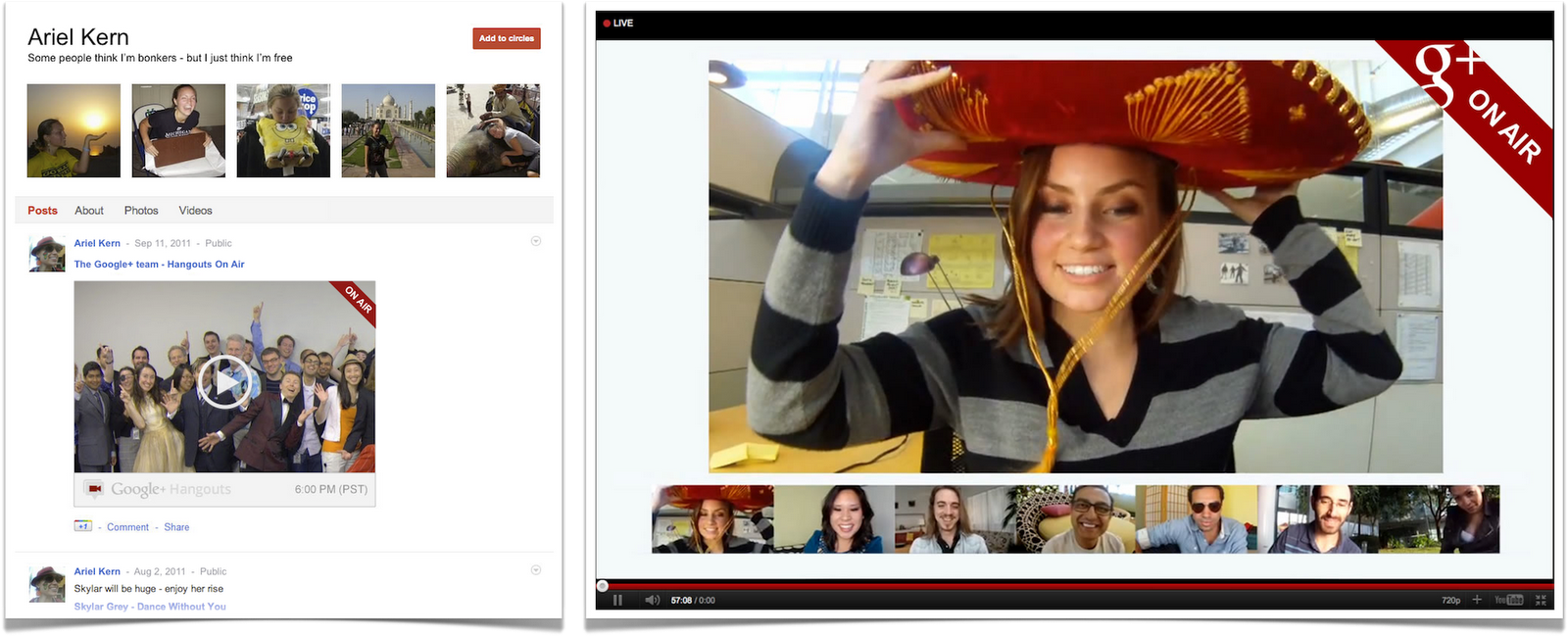
Google+ users already use Hangouts to create intimate onscreen experiences—with family members, prayer groups, even people with certain medical conditions. But sometimes you want to speak to a large audience, or alternatively, view as a spectator. In these cases a public broadcast is what’s needed, so today we’re introducing Hangouts On Air.

The setup is simple enough: just start a normal hangout, and you’ll have the option to broadcast and record your session. Once you’re “On Air,” up to nine others can join your hangout (as usual), and anyone can watch your live broadcast:

Hangouts On Air: Stream View (left), Full-screen Mode (right)

We’re starting with a limited number of broadcasters, but any member of the Google+ community can tune in. In fact: we’ll be hosting our very first On Air hangout with will.i.am on Wednesday night, September 21. For more information visit will.i.am’s or my profile on Google+.

94, 95, 96, 97. Hangouts with extras
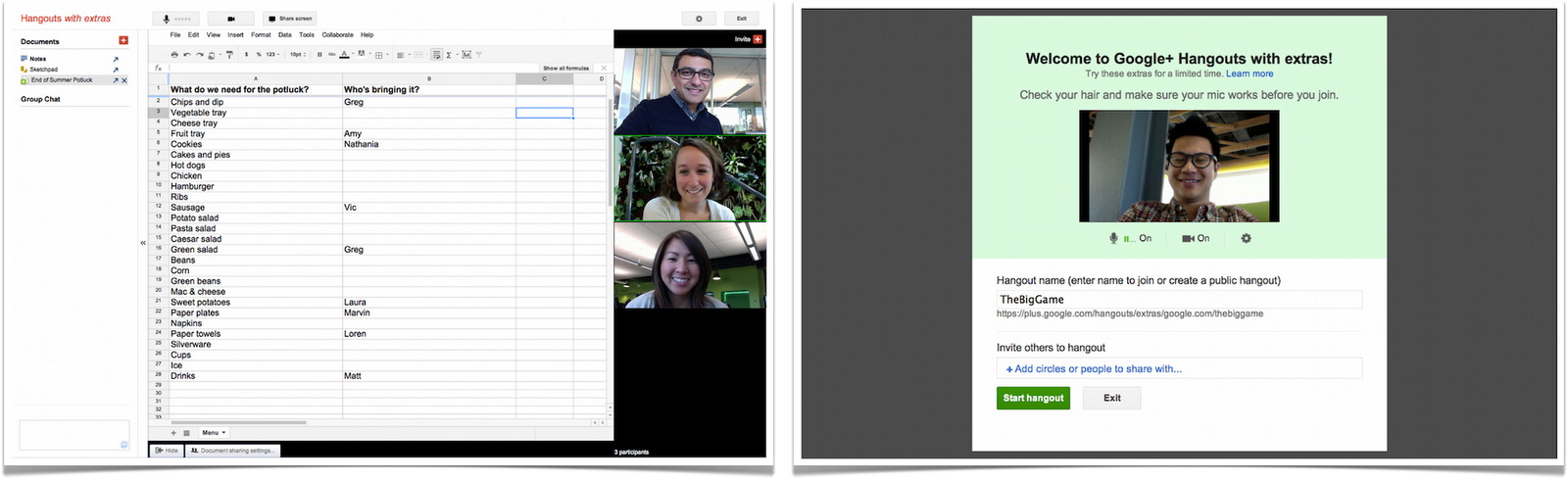
Spending time together goes hand in hand with actually doing things together. Dinner with family can easily turn into movie night at the local theater, for instance. And running into old friends can inspire anything from photo sharing to vacation planning. Hangouts has always included a basic set of in-room actions (like group chat and co-viewing of YouTube videos), but we want to make it easier to do a lot more. That’s why we’re previewing some extras, including:

  • Screensharing: for when you want to show off your vacation photos, your high score, your lesson plan or whatever else is on your screen
  • Sketchpad: for when you want to draw, doodle, or just scribble together
  • Google Docs: for when you want to write, plan or present something with others
  • Named Hangouts: for when you want to join or create a public hangout about a certain topic (like fashion or music or sports…) 
Hangouts with extras: Screensharing (left), Sketchpad (right)

Hangouts with extras: Docs (left), Named Hangouts (right)

The extras are still under construction, but we wanted to preview these features and get your feedback sooner versus later. So start a hangout, click “Try Hangouts with extras” in the green room, and let us know what you think.

98. Hangouts APIs
If field trial has taught us anything about Hangouts, it’s that the community is overflowing with creative individuals. So in the wake of last week’s Google+ API launch, we’re also releasing a basic set of Hangouts APIs. If you’re a developer who wants to build new kinds of apps and games (and who-knows-what-else), then you can find more details on the Google+ platform blog.

+Search: find the people and posts you care about

99. Search in Google+
You’ve been asking for it, and we’ve been busy building it, so today we’re bringing Google’s search expertise to Google+. Just type what you’re looking for into the Google+ search box, and we’ll return relevant people and posts, as well as popular content from around the web.

If you’re into photography, for example, then you’ll see other enthusiasts and lots of great pictures. If you care more about cooking, then you’ll see other chefs and food from around the globe. In all cases, Google+ search results include items that only you can see, so family updates are just as easy to find as international news.

Search in Google+: photography (left), cooking (right)

With more than 1 billion items shared and received every day, we’re excited to see how search will connect people through their posts on Google+.

+Everyone

100. Anyone can sign up for Google+—no invitation required.
For the past 12 weeks we’ve been in field trial, and during that time we’ve listened and learned a great deal. We’re nowhere near done, but with the improvements we’ve made so far we’re ready to move from field trial to beta, and introduce our 100th feature: open signups. This way anyone can visit google.com/+, join the project and connect with the people they care about.

Over the next day we’ll be rolling out all of these features globally. In the meantime, you can check out what’s next in Google+.

Posted by Vic Gundotra, Senior Vice President of Engineering

NVIDIA releases Kal-El white papers, announces a fifth ‘Companion’ core for less demanding tasks

We’ve known about Kal-El — the quad-core mobile processor from NVIDIA — for a fair amount of time, but a lot of the finer details have remained a secret as we’ve anxiously awaited its debut in tablets and smartphones. Fortunately, we have some reading material to bide our time as the company published white papers discussing benefits of the new CPU, and for the most part it’s what you’d expect: NVIDIA touts higher performance, better battery life and improved physics-based gaming when more cores are involved and working together.

What came as a surprise to us was the fact that this quad-core CPU actually utilizes five cores: in addition to the standard four main Cortex A9 high-performance cores, Kal-El throws in a fifth Cortex A9 “companion” core specifically designed to handle less demanding tasks in effort to minimize power consumption caused by active standby processes. How is it done? The Companion core’s max operating frequency gets capped at 500MHz, offering higher performance and greater efficiency per watt when running menial tasks such as push email, Twitter / Facebook sync, widgets, background apps and live wallpapers. This leaves the four main cores free to take care of the stuff it does best — games, web browsing, transcoding / editing audio and video, 3D, physics simulations and image processing, to name a few — allowing performance bumps of up to 50 percent when compared to Tegra 2. We can tell that quad-core devices are going to make us very, very happy. If charts and geeky stats brighten up your day like it does ours, head to the source to read the papers in their entirety.

NVIDIA releases Kal-El white papers, announces a fifth ‘Companion’ core for less demanding tasks originally appeared on Engadget on Tue, 20 Sep 2011 11:50:00 EDT. Please see our terms for use of feeds.

Permalink   |  sourceNVIDIA (1), (2)  | Email this | Comments