Apple’s iTunes software has been so bad for so long that it’s getting hard to justify using this unwieldy software. But what are the alternatives to Apple’s superior iPhone, iPod, and iPad products? And does leaving the company’s i-ecosystem even make any sense?
Giant Metal Transmission Towers Designed to Look Like Humans
Boston-based architecture firm Choi + Shine designs giant electric transmission towers with lifelike features!
Five of the Best Tablets Revealed So Far [Tablets]

We've seen numerous announcements of tablet computers in recent weeks, as the R&D labs of the world push out their hastily assembled attempts at competing with Apple's game-changing iPad. But are any of them up to the job? More »

Make Windows 7 Start Menu Search Find Your Applications Faster
When you first get your shiny new Windows 7 PC, typing anything into the Start Menu search box returns exactly what you want instantly—but what about once you’ve built up loads of files? It tends to get really slow, but here’s how to fix it.
Note: we’re assuming that you already use Disk Cleanup on a regular basis, or maybe you’ve already setup CCleaner to clean your PC on a schedule. Still slow? Keep reading.
Make the Start Menu Only Search Applications
The first thing you can do is change the Start Menu search box to only search through your applications in the Start Menu, rather than finding documents, pictures, emails, and going through your internet history.
Head into Taskbar and Start Menu Properties by right-clicking on the Start orb and choosing Properties, then click Customize.

Now scroll down in the list until you find “Search other files and libraries”, which you should set to “Don’t search”.

Note: only make this change if you don’t want to search for documents, pictures, etc, from the Start Menu search box.
Increase Search Speed by Tweaking Search Locations
The second way you can tweak the Start Menu search box to work a little faster is by simply cleaning up the locations that you are indexing so less files are included in the index. This isn’t going to magically make everything all better, but it’ll definitely help if you’ve got loads and loads of files that are being indexed.
Open up Indexing Options, which you can find easily in the Start Menu search box, and then click the Modify button at the bottom of the window.

Now you’ll be able to tweak the indexed locations—if you’ve got directories with loads and loads of files that you’ll never need to search through, you should probably remove them from the search. For instance, I’ve got a couple of code directories with 10,000 files in them, so I got rid of those.

Keep in mind that if you remove items from the index, you’re removing them from the entire index—so if you have a documents folder that you frequently search via Windows Explorer, you probably should leave it enabled.
Note: once you make this change, Windows will have to do some index cleanup, so you won’t instantly see results, and depending on just how many files you have in the index, it might slow the PC down slightly for a very short while as Windows removes the files from the index. Once it’s all done, however, your Start Menu search should be a bit faster.

Samsung Galaxy Tab Listed for $1,030 on German Amazon [Tablets]

A Samsung product exec told the WSJ that the Galaxy Tab would retail for between $200 – $300 in the US, but over on Amazon Germany, a 799 Euro price-tag has been affixed to the tablet. More »
WeTab tablet spotted running MeeGo at IFA

Remember the WeTab? Or the WePad, perhaps? While we can’t say we had much confidence in ever seeing the tablet again after a seemingly endless series of false starts and delays, it has turned up at IFA, and with something of a surprise no less — it’s running a customized version of MeeGo. Those customizations look to keep things mostly in line with the interface we saw during the device’s WePad days, but it does seem to be a bit more responsive, and is seemingly in a nearly final state. Of course, it’s not quite final enough to avoid another delay — it’s now apparently set to roll out in “late September.” Head on past the break to check it out in action.
Continue reading WeTab tablet spotted running MeeGo at IFA
WeTab tablet spotted running MeeGo at IFA originally appeared on Engadget on Mon, 06 Sep 2010 02:52:00 EDT. Please see our terms for use of feeds.

Lighting Strike Up Close
Turn your speakers up and listen for “Oh my fucking god!”
I’m Bruce Willis
Cee Lo Green – FUCK YOU
Roughrider fans mark century of football
Fans of the Saskatchewan Roughriders paraded down the streets of Regina on Saturday afternoon, one of the highlights of the CFL team’s 100th-anniversary celebrations.
This Could Be the New Fastest Street Car [Cars]

The SSC Ultimate Aero II, the second generation of America’s fastest supercar, looks like a space pod that combines Ferrari angles with Wall-E‘s Eve curves. It could also be the fastest production car in the world if it reaches 270MPH. [Jalopnik] More »
"Tool Man" Tim Allen Is The Voice Of Chevrolet, 2011 Cruze
Tim Allen, the voice of Michigan tourism, Toy Story’s Buzz Lightyear, and Home Improvements Tim Taylor will soon be the voice of the 2011 Chevrolet Cruze, and the rest of the Chevrolet brand, GM announced today. The ads running Allen’s voice will start September 7, the day before the official…
Top 10 Android tablets

7 inch Android tablets
7 inch screen, light weight tablet, is great for reading and big enough for easy surfing. Many current apps won't fill the screen as nicely as on a phone but developers will adopt to these form factors too. Not gonna fit inside your pocket but not too heavy in your bag. These new tablets have capacitive touch screens compared the many "craptablets" around.

Samsung Galaxy Tab – €600 – 900
– 7 inch 1024 x 600 capacitive touch
– 1Ghz Samsung Cortex A8
– Wifi, 3G, A-GPS and bluetooth
– TV-Out
– Front and rear cameras
– Android Market and Google Apps
Samsung made huge buzz over their tablet. Now that we have seen it, tested it and wow’ed it’s great features, we can only cry for cheaper price. It looks like Sammy is priced towards carrier deals, so you may get it later for €99 or $199 with 3G contract. It has it all but if price without contract doesn’t come down it might be too much. Great accessory line.
Hands-on videos: Engadget Carrypad Mobile-Review Netbooknews Slashgear NewGadgets Charbax HDblog
Specifications, Gallery and News links for Samsung Galaxy Tab

Viewsonic Viewpad 7 – €399
– 7 inch 800 x 480 capacitive touch
– 600Mhz Qualcomm Snapdragon
– Wifi, 3G, A-GPS and bluetooth
– HDMI out
– Front and rear cameras
– Android Market and Google Apps
It looks like Viewsonic got their pricing good from the start. You should see it soon cheaper than $399 from many different places and different brands. 600Mhz cpu and 800 x 480resolution looks bad compared to Sammy but I think they are not deal breakers.
Hands-on videos: Carrypad Engadget Charbax Slashgear NewGadgets
Specifications, Gallery and News links for Viewsonic Viewpad 7

Archos 70 Internet Tablet – $274
– 7 inch 800 x 480 capacitive touch
– 1Ghz TI Cortex A8
– Wifi, bluetooth
– HDMI out
– Front cam
Archos 70 has many things right, specially pricing. Lack of Android Market and their decision to use software keys and not hardware buttons are let downs. Great kick stand, nice design and support for multiple video files are goodies you won't find on other tablets.
Hands-on videos: Engadget Charbax Liliputing Carrypad
Specifications, Gallery and News links for Archos 70 Internet Tablet

StreamTV Elocity A7 – $399
– 7 inch 800 x 480 capacitive touch
– 1Ghz Tegra 2 Cortex A9
– Wifi, 3G option and bluetooth
– HDMI out
– Front cam
Compal has been showing it from January and Aigo branded it too. Now StreamTV is bringing it to USA and their pricing is looking ok. No Android Market and other Gstuff but it shouldn’t take long when it’s hacked to eat anything you throw in it. Great video power due Tegra 2. It should appear soon on other countries too with different branding.
Hands-on videos: Engadget Netbooknews GigaOM LAPTOP
Specifications, Gallery and News links for NAZ-10/ ePad N7/ Elocity A7
10 inch Android tablets
They are big, you can fit 2 portrait 7 inchers side by side for their width. Best for sofa surfing, web, videos and pictures. A bit too big and heavy for bed reading. Many apps will look weird with big fonts on these big screen. No Android Market nor Google apps on any of then yet.
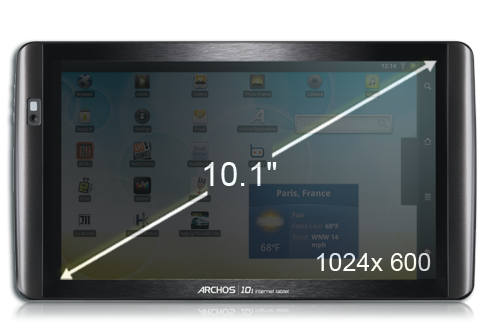
Archos 101 Internet Tablet – $300
– 10 inch 1024 x 600 capacitive
– 1Ghz TI Cortex A8
– Wifi, bluetooth
– HDMI out
– Front cam
101 is grown up Archos 70. It has the same video file support and kick stand but now bigger screen and higher resolution. If you want it big, this one is the cheapest. No Android market is a bummer but side loading / hacking it might be ok for some. Should be easily available everywhere soon.
Hands-on videos: Engadget Charbax Liliputing Carrypad
Specifications, Gallery and News links for Archos 101 Internet Tablet

Toshiba Folio 100 – €399
– 10 inch 1024 x 600 capacitive
– 1Ghz Tegra 2 Cortex A9
– Wifi, 3G option and bluetooth
– HDMI out
– Front cam
Specialty on this device is Toshiba’s Places, which should make sharing content over different screens easier. This tablet has horse power to surf with pleasure and play HD videos either on itself or on big screen TV. It should be the first available 10 inch Android tablet with 3G.
Hands-on videos: Slashgear Charbax Netbooknews Engadget Carrypad
Specifications, Gallery and News links for Toshiba Folio 100
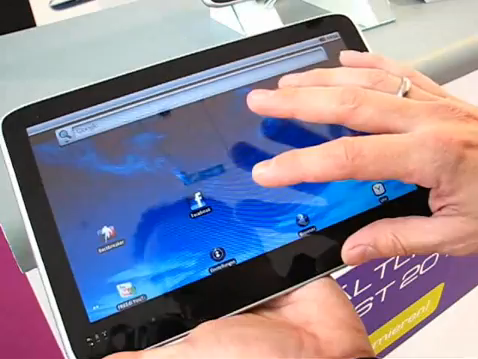
E-Noa Interpad – €399
– 10 inch 1024 x 600 capacitive
– 1Ghz Nvidia Tegra 2 Cortex A9
– Wifi, bluetooth
– HDMI out
Again, Tegra 2 video power. They are also making a 3G version with Android Market but this one still lacks both. As it’s based on ODM design, you should see it branded with different names too. Should be great allrounder on it’s category.
Hands-on videos: Carrypad Engadget Slashgear jkkmobile Charbax
Specifications, Gallery and News links for E-Noa Interpad
5 inch Android tablets
These are best for pockets. Bigger than phone size helps surfing the web and apps don’t look too weird. My personal favorites for reading while traveling, casual surfing and social networks. Dell Streak is the only one with capacitive screen, Gtuff and 3G, which shows on it’s pricing too.
 Dell Streak – $549
– 4.8 inch 800 x 480 capacitive touch
– 1Ghz Snapdragon
– Wifi, 3G, A-GPS and bluetooth
– HDMI out
– Front and Rear cameras
– Android Market and Google Apps
First tablet to get full access to all Google apps and Android Market. I like it a lot. It fits in your pocket but I think it’s a bit big for all-round phone. Great for data centric phone use. Big accessory line, good quality and nicely building community support. Expensive compared to Archos offerings but with 3G and Gstuff has way more mobile value.Great for car navigation too.
Hands-on videos: jkkmobile Engadget Slashgear
Specifications, Gallery and News links for Dell Streak

Archos 5 Internet Tablet – €229
– 4.8 inch 800 x 480 resistive touch
– 800Mhz TI Cortex A8
– Wifi, GPS and bluetooth
– TV out
Olden but golden. I have been using A5IT now for almost a year. It was buggy and unstable but Archos gave us almost 15 updates which made it a good allrounder. I use it for ebook reading with Kindel app. Great support for different Video formats, good kickstand.
Hands-on videos: Liliputing jkkmobile Charbax
Specifications, Gallery and News links for Archos 5 Internet Tablet

Archos 43 Internet Tablet – $199
– 4.3 inch 854 x 480 resistive touch
– 1Ghz TI Cortex A8
– Wifi, bluetooth
– HDMI out
– Rear camera
Let down for me, as I was waiting for 3G and A-GPS device with capacitive screen. Pricing makes me feel a bit better, specially as they added rear camera on it. Good pocketable entry level tablet with huge support for different video formats. Works as a mouse pad when connected to TV.
Hands-on videos: Charbax Engadget Ndevil Liliputing Carrypad
Specifications, Gallery and News links for Archos 43 Internet Tablet
That’s my current list of top 10 Android tablets. Feel free to add your favorites to comments and contact me if you have good videos to add to these links.
UPDATE: More links added on 6th September
There are many other cool tablets around but these are ones you can actually buy now or soon.

Freak Out Your Coworkers With Google Docs Konami Code [EasterEggs]

The Konami Code (if you don’t know it, then shame on you!) has long been part of geek lore. But now it can be part of your work day too: Google has added a new, pranktastic easter egg to Docs. More »
JayCut Is a Great Web-Based Video Editor [Video Editing]

If you need to edit some video away from your home, free web-based video editor JayCut will likely get your project going, whether you need simple cutting and pasting or text, transitions, and impromptu audio recording. More »

Gearbox Announces Duke Nukem Forever

Well, this is it. Hell has frozen over, pigs are flying, dogs and cats are living together – MASS HYSTERIA!!
Gearbox has just confirmed that they will be releasing Duke Nukem Forever. If this actually comes to pass, it looks like L.A. Noire may be the new king of the vaporware.
The future of Duke Nukem Forever looked black indeed when 3D Realms finally went bust in May 2009. Take Two retained rights to the game, and they apparently felt that Borderlands developer Gearbox could put the polish to the long-awaited franchise.
No word yet on when it will hit stores, but we’ll let you know as soon as we do. In the meantime, there’s a live stream of the announcement and gameplay footage in this post.
UPDATE: The game has completed development, and will be released in 2011 on PC, PS3 and XBox 360. Said Gearbox CEO Randy Pitchford, “When Duke ran into trouble, we were glad to [help him out of] a spot. You can’t let the Duke die, right?” Apparently not, since the game is fully playable at PAX right now.
Ridley Scott Talks About ‘Alien’ Prequel
Ridley Scott continues to prepare to return to the “Alien” universe. Now he shares a little insight into what we can expect from the prequel.
Google Wave Lives On (in a Box) [Google Wave]

Google has announced that despite Wave’s demise as a Google App, its open source code will continue to be developed into a fully-functional application available to anyone with the desire to host it. More »
Chrome is now 2 years old! Google celebrates with release of version 6

Two years. Can you believe it’s only been two years since we started browsing the internet faster than a potato can tear through the air? Well, Google can, and it’s certainly not been sitting around during that time, improving Chrome‘s JavaScript performance by a factor of 3, and throwing in a litany of additional features, like tab side-by-side view, themes, auto-translation, and bookmark and preference sync across machines. To celebrate the anniversary, the company’s uploaded version numero 6 to its stable channel, which brings a few more GUI optimizations and some bug fixes to the table. Hardware graphics acceleration isn’t yet included in the public release, but it too shall be joining the party before long.
Chrome is now 2 years old! Google celebrates with release of version 6 originally appeared on Engadget on Fri, 03 Sep 2010 06:25:00 EDT. Please see our terms for use of feeds.
BP Gulf oil spill costs hit $8B US
BP says it has so far spent roughly $8 billion US responding to the disastrous oil well blowout in the Gulf of Mexico.