New Xbox 360 gets official at $299, shipping today, looks angular and ominous (video hands-on!)

Digg this! At first we were doubtful that a edgy box appearing in a little Flash ad from Italy last night could be legit, but Microsoft just got real with the new Xbox 360. (That’s all it’s officially called — just “the new Xbox 360.”) It’ll launch today priced for $299, while the old Elite will stick around for $249 and the Arcade will drop to $149. The new box is crazy sexy in glossy black with touch-sensitive buttons, and Microsoft says it’s “whisper quiet,” with one large fan instead of two — the new 45nm chipset undoubtedly generates less heat to begin with. On the features front, it’s got integrated 2.4GHz 802.11n WiFi, five USB ports, and 250GB of storage on a removable hard drive, although it’s not a standard drive or same drive as the old console, and older Memory Units won’t work, either. Upgraders can use a USB-to-Xbox hard drive connector cable to migrate to the new box, however. There’s also a “custom Kinect port” on the back that looks like an HTC-style ExtUSB port, and it also seems like the power supply has moved inside the case, which is a welcome change. New Xbox 360 units are shipping to retailers now, with availability expected later this week, and MS conference attendees are actually getting theirs shipped today.

If you’re in Europe, don’t fret, as yours is coming soon. Microsoft’s official Xbox Twitter account has confirmed the console hits there on July 16.

Update: We just got the official fact sheet, check it after the break. Oh, and we’re calling it the “Stealthbox” to keep all the models straight. It just feels right, you know?

Update 2: According to a Microsoft representative, the Xbox 360 Original will still be sold while there’s stock, but they’re not making any more of them. Once they’re gone, they’re gone — and we’d assume a new $199 variant of the new design will eventually be released to fill the void.

Continue reading New Xbox 360 gets official at $299, shipping today, looks angular and ominous (video hands-on!)

Filed under:

New Xbox 360 gets official at $299, shipping today, looks angular and ominous (video hands-on!) originally appeared on Engadget on Mon, 14 Jun 2010 16:12:00 EDT. Please see our terms for use of feeds.

Permalink   |   | Email this | Comments

Microsoft demos new Kinect dashboard and voice control

Digg this! Thought Kinect was just for kicking balls and making a fool of yourself? Oh now, you can now use it to do everything from find your friends and to control media playback. With a wave the Xbox 360 pops into a new Dashboard which you can manage by moving your hands around. It also supports voice control, enabling you to say “Xbox Play” or “Xbox Pause” or, you know, whatever. Easy!

Microsoft demos new Kinect dashboard and voice control originally appeared on Engadget on Mon, 14 Jun 2010 13:18:00 EDT. Please see our terms for use of feeds.

Permalink   |   | Email this | Comments

Enable DreamScene in Any Version of Vista or Windows 7

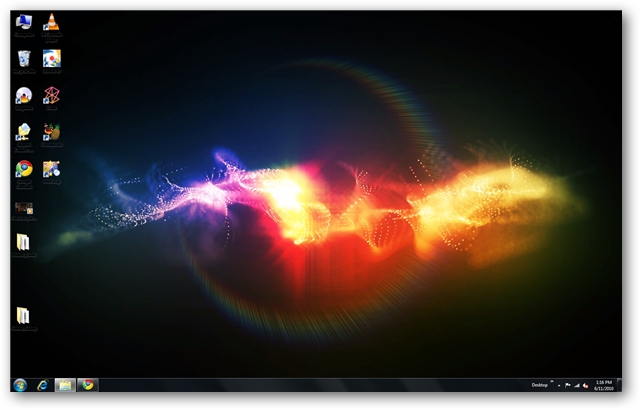
Windows DreamScene was a utility available for Vista Ultimate that allowed users to set video as desktop wallpaper. It was dropped in Windows 7, but we’ll take a look at how to play DreamScenes in all versions of Windows 7 or Vista.

Downloading DreamScenes

First, you’ll need to find some DreamScenes to download. We’ve found some nice ones at both DreamScene.org and DeviantArt. You can find those download links at the end of the article. They’ll come as compressed files, so you’ll need to extract them after downloading.

sshot-38

Windows 7 DreamScene Activator

If you are running Windows 7 you can use Windows 7 DreamScene Activator. This free portable utility enables DreamScene in both 32 & 64 bit versions of Windows 7. Users can then set either MPG or WMV files as desktop wallpaper.

Download and extract the Windows 7 DreamScene Activator (link below). Once extracted, you’ll need to run the application as administrator. Right-click on the .exe and select Run as administrator.

sshot-29

Click on Enable DreamScene. This will also restart Windows Explorer if it is open.

sshot-30

To play your DreamScene, browse for the file in Windows Explorer, right-click the file and select Set as Desktop Background.

sshot-34

Enjoy your new Windows 7 DreamScene.

 sshot-35

Although it says it is for Windows 7 only, we were able to get it to work with no problems on Vista Home Premium x32 as well.

sshot-2010-06-12-[18-51-27] 

You can Pause the DreamScene at anytime by right-clicking on the desktop and selecting Pause DreamScene.

sshot-32 

When you are ready for a change, click Disable DreamScene and switch back to your previous wallpaper.

sshot-36

Using VLC Media Player

Users of all versions of Windows 7 & Vista can enable a DreamScene using VLC. Recently, we showed you how to set a video as your desktop wallpaper in VLC.  Since DreamScenes are in MPEG or WMV format, we will use the same tactic to display them as desktop wallpaper. We’ll just need to make a few additional tweaks to the VLC settings.

You’ll need to download and install VLC media player if you don’t already have it. You can find the download link below. Next, select Tools > Preferences from the Menu.

sshot-10

Select the Video button on the left and then choose DirectX video output from the Output dropdown list.

sshot-16

Next, select All under Show Settings at the lower left, then select the Video button on the left pane. Uncheck Show media title on video. This will prevent VLC from constantly showing the title of the video on the screen each time the video loops. Click Save and the restart VLC.

 sshot-17

Now we will add the video to our playlist and set it to continuously loop. Select View > Playlist from the Menu.

sshot-5

Select the Add file button from the bottom of the Playlist window and select Add file.

 sshot-19

Browse for your file and click Open.

 sshot-22

Click the Loop button at the bottom so the video plays in a continuous loop.

sshot-23 

Now, we’re ready to play the video. After the video starts playing, select Video > DirectX Wallpaper from the Menu, then minimize VLC.

 sshot-25 copy

If you’re using Aero Themes, you may get a pop-up warning and Windows will switch automatically to a basic theme.

sshot-17 

If looping one video gets to be a little repetitive, you can add multiple videos to your playlist in VLC and loop the entire playlist. Just make sure you toggle the Loop button on the playlist window to Loop All.

sshot-24

Now you’ve got a nice DreamScene playing on your desktop. Another cool trick you can do with VLC is take snapshots of favorite movie scenes and set them as backgrounds.

When you’re ready to go back to your old wallpaper, maximize VLC, select Video and click DirectX Wallpaper again to turn it off the video background. Occasionally we were left with a black screen and had to manually change our wallpaper back to normal even after turning off the DirectX Wallpaper.

sshot-27

Note: Keep in mind that using the VLC method takes up a lot of resources so if you try to run it on older hardware, or say a netbook, you’re not going to get good results. We also tried to use the VLC method in XP, but couldn’t get it to work. If you have leave a comment and let us know.

While the DreamScene feature never really caught on in Vista, we find them to be a cool way to pump a little life into your desktop on any version of Vista or Windows 7.

Downloads

DreamScenes from Dreamscene.org

DreamScenes from DeviantArt

Download VLC media player

Windows 7 DreamScene Activator

Got an opinion to share? Click here to join the discussion

Similar Articles Productive Geek Tips
Latest Software Reviews Tinyhacker Random Tips

Xbox 360 Slim outed by Italian ad?

Xbox 360 Slim outed by Italian ad?


Of the rumored devices we’ve been looking forward to getting official at E3 this year, two of the biggest come from Microsoft — both of which, sadly, seem to have escaped from their bag a little early. First is Kinect, the re-naming of “Project Natal,” and now it’s looking like the rumored Xbox 360 Slim has been leaked early as well. An Italian site, Console Tribe, ran an ad (embedded after the break) showing the above rather more angular looking console that’s definitely an Xbox 360, but definitely not a current model. It mentions that this model is compatible with the Kinect and also invites you to “live today.” We’re thinking this model was not supposed to go live until tomorrow, but seizing an extra day doesn’t sound so bad for us.

Continue reading Xbox 360 Slim outed by Italian ad?

Xbox 360 Slim outed by Italian ad? originally appeared on Engadget on Sun, 13 Jun 2010 20:21:00 EDT. Please see our terms for use of feeds.

Permalink Joystiq  |  sourceConsole Tribe  | Email this | Comments

HP picks up Phoenix’s HyperSpace, HyperCore and Flip instant-on assets for $12m

Phoenix Technologies, remember those guys? Yeah, us either. Not that we really minded its instant-on OS or anything, but considering that full-fledged operating systems can boot up in under a minute on most machines, they’re kind of a hard sell. Unless you’re selling to HP, of course, which is on somewhat of an acquisition rampage. In fact, Hewlett-Packard hasn’t even filled out the appropriate paperwork to close that Palm deal it entered into last month, and already the company’s dropping another $12 million in order to pick up Phoenix’s HyperSpace, HyperCore and Flip instant-on and client virtualization products. There’s no mention from either company on what exactly HP plans to do with the new code, but considering that this deal is expected to go final by the month’s end, we’re guessing we’ll be finding out sooner rather than later. On the edge of our seats? Oh, you bet.

Continue reading HP picks up Phoenix’s HyperSpace, HyperCore and Flip instant-on assets for $12m

HP picks up Phoenix’s HyperSpace, HyperCore and Flip instant-on assets for $12m originally appeared on Engadget on Sun, 13 Jun 2010 06:52:00 EDT. Please see our terms for use of feeds.

Permalink   |   | Email this | Comments