Conservative leader Stephen Harper brought his campaign to Saskatchewan Tuesday and said he won’t be satisfied holding 13 out of the province’s 14 ridings.
Acer slaps $1,200 price tag on dual-screen Iconia-6120 touchbook, lets US and Canada pre-order

Acer’s had its fair share of Iconia’s land in the past few months, but none are as breathtaking (and potentially world-changing) as the Iconia-6120. Said machine was priced at €1,499 earlier in the year, but that doesn’t mean an awful lot to folks situated in America and the Great White North. As of today, consumers in both of those nations have a price and release date to ponder, with $1,199.99 (both US and CAD) netting you a touchbook with two 14-inch Gorilla Glass touchpanels, a Core i5 CPU, 4GB of memory, integrated Intel HD graphics and a 64-bit copy of Windows 7 Home Premium. You’ll also get USB 3.0 support, a 640GB hard drive, a 1.3 megapixel camera, 802.11b/g/n WiFi, an HDMI output, gigabit Ethernet, a chassis that weighs in at 5.95 pounds and a battery that’ll probably sputter along for nine or ten minutes (on a good day). Lookin’ to dive right in? Amazon, as well as “other” fine e-tailers, should be taking orders momentarily.


Acer slaps $1,200 price tag on dual-screen Iconia-6120 touchbook, lets US and Canada pre-order originally appeared on Engadget on Tue, 29 Mar 2011 08:00:00 EDT. Please see our terms for use of feeds.
Permalink |  Amazon | Email this | Comments
Samsung Galaxy S II shows off motion-zoom option in TouchWiz 4.0 (video)

It’s skinny, it’s fast, and it can do some seriously fun stuff with its gyroscope accelerometer. Yes, we’re talking about the Galaxy S II, Samsung’s upcoming followup to one of Android’s biggest successes to date, the Galaxy S. The new handset will bring with it a revised version of Sammy’s Android skin, TouchWiz 4.0, which will harness the motion sensors inside the phone to allow you to zoom in and out of webpages as well as navigate the UI with the movement of your hands. Basically, instead of the traditional pinch-to-zoom, resting two fingers atop the screen will allow you to zoom in by bringing the S II closer to your face or zoom out by holding it further away — a naturalistic gesture that makes all the sense in the world to us. Moreover, when adding new widgets to your home panels, you’ll be able to move between them by propelling the phone laterally. It’s quirky and appealing stuff, see it on video below.
[Thanks, Lawrence]
Update: We initially thought this was done using the gyroscope inside the Galaxy S II, but as commenter ClioCreslind helpfully points out, it’s far likelier that Samsung’s using the phone’s accelerometer to achieve its new fanciness.
Continue reading Samsung Galaxy S II shows off motion-zoom option in TouchWiz 4.0 (video)
Samsung Galaxy S II shows off motion-zoom option in TouchWiz 4.0 (video) originally appeared on Engadget on Tue, 29 Mar 2011 06:05:00 EDT. Please see our terms for use of feeds.
How to Use Crossfade in Audacity for Seamless Transitions Between Audio Tracks

Switching tracks suddenly in your audio/video projects can be really jarring for the audience. Crossfades can help make natural-sounding transitions between audio tracks, and you can really take advantage of them if you know a little about how sound works.

 |
 |
 |
| Angry Birds: Video Cheats for Every Level | How To Use Clipping Masks (And Not Layer Masks) in Photoshop | How to Remotely Control Your PC (Even When it Crashes) |
The History of Web Browsers (Picture)


Least I Could Do: 2011-03-29

Netflix Canada announces new bandwidth management settings for capped users

The second bit of news for Canadian Netflixers in less than 24 hours deals with the other pressing issue facing the service in the Great White North: bandwidth caps. While they exist in the U.S., many Canadian ISPs have set the max amount of data allowed at much lower levels and they may cut further if a recent CRTC decision on usage-based billing stands. In response, starting today Netflix.ca accounts all have a new Manage Video Quality setting that lets users select Good / Better / Best bitrates as defaults for their video streams. According to CPO Neil Hunt’s blog post, previously watching 30 hours of Netflix would typically consume up to 30GB of data, while now it can be as low as 9GB under the “Good” setting. Of course, dropping bitrate means lowering picture quality accordingly, despite promises that “the experience continues to be great.” Even with HD and 5.1 audio available, PQ probably isn’t your highest priority if you’ve turned to streaming, but it remains to be seen if customers find the compromise suitable, and whether a similar option comes to U.S. users facing similarly limited connections.
[Thanks to everyone who sent this in]
Netflix Canada announces new bandwidth management settings for capped users originally appeared on Engadget on Mon, 28 Mar 2011 23:09:00 EDT. Please see our terms for use of feeds.
Bell backs down on usage-based internet billing
Telecom giant Bell Canada has pulled its plan to impose usage-based billing to wholesale internet clients, following a widespread public outcry.
Quadrocopters juggle balls cooperatively, mesmerize with their lethal accuracy (video)

You’ve seen one quadrocopter juggle a ball autonomously while gliding through the air, but how’s about a pair of them working cooperatively? Yeah, we’ve got your attention now. The Zurich-based lab that brought us the piano-playing and ball-bouncing quadrocopter is back with a simply breathtaking display of robotic dexterity and teamwork. Like all mad scientists, they call their Flying Machine Arena research “an experiment,” though we see it a lot more as a Pong-inspired dance of our future overlords. We all know how far video games have come since two paddles batted a ball between one another, right?
Quadrocopters juggle balls cooperatively, mesmerize with their lethal accuracy (video) originally appeared on Engadget on Mon, 28 Mar 2011 19:57:00 EDT. Please see our terms for use of feeds.

Japan races to contain radioactive water spread
New pools of radioactive water have been detected around Japan’s earthquake-damaged Fukushima nuclear complex, officials said Monday, as workers continued racing to contain leaks from the facility.
An artificial leaf and a gallon of water could generate enough energy to power your house for a day [Mad Science]

The artificial leaf has been a target of solar research for years — an object that creates fuel sources out of sunlight, mimicking photosynthesis. But this solar energy breakthrough has always been thwarted by the need for rare components… until now. More »
Dutch Tulip Round-Up


Oh spring, come quick! It’s a lifelong dream of mine to be in Holland during tulip season which is now just seconds away. The countryside all swathed in color as far as the eye can see, the air thick with the scent of spring. And then, all of a sudden it’s harvest time and they’re all cut down, packed up and exported worldwide. My Dad tried to go see them once and he was a day too late, he said it was a like floral massacre, bereft of color, the fields barren with random decapitated tulip heads & bulbs left behind. Oops, sadface Daddio. Nice try, better luck next time!
Rejection Hurts — Literally
The most intense forms of rejection create a physical response in the brain, research shows.
Plutonium Found Outside Fukushima’s Reactors for the First Time [Video]

Plutonium has been discovered for the first time outside Fukushima’s reactor buildings. The radioactive material was found in the soil at five points of the nuclear plant. More »

This is the scariest tsunami video yet [Video]

We’ve seen a lot of scary videos of this month’s deadly Japanese earthquake and tsunami — but nothing like this. Watch as the waves ravage the port of Kesennuma, destroying everything in it's path. More »
How to Remotely Control Your PC (Even When it Crashes)
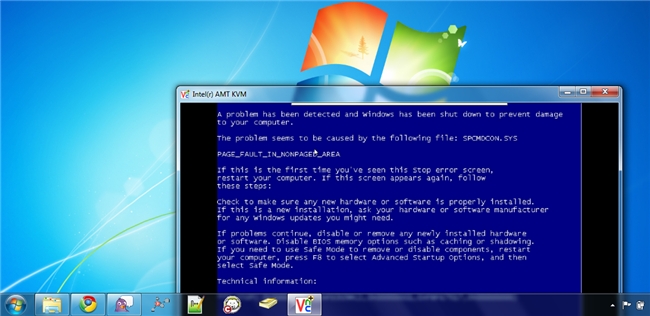
Being able to remotely control your computer is an age old geek trick. But what about changing BIOS settings or installing an operating system remotely? With Intel AMT KMS this is within reach for any geek with the right hardware.
Intel vPro is a management platform built into Intel processors and other hardware that allows companies to manage their desktops and laptops out-of-band (OOB). That means the computers can be managed no matter if the computer in on or off, and even if the operating system has failed or there is no hard drive present.
With Core processors Intel introduced Active Management Technology (AMT) 6.0 which introduced a slew of new features including Keyboard Video Mouse (KVM) Remote Control. This means that with the right hardware configuration you have full remote access to your computer no matter what state it’s in.
Most geeks are familiar with VNC software that runs inside your operating system, but Intel AMT KVM runs at a hardware level which allows you to go remote with your computer in the case of a total system failure or even without an operating system installed. Let’s get started and set up Intel AMT KVM so you can go remote with your computer.
|
|
 |
| How To Use Clipping Masks (And Not Layer Masks) in Photoshop | How to Remotely Control Your PC (Even When it Crashes) | Use Windows 7’s Previous Versions to Go Back in Time and Save Your Files |
ThinkPad Edge E420s now shipping for $699, E220s coming in April

Don’t tell us you’ve forgotten about Lenovo’s pair of new Edge machines! Sure, they’ve taken a while to get to market, perhaps having been inconvenienced by a little hiccup with Intel’s Core 2011 chipsets, but the first of them is now well and truly on sale and the other is looking eager and ready to go too. The 14-inch E420s is up on Lenovo’s web store, starting at $699 with a 2.1GHz Core i3-2310M CPU, while its 12.5-inch sibling, the E220s, is expected on the 8th of April, judging by the roadmap doc we’ve uncovered below. The E420s touts what Lenovo calls an Infinity Glass display, meaning simply edge-to-edge glass, alongside a fingerprint reader, a fetching new matte black lid, a HD webcam, 4GB of RAM and 250GB of HDD storage at a minimum, and a 48.8Wh battery. A 1366 x 768 resolution is your only option, unfortunately, though you can spruce up performance by quite a bit if you opt for the i5-2410M, which does 2.3GHz at default speeds or 2.9GHz when only one of its two cores is pushed to the limit … or should that be to the Edge?
[Thanks, Chris and Abdu]
Continue reading ThinkPad Edge E420s now shipping for $699, E220s coming in April
ThinkPad Edge E420s now shipping for $699, E220s coming in April originally appeared on Engadget on Mon, 28 Mar 2011 04:35:00 EDT. Please see our terms for use of feeds.
Permalink | Lenovo | Email this | Comments
Use Windows 7’s Previous Versions to Go Back in Time and Save Your Files
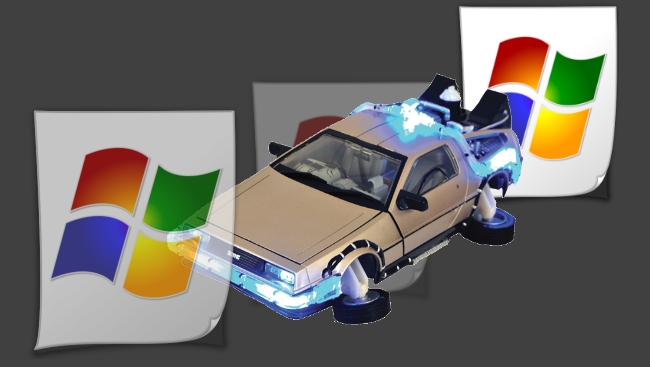
Previous Versions is an incredibly useful feature built into Windows 7, which allows the OS to record and view earlier versions of files without a flux capacitor. Here’s a detailed guide to using this excellent feature.
This feature goes beyond the functionality of the Recycle Bin as it allows you to:
- Recover files you may have permanently deleted.
- View or restore a version of a file which you have saved over.
- Allow you to compare current and/or previous versions of a file side by side.
With a little bit of dedicated hard drive space, an automation script and scheduled task, you can leverage this feature to guard against inadvertent file deletions and overwrites which traditional backups may not adequately cover.
|
|
|
| How To Use Clipping Masks (And Not Layer Masks) in Photoshop | How to Remotely Control Your PC (Even When it Crashes) | Use Windows 7’s Previous Versions to Go Back in Time and Save Your Files |
Awesome Augmented Reality App Could Save Librarians Hours
 If you’ve ever worked in a library, you’re familiar with the drudgery of shelf reading. That’s the process of verifying that all the books on a shelf are in the right order, based on their call numbers. Books get out of order fairly easily, when they’re taken off the shelf and examined, for example, or when they’re just stuck in the wrong place.
Miami University’s Augmented Reality Research Group (MU ARRG! – that exclamation point, I confess, is my addition), led by Professor Bo Brinkman, has developed an Android app that could save librarians a lot of time and hassle. Using the Android’s camera, the app “reads” a bookshelf, and with an AR overlay, quickly flags those books that are misplaced. It will also point to the correct place on the bookshelf so the book can easily be re-shelved correctly.
Sponsor
The app can also aid with inventory, generating a report of what a library really has on its shelves.
There are a few drawbacks. Thin books, such as those found in the children’s section, would be difficult to tag. Also, this prototype only uses 16 bits on the tag, but Brinkman says the group is working on a version that would allow them to put around 72 bits on a tag, allowing the system to scale up to work with any library collection.
The app was developed by undergraduate research assistant Matt Hodges, and it will be demoed next month at the Association of College and Research Libraries 2011 conference.
via Reddit; photo credits: Flickr user Stewart Butterfield
Is Android Right For You?
This is an ongoing series delving into which smartphone OS is for you? Already an iPhone user? Obsessed with your BlackBerry? Need your Android fix? Read on for a taste of them all, and maybe you’ll learn whether… Is Android Right For You? We’ve have already looked at Windows Phone 7, and according to the […]
Related posts:
- 103 Android apps are downloaded every second
- Google to redesign Android Market
- Google releases Android OS 2.2 (Froyo) for the Nexus One