Canada has some of the poorest high-speed internet service in the developed world and is an example of what not to do from a policy perspective, according to a study by Harvard University.
Integrated Gmail Updates with Improved Looks and Handy Features [Downloads]
 Firefox: Integrated Gmail is a clever way to load any Google app on one landing page. With version 2.0, it also adds a lot of interface fixes and helpful features, in the style of a certain well-known Gmail extension.
The basic functionality of Integrated Gmail remains the same—load in other Google Apps, like Reader, Calendar, Chat, Tasks, or whatever you'd like, and set how big they are when you click to expand them. New to 2.0 are several features included in Better Gmail 2, like message counts in your web favicon, and a few that are just all-around neat: universal drag-and-drop between left and right sidebars, sidebar and title bar hiding, multiple inbox support, theme detection and compatibility, and much more, detailed at the developer’s Mozilla page.
 Of course, loading multiple Google apps in a single page can introduce a good bit of lag, and we saw some incessant Gmail load flickering in our installation. With some adjustments, though, you can probably create a single-page inbox for all the stuff Google wants to serve you.
Integrated Gmail is a free download, works wherever Firefox does.

Filippa Hamilton: I was fired because I was too fat!
Ralph Lauren’s clothing company fired the model whose body looked emaciated in a touched-up ad because she weighed too much, the woman told the Daily News Tuesday.Filippa Hamilton – whose hips appeared slimmer than her head in the recent altered ad – said her contract was terminated in April because she was too heavy.”They fired me because they
HP Ranked #1 Green Company (What!?) [Hp]
 Newsweek’s latest Green Rankings gave Hewlett Packard the top position, establishing the firm as the greenest Fortune 500 company this year—a far cry from Greenpeace’s #14 ranking. So what gives?
The ranking methodology utilized by Greenpeace and Newsweek are radically different; the Newsweek rankings are based on a holistic view of the companies including greenhouse emissions, water consumption and supply chain management. Greenpeace study analyzes more focused benchmarks like the use of toxic chemicals.
Greenpeace's biggest knock on HP is it's continued polyvinyl chloride (PVC) and brominated flame retardant (BFR) usage despite a commitment to discontinue their utilization, while Newsweek recognizes their continued use— they give HP credit due to progressively diminished usage.
HP got especially high marks for it’s Green Policy and Performance from Newsweek, issues Greenpeace did not consider. While Newsweek’s ranking system is more comprehensive, there is good reason Greenpeace looks specifically at PVC and BFRs. Dioxin, an organic compound, produced as a byproduct of PVC production has been implicated in a broad range of health problems from acne to sarcoma.
Both rankings have valid rationales to justify their methodologies, HP most likely belongs somewhere in between #1 and #14. [Newsweek and Greenpeace]
Thanks Prof. Singaram for helping me work through organic chemistry.

Fleury may press charges against James
Theoren Fleury is reportedly considering pressing charges against Graham James, his former hockey coach, who Fleury claims sexually abused him in the 1980s.
Windows Live Sync vs. Live Mesh vs. SkyDrive: Which is Right for You?
The new Windows Live suite includes three different services for file storage and online synchronization. They are called Live Mesh, Windows Live Sync and Windows Live SkyDrive – all apps are available for free and you just need a Windows Live account to get started.
New Wi-Fi Direct to Connect Gadgets Without Routers [Wireless]
 Coming mid-2010 there will be a new Wi-Fi standard that will allow any Wi-Fi gadget to connect wirelessly with each other without having to go through a wireless router. The best thing: It will only require a software update.
The new standard is called Wi-Fi Direct and—unlike Bluetooth—the technology will enjoy exactly the same speed and range as Wi-Fi. The Wi-Fi Alliance—which includes Intel, Microsoft, and Apple—says that it will automatically detect and hitch any device equipped with Wi-Fi within a 300 range, from computers to cameras to TVs to printers to anything in between. All peer-to-peer.
The Wi-Fi Alliance and everyone else—including myself—are pretty excited about this. So excited that they are planning a big advertising campaign to make people move to it. And since it will only require a downloadable software patch, you can expect the technology to become ubiquitous pretty fast.
Farewell, Bluetooth. It was not a pleasure to meet you. [Wi-Fi Alliance]
Fleury urged to take abuse complaint to police
Moose Jaw police say that until hockey star Theoren Fleury comes forward with an official complaint, they won’t be investigating accusations of sexual abuse.
Mac fanboys should get a life and some Windows 7 common sense
By Joe Wilcox, Betanews
I have to laugh at the sudden, slew of Mac bloggers taking swings at Windows 7 and asserting that Macs will continue to sell well after Microsoft’s newest OS ships. Feeling a little defensive are we, bros? Their reaction shows worry that the thing they profess against — surging PC sales that swamp Macs — may yet be reality.
Windows 7 is simply Microsoft’s best operating system ever. Mac fanboys should worry and circle together in defensive posture. Collectively, they’re making a last stand against the PC giant. Please, please, boisterous Mac defenders, stand in the front lines and receive the first blows. You deserve them.
Mac market share actually means little to Microsoft, although it sure matters lots to Mac bloggers thumping for Apple. The little dog barks, but the big dog — with its enormous market share — has the bite. Windows 7 is a new set of teeth. (I’ll explain what competitors really matter to Microsoft after the subhead.)
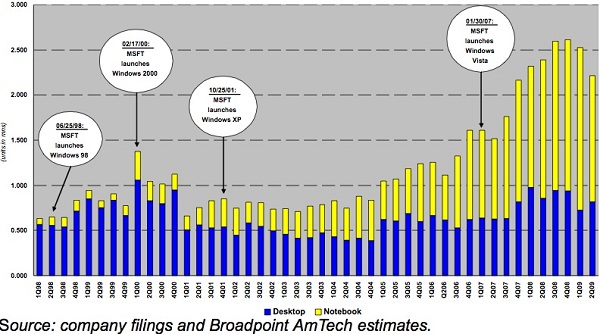
The Apple fanboy crowd snipes against Windows 7 and stresses the over-importance of all things Mac. Some of the assertions about Macs or Windows 7 sales are laughable, they’re so ridiculous. For example, today, Apple 2.0 blogger Philip Elmer-DeWitt asked: “Will Windows 7 boost Apple sales?” Philip writes that “over the past decade, Mac shipments have grown with nearly every new Microsoft release,” based on research released by Broadpoint AmTech yesterday.
That’s not what the data shows. The biggest increase in Mac sales follows the release of the much-maligned Windows Vista. The data supports what is widely known: Vista was a Windows failure. As for the other spikes, supposedly associated with Windows releases, Occam’s Razor dictates that something Apple did and not Microsoft affected Mac sales. For example, the chart shows a huge spike in Mac sales for second quarter 2000, noting that Microsoft released Windows 2000 on February 17. But it ignores something else. A day earlier, Apple unveiled new Power Macs, finally reaching the long-delayed 500MHz processing power milestone and setting off a sales surge.
Another date: Oct. 25, 2001, and the launch of Windows XP. The chart shows level Mac sales for the quarter and a substantial decline for the one following. In July 2001, Apple introduced dual-processor Power Macs, and accordingly there was a two quarter spike in Mac shipments. Philip asks a silly question, and the chart is more reasonably explained by Apple actions, not Microsoft’s.
Over at Apple Insider, Neil Hughes continues the Broadpoint AmTech misinformation, also referring to Philip’s post. Several other blogs or news sites also reported on Broadpoint AmTech numbers, some of them yesterday.
Mac fanboys have also attacked verteran tech reviewer Walt Mossberg’s fairly favorable review of Windows 7. Perhaps they feel betrayed, as Walt has favored Macs for years — and for good reasons in the post-Vista era. But go back a decade and you’ll find Walt to have been less charitable towards Apple.
Assessing the Real Competition
Microsoft’s competitive problems aren’t Macs but:
- Windows XP
- Software pirates
- Netbooks
Windows XP. Windows 7’s biggest competitor will be Windows XP, which runs on about 80 percent of PCs, according to combined analyst reports. Microsoft’s first challenge will be getting XP users to move up to Windows 7. Mac market share was 7.6 percent in the United States in second quarter, according to IDC. (Gartner and IDC should release Q3 preliminary numbers in the next couple of days.)
Mac share is inconsequential to Microsoft compared to Windows XP. My prediction: Windows 7 will slow Mac share gains, which already declined over the last three quarters, according to both Gartner and IDC.
Software pirates. Collectively, software pirates pose the greatest competitive threat to Microsoft, next to Windows XP. Not Macs. Certainly not PCs running Linux. According to Business Software Alliance, software piracy rates are highest in emerging markets, which also are where potential Windows PC adoption is greatest: 85 percent in Latin America, 66 percent in Central and Eastern Europe and 61 percent in Asia Pacific. By comparison, piracy rate in North Americs is 21 percent and 35 percent in the European Union. So in Latin America, more than 8 out of 10 copies of software in use are stolen.
Here’s a loaded question: How many people among the Betanews community use software for which they didn’t pay for, even though the developer charges something? Anyone care to respond in comments? Maybe this is easier: What do you feel you should have to pay for software?
More significantly, software piracy creates competitive opportunities for Macs, because of the damage done to the Windows brand. In a report released last week, BSA revealed a direct correlation between online software piracy at torrents and other file-trading sites and malware infections. Countries with high online piracy rates also have high malware infection rates. Related, 25 percent of a sampling of 98 sites distributing pirated software or digital content also contained malware. Where does the blame fall when PCs are infected with viruses? On Microsoft and Windows, which tarnishes the brand and helps foster popular folklore that Macs are more secure than Windows. Macs have problems, too, but they’re not always as well publicized.
Netbooks. Microsoft also faces more competitive threat from netbooks, which are gobbling up Windows margins at an alarming rate. Microsoft makes substantially less on each Windows XP Home license shipping on netbooks than it does on either Windows Vista Home Basic or Premium.
During second calendar quarter, when Windows Client revenue fell 29 percent year over year and income declined 33 percent, netbooks made up 11 percent of PC sales, according to Microsoft. Microsoft Chief Financial Officer Chris Liddell acknowledged that the increase in lower-margin consumer Windows licenses — fed in part by increasing netbook demand — contributed to declines.
Last week, DisplaySearch updated second calendar quarter PC shipment data. DisplaySearch concluded that netbooks accounted for 22.2 percent of overall PC sales and 11.7 percent of revenues. Netbook sales jumped a staggering 264 percent year over year, while overall laptop sales (without counting netbooks) declined 14 percent.
Meanwhile, increased netbook sales exerted ever greater pull downward on average selling prices. Laptop ASPs fell to $688 in second quarter from $704 in first quarter and $849 in Q2 2008. Netbook prices fell to $361 from $371 and $506, respectively, during the same time period. Microsoft has lots more to worry about than Macs, particularly netbook cannibalization of the PC market and the negative impact on Windows margins.


50 Years of Space Travel In One Beautiful Solar System Map [Space]
 Most missions through space are lonely. Solitary probes arc through the solar system, charming us with their photos and data, and eventually—quietly—fade into disrepair, or out of range. But witnessed together, they form something sublime.
National Geographic has combined mankind’s nearly 200 manned and unmanned exploratory space missions into one infographic. It’s not nearly to scale, and it doesn’t even try to follow the actual paths of the various chunks of metal we’ve tossed into the ether.

But the broad strokes are all here, and they’re fascinating: Of the dozens and dozens of probes launched in the last 50 years, precious few have made it past the asteroid belt; a handful have been tossed into the face of the sun; and just the luckiest, boldest pieces of hardware have been jettisoned into the outer reaches of our solar system.
NatGeo’s got an interactive scrollable map here, but honestly, I’d skip straight to the poster-sized version on Flickr. [NatGeo via i09]
“Got the Wrong Bob” Gmail Feature Saves You from Emailing the Wrong Person [Gmail]
 Gmail Labs’ new “Got the Wrong Bob” feature saves you the embarrassment of sending an email to the wrong contact by alerting you whenever you compose an email to a contact with the same name as any of your frequently emailed contacts.
Got the Wrong Bob joins the forces of other embarrassment savers available in Gmail Labs, from the previously mentioned Undo Send feature to the silly but useful Mail Goggles feature.
To enable any of these Labs features, just head to the Labs settings page, enable the feature you want, then save your changes. Hopefully in the future you won’t get another “Did you mean to send this to another Bob?” response from a wayward contact.
New in Labs: Got the wrong Bob? [Official Gmail Blog]
OnlineOCR Converts Your Scanned Documents to Editable Text [Text]
 Whether it’s a page of printed notes from an instructor, an old proposal you want to edit, or a letter your boss wants turned into a template, OnlineOCR can help take an image of text and turn it into an editable copy.
You can upload documents in a variety of formats like PDF, TIFF, JPG, and other image files as well as a ZIP of your document. Without creating an account you can convert documents up to 1MB in size and 5 pages long. Creating a free account allows you to upload documents that are 20MB in size and longer than 5 pages.
The biggest bonus that comes with account creation isn't the expansion in file size however but the format preservation. You can convert a PDF with columns into a Word document with columns and so on. The free version simply rips the text from the document into plain text—as seen in the screenshot above. If all you need is the text to slap into another application, the free account is more than sufficient. Note: For the advanced conversion that comes with an account, you get 5 credits good towards 5 pages of conversion, after that you’ll need to purchase additional credits to use the service. Basic conversion is always free. Thanks sharp-eyed readers!
Have your own favorite OCR tool? Let’s hear about it in the comments.
Google Adds Shared Folders to Docs [File Sharing]
 Good news for people using Google Docs to share or collaborate on documents: Google today has added folder sharing and multiple document uploading to its popular suite of web-based document and spreadsheet apps.
There's not much to getting up and going with shared folders. Either right-click a folder and select Share or go to a folder and select the Share this folder drop-down to invite people. They've also improved their file upload tool to support uploading multiple documents at one time—provided you're sharing documents within their supported types. Images, Word documents, PDFs, Excel spreadsheets, and PowerPoint presentations work like a charm; I tried uploading a plain text Greasemonkey script, for example, and it was rejected, so while Docs has almost opened the doors for regular old file hosting and sharing, it's still got its limitations.
Shared folders and more in Google Docs [Official Google Docs Blog]
First Dell Adamo XPS Profile Photos: OK, That’s Like Disgustingly Thin [Laptops]
 So that’s what the Dell Adamo XPS, a 9.99 mm thin laptop, looks like from the side. Evokes the words “hypodermic,” “stab” and “scissors,” doesn’t it?

It’s also apparent the laptop’s undercarriage (which holds the keyboard) folds up into a recess where the screen is. Freaky. But I like it.
Versus Films that will Never Happen
I tripped over an article this weekend that showed a trailer mashup editing bits of Batman with the Blade film making it look like it would be a Batman Vs Blade film.
Clearly something that would never happen since Batman is DC and Blade is Marvel but it actually made me curious as to how such a film would play out. Then I found out the guy responsible for it has a few of these clever mashups to share. I am surprised I hadn’t seen them and in case you hadn’t either I wanted to share them here.
Batman Vs Blade
Incredible Hulk Vs Wolverine
Batman Vs Terminator
All films that are never going to happen, but it makes you wish they could.
Tired of Waiting for Google Wave? Try ShareFlow Now
While you’re waiting to get your hands on the new collaborative service from Google, you can check out similar types of features in ShareFlow. Here we will take a look at the free service and what it has to offer.
ShareFlow from Zenbe is a web based collaboration tool for teams and groups to work on more easily together. A free account allows up to 25MB of storage space for 5 different projects or “flows”. If you want more space they do have upgrades you can purchase for a monthly fee.
Using Shareflow
The first thing to do is sign up for the free service and enter in your log-in credentials.

Invite others to join the flow by sending them an email invitation.

Create an event with the time and date that all collaborators can view and comment on.

Each flow has a specific email address and you can email messages directly to the flow for other members of the team to see.

Create a unique avatar in your ShareFlow profile.

You can upload documents for other members to view, download and leave comments on. With a paid account you can upload any files up to 100MB in size.

Double click on a document to download or view in a pop up in a separate window.

You can preview audio and video files as well.

if you want to keep up with the changes in a flow you can have a daily digest emailed to you.

If you decide you need more storage space and extra work flows you can upgrade at any time.

ShareFlow may not be as cost effective or include the same options as Google Wave, but it is similar and gets the job done. If you want a web based collaboration tool and are tired of waiting for a Wave invite, you might want to check out a ShareFlow free account. If nothing else you can get an idea of what the web based collaboration model is all about.
| Similar Articles | Tinyhacker – Tiny Geek Hacks |
|
|
| Latest Software Reviews | Super User Daily |
| Geek Arcade | Popular Forum Threads |
Major bug in Snow Leopard deletes all user data
Reports have been cropping up on the Apple Support forums that users have been losing all their data due to a nasty bug in Snow Leopard, Apple's latest Operating System. Many users are reporting that all settings are being reset and most data is gone, according to iTWire. The problem, can easily be reproduced when a user logs into the 'guest' account, either on purpose or by accident, and when they log back out of the account and back into their normal one, they find that their account has been fully reset with all data wiped and lost – the account is like a brand new one. The home directory still exists under "/Users/username" but is completely empty.
NHL Ice Crew Girls
Fleury tell-all book chronicles sexual abuse
Former NHL great Theoren Fleury is set to release a book next week that reveals he was sexually abused by junior hockey coach Graham James in the 1980s.
NHL fines Quinn over post-game remarks
The NHL fined Edmonton Oilers head coach Pat Quinn $10,000 US on Friday for comments made after his team’s heated 4-3 shootout loss to Calgary a day earlier.