The NHL has suspended New York Islanders forward Pascal Morency for the remainder of the pre-season and five regular-season games for leaving the bench to fight Calgary’s Dion Phaneuf.
Hot Sask. weather shatters records
A streak of hot weather in Saskatchewan broke temperature records across the province Saturday, Environment Canada said.
CN Tower still world’s tallest: Guinness
A wrinkle in semantics means Toronto’s CN Tower will retain its place in the Guinness Book of World Records – but not as the world’s tallest free standing structure.
NHL suspends Islanders’ Morency indefinitely
New York Islanders rookie Pascal Morency was suspended indefinitely by the NHL on Friday for leaving the bench to go after Calgary defenceman Dion Phaneuf during Thursday’s pre-season game.
Fleury scores shootout winner in return to Calgary (AP)

Theo Fleury, returning to hockey after being away for 6 years, scored the only goal of the shootout to lead the Calgary Flames to a 5-4 preseason victory over the New York Islanders on Thursday night. Olli Jokinen had two goals and an assist for the Flames, but it the 41-year-old Fleury who had the crowd chanting his name.
Office Web Apps to be offered free to all Windows Live users
By Scott M. Fulton, III, Betanews

This afternoon, a Microsoft spokesperson told Betanews that the company is now beginning the process of notifying selected participants that they have been accepted for inclusion in the company’s Technical Preview program for Office Web Apps. But in another huge example of burying the lead, a blog post that went live minutes ago from Windows Live General Manager Brian Hall states that the complete Web Apps suite, once officially released, will be “available” to all Windows Live users.
As the spokesperson confirmed to Betanews, Hall’s implication is accurate: Everyday users of Windows Live services (which are already free) and who have SkyDrive storage on those services (the first 25 GB of which are free) will have the entire suite available for use from any modern Web browser. A video released today showed Excel Web App (that’s the formal name for it now) running on a Mozilla Firefox 3.5 browser, and on a Windows 7 platform. We’re still awaiting word on non-Windows browsers.
There will be no cost, the spokesperson told us this afternoon, for users of Windows Live SkyDrive. When the Web Apps suite is released, all of them will notice the addition of a Documents tab, from which they’ll be able to launch Office documents. Word, Excel, and PowerPoint will be the first three in the suite, although Microsoft confirmed today that an online version of OneNote will be next.
Here’s the specific quote from Hall: “Over time, as the final version is released, the Office Web Apps will become available to all 500 million+ users of Hotmail, Messenger, and other Windows Live services.”
So how will Microsoft make money from this? Businesses will be able to subscribe to a version that the company spokesperson described as providing “more security and control.” Unlike Windows Live, this version will be hosted directly through Microsoft Online Services, where it’s presumed availability and uptime are guaranteed along with safety and stability.
For business users — especially those that are already hosting SharePoint sites — there will be the ability to host Office Web Apps on their own sites, for their own users, potentially as an alternative to deploying the physical software on users’ computers directly.
“All Office volume Licensing customers will have access to the Office Web Apps that they can run themselves on premises,” the spokesperson told Betanews. “This competitive differentiator is an example of the choice we are offering our customers. More than 90 million Office annuity customers will have access to Office Web Apps at launch.”

3:15 pm EDT September 17, 2009 · Betanews received some clarifications from Microsoft later in the day. First of all, additional storage space beyond the first 25 GB will not be available through Windows Live SkyDrive. That might have been a good extra source of revenue for the company for Office Web Apps users, but for now, the spokesperson told us Microsoft is merely considering leasing extra space in the future.
Businesses that are looking for more useful storage options, the spokesperson suggested, may consider investing in SharePoint Online. There, multiple subscribing users are entered into a collective “pool,” the size of which is 250 MB per user.
The spokesperson also confirmed information about platforms: The current build of Office Web Apps for the technical preview has been confirmed to run on Internet Explorer versions 7 and 8 (for Windows); Firefox 3.5 on Windows, Mac, and Linux; and Safari 4 for Mac (not for Windows). Google Chrome was not listed as a supported platform, perhaps for obvious reasons.
That doesn’t mean users can’t give it a shot, we’re told: “If customers prefer to use another browser they should still give the Web Apps a try. While we cannot officially support all browsers, customers will not be blocked from using them. It is a goal of the Web Apps to have broad compatibility and reach,” the spokesperson said.
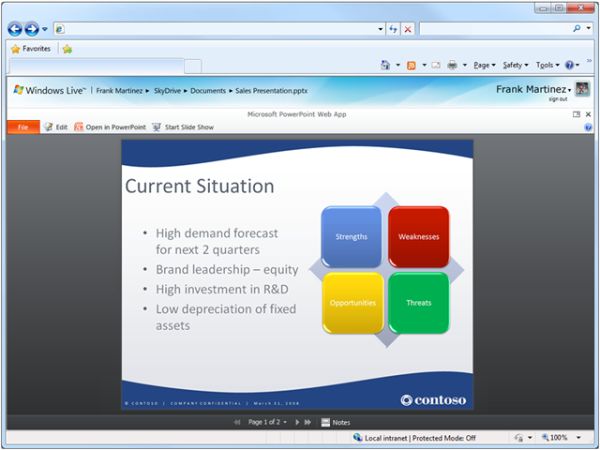
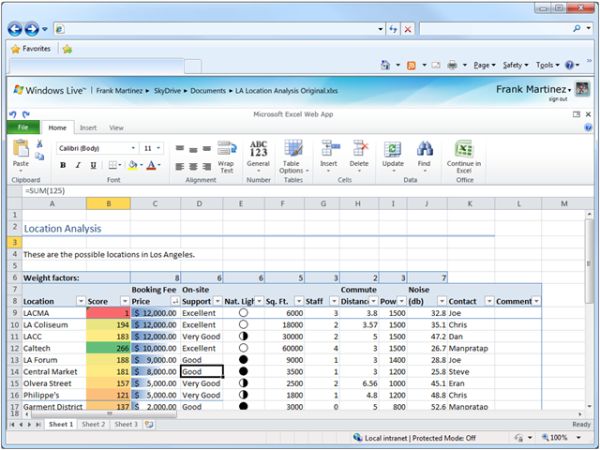
The first public demonstrations of Office Web Apps reveals a few more items than we saw demonstrated last year at PDC, though not many. Most notably, we see the full set of ribbon controls for PowerPoint Web App, which was not ready for prime time last October. We also see evidence that some of the incomplete Excel functions such as conditional cell formatting have been worked out, along with evidence that the “BackStage” — the replacement for the Office button in Office 2007 — now has a functional counterpart. An abbreviated menu bar (or rather, a category bar for items collected together by the ribbon) now contains a brightly-colored “File” category, which both resembles the BackStage control and also represents the old-style menu bar functionality from Office 2003 and earlier.


Fleury set for Saddledome return
The spotlight will shine on Theoren Fleury when he makes his return to the Saddledome, as his bid to make the Flames begins Thursday when Calgary takes on the New York Islanders in pre-season action.
Roughriders enjoying sellouts
The Saskatchewan Roughriders football club is enjoying one of its most popular seasons ever with another sellout confirmed for the Sunday matchup against Edmonton in Regina.
Hacker: Snow Leopard less secure than Windows
As reported by Techworld, Snow Leopard, Apple's highly anticipated new operating system, lacks basic security features that are found in Windows XP, Windows Vista and Windows 7 says Charlie Miller, a noted security researcher. Address Space Layout Randomization, commonly referred to as ASLR, randomly assigns data to the memory to make it more difficult for hackers to locate the critical operating system functions. Charlie Miller of Baltimore-based Independent Security Evaluators who many people may remember from when he successfully hacked a fully patched Macbook in seconds, was disappointed upon hearing that Apple did little to improve ASLR from Leopard to Snow Leopard. "Apple didn't change anything.
Why I chose Windows 7 over Snow Leopard (and you should, too)
By Joe Wilcox, Betanews
Last week, I returned to using Windows 7 after spending the summer on a 13-inch MacBook Pro. Apple almost had me there for awhile, but I’m back where I belong and satisfied with the switch. Given that Apple released Snow Leopard a couple of weeks ago, Windows 7 officially launches October 22nd and there is plenty of geek debate about which OS is better, it’s appropriate time to tell the story about how I went — in the words of J.R.R. Tolkien — “there and back again.”
First, some background. I am a longtime Mac and Windows user. I have used Windows pretty much since its release in the early 1990s and Macs since December 1998, when I carted a Bondi Blue iMac out of a CompUSA. Based on my reading comments, many Betanews readers are religious about their platform choices; I am not. Mac OS and Windows are just tools to me. I don’t dogmatically defend either platform. I’m neither Mac or Windows fanboy. My work requires using both operating systems, and for convenience one usually is primary. That said, I’ve flopped between platforms for more than a decade.
In April, I posted at my old work blog: “How I Came to Get a PC and Not a Mac.” There I explained how in January 2009, I forsook the Mac for the PC, mainly because of Windows 7. If someone asked me in November 2008 about buying a Windows PC, I would have laughed. It just wasn’t happening. But Windows 7 won me over, in beta and later release candidate.
Still, post switch, I struggled with a key product category: Digital media creation software suite. In a June blog post, I asked: “Why is there no iLife equivalent for Windows?” Windows Live Essentials isn’t it, although Microsoft’s digital media suite is lots closer since the final release of Windows Live Movie Maker. Ahead of Comic-Con 2009, where I planned video interviews and needed easy and efficient software to process them, I moved back into the Apple camp. My main machine became the then new 13-inch MacBook Pro. I also planned to test out the MacBook Pro’s new battery and later Snow Leopard.
The Mac portable’s battery life hugely satisfied (consistently 6 hours) but not Snow Leopard. I find Snow Leopard to be hugely disappointing, shockingly so. Apple promised no major, new features, so I didn’t expect much — and the $29 price ($100 less than Leopard) further lowered expectations. But, after using Snow Leopard, I think $29 is asking too much for what Microsoft would call a Service Pack and give away for free.
From an architectural perspective, however, Snow Leopard is Apple’s most important Mac OS X release since the dot-oh release in March 2001. I call Snow Leopard a fix-the-plumbing release, in preparation for moving the Mac install base forward to 64-bit. Performance tweaks are everywhere, and you can feel them in subtle but distinct ways. I predict that Mac OS X 10.7 will be a big release, jumping off Snow Leopard’s architectural remodeling. But for now, Snow Leopard offers few benefits where users can see them.
The Mac OS X user interface, once trendsetting, is now a tired motif overdue for overhaul. Worse, Apple hints at what the UI could and should be in a few places, with QuickTime being the most visible example. The QuickTime UI is refreshing and new — delightful. Something similar should skin much of Snow Leopard. Worse still, QuickTime’s more modern UI is jarring reminder when switching back to the Snow Leopard Finder about how old most of the rest of Mac OS X feels.
By comparison, Windows 7 feels surprisingly fresh. Microsoft is finally doing good user interface design. Around 2006, which coincidentally — or not — is about when Bill Buxton joined Microsoft Research as principal researcher, the company started making huge strides in UI and UX (user experience) design. Buxton is a well-know UX designer who professes mantra:
Ultimately, we are deluding ourselves if we think that the products that we design are the ‘things’ that we sell, rather than the individual, social and cultural experience that they engender, and the value and impact that they have. Design that ignores this is not worthy of the name.
I find myself to be way more productive using Windows 7 than any Mac OS X version, and that’s surprising to me. For years, the greater productivity claim belonged to Mac OS X. Consistently, I get about 30 percent to 40 percent more work done using Windows 7 than either Leopard or Snow Leopard. Windows Vista doesn’t rate. The combined usability flaws — everything from slow resume from sleep to nagging pop-ups to UI pauses or hangs — are too much for me to use Windows Vista any longer.
More importantly, I have loads more fun using Windows 7 than Mac OS X. I haven’t had this much fun using a Microsoft operating system since Windows 95. After more than three months running Mac OS X, I really missed Windows 7. By comparison, for the six months I primarily used Windows 7 test builds, I only missed Mac OS X for iLife.
There still is no iLife for Windows, but I decided to do without. Perhaps if Snow Leopard was more or Windows 7 much less, I would be using a Mac laptop today. I did briefly use Apple’s Boot Camp to install and run Windows 7 gold code on the MacBook Pro (Hey, the Windows Experience Index was 5.2 — not bad). But I wanted something more from a lightweight portable that Apple doesn’t offer, which I explain in a couple paragraphs. The MacBook Pro is gone now and replaced with a Sony VAIO.
I find the Sony VAIO, model Z720D/B, to be much better value than the 13-inch MacBook Pro. Sony sells the VAIO for $1,849.99, but some dealers charge less. I got mine from PC Nation for $1,499.98 — or about $100 less than the 13-inch MacBook Pro sold direct from Apple ($75 less from some dealers). A friend bought the MacBook and digital camera, which more than covered cost of the VAIO.
Sony config: 2.53GHz Intel Core 2 Duo processor (1066MHz front-side bus), 13.1-inch LED backlit display with 1600-by-900 resolution, (dedicated) 256MB nVidia GeForce 9300M GS graphics (DDR3) and Mobile Intel Graphics Media Accelerator 4500MHD, 4GB of DDR3 memory, 320GB SATA hard drive (7,200 rpm), dual-layer DVD burner, Bluetooth 2.1 + EDR, 10/100/1000 Ethernet, fingerprint reader, 802.11a/b/g/n wireless, two USB ports, FireWire 400 port, HDMI port, Verizon EVDO modem and Windows Vista Business 64-bit.
MacBook config: 2.53GHz Intel Core 2 Duo processor (1066MHz front-side bus), 13.3-inch LED-backlit display with 1280-by-800 resolution, 4GB DDR3 memory, (shared) 256MB nVidia GeForce 9400M (DDR3) graphics, 250GB SATA hard drive (5,400 rpm), dual-layer DVD burner, 802.11n wireless, backlit keyboard, Bluetooth 2.1 + EDR, 10/100/1000 Ethernet, two USB ports, FireWire 800 port, one Mini DisplayPort and Mac OS X 10.5.
While the computers are fairly close in terms of base hardware, I find the VAIO’s higher screen resolution to be a highly appealing feature, and the major reason for my replacing the MacBook rather than installing Windows 7 via Boot Camp.
Since there has been so much unnecessary noise about 20-hour Windows 7 upgrades — which Scott Fulton appropriately addressed yesterday — I would briefly like to share my own expierence. After unboxing the Z720 and booting it up, I immediately made restore discs. After which, I removed unwanted software, such as Google Toolbar and Symantec anti-malware. I then installed Microsoft Security Essentials beta and Windows 7 Ultimate 64-bit gold code. The upgrade took about 45 minutes. The Windows installer warned of compatibility problems with four Sony utilities, but they all work just fine.
Windows 7 performance is excellent, and resume-from-sleep time is about as fast as Snow Leopard. I’ve no complaints and lots of satisfaction for the switch. For anyone holding back because of Vista, Windows 7 is for you. For anyone considering switching to a Mac, wait to see what new designs PC manufacturers release with Windows 7. You might be surprised just how cool they can be.
Gulp, here it comes. I’m a PC, and why aren’t you?
Update: Ford’s SYNC Technology On the Line in Patent Dispute
Ford determined to keep SYNC’s technology, so competitors can’t get their claws on it
World’s hungry reach record 1 billion
The number of hungry people has passed a record one billion this year at the same time that food aid is at a 20-year low, the United Nations World Food Programme said Wednesday in London.
Fleury suiting up Thursday? Looks like it
Judging by Wednesday's second practice group, which featured a game-ready number of players (20), Theo Fleury will make his re-debut Thursday night against the visiting New York Islanders.
In fact, the Flames lineup looks to include tonnes of veterans — Bouwmeester, Conroy, Iginla, Jokinen, Langkow, Phaneuf, Regehr, Sarich, Kiprusoff. A start contrast to Tuesday's youthful collection of Flames.
Also set to play against the Isles — Mikael Backlund.
Dell to pay $4m over deceptive advertising
Computer manufacturer Dell is to pay out $4million in penalties, costs and damages over accusations of deceptive advertising, according to the Associated Press. A case was brought against the company in 2007 by the New York attorney generals office, when it emerged that the company was advertising zero interest credit deals for new computers before denying the application. Customers were then encouraged to buy the computer at a far higher rate. Other customers were also found to have paid for warranty services that they never received. The Texan based computer maker denied the allegations, but New York's Supreme Court ruled that Dell was guilty of fraud, leading to the financial settlement with the New York attorney general.
Opera Mini 5 Beta Out Now: Tabbed Browsing, Speed Dial Bookmarks [Mobile Browsers]
 Unlike Opera Mobile, Opera Mini crunches pages on a server for viewing on your Java phone or BlackBerry. The beta has a snappier interface geared for touch or keypad control, and adds tabbed browsing, speed dial, and a password manager.
 The idea is to mirror the desktop version as much as possible. Open a new tab and you’ll see the visual speed dial thumbnails, which you can also customize based on your browsing history. The new version can also be set to store login details on your phone.
As with Opera 4.2, YouTube videos will play via your phone’s native media player, and there’s still no Flash support. What also sucks: This beta won’t support Skins and Opera Link, though both should be reintroduced as development continues.
[Opera: Full Website | Mobile version]

Fast Food Chart Rounds Up the Unhealthiest Items at Popular Chains [Fast Food]
 It’s a given that fast food isn’t the most nutritious way to sate your hunger, but as a helpful reminder, the gang over at web site Next Generation Food have charted the unhealthiest items from the most popular chains.
Sophie Clayton took to charting the high calorie menu items at Burger King, Dunkin’ Donuts, KFC, McDonald’s, Pizza Hut, Sonic, Starbucks, Subway, Taco Bell, and Wendy’s. Specifically, she did a side-by-side comparison of the fat, cholesterol, calorie, and sodium contents of some of their more greasy foods.
Some samplers? A 14 inch Supreme Stuffed Crust pizza at Pizza Hut, for example, will set you back 80 grams of fat and over 4,000mg of sodium, while a Blueberry Crumb Donut at Dunkin' Donuts is—at just under 500 calories—one of the more healthy options on the menu. Then again, it's just one donut.
Hit up the link to view the full chart, and if you want a closer look at the unhealthiest and healthiest items you’ll find on the menus at McDonald’s and Wendy’s, check out the best and worst fast food: McDonald’s edition and Wendy’s edition.
Processed Food: A Silent Assassin? [Next Generation Food via Consumerist]

Dirty Dancing star Swayze dies at 57
Actor Patrick Swayze, best known for his roles in the films Dirty Dancing and Ghost, has died after battling pancreatic cancer.
Apple tablet rumors strike back: 9.6-inch with HSDPA and P.A. Semi processor coming February 2010?

Now that all that iPod mess is over and done with, looks like it’s as good of time as any to return to the world of Apple tablet rumors. A report from Taiwan Economic News starts us off right, with “industry sources” telling the outlet it’ll have a 9.6-inch multitouch screen, built-in HSDPA (so much for Verizon), a P. A. Semi processor, a “long lasting battery pack,” and a $799 to $999 price tag. Most to all of that sounds fairly familiar, but coming along with it is a new timeline: shipments will reportedly be delivered to Apple this December in preparation for a launch in February 2010. As for component providers, Taiwanese company DynaPack will reportedly be the exclusive supplier of battery packs, as much as 300,000 per month, while iPhone screen-maker Wintek will be doing the display duties here, too. The author in question here does appear to have some manufacturing sources — it looks like he was right about the Acer Timeline — but at this point, we’re not ready to believe anything without some photographic evidence of Steve Jobs personally adding the magical unicorn tears.
[Via TabletAge; thanks, Philip]
Filed under: Handhelds
Apple tablet rumors strike back: 9.6-inch with HSDPA and P.A. Semi processor coming February 2010? originally appeared on Engadget on Tue, 15 Sep 2009 01:17:00 EST. Please see our terms for use of feeds.
Read | Permalink | Email this | Comments
HP MS200 all-in-one barely putters past nettop status, saves face with Windows 7

An AMD Athlon X2 3250e Dual-Core Processor clocked at 1.5GHz isn’t going to be churning through the next Pixar masterpiece anytime soon, but it might just make for a passable (and certainly cheap) all-in-one PC in HP’s new MS200. HP has paired the chip with 2GB of RAM, a 320GB HDD, DVD burner and ATI integrated graphics (which wasn’t running Aero when we spotted this thing) and a fairly low resolution 18.5-inch LCD. The upside is of course the $599 pricetag, but you’ll have to wait until October 22 to buy and behold the glorious visions of Windows 7. PR is after the break.
Gallery: HP Pavilion MS200 press shots


Gallery: HP MS200 hands-on


Continue reading HP MS200 all-in-one barely putters past nettop status, saves face with Windows 7
Filed under: Desktops
HP MS200 all-in-one barely putters past nettop status, saves face with Windows 7 originally appeared on Engadget on Tue, 15 Sep 2009 00:59:00 EST. Please see our terms for use of feeds.
Lenovo introduces multitouch ThinkPad X200 Tablet and T400s laptop

Lenovo’s getting a little jump on the wave of Windows 7 machines due to hit next month with a multitouch update to the X200 convertible and a new multitouch version of the T400s. The new X200 Tablet is pretty much what you’d expect, bringing some newer, faster Core 2 Duo processors into the mix along with a two-finger capacitive multitouch screen, but we’re a little more intrigued by the multitouch T400s update, since the screen is actually a little nicer and can register up to four fingers. To take advantage of all this new functionality, Lenovo’s bundling in a new app called SimpleTap, which brings up an icon-based control panel for settings like volume, screen brightness, and other system functions, as well as quick app and web bookmark launchers. It’s pretty cool stuff, but it’ll cost you: the multitouch T400s will start at $1,999, while the multitouch X200 will open at $1,729. (There’s also a new X200 outdoor screen option for $1,779.) Check a video of SimpleTap after the break, as well as the full press release.
Continue reading Lenovo introduces multitouch ThinkPad X200 Tablet and T400s laptop
Filed under: Laptops
Lenovo introduces multitouch ThinkPad X200 Tablet and T400s laptop originally appeared on Engadget on Tue, 15 Sep 2009 00:01:00 EST. Please see our terms for use of feeds.