Rogers’ first LTE network is live in Ottawa, aims to become fastest in North America

Good news for those of you waiting for Rogers’ first LTE network launch in Ottawa, Canada: it happened. Ottawa’s LTE debut now puts Rogers firmly at the top of the heap amongst its chief rivals Bell and Telus — at least where speed is concerned. To start, the only device on offer is the Sierra Wireless AirCard 313U, which retails at $79.99 on a three-year deal or $169.99 completely off-contract. As you’re likely aware, LTE is all about the speed, and with that speed comes the potential for cost as this network will see you burning through a gigabyte of data in mere minutes. To help balance that out, Rogers has also introduced a new tiered LTE Flex Rate Plan with prices starting at $45 for 1.5GB to $90 for 9GB — with every GB thereafter deftly removing another $10 from your billfold. To help the addiction really settle in, the carrier has wisely made the first two months of service free with overage costs also getting the boot. Of course, this all sounds like a recipe for a challenge, so we’ve arranged to get our hands on one these devices for some first impressions on speed and quality and then begin a two month odyssey of its LTE network — and fair use policy — abuse.

Rogers’ first LTE network is live in Ottawa, aims to become fastest in North America originally appeared on Engadget on Thu, 07 Jul 2011 16:16:00 EDT. Please see our terms for use of feeds.

Permalink   |  sourceRogers RedBoard  | Email this | Comments

Share your docs on the go with the improved Google Docs for mobile

(Cross-posted from the Google Docs blog)

Google Docs is about collaboration, but as many of us know, others often rely on us even when we’re nowhere near a computer. That’s why we’re excited to bring the features you need to your tablet and mobile device’s browser. Today, we’ve updated the look of Google Docs for mobile browsers and added the ability to sort, narrow, and share multiple docs in your mobile docs list.

To get started, go to docs.google.com from your supported device’s browser. Press Sort to organize the list of docs visible in the mobile browser, or press Narrow by to specify the subset of docs you’d like to see.


To share from your mobile docs list, select one or more documents, press the Share button, and select Share, Get the link to share for public or unlisted docs, or Email as attachment. Sharing a doc in your mobile browser works the same way as it does on the desktop.


We’re committed to improving the experience of accessing your docs from your mobile device. We’d love to hear what you think is working and what isn’t in our support forums as well as in the comments of this post.

Posted by Hossein Attar, Software Engineer

Dropbox vs. the Alternatives: Which Online Syncing Service Is Right for You? [Syncing]

Dropbox may be the most popular service for syncing files and storing them online, but that doesn’t mean it’s the best. Some of us are currently considering Dropbox alternatives due to recent security or privacy concerns, while others just want to see what else is available. Here’s how Dropbox stacks up against four other major online syncing services: Windows Live Mesh, SpiderOak, SugarSync, and Wuala. More »


Acer starts rolling out Android 3.1 update for the Iconia Tab A500

Almost on schedule, Acer has started pushing out an update for its Iconia Tab A500 that will upgrade the 10-inch slate to Android 3.1. If you’ll recall, the update actually leaked late last month, but would have required folks to take the risk of flashing their tablets. As is often the case, it’s unclear how long the roll-out will last, so don’t be crestfallen if you can’t enjoy those resizeable widgets just yet. For those of you who did wake up to an update, have at it — and do tell us how it goes.

Acer starts rolling out Android 3.1 update for the Iconia Tab A500 originally appeared on Engadget on Thu, 07 Jul 2011 09:56:00 EDT. Please see our terms for use of feeds.

Permalink   |  sourceElectronista  | Email this | Comments

“Download map area” added to Labs in Google Maps for Android

(Cross-posted on the Official Google Blog)

One way we bring you new product features is through Google Labs—a collection of fun, experimental features you can turn on if you’re interested in the functionality. In fact, Google Maps itself started as a lab. In addition to our desktop Maps Labs, Google Maps for Android has a few tricks you can try out right from your phone. We’d like to introduce you to one new experimental feature, “Download map area,” but also remind you of two other ones we already have: “Scale bar” and “Measure.”

Download map area
When you’re visiting an unfamiliar location, Google Maps for mobile is great for getting an idea of how close you are to your destination, where streets and landmarks are in relation to each other, or just for getting “un-lost.” But what if you don’t have a data signal, or you’re abroad and don’t have a data plan? We say that if you use Google Maps for mobile, you’ll never need to carry a paper map again. The “Download map area” lab in Google Maps 5.7 for Android is a step in making that statement true even when you’re offline.

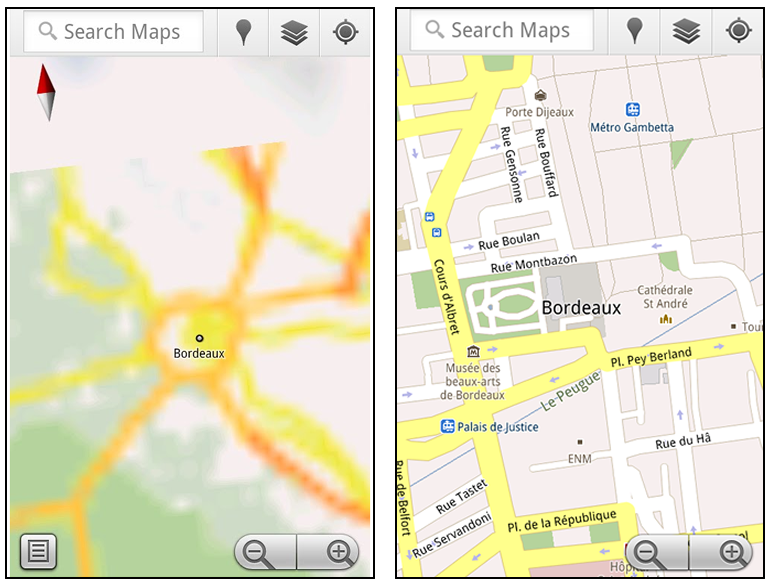
Let’s say later you’re visiting Bordeaux during a trip to France. If you were to open Google Maps for mobile and zoom into Bordeaux without data coverage or wifi, you’d see the image on the left:
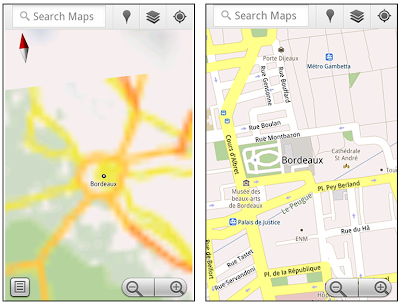
Left: Bordeaux with no data or wifi. Right: Bordeaux with downloaded map area

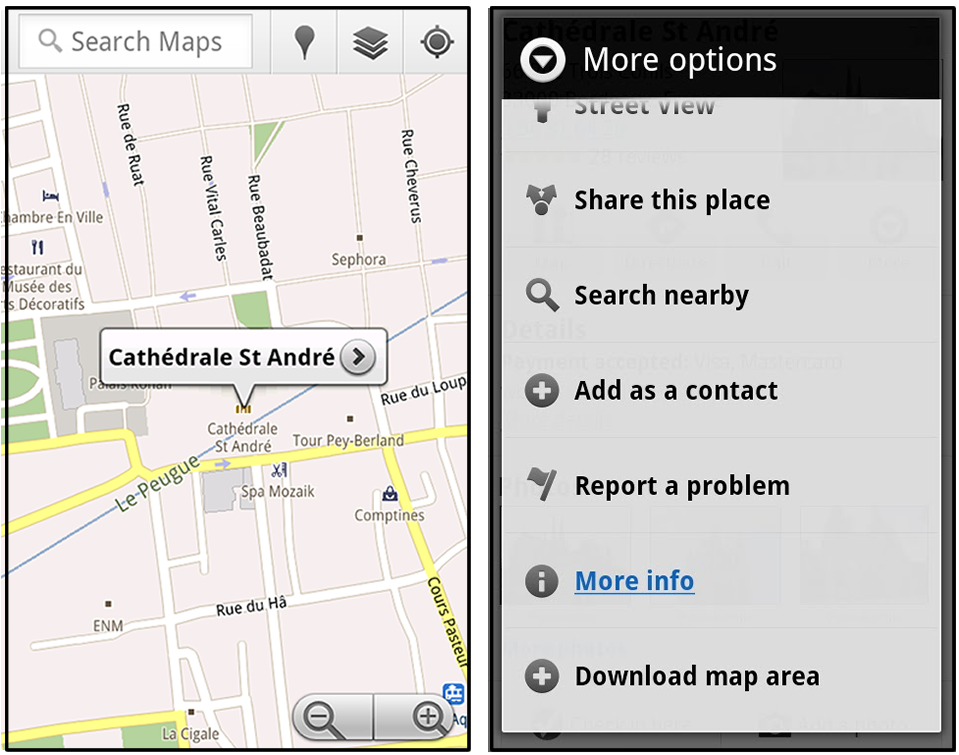
That’s not particularly useful when you’re trying to find out how close you are to the Cathedrale St. Andre. But a little advance planning and “Download map area” can help. Before you take your trip, while you still have access to WiFi or data coverage, you can open up any Places page in the world, click “More” to get the Place page menu, and download Google’s maps for a 10-mile radius.
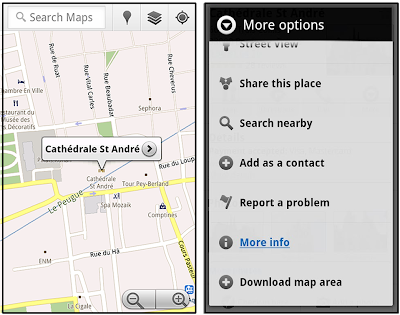
Left: Tap a landmark to enter its Place page Right: Place page “more options” menu

The download can take as little as a minute or two. This download stores only the base map tiles and the landmarks on the map, so you still need a data connection to see satellite view and 3D buildings, search for Places and get directions. But we hope the level of detail available will help you find your way!
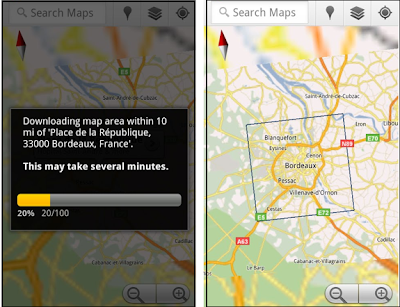
Left: Status screen for download. Right: Coverage of downloaded map area

All your downloaded map areas can be managed in your Google Maps cache settings so you can delete maps you no longer need or if you want to free up storage. After 30 days, all downloaded map areas will be removed from your cache; they can be re-downloaded any time.

Scale bar
Google Maps has approximately 20 different zoom levels that range from a 2,000 mile scale to a 20 foot scale. With finger gestures making it really quick and easy to zoom in and out, sometimes it’s not always clear what zoom level you’re at. What might be just a few streets away can be quite a long walk depending on the scale. To help with this, you can turn on a scale bar, which updates based on your zoom level.
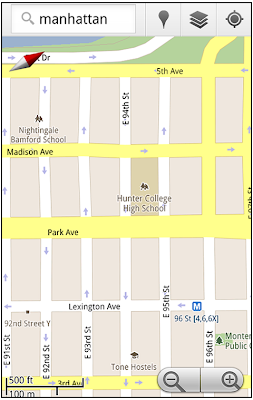
Scale bar in the lower left

Measure
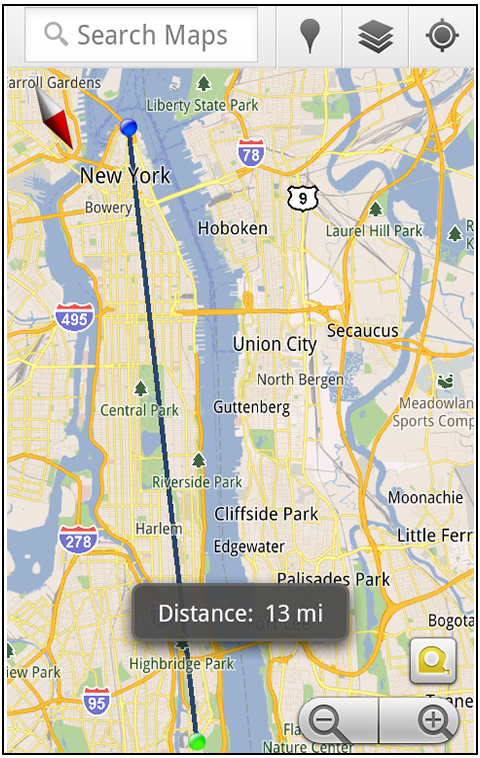
If you ever need to know the distance between San Francisco and New York (about 2602 miles) or between any other two points on the map, the “Measure” lab can help you out. Once it’s enabled, you’ll notice a tape measure icon just above the zoom buttons. After clicking that icon, you’ll be prompted to tap two points on the map and Google Maps will calculate the straight distance between those points (this direct distance is “as the crow flies”).
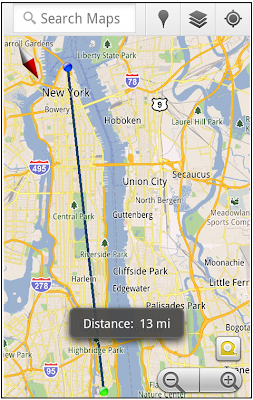
Example of the “Measure” Labs feature

To access Labs on your phone, press your phone’s menu button once in Google Maps, choose “More” and select Labs. On a tablet, click the menu button in the upper-right corner of Maps. The “Download map area” lab requires Android 2.1+ and the latest version of Google Maps. We look forward to bringing you more experimental features soon and hope you enjoy trying out Labs in Google Maps for Android.

Posted by Chikai Ohazama, Director of Product Management, Google Maps for mobile

Steve Ballmer to deliver CES keynote, Windows 8 will be the real star

Windows 8 and Steve Ballmer

It’s hard to believe, but with the show still six months away, we’re already getting bombarded with CES-related e-mail. We do have one piece of intriguing news to report at this early stage of the game: Steve Ballmer is set to kick off the festivities with the preshow keynote on January 9th and it’s a safe bet the presentation will be loaded with Windows 8 goodness. Now, what exactly we’ll see when the reliably excitable Microsoft CEO takes the stage is still a mystery, but WinRumors‘ little birdies have been whispering about a public beta of the upcoming OS and demos of both Intel- and ARM-based tablets — predictable, but still exciting prospects. Check out the PR after the break.

Continue reading Steve Ballmer to deliver CES keynote, Windows 8 will be the real star

Steve Ballmer to deliver CES keynote, Windows 8 will be the real star originally appeared on Engadget on Thu, 07 Jul 2011 08:20:00 EDT. Please see our terms for use of feeds.

Permalink   |  sourceWinRumors  | Email this | Comments

Google+ official invite system back up

Google’s recently announced Plus social networking service has re-opened its doors to invites after temporarily shutting them down last week. While the site still requires you to be invited by someone who is in the service (hence it is not fully open to the public at the moment), if you…

Men May Need More Cuddling Than Women [Study]

According to new research, men may be mushier than they let on. A study found that men are more likely to be satisfied with their long-term relationships if there’s plenty of kissing an cuddling involved. Plus, men are more likely to say they’re happy with their relationships, while more women report being sexually satisfied. More »


Deal in the works for Sask. teachers

The basic elements of a tentative agreement have been identified that will pave the way to a new contract for Saskatchewan’s 12,000 teachers, union and government officials say.

Google, Microsoft and Apple

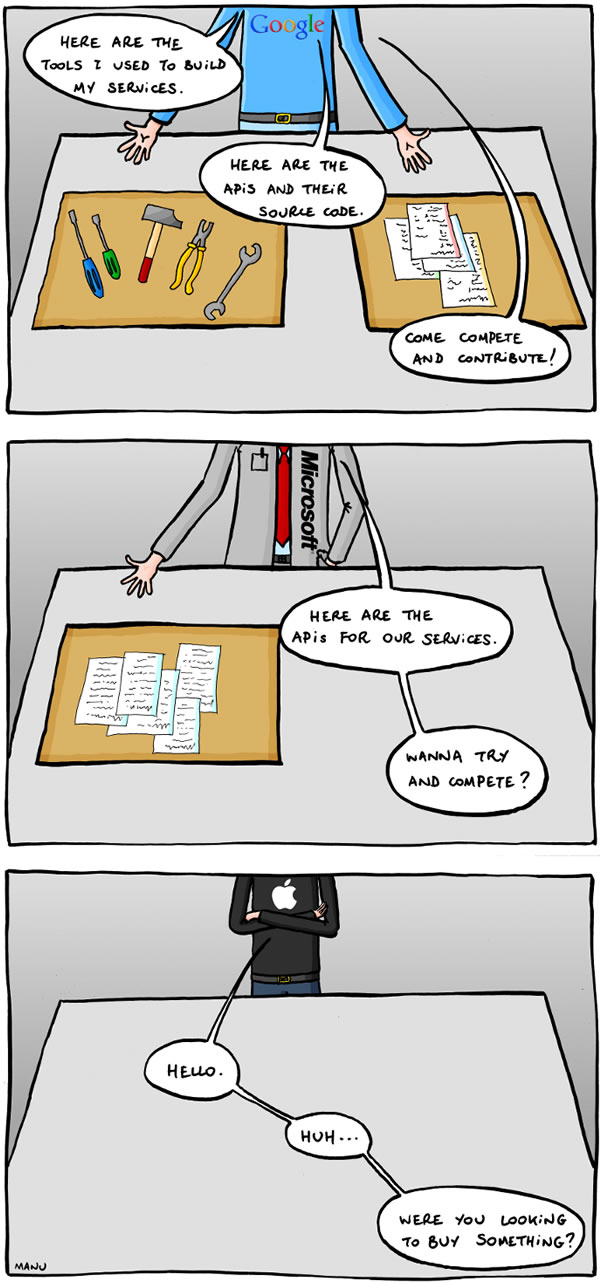
Google v microsoft v apple

To use a quote from The Simpsons: “It’s funny because it’s true.” While Apple stuff is pretty neat, I sometimes get that feeling that they see all programmers who don’t work for Apple as barely-tolerated, not-really-trusted “fourth-party developers”.

This comic was created by Manu Cornet, the artist behind the comic org charts of the big tech companies.

Update (Thursday, July 7th, 2011): Wow, there’s a lot of butt-hurt going on about this comic. Remember: it’s the comic artist’s opinion, not mine, and secondly, for the Apple fans — you do know that I work at Shopify, which has more Macs on display than the local Apple store and my desk look likes this, right?

Microsoft Live Essentials 2011 to get updated this week

Windows Live Essentials 2011, the suite of small Windows programs from Microsoft, will be getting an update later this week with a number of improvements to many of the programs. In a blog post on the Microsoft web site, Microsoft team member Arthur de Haan goes over the updates. One…