A wife goes out for a night with the girls, telling her husband she’ll be home around midnight.
Midnight passes by, drinks are flowing, the girls are laughing and having a great time. At around 2:45 in the morning, drunk as hell, she finally gets a cab and makes her way back home.
She gets to the front door and ever-so-gently nudges it open, not making a sound. She takes her shoes off, again not making a sound. Knowing her husband will give her hell for coming home so late and drunk, she’s quite proud of herself for being so stealthy.
Just then, the cuckoo clock in the hallway goes off, cuckooing 3 times. Realizing he might wake up, she decides to cuckoo another 9 times. She smiles to herself, proud that she’d come up with such a clever solution on the spot. He’d never know the difference!
That next morning during breakfast the husband looked at his wife, obviously hungover, and asked, “So… what time did you get in last night?”
“Oh, right around midnight,” she replied. The husband didn’t seem disturbed at all, her plan had worked!
“Well,” he said, “I think we need a new cuckoo clock.”
“Why do you say that?” she asked.
“Because last night the one we have cuckooed 3 times, then said ‘oh shit,’ cuckooed 4 more times, cleared its throat, cuckooed another 3 times, giggled, then tripped over the coffee table and farted.”
Casey Anthony could walk free Thursday after she’s sentenced for misdemeanour convictions in Florida, but the 25-year-old acquitted of killing her two-year-old daughter Caylee will likely forever be on trial in the court of public and legal opinion.
It ain’t the first time Mark Zuckerberg has taken the stage to announce… something, but today’s shindig is resulting in “something” that’s a bit more exciting for the average user. As rumored, the world’s most notable VoIP service is set to become exceedingly integrated with the world’s most notable social network. Skype has just thrown up a teaser page for v5.3 for Windows (and v5.5 Beta), noting that Skype and Facebook will aim to provide “the best of both worlds.”
Zuck is primarily announcing three main things today: group chat, a new way to chat (“an easier way to find someone who is online”) and Skype-enabled video chat. Oh, and the tiny, tiny fact that there’s now 750 million Facebook members. What’s notable is just how easy it is to fire up a group chat (or send transcripts to group members who miss out) and get a video call going using your existing Skype contact list. A single click is all it takes, and we’re told that it’ll be rolled out to everyone “over the next few weeks” in 70 different languages. The new chat design will be scalable based on your browser size, and the company made a point to mention that it’ll be listening closely to user input in order to iterate as it moves forward.
Tony Bates stepped up to the plate, and noted that over 300 million videocall minutes a month are going through Skype, and at peak times, over half of its traffic is video. He also noted that the technology behind it was “tough” to construct, but somehow it managed to hammer this whole thing out in around six months via joint development. There’s also talk about future “paid products” in due time, and it’s strikingly clear that this partnership isn’t going to fade anytime soon. If you’re looking to take a dive yourself, hit up the source links below for the Windows applications, and wear that F5 button out over at Facebook’s homepage if you’re more of the “in-browser” type.
Oh, and if you’re curious about mobile — video chat isn’t active on that front yet, and Mark’s not spilling any details on “when.” To quote him on a question of time tables: “We’ll see.”
Update: Those on the web can get started right now. Of note, this forces open the familiar chat bar, so it doesn’t much look like you can hide from “those people” while attempting to find folks on Skype. Sadly, we’re also seeing that doing so can add loads of Facebook contacts to your Skype program, and there’s no real way to see that it’s happening until it’s too late. Clever, Mark.
Update 2: We’ve spent a little time with both of the new options, and you can read up on our impressions here!
Today we’re releasing Google Maps 5.7 for Android. From Bangkok to Baltimore, we’ve added Transit Navigation (Beta), updated access to directions, better suggested search results, and a photo viewer to Place pages—all of which can help you whether you’re traveling to an unfamiliar part of town or visiting a city across the world.
Transit Navigation (Beta) Google Maps Navigation (Beta) currently provides over 12 billion miles of GPS-guided driving and walking directions per year. Now, GPS turn-by-turn (or in this case, stop-by-stop) navigation is available for public transit directions in 400+ cities around the globe with Transit Navigation.
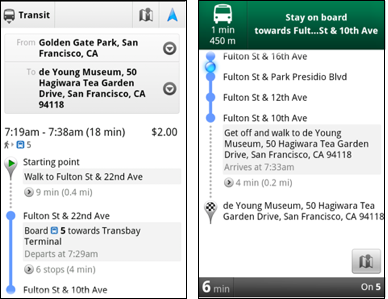
Transit Navigation uses GPS to determine your current location along your route and alerts you when it’s time to get off or make a transfer. This is particularly helpful if you’re in a city where you don’t speak the language and can’t read the route maps or understand the announcements. After starting your trip with Transit Navigation, you can open another application or put your phone away entirely and Google Maps will still display an alert in your notification bar and vibrate your phone when your stop is coming up.
Left: Transit directions without Navigation. Right: with Navigation
Navigation alerts appear even if you switch to another app
Now you can spend more time enjoying the sights out the window and less time worrying about how many stops are left, where you are along the route or whether you missed your stop. Since Transit Navigation relies on GPS signals, we recommend using this feature for above-ground transit.
Updated Directions Now that we’ve improved our directions services, we wanted them to be incredibly easy to pull up on your screen. If you select the driving or walking icon and your route is supported by Google Maps Navigation, the Navigation icon will automatically appear so you can get access to step-by-step directions in one click. Note: this change is currently only in place for driving and walking and does not appear for public transit.
One-click access to Navigation from directions
We’ve also streamlined how you access directions from within a Place page. Before, clicking directions in a Place page would bring up options for “Driving Navigation,” “Walking Navigation” and “Directions.” Now, you’ll be taken straight to the map and see the new directions box shown above.
Improved Search Suggest We’ve made two changes to search suggestions that improve their quality and speed. First, we’ve added category icons, so instead of all search suggestions displaying the same icon, the icon next to the listing will reflect the type of result. You’ll see a pin for a Google Places listing, a star for a starred Place or location, a clock for a previously used search term, a person for contacts and a magnifying glass for “anything else.”
Two examples of search suggest with new icons
Also, any place you got directions to or called directly from its Places page will be included as a suggestion for a relevant search. For example, if you recently received directions to the U.S. Post Office on Wilshire Boulevard, afterward, when you begin a search with [p] or [bou], that U.S. Post Office would appear as a search suggestion.
Photo viewer for Place pages Since we released business photos for Place pages last October, millions of photos have been added to Place pages around the world. To enable you to view these photos on the run, a slick new photo viewer has been added so you can browse photos while deciding where to go.
Left: Business photos in Place pages. Right: New photo viewer
To start using Google Maps 5.7 for Android, download the update here. This update requires an Android OS 2.1+ device and works anywhere Google Maps is currently available. Learn more at our help center and have fun exploring, whether it be by car, transit, bike or foot.
Posted by Chris Van Der Westhuizen, Software Engineer
Chrome: If you’re a Google+ user and want access to notifications and the ability to post or respond to your circles without having to switch to a Google site, this Surplus extension will do the trick. More »
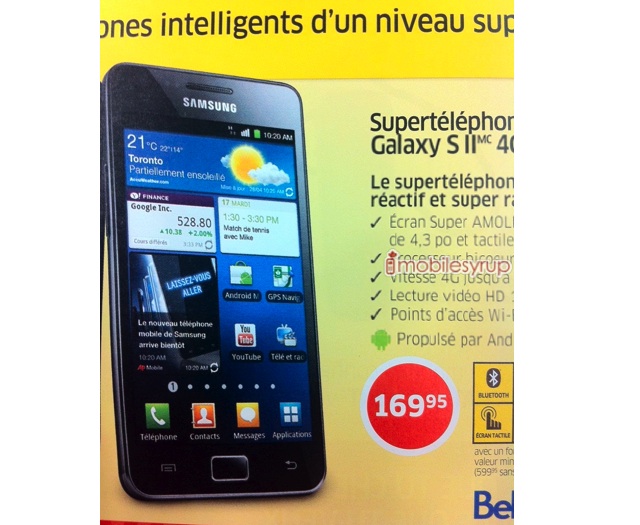
The incredibly stunning Samsung Galaxy S II 4G will be officially released by Bell on July 14th, a mere 8 days away. The no-contract price has been confirmed to be $599.95 but the 3-year has always been an unknown. When SaskTel announced they’ll be carrying the this Android 2.3 powered device they revealed in their press release that the 3-year price will be $79.99. Looking at this flyer from Bell’s retail outlet The Source show Bell planning on launching this for a 3-year contract price of $169.95.
south koreans can do their grocery shopping while waiting for the subway at a virtual supermarket opened by tesco homeplus, that lets users scan the QR codes of desired products, which are then delivered to their home within the day.
NFC is gradually turning to the social side, thanks to new functionality found within the Google+ app for Android. Software developer Ridzuan Ashim discovered that, when used on an NFC-enabled device, you can read tags and share them through the new social networking service. After scanning, the OS asks you if you want to share the associated text with Google+ or another relevant program. Though the abilities seem somewhat limited for now, we’ll likely see more developer support tossed in as the service matures. Using NFC in this way could lead us into a group Huddle, check us in at a restaurant and share it with our Circles, and perhaps even add us into somebody’s Circle or Hangout. It’s only functional on a limited number of Android devices for now, so if you happen to use a Nexus Sand have been invited to the exclusive club better known as Google+, you’re a prime candidate for giving it a look-see. If the above criteria doesn’t apply, check out the video below to experience all that near-field glory through someone else’s phone.
Sony’s S1 and S2 Honeycomb tablets have been very coy in front of the cameras since their initial unveiling. Aside from two visually pleasing shortfilms and a tease of a hands-on, we haven’t seen much of them since — or any specific release details, for that matter. The former’s changed at least, however, thanks to Notebook Italia. The site managed to handle the duo long enough in front of a lens to capture a bevy of snapshots, along with a short video of the S1 running PlayStation Suite. If you’ve been anxious to get a better look you’ll find the S1 clip past the break, and all of the photos by hitting the source link below.
Update: Niccolo from HDblog.it wrote in just as this post was going live, offering up another batch of screenshots and another hands-on video. That’s down below, enabling double your viewing pleasure, and double your fun.
A massive dust storm descended on the Phoenix area Tuesday night, drastically reducing visibility and delaying flights as strong winds toppled trees and caused power outages for thousands of residents in the valley.
Last month, 89-year-old apocalypse forecaster Harold Camping suffered a stroke, likely related to the cumulative stress of having failed to deliver on big rapture promises. More »
Google’s limited launch of its Google+ social networking service has proven to be popular, at least among the lucky few who have had a chance to get invites to sign up for the service. But in order to get more people to sign up to use the service, Google is…
This heavily-modified street-legal Ford GT made history as the first car recognized by the Guinness Book of World Records for standing-mile speed at 223 mph. Even cooler: they did it on the runway used for landing Space Shuttles.
It sounds like an Onion headline, but it’s actually true!
"Visiting a national park in North Sulawesi, Indonesia, award-winning photographer [David] Slater left his camera unattended for a while. It soon attracted the attention of an inquisitive female from a local group of crested black macaque monkeys, known for their intelligence and dexterity.Fascinated by her reflection in the lens, she then somehow managed to start the camera. The upshot: A splendid self-portrait."
Most amazing to me: these things are all in focus! … read more