
To avoid slow and uneven heating when microwaving your food, try placing the plate or container on the edge of the spinning carousel instead of directly in the middle of the microwave. More »

Reality Bites
To avoid slow and uneven heating when microwaving your food, try placing the plate or container on the edge of the spinning carousel instead of directly in the middle of the microwave. More »

As expected Bell and Virgin Mobile officially turned on their 4G network in Saskatchewan today. This brings peak download speeds of up to 21 Mbps, but you can expect “typical speeds of 3.5 to 8 Mbps”. The good news is that all the latest devices from both carriers are available, the iPhone 4, Bold 9780, Galaxy S, Wilfire S, Incredible S… now it’s going to come down to who has the best monthly rate plans. You can count on SaskTel to compete for more business now…
Related posts:
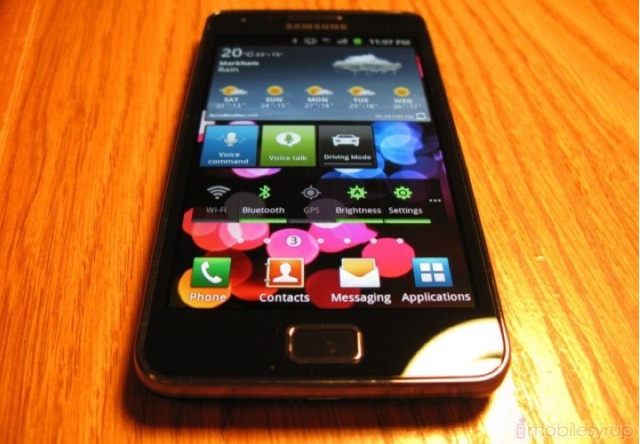
The Samsung Galaxy S II is coming to Canada soon. We aren’t able to divulge carrier details but during a media briefing we had a chance to play with the device, my first impressions are below and will follow up with a full review shortly.
Samsung has a solid competitor not only to the iPhone, but to the rest of the highly-competitive smartphone market. It seems like they’ve taken their hard-earned lessons to heart, and improved in every way upon the original.

Hardware
The hardware is all plastic, but its lineage owes far more to the Nexus S and Infuse 4G than to the original Galaxy S series. It’s clear Samsung learned a few things from the original: plastic is fine as long as it doesn’t creak; plastic is fine as long as it doesn’t invite fingerprints.
The SGS2 improves upon the first in both respects: the main plastic body extends through the sides and partway to the back, creating a very sturdy “unibody” casing that feels far sturdier than any previous Samsung device I’ve used, while keeping it admirably thin at 8.5mm. That’s 1.4mm thinner than the original.
Before moving onto the front, I must note that the battery cover, which only fits over a portion of the entire back, seems flimsy and breakable. But Samsung has done some wonderful things with plastic, as this thing bends and bends while maintaining its shape. It also has a wonderful ribbed pattern that feels great in the hand and provides more grip than the smooth back of the original Galaxy S.
The screen is hands-down the best in the business. Discount for a second that the 4.3″ display still displays the same number of pixels as the 4″ original, and some 30% fewer than the 3.5″ iPhone 4. Once you see it, you will understand. The blacks are the blackest, the colours the most vivid, the text the sharpest. I don’t know how else to explain it, but when I am reading black text on a white background it feels like I’m reading a piece of paper. There is no screen at all. This is likely because the screen itself is so close to the glass, preventing that disconnected feeling you get from looking at a lower-quality LCD. I wish this didn’t read like hyperbole, but it’s the only way I can describe it. With a slightly higher resolution, the Super AMOLED display of the Galaxy S II would be perfect. As it stands, there are issues with pixel density and aliasing that are not present on the iPhone 4′s Retina Display. But the 4.3″ size makes it far easier, for me at least, to comfortably read articles, books and web pages.

The design is also commendable. There is a simplicity to the face that is absent from most other Androids. When the screen is off, only the Home button is visible, as the Back and Menu buttons are lit only when needed. There is a noble austerity to the entire device, from its solid lightness to its lack of pretension. It has just two ports: a combination USB/HDMI port on the bottom (known as a MHL port) and a 3.5mm headphone jack on top. The left side finds the small black volume rocker and on the right a power button. There is a single speaker on the bottom rear of the device, where a small chin protrudes.
The phone at 116g is meagre, but weighted perfectly. Holding it to talk is not cumbersome, despite its ample size.
Software
The Galaxy S II ships with TouchWIZ 4, a skin which at first resembles its much-derided predecessor. Luckily, Samsung has made some drastic improvements to performance and aesthetic over the past year, and I can happily say it rivals Sense in responsiveness and usefulness.
Give me a stock Android skin any day of the week, but some of the features Samsung has added to the new TouchWIZ are admirable. But more than anything, this is Android running flawlessly, without slowdowns, crashes or memory problems. That it took a device with a 1.2Ghz dual-core processor and 1GB RAM to finally tame the wild beast that is Android is a bit mystifying, but tame Android it does.
Browsing flies. The stock browser is hardware-accelerated, and over 3G or WiFi performance is unprecedented. There is an iOS-like kinetic scrolling mechanism that all but does away with j***y Android browser scrolling. Pinching your fingers together brings up the tab menu. It’s a simple thing that, combined with the flawless performance, makes me want to use the stock browser. I haven’t done that since 2008.

Elsewhere
The Galaxy S II has Android 2.3.3 Gingerbread loaded, and the dark aesthetic has been adapted nicely to work with TouchWIZ. The camera app has been given a nice visual overhaul, and the 8MP camera takes great shots. Focus is fast, and photos have a nice amount of detail, though colours are somewhat muted giving surroundings a dreary look. Some people prefer the way colours “POP” on the iPhone 4, but I think it’s a misnomer to say its quality is superior. Rather, it seems that Samsung captures colours more accurately, and certainly with more detail. It’s a matter of opinion whether purists will prefer Samsung’s results. The 2MP front camera also take nice photos in good lighting and the phone natively supports video calling, though as far as I can tell only between Samsung devices.
Bundled apps are appreciated, but cannot be removed, which is a shame. There are four hubs: Games, Social, Music and Readers, each powered by a different third-party service. For example, Music is a modified version of 7Digital’s Android app, and Readers is a combination of Zinio, PressDisplay and Kobo. Surely Samsung could have left these out without opposition, but for them it’s a matter of trying to sell content on the device a la iTunes and differentiate from the other Android manufacturers who are without licensing deals.

While the SGS2 doesn’t have a Tegra 2 processor in it, it’s arguably a better gaming machine than the equivalent Optimus 2X or Motorola Atrix. It achieves an awesome 3200+ points on the Quadrant benchmark, compared to around 1500 from the Nexus S and 2500 from the Atrix.
Battery life has proven a marvel. At 1600mAh, it’s some 300milliamps less than the Atrix, and yet it seems to last far longer. In fact, the Galaxy S II has the best battery life of any Android device I’ve tested to date. I clocked nearly 26 hours on a single charge and still had 19% left before I recharged it, and that was with doing what I normally do through the day: browsing, calls, Twitter, email and camera. I’ve heard good things from other users, too, so I know I’m not a lucky aberration.

I’ll leave the rest for the review, but so far, so good. If you’ve had a bad experience with Android before, there is still a lot to like about the Samsung Galaxy S II. Make no mistake though, this is one of the smoothest smartphone experiences I’ve ever had, and that includes extensive use of the iPhone 4. Sure, the experience is different, and some would say not as refined, but there are few if any tasks one cannot accomplish as quickly or easily on the SGS2 as they can on an iOS device. It’s taken this long, but with the latest iteration of Samsung, HTC and Motorola devices, it seems that the hardware has finally caught up with the demands of the Android software.
—-
In no particular order, here are a couple field notes of what Samsung has added to the experience:
– Double-tap the home screen for Vlingo-powered voice commands. This also works at the home screen
– Touch two points of a web page / photo and tilt the phone to zoom in and out
– Move icons around the homescreens by tilting the phone
– Mute incoming calls and sounds by turning over the phone
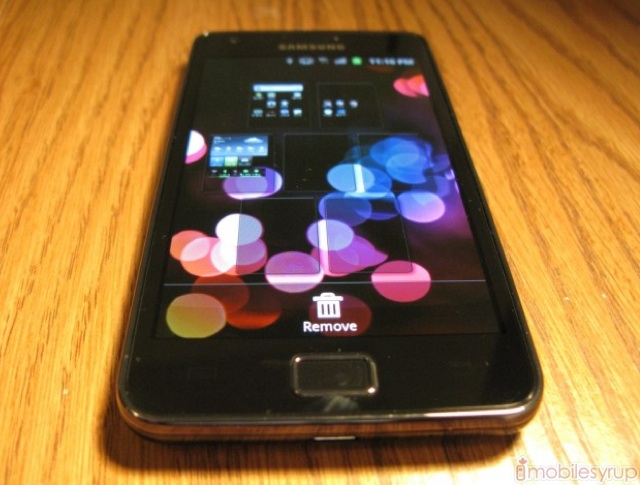
– Press and hold an empty part of the home screen to bring up a custom editing menu with excellent widget support
– 7Digital-powered Music Hub
– Extensive social media support through the Social Hub
– Readers Hub with News/Books/Magazine support (PressDisplay/Kobo/Zinio)
– Game Hub powered by mobage
– Built-in Video Maker and Photo Editor
– Kies air management to connect phone to PC or Mac
– Built-in IM client, FM Radio, Polaris Office
Related posts:

This video is simply unbelievable: Buildings, mountains and trees materializing in the mist over the water, following a heavy downpour at dusk. Witnesses couldn’t believe their eyes. I couldn’t believe it either. But cameras don’t lie, right? More »


If you or someone you know needs help managing their Facebook notifications, either because they can’t stand getting all the emails or they just want to adjust them a little, here’s how it’s done. More »
Is the full-screen touch interface for Windows 8 ‘just a shell’ on top of Windows?
Not really; there isn’t an application running like Media Center that you could shut down and it isn’t just a browser – this is another mode for the interface that you can switch in and out of. But it is the browser that powers it.
Apps for the immersive Windows 8 interface are written in HTML5, JavaScript and CSS (and presumably, Silverlight – this is the IE10 engine and there’s no reason for it not to run plug-ins) and packaged up in an AppX container.
In fact, if you dig into the web standards support that Microsoft has added to IE10, it’s clear to see that despite the resemblance to the Silverlight-powered Windows Phone 7 ‘Metro’ interface, the layout of this new user interface is the biggest reason for adding those standards now.
One standard that Microsoft added to IE9, Media Queries, is always suggested as a way to have one web page display appropriately on different-sized screens – not just shrinking the page but reflowing the layout and adding or removing extra details to fit.

IE9: Media Queries change the layout of the page as you resize it
The IE Test Drive demo for Media Queries shows a page of pictures optimised for a smartphone, a netbook and a notebook or desktop: the images change size, lose the headline and caption and switch from a grid layout to a stack.
That’s exactly the same change you see in the News application in the Windows 8 touch demo: when the app is full screen, you get large thumbnails with captions underneath them and the heading for each section has several links.
The layout is the same when another app takes up a slice of the screen, but when you slide the News app over so it takes up a smaller area, you only get one image and heading in each section and the images turn into small thumbnails to make room for the caption.
It’s the same with the video player; as the window gets smaller the video doesn’t just get resized – the layout changes with the title appearing underneath it, along with the playlist. That’s exactly what you’d expect from an interface based on Media Queries.

WINDOWS 8: When the News app is full screen, you get a page of large images…
Incidentally, Media Queries let you change the layout of a page based on the orientation as well as the size. So far we’ve only seen the Windows 8 immersive user interface in landscape format, but we’ve also only seen it on a breadboxed ARM system that would be pretty hard to pick up and rotate, so it’s still entirely possible that there will be a portrait version of the interface.

NEW LAYOUT: Drag the video player to take most of the screen and the News layout changes completely
Media Queries retrieve different layouts and views of the page from the server depending on the window size but getting a flexible layout in the first place takes a combination of three web standards only introduced in IE10 – including one that Microsoft came up with and only proposed to the W3C group that standardises HTML in April.

VIDEO THUMBNAIL: Give the News app more room and the video player changes layout instead
That’s the Grid Layout standard, which “allows us to align content and create regions within an app,” according to Markus Mielke, a senior lead program manager on the IE team – and IE10 is the first browser to include Grid Layout.

HOW GRIDS WORK: This IE10 tutorial shows how an app can be divided into regions that align and stretch…
Grids can have headers, footers, main sections and gutters to divide areas. You can define the proportions of the areas as fractions of the page and use layers and alignment to position content inside the grid rather than counting pixels. “If you’re familiar with the WPF grid [for laying out applications], some concepts should sound familiar,” Mielke points out and grid is ideal for web apps – including the Windows 8 user interface.

START GRID: The Start screen layout uses a grid of tiles…
Look at the way the tiles in the Windows 8 Start screen are laid out in grids, with three columns that can have one or two tiles in each cell of the grid, with a gutter between them to mark the edge of a ‘page’ (like the panoramas in Windows Phone 7 that means you can always see that there’s more content than fits on screen). The Photo Feedr app has the same kind of grid layout, with different sized pictures arranged to fit into the grid.

PHOTO GRID: …and the Photo Feedr app has a grid layout of thumbnails
Within the grid layout the elements of an app don’t have to all resize or stretch in the same way; that’s handled by the flexible box standard (flexbox for short). And when there’s content arranged in columns that you want to reflow as the window changes size, that’s done by the multi-column standard.

STRETCH: As you make the window larger, flexbox stretches the layout but keeps the boxes aligned.
The flexbox standard is “in flux,” Mielke says and it’s only just entering the working draft stage, which is about stable enough to fit the IE team’s maxim of only implementing standards that are ready for developers to work with. But the multi-column standard he calls “super stable”; it hasn’t changed since the end of 2009, so it could easily have been in IE9 on that basis. It’s most useful when you have flexbox and grid layout as well and our guess is that the IE team waited until it could work on them all together in IE10 – so the Windows team could use them to build their interface.

RELATIVE: Set the proportions for flexible boxes and different content areas get more of the space in a larger window

MULTISIZE: This IE10 demo app gets different layouts and content details depending on the window size – exactly the same principles you see in the Windows 8 touch apps
Another new standard implemented in IE10 is CSS3 transitions; the new HTML5 SkyDrive photo view uses this to rearrange image thumbnails using subtle animations as you resize your browser window – so the images flow into place rather than jumping. That looks very like the way the tiles on the Start screen flow into place as you scroll sideways.

HTML5 SKYDRIVE:Animated transitions rearrange your photos and SkyDrive keeps the aspect ratio (like flexbox)
“If you think small you should not forget big as well,” Mielke says of web apps; “it’s not just about small devices, it’s also about scaling up.” Similarly the Windows 8 immersive interface isn’t just for tablets; we’re expecting a variant for big screen systems – perhaps one you can control with Kinect.

 |
 |

Forget sports drinks, the best beverage to have after a workout or hard race is chocolate milk, studies say. More »
Canadian homes and businesses will start receiving mail again Tuesday after legislation forcing 48,000 locked-out postal workers back to their jobs became law, Canada Post says.
If you’re guilty of skipping computer history class, here’s an exhaustingly lengthy Infographic from Manolution that can help you catch up. It sums up in detail the story behind the two biggest names in the industry: Microsoft and Apple, from their inception to today.

–
commentaires
– via:
shoze.blogspot.com

Well, what do we have here? From the looks of it, we’ve got ourselves launch dates for a slate of new Lenovo tablets. A little note from the outfit’s Affiliate Program, pictured above, shows the Android-packing IdeaPad K1 will, unsurprisingly, debut in late June or July, with a June 28th arrival being pegged for its rumored ThinkPad tablet. What’s more, we could see a refresh of the company’s IdeaCentre nettop coming our way August 30th. Looks like this summer could be a hot one for Lenovo, but we’ll just have to wait and see how things pan out.
Lenovo ThinkPad, IdeaPad tablets coming later this month? originally appeared on Engadget on Sun, 26 Jun 2011 11:06:00 EDT. Please see our terms for use of feeds.

An asteroid the size of a large house will zip within 12,900 kilometres of the Earth at about midday London time on Monday. More »
A Conservative bill ordering 48,000 Canada Post employees back to work cleared the House of Commons on Saturday after a marathon debate and several failed opposition attempts to amend it.
Shared by Terren
One of the key elements of using any Android version is integration with Google, and Honeycomb is no different. From the inclusion of Google-specific apps to the requirement for a Google account to access the Market and download free and paid apps, there is clearly a lot to gain from using a Google account.

NASA’s next Mars rover, the Curiosity Mars Science Laboratory, will soon embark on a quantum leap in humankind’s scientific exploration of the Martian surface. More »

In short, awesome. Filmmaker John Banana made this fan film in honor of the original movie’s 20th anniversary and the late, great Dave Stevens. It’s really too cute for words. [The Mary Sue] More »

Now you can take your stalking ability to a new level on your Android device. The Facebook for Android app has been updated to version 1.6 and finally brings the capability to upload videos straight from your device. Certainly a good feature to have. In addition, Pages has been added along with improvements to the news feeds you subscribe to.
Source: Android Market
Via: Phandroid
Related posts:

Space nerds, get your browsers ready — UrtheCast will soon be streaming HD video of Earth straight from the ISS. The system will actually consists of a pair of cameras, one still and one video, that will be mounted on the Russian arm of the station. The still shots will be very wide, covering about 30 miles with a resolution of 18-feet per pixel. Much more exciting will be the three feet per-pixel stream of 3.25fps video that will run 24 hours a day, seven days a week. You probably won’t be able to see yourself waving as the ISS passes overhead, but you should be able to spot your cardboard box fort house. The feeds won’t be your typical boring NASA fare either — you’ll be able to search, rewind, and tag objects or events, and UrtheCast is providing APIs for developers to build upon the service. The project won’t be launching until June 28th, so bide your time by checking out the video and PR after the break.
Continue reading UrtheCast to stream live HD footage of Earth from ISS, like Stickam for space
UrtheCast to stream live HD footage of Earth from ISS, like Stickam for space originally appeared on Engadget on Sat, 25 Jun 2011 09:40:00 EDT. Please see our terms for use of feeds.
Permalink | | Email this | Comments
The Xbox 360 is the oldest of the three current generation game consoles with nearly six years of life. But according to an executive at Microsoft, it may be a while before the company officially retires the console. Computer and Video Games reports that Chris Lewis, a VP for the…


