Samsung Galaxy Tab gets video preview in Korea

It sees like we can’t let a day pass without talking about Samsung’s upcoming Froyo tablet. This time there’s a whole video preview, courtesy of some of our Korean brethren. Android 2.2, WCDMA 3G, 802.11n WiFi, a 16:10 screen ratio, a front-facing camera “dedicated to video calling,” SDHC memory expandability, and a DMB tuner for those TV-crazy Koreans are all listed on the spec sheet, but you’ll be wanting to see the Galaxy Tab’s UI in motion. It really looks silky smooth and should give the iPad cause for concern. Speaking of the iPad, there’s a size comparison against Apple’s slate and Samsung’s own Galaxy S handset as well — all yours after the break.

Update: Fast-loading video embedded after the break.

[Thanks, Eric]

Continue reading Samsung Galaxy Tab gets video preview in Korea

Samsung Galaxy Tab gets video preview in Korea originally appeared on Engadget on Thu, 26 Aug 2010 08:44:00 EDT. Please see our terms for use of feeds.

Permalink   |  sourcedt.co.kr  | Email this | Comments

Samsung’s 7-inch Galaxy Tab gets spied in the wild (video)

Man, you just can’t hide your gadgets from curious onlookers these days. Case in point: Samsung’s Galaxy Tab was innocently doing some testing rounds through Sydney recently, only to be happened upon by the Electronista scribes, who diligently videotaped it — seemingly without the knowledge of the tablet’s possessor. The video confirms what we already know, it’s a 7-inch tablet, it’ll be driven by an Android, and it looks very much like a giant cellphone. The Samsung employee described it as “awesome” and very different from the iPad’s experience, while the UI apparently looked very responsive. Go after the break to see for yourself.

Continue reading Samsung’s 7-inch Galaxy Tab gets spied in the wild (video)

Samsung’s 7-inch Galaxy Tab gets spied in the wild (video) originally appeared on Engadget on Mon, 23 Aug 2010 10:31:00 EDT. Please see our terms for use of feeds.

Permalink   |  sourceElectronista  | Email this | Comments

Xbox Live launch titles for Windows Phone 7 finally revealed, we’ve got the full preview

We’ve known that proper Xbox Live gaming (powered by XNA) was coming to Windows Phone 7 devices, but we’d yet to see any of that thumb-spraining goodness in action besides a brief demo and a few developer videos. Well, Microsoft has finally come clean with details about its launch strategy for the platform, and from where we sit, it’s definitely looking pretty promising. First off, the company has announced a full list of launch titles for WP7 handsets, including some familiar names and franchises like Castlevania, Halo: Waypoint, Star Wars, Crackdown, and Guitar Hero, alongside a handful of newer properties like the ultra-cute ilomilo, produced in-house by Microsoft Game Studios. In total, the company will launch with over 60 game titles, with new offerings appearing every week in the Xbox Live Marketplace, just like its big brother console version. We’ve got all the details, a full list of the launch titles, and our hands-on preview after the break — so read on to get the scoop!

Continue reading Xbox Live launch titles for Windows Phone 7 finally revealed, we’ve got the full preview

Xbox Live launch titles for Windows Phone 7 finally revealed, we’ve got the full preview originally appeared on Engadget on Mon, 16 Aug 2010 23:12:00 EDT. Please see our terms for use of feeds.

Permalink   |   | Email this | Comments

Toshiba’s dual-screen Libretto W100 laptop on sale in America for $1,100

Terrific news, laptop shoppers. Toshiba’s concept-turned-commercial Libretto W100 is now on sale in the US of A, but there’s no telling how long it’ll remain in stock. We heard from the get-go that this dual-screen wonder would only be a limited run, and just a week after going on sale in Japan, the W105-L251 is getting prepped right now for a shipping label with your address on it. $1,099.99 buys you a Pentium U5400 processor, Windows 7 Home Premium (32-bit), integrated Intel HD graphics, a memory card reader, 2GB of DDR3 memory, a 62GB solid state drive, 802.11b/g/n WiFi, Bluetooth 2.1+EDR, an inbuilt webcam and an 8-cell battery. Oh, and twin 7-inch WSVGA LCD panels. Toshiba reckons that you’ll get yours in “2 to 3 weeks” if you order direct, though Amazon has a pre-sale of its own going for those who like to press their luck.

Continue reading Toshiba’s dual-screen Libretto W100 laptop on sale in America for $1,100

Toshiba’s dual-screen Libretto W100 laptop on sale in America for $1,100 originally appeared on Engadget on Mon, 16 Aug 2010 14:36:00 EDT. Please see our terms for use of feeds.

Permalink   |  sourceToshiba, Amazon  | Email this | Comments

Internet Explorer 9 Beta launching September 15th, might enter a beauty pageant

Once again, the whispers were true. Microsoft has proudly announced on this fine day that September 15th will mark the official launch of the Internet Explorer 9 Beta, but details beyond that are scant. We do know that the Big M will hold a gala in San Francisco to celebrate “The Beauty of the Web,” and once it hits the tubes, you’ll need either Vista or Windows 7 to use it (sorry, XP loyalists). ‘Course, it remains to be seen if IE can catch up to Chrome and Firefox in the technical department, but at least you can start preparing your existing squeeze for somewhat of a letdown next month. Let ’em down easy, okay?

Internet Explorer 9 Beta launching September 15th, might enter a beauty pageant originally appeared on Engadget on Thu, 12 Aug 2010 16:54:00 EDT. Please see our terms for use of feeds.

Permalink   |  sourceBeauty of the Web  | Email this | Comments

Bill Gates expects the web to be the best single source of education within 5 years

Bill Gates just might be the world’s most famous college dropout (sorry, Kanye), but lest you think he’s changed his mind about the educational establishment, he’s got a few words of reassurance for you. As the closing speaker of the Techonomy 2010 conference, Bill dished out his vision of how learning will evolve over the next few years, stating his belief that no single university will be able to match the internet when it comes to providing the learning resources a student needs. Describing traditional studies as “place-based” and inefficient, he forecasts that university education will become five times less important within five years, with online lecture sources picking up the reins of enlightening our youth. In other news, Bill’s pen-based tablet PC idea is going great!

Continue reading Bill Gates expects the web to be the best single source of education within 5 years

Bill Gates expects the web to be the best single source of education within 5 years originally appeared on Engadget on Mon, 09 Aug 2010 05:38:00 EDT. Please see our terms for use of feeds.

Permalink   |  sourceTech Crunch  | Email this | Comments

Telus turns Canadian Xbox 360s into IPTV boxes starting today

After years (and years) of waiting it’s no surprise to see the Xbox 360 finally sliding into the role of IPTV set-top box, but we couldn’t have seen Canada’s Telus being the first in North America to offer the option. It only switched customers over to the Microsoft Mediaroom platform (also used by AT&T's U-Verse, where the feature should appear soon) powering its Optik TV package — currently only available in Alberta and B.C. — earlier this year, enabling this new multiroom setup. Of course, that means the Xbox 360 can’t be the only set-top box in the house — it just acts as a client to the main DVR for live TV watching, or to schedule and watch previously recorded programming. Subscribers owners can check the main website for access on their current Xbox 360 or grab a free new system by signing up for two years of internet access. Mediaroom 2.0 is expected to bring PCs and mobile devices into the fold at some point as well, but for now check out the Xbox 360 experience in our video demo after the break, as well as a press release with all the details.

Continue reading Telus turns Canadian Xbox 360s into IPTV boxes starting today

Telus turns Canadian Xbox 360s into IPTV boxes starting today originally appeared on Engadget on Wed, 04 Aug 2010 15:07:00 EDT. Please see our terms for use of feeds.

Permalink   |   | Email this | Comments

RIM launches BlackBerry 6 platform

It’s been teased since WES back in April — but with the launch of the Torch today, RIM had to come clean with all the details on its thoroughly refreshed BlackBerry 6 operating system, too. Besides the obvious name change from “BlackBerry OS” to simply “BlackBerry,” the software features countless updates, most notably new universal search functionality, social network aggregation, WiFi-powered media sync with your desktop music collection, and an all-new (and desperately needed) WebKit-based browser with support for HTML5. Thankfully, RIM has also committed to bringing BlackBerry 6 as an upgrade to at least a few recent models — the Bold 9700, Bold 9650, and Pearl 3G, to be specific — “subject to carrier certifications in the months ahead.” Follow the break for the full press release and video teaser.

Continue reading RIM launches BlackBerry 6 platform

RIM launches BlackBerry 6 platform originally appeared on Engadget on Tue, 03 Aug 2010 11:42:00 EDT. Please see our terms for use of feeds.

Permalink   |   | Email this | Comments

Nokia’s treatment of MeeGo smartphone UI revealed?


We’ve already gotten a glimpse at MeeGo’s prerelease stock UI for handsets, but just like Symbian, there’s no guarantee that the experience is going to be consistent across manufacturers — and a new video apparently captured from an online survey makes it seem like Nokia might be looking to go in a slightly different direction. The one minute, twenty-nine seconds of footage walks us through five parts — starting up, the “powerful multitasking UI,” getting connected, the Ovi Store experience, and the music player — and as you might imagine, it’s the Ovi Store portion that has us feeling like this is a thoroughly Nokia-customized experience (not to mention the copyright in the lower left). It generally looks richer and more functional than what we’ve seen before, and parts — like the webOS-esque multitasking — remind us of Maemo 5’s thumbnails, which makes perfect sense considering MeeGo’s roots. Follow the break for the full video.

[Thanks, MTA]

Continue reading Nokia’s treatment of MeeGo smartphone UI revealed?

Nokia’s treatment of MeeGo smartphone UI revealed? originally appeared on Engadget on Mon, 02 Aug 2010 14:17:00 EDT. Please see our terms for use of feeds.

Permalink   |   | Email this | Comments

China to build ginormous buses that cars can drive under (video)

Seriously, this is the future that China’s envisioning: huge friggin’ buses engulfing smaller cars on the road. Despite the silly picture and the eccentric “3D Express Coach” branding, this cunning project by Shenzhen Huashi Future Car-Parking Equipment actually makes sense. The idea is to make use of the space between regular-size cars and bridges, thus saving construction costs as well as minimizing congestion impact by allowing cars to drive underneath these jumbo buses. Fancy hitching a ride? You better start planning your move to Beijing’s Mentougou district, which is where Huashi will commence building its first 186km of track at year’s end. For now, enjoy the Chinese demo video after the break (translation text at source link).

Continue reading China to build ginormous buses that cars can drive under (video)

China to build ginormous buses that cars can drive under (video) originally appeared on Engadget on Mon, 02 Aug 2010 09:13:00 EDT. Please see our terms for use of feeds.

Permalink   |  sourceChina Hush  | Email this | Comments

Group Video Chat With Family and Friends For Free

Whether it’s a graduation or new birth, there are many special occasions in life that we’d like to be present for but can’t due to distance.  When a call doesn’t cut it, here’s how to video chat with up to 20 friends or family with Tokbox.

Video Chat can be complicated to setup, especially if you want to video chat with multiple people.  There are numerous web apps that offer free, limited plans for group video chat, but they are almost all aimed at the enterprise market and are fairly complicated to use.  Whether you’re a geek or have never setup a webcam, complicated tools never make the job easier.  We were excited to find that Tokbox is very simple to use for group video chats, and worked great.  Keep reading to see how it works, and then go try it out with your family and friends!

Getting Started

First, you’ll need to get a Tokbox account.  Head over to the Tokbox website (link below), and click the Sign Up button under Video Chat.

sshot-2010-07-29-[13-13-32]

Enter your name, age, email and password.  Agree to the terms of use, and then click Submit.

sshot-2010-07-29-[13-13-52]

That’s all, folks; you’re all ready to make video calls.  Click the call now button at the top of the page to go ahead and invite friends to chat with you.

sshot-2010-07-29-[13-15-25]

You may have to wait a few moments for the video interface to load.  Note that the entire TokBox interface is powered by Flash, so you’ll have to have flash installed on your computer to use it.

sshot-2010-07-29-[13-15-54]

Once it’s loaded, Flash will ask to access your camera and microphone.  Click Allow, and if you’d rather not have to answer this again in the future, check the Remember box as well.  Now click Close to get on with your video chat.

sshot-2010-07-29-[13-16-09]

Enter your friends’ email addresses and add an invitation message, then press Invite Contacts.

sshot-2010-07-29-[13-18-08]

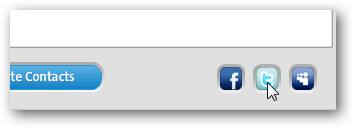
Alternately, click one of the social media icons on the right to invite your friends from Facebook, Twitter, or MySpace to your video chat.

image

You’ll now see your video on the left side, and blank area on the right while you’re waiting on your friend to arrive.

image

You may see some tips for things to do to help your experience, but generally everything just worked in our test without tweaking.

image

Joining a Video Chat

If you’ve been invited to a TokBox chat, you’ll receive a link in an email or social network message.  Click the link to join your friend’s chat.

sshot-2010-07-29-[21-20-06]

Click Allow to let TokBox access your camera and microphone so your friend can see and hear you in the chat.

sshot-2010-07-29-[21-18-25]

Finally, enter your name and click Enter video chat now.

sshot-2010-07-29-[21-18-45]

After a few moments, you and your friend will be chatting together with live audio and video.  You can see information about your internet connection by hovering over the video.  Up to 20 people can chat at once, so if there are more participants the video windows will resize to fit all of the videos.

sshot-2010-07-29-[21-22-06]

Alternately, if your computer doesn’t have a webcam, your video box will show a mic icon and say Voice only.  You can still see your friends’ videos, but they won’t be able to see you.

image

You can also text chat with your family and friends from the text box underneath the video chat. This will help you troubleshoot issues with audio or video. 

image

Extra Features

Tokbox also makes it easy for you to share videos and pictures with your friends.  Click the TV icon on the top of the chat window to add a video from YouTube or a picture from Flickr or Picasa to show everyone in your chat.

image

Once you’ve exited a video call, you can see your recent calls on the dashboard, and can even easily call someone back.

image

You’ll see a countdown timer before the call starts, so if you accidently clicked call you can always cancel before your video call starts.

image

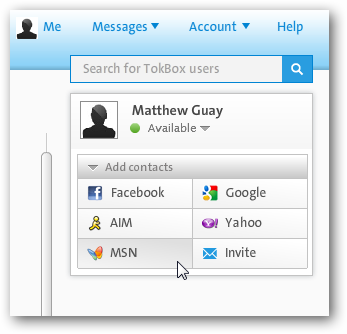
You can add your contacts from social networks to quickly invite them to a video call from the dashboard as well.

image

Or, if one of your friends calls you while you’re logged into TokBox, you’ll see a nice preview asking if you want to accept or ignore the call.  Click Accept to start video chatting with the caller.

image

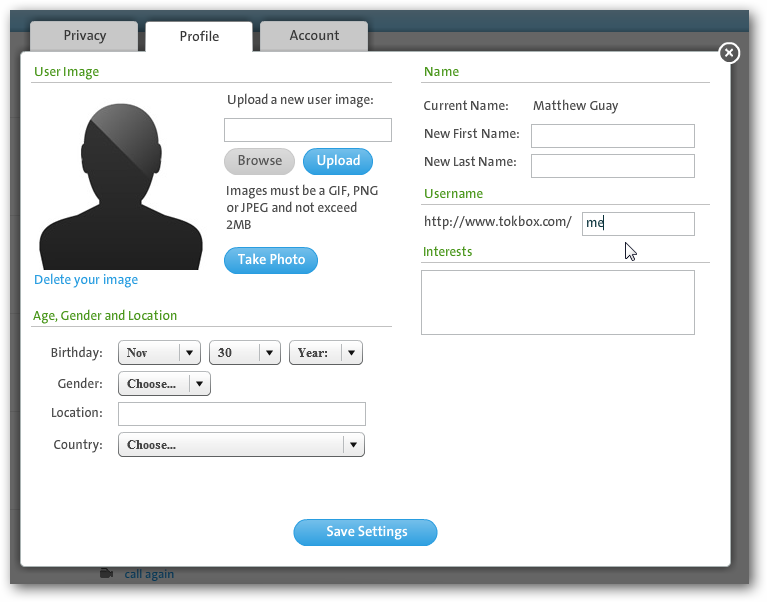
Or, you can change Tokbox settings if you like.  Click the Account link on the top right, and then select Edit my profile.

image

Here you can add personal info, as well as change your TokBox username.  You can share your username with friends and family so they can quickly call you anytime by visiting tokbox.com/your_name.

image

Conclusion

While Skype is a great service for making voice and video calls to individual people, it’s currently difficult or impossible to video chat with several people at once.  TokBox makes it incredibly simply to video chat with your family and friends, and since up to 20 people can chat together they all can join in at the same time.  Whether you want to discus reunion plans or simply have an online reunion, you can quickly get your family in the same “room” with TokBox even if they’re not tech savvy. This might come in handy if you have a loved one stationed overseas who aren’t tech savvy.  We’ve tried many different services, but few were as easy to use as Tokbox.  Give it a try, and let us know how it worked for you!

Link

Signup for Tokbox

Got an opinion to share? Click here to join the discussion

Similar Articles Productive Geek Tips

Sony’s 360-degree RayModeler 3D display brings its glasses-free act to LA, plays Breakout (video)

Sony talked up its cylindrical no-glasses 3D 360-degree prototype display last fall, and now it’s showing off the tech, dubbed RayModeler 3D, on US soil at SIGGRAPH 2010 through tomorrow. A major bonus of that showcase is an English language video — embedded after the break, plus a hands on including a game of Pong Breakout from Core77 and our videos from the Japanese exhibition — showing how it all works, including the eight-camera rig and turntable that capture objects in 45-degree separations before they are interpolated to create a continuous 360-degree motion image. Sony claims this is the first of its type capable of high quality images, full color and interactive live motion — check it out and imagine keeping a tiny 3D pet or floating, disembodied head on your bedside table, where it can respond and react to your every gesture. We wouldn’t want our blip-verts any other way.

Continue reading Sony’s 360-degree RayModeler 3D display brings its glasses-free act to LA, plays Breakout (video)

Sony’s 360-degree RayModeler 3D display brings its glasses-free act to LA, plays Breakout (video) originally appeared on Engadget on Wed, 28 Jul 2010 17:29:00 EDT. Please see our terms for use of feeds.

Permalink Core77  |  sourceSonyStyle Blog  | Email this | Comments