If you thought you couldn’t get a real Android tablet from a brand you’ve heard of for less than $200, think again. Lenovo’s just announced the IdeaPad Tablet A1, a 7-inch Android unit that we got a sneaky first glimpse of back in July. Now it’s real, and it’s cheap, it’s running Gingerbread, and while it doesn’t hold a candle to the Galaxy Tab 7.7, it honestly feels like something far above its price point. Read on for our impressions.
A sad off-season in the National Hockey League continued with the death of former Toronto Maple Leafs and Calgary Flames tough guy Wade Belak, who took his own life, multiple sources told CBC News late Wednesday.
The unchallenged reign of the MacBook Air on the thin-and-light domain is nearing an end — the Ultrabooks are coming, and the Lenovo U300s looks to be one of the strongest competitors we’ve yet seen. It’s a new entry to the IdeaPad lineup, the thinnest and lightest of a redesigned and reborn U Series that will also include the slightly stockier 13.3-inch U300 and the even bigger but even more serious 14-inch U400. All three are shipping in October, and we recently got a chance to try out the tiny trio. Read on for full details and our full impressions.
Looks like the Galaxy Tab 10.1 might finally have some real competition on its hands, with Toshiba announcing the AT200 tablet — which we’ve been hearing rumors about for the past few days. It’s a 10.1-inch Android tablet that measures in at just 7.7mm thick — that’s nearly a full mm thinner than the Samsung. The 10.1-inch LCD is 1,280 x 800 and is powered by a TI OMAP 4430 processor at 1.2GHz that can be paired by up to 64GB of memory — augmented by microSD. There’s a five megapixel webcam around back, a two megapixel shooter facing forward, and up to eight hours of battery life is promised. What hasn’t been promised is a price or a release date, but we’re told it’ll ship sometime before the end of the year.
There’s another picture after the break, plus full details in the press release. We’ll be back with full hands-on when possible.
Today Google is launching a service meant to directly compete with Netflix for Canadians’ media dollars. YouTube Movies, which launched earlier this year in the U.S. will allow consumers to rent movies for $3.99 or $4.99 each. Upon purchasing, they will have 30 days to start watching the movie, and 48 hours to conclude it.
But it’s an interesting move for Google, who traditionally generates most of its revenue from ads. In recent months, YouTube has partnered with several movie studios to bring free versions of older movies, most recently The Godfather, to shore up interest in YouTube as more than just a portal for cat memes.
While they bring more Hollywood titles than Netflix, they also have signed agreements with Alliance Films and Mongrel Media to bring superior Canadian-produced content to the fore. They also state that rented movies will have free extras included in the price, much like on a DVD, like cast interviews and bloopers.
And where does mobile come into this? Well, Google claims that you will be able to stream this to your Android tablet soon, likely by adding a portal in the Android Marketplace as they’ve done down south.
Will you use this service? Or is $7.99 for Netflix, even with their often-lackluster selection, more enticing to the average person?
A policy professor says school nutrition programs have failed to address child hunger, resulting in “food insecurity,” a phenomenon stemming from not knowing where one’s next meal will come from.
It’s that time of the year again for the Chrome team, when we pause on our anniversary to reflect on the amazing life and times of the web. It’s hard to believe that it’s already been three years since we launched our open source web browser, Chrome.
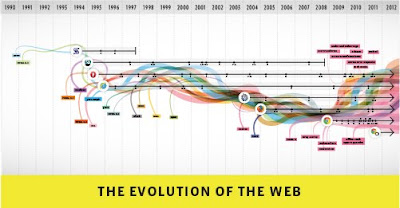
In that time, the web community has continued to inspire us, bringing the power of the web into all kinds of apps and experiences, with all modern browsers making great strides in speed, simplicity and security. To pay homage to the goodness of the web, we’ve put together an interactive infographic, built in HTML5, which details the evolution of major web technologies and browsers:
(With thanks to our friends at Hyperakt, Vizzuality, mgmt design, and GOOD)
In our third year, we’ve also brought Chrome’s principles of speed, simplicity and security to a new model of computing: the Chromebook. The Chromebook is pure Chrome—a computer built for everything you ever need to do on the web while doing away with all the usual annoyances of an old, slow PC.
Here’s a quick fly-by through the some of the highlights of the past 12 months on the Chrome platform:
Faster and faster
We kick off the Year of the Rabbit with a new compilation infrastructure for the V8 JavaScript engine, codenamed “Crankshaft,” which improves JavaScript performance by up to 66 percent.
Chrome’s new settings interface helps you find the right settings quickly with an integrated search box. It also provides direct links to each settings page, which can be copied and pasted for easy troubleshooting.
The omnibox is improved to better suggest partial matches for webpage titles and URLs.
You can optionally enable Chrome Instant, which shows relevant content in the browser window as you type, before you press Enter.
Chrome supports many popular screen readers such as JAWS, NVDA and VoiceOver to help visually impaired people better experience the web.
Print Preview, a popular feature request, uses Chrome’s built-in PDF viewer to display the preview, and enables you to save any webpage as a convenient PDF file using the “Print to PDF” option.
Chrome’s icon takes on a simpler look to embody the Chrome spirit, since Chrome is all about making your web experience quicker, lighter and easier for all.
An even more secure platform
Our integrated and sandboxed PDF viewer enables you to view PDF files on the web without installing additional software. Furthermore, we built an additional layer of security around the PDF viewer called a “sandbox” to help protect you from security attacks that are targeted at PDF files.
Adobe Flash Player is sandboxed on Windows, further protecting you from security attacks and malware targeted at Flash content on the web.
Chrome warns you before downloading some types of malicious files with enhanced Safe Browsing technology. In order to help protect privacy, malicious content is detected without Chrome or Google ever having to know about the URLs that you visit or the files you download.
To provide greater transparency and control over the data that websites store on your computers, Chrome lets you delete Local Shared Objects created by Adobe Flash Player using the browser’s built-in setting dialogs.
Wowzah, the modern web!
The Chrome Web Store is an open marketplace where you can search for and discover web applications, both free and paid, along with ratings and reviews. Developers can add in-app payments to their apps for a flat 5 percent transaction fee.
Chrome supports WebGL, which brings hardware-accelerated 3D graphics to the browser with no additional software needed. For a taste of what WebGL can do, check out “3 Dreams of Black,” a 3D music experience for the web browser.
Chrome’s support for the HTML speech input API enables developers to give web apps the ability to transcribe your voice into text. Try it out on www.google.com by clicking on the microphone icon in the search box.
Hardware-accelerated 3D CSS enables snazzier experiences in webpages and apps which use 3D effects.
Delivering a new, simpler model for computing
Chrome is enterprise ready, with an MSI installer and support for managed group policies. Many organizations such as Vanguard and Procter & Gamble have successfully deployed Chrome to thousands of users in an enterprise setting.
As of this past July, Chromebooks are now available for purchase in eight countries—the U.S., U.K., France, Germany, Italy, Spain, the Netherlands and South Korea. And just like Chrome, the Chromebook always keeps getting better. When you turn your Chromebook on, it updates itself automatically: you get the latest and greatest version of the operating system without having to think about it.
There’s more to come. Keep an eye on the Chrome blog to hear about new features and performance improvements as we continue to ship stable channel updates every six weeks. As always, on both Chrome and Chromebooks you’ll be automatically updated to the new versions as soon as they’re released.
Posted by Ben Goodger and Darin Fisher, Software Engineers
How excited is Samsung about the new Galaxy Note? The company is convinced that the device heralds a whole new space for the industry, something in between the smartphone and the tablet. And what’s the space called? The Note, of course. At 5.3 inches, the thing does feel a lot more like a cell phone than a tablet — albeit a really large one. It’s still reasonably portable, certainly more so than the also recently announced Galaxy Tab 7.7, but the added screen real estate might not be worth the extra pocket space for those who don’t use their portable devices to watch movies.
Interestingly, the major application here actually seems to be enterprise users. While Android 2.3 isn’t particularly known for being a great business OS, the ability to scribble notes with the stylus, the “S Pen,” harkens back to the old PDAs and will likely appeal to users sick of typing with their fingers. That said, we had some difficulty mastering the pen in the short time that we spent with it. Despite Samsung’s insistence on the thing’s accuracy, the stylus was quite slippery on the device’s glossy screen, and we had a lot of difficulty being precise for simple drawings — as you can see in the scribble above.
All in all, it’s hard to envision the Note as a whole new space, and it remains to be seen whether the S Pen can indeed give the aged stylus new life. Check on our hands-on video after the break and see for yourself.
Here it is, official as official gets: Samsung just announced the Galaxy Tab 7.7. As the name suggests, it has a 7.7-inch (1280 x 800) display — specifically, a Super AMOLED Plus panel. Like so many other 7-inchers hitting the market, it runs Android 3.2 and yes, that’s a skinned flavor of Honeycomb, with Samsung’s tablet-optimized TouchWiz UX layered on top. Inside, it runs the same Samsung-made dual-core 1.4GHz processor found in the new Galaxy Note, along with an HSPA+ radio promising theoretical download speeds as high as 21Mbps. Other specs for the 0.74-pound (335-gram) tablet include 16GB to 64GB of internal storage, a microSD card slot, a 5,100mAh battery rated for 10 hours, 802.11n WiFi, GPS, Bluetooth 3.0 and dual 3MP and 2MP cameras. In a nutshell, it’s the in-between-sized do-over a lot of folks have been awaiting since the original Galaxy Tab grew stale — a slate that promises faster speeds and some seriously improved viewing angles. We’ll be the judge of that in our review, but in the meantime stay tuned for some early hands-on impressions.
SaskTel has honestly stepped up since their 4G network launch. The latest devices such as the BlackBerry Bold 9900, Torch 9860 and the Samsung Galaxy SII and now they have slapped the “coming soon” label on one of the hottest tablets. No word on the release date or price, probably $499.99 outright.
Here’s a rundown of the specs: the Samsung Galaxy Tab 10.1 4G runs Android 3.1 Honeycomb with TouchWiz, measures in at 8.6mm thin with a weight of 565grams, a 10.1-inch display that has a resolution of 1280×800, dual-core 1Ghz Tegra 2 processor, 1GB RAM, 3 megapixel camera on the back with a 2 megapixel.
Blockbuster Canada’s receiver wants a court order to shut down the movie rental company’s 253 remaining retail locations, saying it can’t find a buyer.
Sony announced that their Android 3.1 Tablet S will be coming to Canada today, we found out the official launch date is actually the 16th of September. There are a couple versions, a 16GB for $499.99 and a 32GB for $599.99. So what makes the Tablet S different than all the other tablets that have arrived on Canadian soil? Here’s a few quick notes with my short time with it.
First, the design is different. Sony says the idea of this tablet came from a folded piece of paper, actually they dub it a “folding design”, with most of the weight being at the top, while the bottom is incredibly thin. It only weighs 590 grams and overall dimensions are 9.5 x 6.8 x 0.3 inches, so a bit smaller than the iPad and the Samsung Galaxy Tab. This is mainly due to the display, coming in at 9.4 inches, which is actually a good size and compliments the unique elevated design when it sits on a table/your lap. The display itself catches a massive amount of fingerprints, but has a high resolution to it at 1280 x 800. The viewing angles were good and in our full review we’ll take it outside and see how it does with direct sunlight.
As for other specs, the Wi-Fi only Tablet S comes with NVIDIA’s dual-core Tegra 2 processor with 1GB of RAM. I saw little lag time during the quick overview but noticed the accelerometer took its sweet time to adjust to the way the tablet was being held. On the front of the tablet is a 1.3-megapixel front-facing camera for video calling, on the back is a respectable 5-megapixel camera that can shoot 720p HD videos. One of the cool aspects of this is the ability to share media via DLNA capable devices. In the video you’ll see a quick demo of how you can immediately push images and videos to the TV, plus share music wirelessly.
The huge advantage that the Tablet S has over the other tablets is the distinctive and standout muliti media features. This is the only tablet that’s PlayStation certified, this comes pre-loaded with a couple titles, Crash Bandicoot and Pinball Heroes. Sony expect more games to be coming out by the end of the year.
As for accessories, to start the Sony Tablet S has two. A Bluetooth Keyboard that has dedicated keys for Android (top left hand side) will retail for $79.99 and a Desk Cradle that will cost $39.99. There’s so much more, like the Reader eBooks and the ability to watch movies from Q Video on demand. We’ll have a full in-depth review up shortly. The Tablet S will be available at the Sony Store (and online), Best Buy, Future Shop and London Drugs.
Today, the top speed limit in the country is 80 mph. By tomorrow, September 1, 2011, the Texas Legislature will have upped the state’s maximum speed limit to 85 miles per hour, faster than any other state in the nation. (Note: A more thorough reading of the bill reveals the Texas DOT was granted the option to raise the speed limit to 85 on the day the bill was signed, back in June. The September 1 milestone eliminated separate night speed limits.) More »
Today, the top speed limit in the country is 80 mph. By tomorrow, September 1, 2011, the Texas Legislature will have upped the state’s maximum speed limit to 85 miles per hour, faster than any other state in the nation. More »