
British actor Rowan Atkinson, known for his Mr. Bean TV and movie character, crashed his high-powered McLaren F1 supercar this week but escaped with just minor injuries.
Reality Bites
British actor Rowan Atkinson, known for his Mr. Bean TV and movie character, crashed his high-powered McLaren F1 supercar this week but escaped with just minor injuries.

Looking more UFO than UAV, the Japanese Defense Ministry has created a spherical surveillance drone which they have deemed the world’s first. Designed for use in urban areas, the menacing, all-black machine can fly up to 37 miles-per-hour. More »


More BlackBerry goodness coming at you this week! RIM announced today that BlackBerry App World 3.0 is now officially available in BlackBerry beta zone for smartphones, not for the PlayBook. There are several new features, mainly the overall layout has been redesigned which will ultimately make it a better experience for Berry users. The home screen has been rejigged and also now has a storefront search bar. RIM has gone a more social route and giving you the ability to share app details through BBM, Facebook, Twitter, email and SMS. Specifically for apps, new channels have been added: Apps, Games, and Themes. Here’s the complete list of the new BlackBerry App World 3.0:
New features include:
– Sleek New Design – The BlackBerry App World experience has been enhanced to help users discover the latest and greatest apps and content, starting right on the BlackBerry App World home screen where rotating spotlight banners show off all that’s new and exciting.
– New Channels – Apps, Games, and Themes now have their own channels so users can get to what they want even faster.
– Introduction of My Account – My Account makes managing BBID and payment options easy with direct access to all account information from the home screen.
– New My World Features – My World gives users a streamlined view of their apps and status, and now at a glance, in addition to seeing which apps are installed and uninstalled, users can manage subscription content and services. When new updates or subscription renewals are available for apps, users will be notified using push technology.
– App Social Sharing – When a user finds an app they can’t live without, they can share it directly from the app details screen through BBM, Facebook, Twitter, email and SMS
– Evolved App Details Screen – At a glance, users can get a quick summary, check out reviews and star ratings, take a look at screen shots, and more
– More Search Options – Quickly find apps with a Search Bar now appearing on the storefront home screen and search results are presented across Channels as well as My World. Search Bars are also within each Channel and users have the ability to filter by App Name, Price, Rating, Newest, Best Match, or Popular
Source: BlackBerry
Via: BlackBerry Beta Zone
Related posts:
Lindsay Powers
There’s no coffin or urn, but Sheen’s character Charlie Harper’s trademark bowling shirt is on display surrounded by elaborate flowers.

Lovers often split up and then get back together. According to Mashable, however, the tiff between Google and Twitter over Realtime Search is taking on a cold air of finality — even though it seemed kinda temporary at the time. The Big G just reiterated plans to restore its social networking search function, based on Google+ and “other sources,” but it made no mention of its former sweetheart. Oh well, a wise person once told us that when it comes to relationships, you should never press rewind.
Google’s Realtime Search will return, probably sans Twitter originally appeared on Engadget on Fri, 05 Aug 2011 05:50:00 EDT. Please see our terms for use of feeds.
Permalink |  Mashable | Email this | Comments

Amanda Bell James from Manitoba, Canada is Netflix’s one millionth customer. She signed up 10 months after the service launched and is the happy recipient of a lifetime membership. More »
 Philiana Ng
The cable network is currently airing Season 4.5 of the veteran sci-fi series, starring Colin Ferguson.

Air Canada has been fined $50,000 US by the U.S. Department of Transportation for violating "deceptive price advertising" rules in online ads.
Posted by Maciek Nowakowski, Associate Product Manager
When I check my email, I often rely on the message snippets to figure out which messages to open first. Sometimes, though, I want to see more than snippets, which is why I’m happy to announce that you can now preview messages in your inbox using a new feature in Gmail Labs called Preview Pane. It’s probably a very familiar layout to those of you who have used Gmail on a tablet device. We also think it’s going to work especially well if you have a larger resolution screen.

After you enable Preview Pane from the Labs tab in Gmail Settings you’ll see a toggle button in the top right corner of your message list, which lets you switch between preview and list views.


Multiple universes are accessed, in fiction, through portals in space or mystical necklaces or sometimes just in dreams, but always when characters break the rules of space time. In reality, alternate universes are not in other dimensions. They’re just far, far away. And the reason they are alternate universes is that they can’t be reached no matter what. But can they be tested for? More »

Android: Bubbleator is a utility that will slowly scroll notifications like missed calls, new SMS messages, and the latest posts from your Twitter and Facebook streams across your home screen as a live wallpaper. More »


NASA’s Mars Reconnaissance Orbiter may have just found flowing water on Mars. It’s the closest that scientists have come to finding flowing water on the Red Planet and will help determine if Mars could harbor life. More »

Gmail for mobile was looking a little tired around the eyes, so Google went ahead and gave the ol’ web app a cosmetic lift. The update, announced on the Gmail blog, packs a hat trick’s worth of tweaks aimed squarely at iOS and QNX (read: BB PlayBook) users. Email messages can now be manually refreshed with a top-down pull and release — a feature similar to Twitter’s own drag-down approach. The team also added a bit of finesse to inbox navigation with new sliding transitions, and even beefed up the graphical interface, taking full advantage of that Retina Display. Curious to see these tune-ups in action? Then head to the source for your own hands-on.
Gmail for Mobile gets a facelift, now ready for its Retina Display close-up originally appeared on Engadget on Thu, 04 Aug 2011 14:29:00 EDT. Please see our terms for use of feeds.
As part of our effort to provide an improved and consistent web experience across Google products, we’d like to invite you to try out a new look for the documents list that’s rolling out to users over the next few days. If it’s available to you, you’ll be able to preview the new look by clicking on Try the new look under the gear icon in the upper right. You’ll be able to return to the classic look using the same menu.
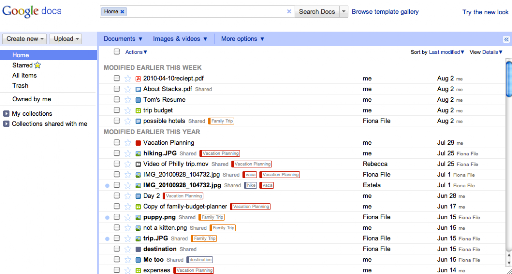

As part of this new look, we’ve also added keyboard shortcuts to help you easily navigate your documents list without a mouse. For example, when selecting a document, use the ⇓ (down arrow) to move down the list and the ⇑(up arrow) to move back up. Once you find the item you’re looking for, type a to open the Actions menu. Then, use the ⇑ and ⇓ arrow keys to navigate the Actions menu, and hit to select an action.
The Create new shortcuts are also convenient for creating new docs while you’re working. Simply hit Shift + T to create a new text document, Shift + S to create a spreadsheet, or Shift + C to create a new collection.
Can’t remember all those shortcuts? Just remember the question mark. Type ? when you’re not in the search bar, and a window will appear showing all available shortcuts.

These shortcuts will only be available if you’re using the new interface. Keep an eye out for more changes to the new interface as it evolves, and make sure to tell us what you think about the new design in this brief feedback form so we can continue to improve your experience.
Posted by: Ted Chen, Software Engineer

 Lesley Goldberg
Former showrunner Howard Gordon says “conversations are definitely happening” but he “will not be heartbroken” if it doesn’t happen.

Whether you’re an faithful Android user or you’ve just unboxed your first Android phone, there’s a wealth of free and cheap apps in the Android Market that can turn your device into a mobile powerhouse. Our second annual Lifehacker Pack for Android is stuffed full of apps to keep you connected to home, office and friends, or just help you stay entertained on the go. More »

Let’s do a roll call, shall we? Who doesn’t have a Honeycomb tablet to shill in the states? Acer, ASUS, Motorola, Samsung, Sony, and Toshiba all have something to their names, with Dell possibly bringing its China-only Dell Streak 10 Pro here too. Until now, Lenovo was one glaring exception. The company already had a head start selling the LePad tablet in China, but it was only last month that it announced not one, but two Honeycomb slates for the US market: the IdeaPad K1 for mainstream consumers, and the ThinkPad Tablet for business users (and a fair share of geeks, too). Now, we could easily roll our eyes at how saturated the market for Android tablets is becoming, but Lenovo isn’t just any old OEM. The brand has won such an avid following that we bet the company could have essentially slapped its name on a plain-Jane black slab and waited for loyal fans to line up.
In fact, though, you’re in for a bit more than name recognition. The K1 goes after mainstream consumers with a winsome design, sure, but also a software package designed to make Honeycomb easier to use, and to help ensure that flummoxed, low-tech users don’t have to spend too much time downloading apps out of the box. What’s more, it ships with Android 3.1 and has a two-cell battery that promises up to ten hours of battery life. Oh, and the 32GB model rings in $499, undercutting the 32GB iPad 2 and Samsung Galaxy Tab 10.1 by $100. But is that enough for it to stand out? Let’s see.
Gallery: Lenovo IdeaPad K1 review


Continue reading Lenovo IdeaPad K1 review
Lenovo IdeaPad K1 review originally appeared on Engadget on Thu, 04 Aug 2011 12:00:00 EDT. Please see our terms for use of feeds.
Permalink | | Email this | Comments

Getting tested for STDs used to mean a doctor’s visit, vials of blood, and days, weeks, or even months of anxiously waiting for results. mChip aims to change all that, while simultaneously ridding your brain of viable excuses not to get tested. It works as such: one drop of blood goes on the microfluidics-based optical chip, 15 minutes pass, and boom, the AmEx-sized device will confirm whether or not you have syphilis and / or HIV. The bantam gizmo is practically foolproof, as reading the results doesn’t require any human interpretation whatsoever. Plus, it’s cheap — cheaper than a coffee at Starbucks. One dollar cheap. Researchers at Columbia University claim the mChip has a 100 percent detection rate, although there’s a four to six percent chance of getting a false positive — a stat similar to traditional lab tests. As you’d likely expect, there’s hope that the inexpensive mChip will help testing efforts in places like Africa to detect HIV before it turns into AIDS. Next stop: the self-service pharmacy at CVS?
$1 chip tests for HIV in 15 minutes flat, fits in your wallet originally appeared on Engadget on Thu, 04 Aug 2011 07:32:00 EDT. Please see our terms for use of feeds.

Adding to yesterday’s five handsets, RIM’s got two more BlackBerrys for 2011 according to their MD of global sales and regional marketing, but as to whether they’ll use the PlayBook’s QNX OS remains to be seen. More »

An updated version of Skype just appeared on the Android Market sporting a crucial improvement: it now supports two-way video calling on a wide range of current Android handsets, rather than the meager four that had previously received preferential treatment. If you have a recent phone from HTC, Samsung or Sony Ericsson (excluding the Arc), then you’re probably in luck. Oh, and LG Revolution (Verizon) and Acer A5 owners can get their vogue on too. Running Gingerbread is a must, though, because Froyo will only let you use your device’s rear camera, which is obviously quite difficult to pose for. Check out the source link for the full list of supported handsets and let us know if you run into problems.
[Thanks, Nathan]
Skype two-way video chat finally arrives on more Android handsets originally appeared on Engadget on Thu, 04 Aug 2011 04:27:00 EDT. Please see our terms for use of feeds.
