
How to Create a Wiki without any Technical Know-How Using Google Sites

image

Wikis are a great way to communicate and work on a project with other people, but hosting your own wiki can be complicated to work with. Today we’ll show you how to setup your own Wiki page with Google Sites.

Note: naturally this post is meant for beginners, so the more advanced users should probably skip this one.

Create Your Wiki

We need to sign up for an account in Google before we can create a Wiki with Google Sites. Once you have your Google account, go to Google Sites and click the ‘Create Site’ button to start creating your own Wiki.

image

Google Sites has different templates that we can choose from for our website. Select ‘Project Wiki’ to start creating your wiki.

Specify a name that best describe the purpose of your wiki.

We can even make a visually engaging wiki with a selection of themes.

Google gives us the option to publicly share our wiki or share the wiki with a group of people that we are working with.

Adding collaborators and members in the wiki is quite simple. Select “Share this site” from the more actions dropdown and enter the email address(s) of collaborators you want to add.

You can invite people to collaborate on your wiki by sending email invitations.

We can even give different permissions to each person who we invite to edit our wiki.

Changing the Wiki’s Appearance

There is a lot of customization that we can do with our Wiki. Start by accessing the site management editor by clicking the ‘Manage Site’ menu.

The site editor let us customize the site layout, color, fonts, and theme.

Click the ‘Color and Fonts’ menu to change the site background, header, image, and fonts colors.

Inserting other Page Elements

Google Sites is tightly integrated with other Google products such as Picasa, Spreadsheet, Document, Presentation, etc. To begin inserting these elements into your Wiki, begin with clicking the ‘Edit Page’ or ‘Create Page’ button.

Click on the ‘Insert’ menu and choose the Google product that we want to incorporate into our wiki.

The great thing about Google Sites is that we can put our Google documents (spreadsheet, presentation) or Picasa photo album into any sites that we create in Google Sites.

Google Sites makes it easy for us to create Wikis without any technical know-how. It has a user friendly interface that allows us to create visually appealing and easy to use Wiki, just take a look at this Wiki site.
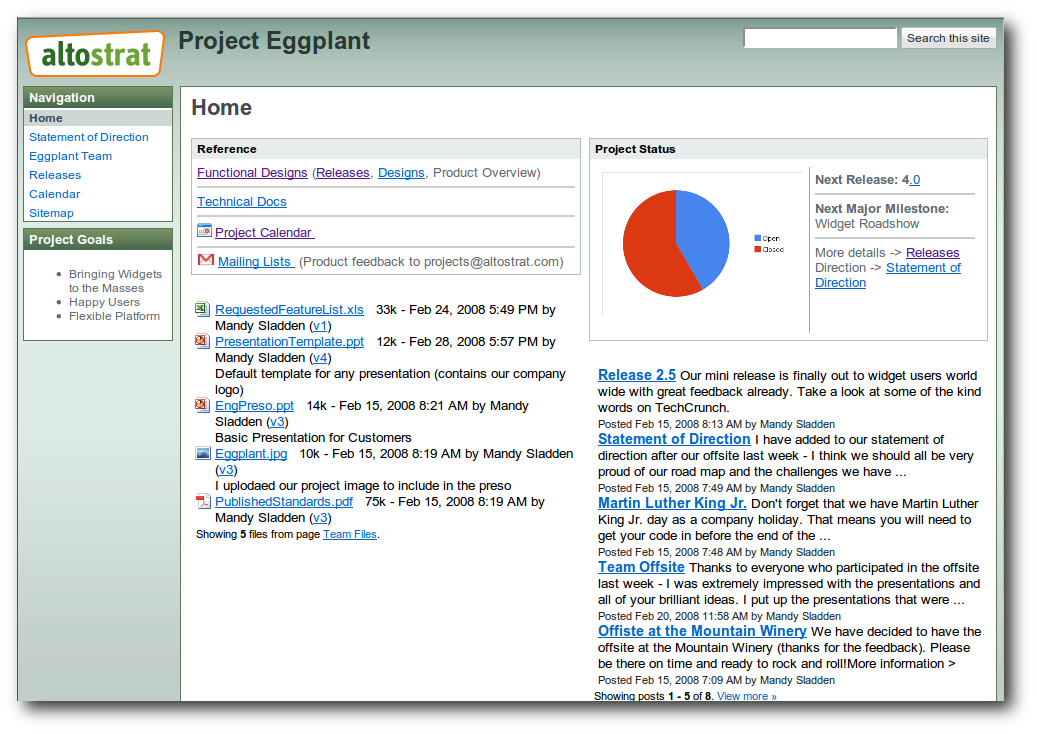
Now you can use Google Sites to create your own Wiki and use them in your work.

Google Sites

Got an opinion to share? Click here to join the discussion


Discover Card Motiva Application

Latest Features How-To Geek ETC

Five new themes

Posted by Manu Cornet, Software Engineer

Manu: Hey, how would you fancy some new Gmail themes?
Jake: Sure, I would love that! How usable are they?
Manu: Huh, usable? Well, there’s a flishy-flashy theme that blinks every…
Jake: What? I don’t want things to flash, I want to read my email.
Manu: No? Well then, what about this fluorescent pink theme that will make your screen look very special when your friends are looking at…
Jake: No pink please!
Manu: Oh. Then maybe this hyper dynamic and playful theme that makes all links on the page jump away each time you try to click on…
Jake: Are you insane? Please, just give me something usable. If I want flashy game-like graphics, I can use High Score. If I want something dapper for my friends to look at, I can use Shiny. If I want cartoon characters hanging out here and there in my Gmail, I can use Zoozimps. I just want something dead simple.
Manu: What about stripping the Gmail interface to the bare bones, like these two new themes, Basic Black and Basic White?


Jake: That’s better. The dark one may be good for my eyes.
Manu: Great! Do you have an Android phone?
Jake: Yes.
Manu: Then you may like this Android theme too. How about that?


Jake: Nice! Some graphics but still subtle. Give me more.
Manu: Relaxing tree tops? This one ain’t blinking.


Jake: Not bad! What about something that would feel more handmade?
Manu: You’re in luck, sir. I have this cool Marker theme in store for you. Very unprofessional.


Jake: Nice — I’m gonna stick with this one for now.
Manu: Good choice! See you next time for some more.

New Retinal Chip Temporarily Restores Vision for Blind Man

Retinal Chip Restores VisionResearchers at University Eye Clinic in Tübingen, Germany have begun testing a new retinal implant designed to restore sight to the blind. Previous experiments like this have employed external cameras, but the new device uses the patient's eye itself to help collect and process visual data. A small chip is implanted in the rear of the eye, where it converts light into electronic impulses. These impulses are then fed to the optic nerve; patients are trained to interpret the flashes as images. The resulting images were detailed enough for patients to recognize large letters and navigate a room filled with obstacles.

The most successful results came with Miikka Terho, of Finland, who was — within days of receiving the implant — able to read his own name, which had been intentionally misspelled to ensure that he was actually reading the word. Terho was also able to tell time on a clock, as well as identify and locate cutlery and dishes on a table. His prototype implant has since been removed, but he has been promised an upgraded model soon.

Continue reading New Retinal Chip Temporarily Restores Vision for Blind Man

New Retinal Chip Temporarily Restores Vision for Blind Man originally appeared on Switched on Thu, 04 Nov 2010 15:10:00 EST. Please see our terms for use of feeds.

Permalink | Email this | Comments

Star Wars-style 3D Holograms in the Works

 princess_leia_hologram.jpg

It looks like we might finally be catching up with a long,
long time ago in a galaxy far, far away–in a couple of years, at least Researchers at the University
of Arizona have reportedly designed
an almost 360 degree hologram that updates at a rate of two seconds–not quite
animation-level, but a step in the right direction, perhaps.

Said researcher Nasser Peyghambarian, “We foresee many
applications, including for example, car or airplane manufacturing. They can
look at the hologram and design the system they have in real-time and look at
the model and make changes on it as they go.”

He didn’t mention anything about messages from the Rebel
Alliance, but we all know he was thinking it.

The group has been working on the technology for some time.
Back in 2008, they created a black and white 3D projection that updated every
four minutes. The new technology updates more than 100 times faster than that.

Just don’t expect the thing to land in your living room any
time soon. Says Peyghambarian, “I don’t think you can see these in our
houses in less than seven to 10 years.”

Good News: Bookmark-Syncing Service Xmarks Not Closing Down After All [Bookmarks]

Back in September, we heard that bookmark-syncing service Xmarks was shutting down in 2011, which came as awful news to those of us who relied on the any-browser extension to keep our bookmarks in sync no matter what browser we were using. As it turns out, the service has found someone to buy it and keep it going—with free and premium components. It's unclear what portion of the service will be free and what will be premium, but it's still likely to come as good news for Xmarks lovers. Thanks Rob! [Xmarks Blog] More »


Dell Inspiron Duo flips its lid on official video

Blink really slowly and you might miss it. Seriously, though, Dell’s 35-second Inspiron Duo teaser plays up the tablet angle for quite a bit — even prominently showing off a JBL speaker dock — before getting to the really awesome part. Oh, you know, where it totally flips its screen over and becomes a netbook. Coming soon, and last we heard it was by the end of the year, so that gives them around 57 days to make it happen. Video after the break.

Continue reading Dell Inspiron Duo flips its lid on official video

Dell Inspiron Duo flips its lid on official video originally appeared on Engadget on Thu, 04 Nov 2010 10:59:00 EDT. Please see our terms for use of feeds.

Permalink SlashGear  |  sourceYouTube  | Email this | Comments

Table Connect for iPhone demonstrated on video, makes us want

Sure, showing an image and boasting wildly is one thing, but it’s another thing entirely to see something as outlandish as this functioning on video. The gurus behind the Table Connect for iPhone have returned, using a jailbroken iPhone, a dedicated app (for now) and a freshly washed hand to demonstrate what iOS looks like on a 58-inch multitouch table. We’ve got to say — for early software, it sure is snappy. Of course, practicality is still in question, but who ever cared about that? Head on past the break and mash play.

[Thanks, Bogdan]

Continue reading Table Connect for iPhone demonstrated on video, makes us want

Table Connect for iPhone demonstrated on video, makes us want originally appeared on Engadget on Wed, 03 Nov 2010 15:52:00 EDT. Please see our terms for use of feeds.

Permalink TUAW  |  sourceTable Connect for iPhone  | Email this | Comments

Chrome 9 Lands in Dev Channel with Numerous Little Tweaks [Updates]

There’s a lot of work going on in the background, but Dev Channel subscribers of Google Chrome might not even notice they’ve been upgraded overnight to Chrome 9. Tweaks to the JavaScript engine, the off-by-default hardware acceleration, and some of the extension handling are present, but most of the work listed in the lengthy changelog relates to features not quite ready for primetime. Chrome 9 arrived for Windows, Mac, and Linux users running the Dev channel release. [Google Chrome Releases] More »


Facebook Status Updates Reveal We’re Entering Breakup Season

Break Up Trends

Journalist David McCandless indexed over 10,000 Facebook status updates, and found that breakups peak twice a year: once just before spring break (to make you feel less guilty about all that drunken anonymous sex) and just before Christmas (to save cash on gifts). McCandless also found that most breakups happen on a Monday. The worst day of the week just got crappier.

Facebook Status Updates Reveal We’re Entering Breakup Season originally appeared on Switched on Wed, 03 Nov 2010 07:20:00 EST. Please see our terms for use of feeds.

Permalink | Email this | Comments

LG Pad coming in Q1 2011, with Android Honeycomb, dual-core Tegra 2, and 8.9-inch screen

Want some specificity about LG’s super-duper tablet roadmap? Last we heard from the Korean tech giant, it was canning plans for a Froyo slate and looking forward to a more suitable iteration of Android, which a senior official at the company has today clarified to mean Honeycomb, describing it as the “tablet PC-version” of the OS. He’s even gone beyond the call of PR duty in placing a release schedule for the 8.9-inch LG Pad in the first quarter of 2011, boasting that it’ll come with a dual-core Tegra 2 chip inside. That sounds terribly delicious to us, as does the note that LG has worked hard to accommodate the needs and wants of European and North American consumers — the release window is explicitly said to be for both domestic and overseas markets.

Update: We’ve just heard back from LG on the matter and the company says it has nothing official to tell us. It’d seem whoever the cited official in this piece is, he was dishing details that LG doesn’t want the world to know yet. LG’s PR team has also pulled a tweet about this story, ostensibly to cover its tracks.

LG Pad coming in Q1 2011, with Android Honeycomb, dual-core Tegra 2, and 8.9-inch screen originally appeared on Engadget on Wed, 03 Nov 2010 06:14:00 EDT. Please see our terms for use of feeds.

Permalink @visitken (Twitter)  |  sourceMK News (KR)  | Email this | Comments

Archos 70 Internet Tablet now shipping for $279 with 8GB storage, Android 2.2

Archos wasn’t going to settle for shipping a single Android device out today, no sirree — the French PMP specialists are pumping out these 7-inch Archos 70 Internet Tablets effective immediately. $279 buys you a 1GHz ARM Cortex A8 processor, 8GB of flash storage, and Android 2.2 running on an 800 x 480 capacitive multitouch screen, with an OpenGL ES 2.0 graphics accelerator, 802.11 b/g/n WiFi, Bluetooth and a front-facing VGA camera in an 11oz, 0.43-inch thin package that screams to be held. Sadly, you still won’t find Android Market on here, though we’ll give Archos credit for ditching most of the proprietary connectors and ports, which should make sideloading your own apps somewhat less of a chore. (There’s also a microSDHC card slot.) Expect a 250GB hard-drive model to debut any day now for $350… along with our full review.

[Thanks, androidboi]

Archos 70 Internet Tablet now shipping for $279 with 8GB storage, Android 2.2 originally appeared on Engadget on Tue, 02 Nov 2010 22:51:00 EDT. Please see our terms for use of feeds.

Permalink   |  sourceArchos  | Email this | Comments

International Space Station marks ten years of continuous habitation

It’s not often we get to mark a ten year anniversary… in space, but that’s just what the International Space Station is now celebrating. It was ten years ago today that the first crew arrived for a stay on the space station (which itself had been in orbit for two years prior), and it has been continuously occupied by humans ever since. It’s also, of course, expanded considerably during that time period, and seen its share of bumps along the way, but it’s not ready to de-orbit any time soon. The anniversary also marks the halfway point of the ISS’s expected lifetime and, if past history is any indication, it could well end up getting an extension beyond that — even if it’s with an all-robot crew. Hit up the source links below for NASA’s own retrospective on ten years of life on the station.

International Space Station marks ten years of continuous habitation originally appeared on Engadget on Tue, 02 Nov 2010 16:22:00 EDT. Please see our terms for use of feeds.

Permalink   |  sourceNASA (1), (2)  | Email this | Comments