Quebec’s highest court has acquitted former NHL hockey star Guy Lafleur, earlier convicted of giving contradictory testimony at his son’s sexual assault and forcible confinement trial.
Potash Corp. rejects BHP’s takeover bid
Potash Corp. of Saskatchewan Tuesday rejected a hostile takeover bid from the world’s largest mining company as “grossly inadequate.”
Windows Live Essentials 2011 beta 2 available now
Microsoft has just released the next major version of the Windows Live Essentials 2011 beta suite. The package comes with a number of improvements, bug fixes and added features.
Microsoft originally released a Windows Live Essentials beta on June 24. Essentials includes the popular programs Windows Live Movie Maker, Mail, Writer,…
Smartphones to Get 1.5GHz Qualcomm Chips By End of Year [Qualcomm]


Xbox Live launch titles for Windows Phone 7 finally revealed, we’ve got the full preview

We’ve known that proper Xbox Live gaming (powered by XNA) was coming to Windows Phone 7 devices, but we’d yet to see any of that thumb-spraining goodness in action besides a brief demo and a few developer videos. Well, Microsoft has finally come clean with details about its launch strategy for the platform, and from where we sit, it’s definitely looking pretty promising. First off, the company has announced a full list of launch titles for WP7 handsets, including some familiar names and franchises like Castlevania, Halo: Waypoint, Star Wars, Crackdown, and Guitar Hero, alongside a handful of newer properties like the ultra-cute ilomilo, produced in-house by Microsoft Game Studios. In total, the company will launch with over 60 game titles, with new offerings appearing every week in the Xbox Live Marketplace, just like its big brother console version. We’ve got all the details, a full list of the launch titles, and our hands-on preview after the break — so read on to get the scoop!


Xbox Live launch titles for Windows Phone 7 finally revealed, we’ve got the full preview originally appeared on Engadget on Mon, 16 Aug 2010 23:12:00 EDT. Please see our terms for use of feeds.
Permalink | | Email this | Comments
Ontario Parents Say School Wi-Fi Networks Make Kids Sick

Share
Parents in the town of Barrie, Ontario, Canada, want their school district to disable its Wi-Fi network because, they claim, it’s making their kids sick. According to a report by The Canadian Press, parents say that, after the district went wireless, kids from 14 different schools …
Continue reading Ontario Parents Say School Wi-Fi Networks Make Kids Sick
Filed under: Web, Back to School
Ontario Parents Say School Wi-Fi Networks Make Kids Sick originally appeared on Switched on Mon, 16 Aug 2010 14:25:00 EST. Please see our terms for use of feeds.
Read | Permalink | Email this | Comments
Ont. school board won’t turn off Wi-Fi
A school board in central Ontario is defending its decision to keep wireless internet access in classrooms despite fears from some parents that radiation from Wi-Fi transmissions is making kids sick.
Toshiba’s dual-screen Libretto W100 laptop on sale in America for $1,100

Terrific news, laptop shoppers. Toshiba’s concept-turned-commercial Libretto W100 is now on sale in the US of A, but there’s no telling how long it’ll remain in stock. We heard from the get-go that this dual-screen wonder would only be a limited run, and just a week after going on sale in Japan, the W105-L251 is getting prepped right now for a shipping label with your address on it. $1,099.99 buys you a Pentium U5400 processor, Windows 7 Home Premium (32-bit), integrated Intel HD graphics, a memory card reader, 2GB of DDR3 memory, a 62GB solid state drive, 802.11b/g/n WiFi, Bluetooth 2.1+EDR, an inbuilt webcam and an 8-cell battery. Oh, and twin 7-inch WSVGA LCD panels. Toshiba reckons that you’ll get yours in “2 to 3 weeks” if you order direct, though Amazon has a pre-sale of its own going for those who like to press their luck.
Gallery: Toshiba Libretto W100 press photos


Continue reading Toshiba’s dual-screen Libretto W100 laptop on sale in America for $1,100
Toshiba’s dual-screen Libretto W100 laptop on sale in America for $1,100 originally appeared on Engadget on Mon, 16 Aug 2010 14:36:00 EDT. Please see our terms for use of feeds.
Permalink |  Toshiba, Amazon | Email this | Comments
NFL Considering "Chip-in-Ball" Technology

Can technology make wrong calls a thing of the past? The NFL is hoping so.
A football field is 100 yards long, but games often come down to small battles over inches of gridiron real estate. The outcomes of these small battles often hinge on observations which, as all fans eventually learn, are prone to mistakes. Reuters is reporting that the NFL is investigating at least one technology that would remove some elements of human judgment from the game. According to the report, the league is in discussions with German location-mapping firm Cairos Technologies to implement their “chip-in-ball” technology to take the guesswork out of accurate ball placement.
Cairos has been pushing for the go-ahead to use their Goal Line Technology (GLT) in professional soccer (“fútbol” in European-speak) matches. The technology has been in development for over a decade and been utilized in several test runs. Around the soccer blogosphere, GLT has been the subject of vigorous debate among technophile soccer hooligans, but still has not given the official go-ahead from the soccer higher-ups. Now Cairos is setting their sites on other sporty avenues.
If the NFL deal works out, Cairos’ reported next deal is with Professional Figure Skating to develop a technology that will use digital cameras that have the ability to measure both sparkle and spunk (that last part’s not true!)
After the jump, find a video describing the tech.
Boomerang Gmail Plugin Lets You Send and Receive Whenever You Want

We don’t know about you guys, but here at Switched, we get a boatload of e-mails and that’s not going to change any time soon. We send almost as many as we receive, too. Truth be told, it can be a little overwhelming sometimes, so we’re a little intrigued by Boomerang for Gmail, which promises to …
Continue reading Boomerang Gmail Plugin Lets You Send and Receive Whenever You Want
Boomerang Gmail Plugin Lets You Send and Receive Whenever You Want originally appeared on Switched on Sun, 15 Aug 2010 17:00:00 EST. Please see our terms for use of feeds.
Read | Permalink | Email this | Comments
Prototype of robot that develops emotions on interacting with humans officially complete

The first prototype of a Nao robot that can develop emotions as it interacts with a human caregiver has been completed. A team across Europe was led by Dr. Lola Cañamero of the University of Herefordshire in the UK to develop the bot, which differs in several significant ways from those that came before it. These robots develop over time in much the way that a child does, learning to interact with and respond to the human beings around them. Modeled after human and chimpanzee childhood development paths, they are programmed to be highly adaptable to the people around them, and to become attached to whatever person is most suited to its needs and ‘personality’ profile. Over time, the more they interact, the more they learn and bond to the human being. These little ones, moreover, are capable of expressing a wide range of emotions, including anger, frustration, fear and happiness. The next steps are to research the bots’ emotional and non-linguistic behavior, and to move toward combining linguistic and non-linguistic communication to become further attached and adapted to them. Yes, we want one.
Prototype of robot that develops emotions on interacting with humans officially complete originally appeared on Engadget on Sat, 14 Aug 2010 12:44:00 EDT. Please see our terms for use of feeds.
Permalink | University of Herefordshire | Email this | Comments
Windows 7 Tip of the Week: Prevent Windows Update from Automatically Rebooting Your PC
When Windows Update installs certain types of updates, a reboot is required so that certain software components can be updated while they’re not running. Unfortunately, this means that many people will leave their PCs running, with open applications and unsaved data, and in many cases, they’ll wake up the next day to discover the PC was automatically rebooted by Windows Update. Here’s how to stay secure, but prevent the computer from rebooting automatically.
Helsinki Storm
Awesome video of this quick moving storm but its also a little anticlimactic.
Wipeout’s Top 10 Moments
Woman Has Orgasm On Slingshot Ride
Deer-Startling Device Gets a Tryout in Utah
Roadside electronics that emit high-pitched whines and strobe lights could save deer from becoming roadkill.
ASUS prices 10-inch Android Eee Pad under $399, 8-inch Eee Tablet at $300, other tablets too

ASUS just dumped Windows Embedded Compact 7 for Android for its lower-end tablet devices, and CEO Jerry Shen is passing along the savings. He’s pledging that the 10-inch Eee Pad EP101TC, due to ship in March, will cost under $399 — and if the Notion Ink Adam is any indication that means it’ll be $398. Then there’s the EP121, a 12-inch tablet running Windows 7 that’s positioned rather higher up in the market, as indicated by its $1,000 price tag. Shen says this high cost is due to that docking station able to intriguingly transform it into a laptop when it ships around December or January. Next is yet another Eee Pad due around January, one that will run Windows Embedded Compact 7 on a 10-inch screen and at a price somewhere south of $499. Finally, there’s the grayscale Eee Tablet e-reader thing, formerly rumored to be under $599 but now priced at a solid $300 and, supposedly, shipping in October. Surely we’re mere months away from tablet saturation at this point.
ASUS prices 10-inch Android Eee Pad under $399, 8-inch Eee Tablet at $300, other tablets too originally appeared on Engadget on Fri, 13 Aug 2010 07:47:00 EDT. Please see our terms for use of feeds.
Permalink | PC World (1), (2) | Email this | Comments
Upload Documents to Google Docs With One Click
Google Docs is a great solution for saving and sharing documents online, but browsing to the site every time is time consuming. Here we look at a Desktop Gadget that lets you upload files with a simple drag & drop.
Install and Upload Docs with the Cloud Drive Gadget
Head to the Cloud Drive gadget download site (link below), and click Download to get started.
![sshot-2010-08-12-[11]](http://www.howtogeek.com/wp-content/uploads/2010/08/sshot2010081211.png)
This is a 3rd party gadget, so you’ll be asked to verify you want to download it. Click Install to go ahead and download it.
![sshot-2010-08-12-[12]](http://www.howtogeek.com/wp-content/uploads/2010/08/sshot2010081212.png)
Once the Gadget is downloaded, run and install it as normal.
![sshot-2010-08-12-[14]](http://www.howtogeek.com/wp-content/uploads/2010/08/sshot2010081214.png)
The gadget should appear on your desktop as soon as you install it and you can add it from the gadget gallery as well.
![sshot-2010-08-12-[98]](http://www.howtogeek.com/wp-content/uploads/2010/08/sshot2010081298.png)
You’ll need to add your Google account info before you can upload files. Click the gear button to open the Options pane.

Now enter your Google account info, and click Ok. You can also enter an Advanced Key for more features such as previewing your recently uploaded files and one-click access to the document you just uploaded; to get one, you’ll need to make a donation at the developer’s site.

You’re now ready to add files to Google Docs. Simply drag any document you want to upload and drop it on the gadget.
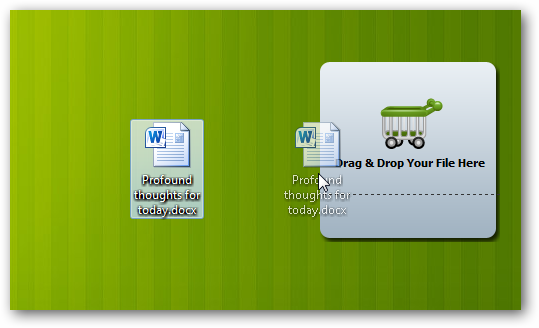
The gadget will now change to show that it’s uploading your file.
![sshot-2010-08-12-[13-53-53]](http://www.howtogeek.com/wp-content/uploads/2010/08/sshot20100812135342.png)
The Gadget will let you know when the upload is finished. Uploading most documents only took a few seconds in our tests. Since you can just drag and drop the documents into the gadget, it’s almost as easy as saving a file on your computer or putting it in your Dropbox.
![sshot-2010-08-12-[13-53-21]](http://www.howtogeek.com/wp-content/uploads/2010/08/sshot2010081215.png)
You’ll be able to see your document in Google Docs ready for you to edit online or share with others. As usual, Google docs will lose some formatting from Word, but this is the same regardless of how you upload documents.
![sshot-2010-08-12-[101]](http://www.howtogeek.com/wp-content/uploads/2010/08/sshot20100812101.png)
Conclusion
This little desktop gadget makes it very simple to add your documents to Google Docs. It’s much quicker and easier than logging in to the Google Docs dashboard to upload files, so it should make it easier to keep your files online if you prefer Google’s web apps. Since it’s just a desktop gadget, it’s also less resource intensive than many other desktop Google Docs solutions.
If you’re a command line geek, you might also be interested in our article about Using Google Services Via Command Prompt; you can even upload documents to Google Docs this way. Or you could try Mounting Google Docs in Explorer so you can save files directly to Google Docs just like any other folder.
Links
Download the Cloud Drive gadget
Get More Info From the Developer’s Site

Internet Explorer 9 Beta launching September 15th, might enter a beauty pageant

Once again, the whispers were true. Microsoft has proudly announced on this fine day that September 15th will mark the official launch of the Internet Explorer 9 Beta, but details beyond that are scant. We do know that the Big M will hold a gala in San Francisco to celebrate “The Beauty of the Web,” and once it hits the tubes, you’ll need either Vista or Windows 7 to use it (sorry, XP loyalists). ‘Course, it remains to be seen if IE can catch up to Chrome and Firefox in the technical department, but at least you can start preparing your existing squeeze for somewhat of a letdown next month. Let ’em down easy, okay?
Internet Explorer 9 Beta launching September 15th, might enter a beauty pageant originally appeared on Engadget on Thu, 12 Aug 2010 16:54:00 EDT. Please see our terms for use of feeds.
Microsoft Adaptive Keyboard prototype debuts at center of UIST Student Innovation Contest

No, it’s not the mystery device that Microsoft has been teasing as of late, but we have a feeling that plenty of folks will be wishing that the company’s so-called “Adaptive Keyboard” was it. Unfortunately, it’s just a prototype, and Microsoft apparently has no plans to turn it into an actual product. It will, however, be landing in the hands of a few lucky students participating in this year’s UIST Student Innovation Contest, who will be given free reign to do whatever they like with the keyboard and possibly be rewarded with a $2,000 or $500 prize for their hard work. As for the keyboard itself, it’s basically Microsoft’s take on something like the Optimus Maximus, and consists of a large touchscreen display on top that “extends” to the keys below — opening up a whole range of possibilities for different configurations and other shenanigans (no further technical details just yet, unfortunately). Head on past the break for a pair of demo videos and, if you’re a student, hit up the source link below for the complete contest details — act fast though, the deadline for applications is August 17th.
Microsoft Adaptive Keyboard prototype debuts at center of UIST Student Innovation Contest originally appeared on Engadget on Thu, 12 Aug 2010 16:02:00 EDT. Please see our terms for use of feeds.
Permalink | Microsoft, UIST Student Innovation Contest | Email this | Comments