
According to modified general relativity equations, our universe may be inside a black hole, the black holes in our universe may contain other universes, and the black holes in those universes may contain other universes… I need a drink. More »

Reality Bites
According to modified general relativity equations, our universe may be inside a black hole, the black holes in our universe may contain other universes, and the black holes in those universes may contain other universes… I need a drink. More »
With the box office success of Predators — both domestically and internationally — Robert Rodriguez, who produced the film, told IGN today that sequ…
The FCC has re-defined the minimum requirements of broadband to 4 Mbps downstream and 1 Mbps upstream. That’s a huge jump up from the previous minimum of 200Kbps but is fitting given our video streaming, downloading and cloud living times. As for myself, I could barely live with 4 Mbps down but then the FCC reminds me that 24 million people lack access to high speed internet, so I shut up. [FCC via ExtremeTech] More »
Microsoft reported a strong Q4 revenue thanks to Windows 7, and with that they announced they have sold 175 million licenses for Windows 7, the fastest selling operating system in history.
Windows 7 was released nine months ago, on October 22, 2009. The OS originally released to manufacturing one year ago….
Free health care and enhanced social benefits come at a price. A more socially liberal government also brings a more financially liberal ecosystem as well. Stymied competition in the technosphere has always been a point of strong contention for Canadians. From anti-competitive pricing practices in the media-distribution business to a…
Rogers Communications announced that they will be making adjustments to their current Internet service plans, and not for the better.
Just days after Internet movie streaming company Netflix announced that they would be expanding their empire into Canada, Rogers Communication released their lower monthly download caps. The changes directly affected two…
A local state of emergency was declared in North Battleford, Sask., on Thursday after an intense hailstorm, which led to flooding in some parts of the city.
 Today at Comic Con in San Diego, we announced the Xbox 360 Limited Edition Halo: Reach bundle which will be available September 14th when Halo: Reach launches.
Designed by Bungie, the Xbox 360 Limited Edition Halo: Reach Bundle includes all the features of the newly designed Xbox 360 console, such as a 250 GB Hard Drive and the fastest built-in Wi-fi. Additionally, you’ll receive two Limited Edition Wireless Controllers and a standard edition copy of Halo:Reach. The bundle will be available for US $399 in limited quantities and only while supplies last.
Bungie unboxes the console for you
Edit: The bundle is now available for pre-order along with the special edition controller and wireless headset

Stan Lee, that guy with bit parts in all the superhero movies, unveiled three new superheroes at ComicCon: Soldier Zero, Starborn and The Traveler. More »

Okay, it’s a little off the video game beat, but only a little. If you’re not psyched for December’s big event film TRON Legacy, well you should be. The sequel to one of the first video-game movies looks amazing and this trailer shows so much promise. What caught my eye was the digital recreation of the younger Jeff Bridges (Flynn).
Those who haven’t seen the original film should understand how groundbreaking the visuals were in the 1980′s. seeing them upgraded with modern CGI and green-screen techniques is awesome. Anyway.. watch and see…

This time last year, almost to the day, Microsoft saw its first annual sales decline in history. Things are looking much better now, with the company reporting a record $16.04 billion in revenue, a 22 percent year-over-year increase for its Q4 revenue ending June 30th. In fact, revenue is up across all divisions, with Windows and Windows Live seeing the biggest uptick (43.5 percent to $4.55 billion) followed by Entertainment and Devices (27.3 percent to $1.6 billion). Operating income, on the other hand, paints a different picture of E&D, showing a $172 million loss for this quarter (compared to $141 loss in Q4 last year), but looking over the entire fiscal year, the home of Xbox and Zune this year did $679 million in operating income — a sizable jump to the $108 million from 2009. The overall operating income for the company is $5.93 billion this quarter (net income $4.52 billion), a 49 percent increase over last Q4, and $20.36 billion for the year (18 percent compared with fiscal 2009).
We know you’re interested in comparisons, so we’ll just go ahead and break it down for ya: the gang in Redmond is still beating Apple in both revenue ($16.04 billion vs. $15.7 billion) and profit ($4.52 billion vs. $3.25), but that margin feels smaller than it used to. Enough to keep the rumored pressure off Ballmer? Frankly, we don’t even think biplanes could knock the man off the top of a tower, but Windows Phone 7 has a lot to prove, and fast. Microsoft is hosting a webcast of its report later today — usually much ado about nothing, as far as we’re concerned, but we’ll listen in and let ya know if anything interesting pops up.
Update: Some interesting Xbox 360 statistics. 1.5 million consoles were sold this last quarter. Xbox Live has 25 million members, and for the first time since its inception, the revenue from the Marketplace exceeded subscription revenue.
Microsoft reports $4.5b in profit, a record $16.04b in revenue originally appeared on Engadget on Thu, 22 Jul 2010 17:14:00 EDT. Please see our terms for use of feeds.
Permalink |  Microsoft | Email this | Comments
The Saskatchewan government has issued cheques totalling $3,000 to nearly 950 flood victims in three communities.
When watching a video that’s streaming across your home network, it’s annoying to get the “stutter effect”. With a simple tweak in VLC and Windows Media Player we can help prevent this annoyance.
There could be other factors that cause network video streams to stutter, such as the type of hardware you’re using or streaming wirelessly. But before you go out and spend a bunch of money for a full Gigabit network, a simple setting change to the read buffer cache in VLC or WMP can definitely help.
Increase Caching in VLC
To change the buffer cache size in VLC click on Media \ Open Network Stream.
![sshot-2010-07-21-[23-51-33]](http://www.howtogeek.com/wp-content/uploads/2010/07/sshot20100721235133.png "sshot-2010-07-21-[23-51-33]")
At the bottom right of the screen, check Show extended options.
![sshot-2010-07-21-[23-53-12]](http://www.howtogeek.com/wp-content/uploads/2010/07/sshot20100721235312.png "sshot-2010-07-21-[23-53-12]")
Now increase the number in the Caching field. By default ours was set to 200ms and we bumped it up to 500ms or 0.5 seconds. When done click the Play button.
![sshot-2010-07-21-[23-54-58]](http://www.howtogeek.com/wp-content/uploads/2010/07/sshot20100721235458.png "sshot-2010-07-21-[23-54-58]")
Now you should be able to enjoy your video stutter free.
![sshot-2010-07-22-[00-04-52]](http://www.howtogeek.com/wp-content/uploads/2010/07/sshot20100722000452.png "sshot-2010-07-22-[00-04-52]")
Windows Media Player
To increase the read buffer in Windows 7 Media Player open it up and click “Alt+T” to bring up the menu and go to Tools and click on Options.
![sshot-2010-07-22-[00-09-58]](http://www.howtogeek.com/wp-content/uploads/2010/07/sshot20100722000958.png "sshot-2010-07-22-[00-09-58]")
Now click on the Performance tab and under Network buffering change the buffering from using the default (which is 5 seconds) to a larger number. Notice in WMP it’s not in milliseconds like VLC so just increase it to whatever works best. When you’re done click OK.
![sshot-2010-07-22-[00-12-50]](http://www.howtogeek.com/wp-content/uploads/2010/07/sshot20100722001250.png "sshot-2010-07-22-[00-12-50]")
Now you should be able to watch your favorite streaming video content on Media Player without any stuttering in the feed.
![sshot-2010-07-22-[00-14-18]](http://www.howtogeek.com/wp-content/uploads/2010/07/sshot20100722001418.png "sshot-2010-07-22-[00-14-18]")
Windows Media Player 11
You can also do this in WMP 11 in XP and Vista following the same process…
![sshot-2010-07-22-[00-46-38]](http://www.howtogeek.com/wp-content/uploads/2010/07/sshot20100722004638.png "sshot-2010-07-22-[00-46-38]")
![sshot-2010-07-22-[00-48-25]](http://www.howtogeek.com/wp-content/uploads/2010/07/sshot20100722004825.png "sshot-2010-07-22-[00-48-25]")
Conclusion
If you’re annoyed by stuttering when streaming video over your network, changing these settings can help. You’ll probably have to experiment a bit with the caching until you get it where you want it. You should be able to do this in other video players as well, just read the products documentation. Depending on how much you increase it by, it may take videos longer to startup, but you should be able to enjoy stutter free video!

| Similar Articles | Productive Geek Tips |

Looks like Microsoft’s solidified their official partner lineup for this year’s Windows Phone 7 launch. We’d already known Samsung and others were in the mix, but looks like HTC will be pumping out Microsoft-powered handsets as well. More »

The latest Verizon-pushed Android phone, the Droid X, has a huge screen, some pretty decent hardware—and lots of unnecessary, non-removable apps pre-loaded that you can't kill off. Despite claims of being non-root-able generally locked down, Android hackers have done just that, allowing owners to entirely wipe away the promotional apps they don’t want. That’s what you get for now, but expect interface replacements and other goodies to come along with time. [AllDroid via BoingBoing] More »

Would you like to try out Google’s Android OS on your netbook or desktop? Here’s how you can run Android from a flash drive and see how fast Android can run on real hardware!
Install Android On Your Flash Drive or Memory Card
First, make sure you have a flash drive or memory card inserted into your computer with around 256MB or more storage space. Remove any files you may need off of the drive, so you can use it to run Android on your computer.
Now you’re ready to download and setup Android on your drive. Head over to the Android x86 download page (link below), scroll down to the StableRelease section, and click View under android-x86-1.6-r2.iso. This will start the iso file downloading to your computer.

In the mean time, head over to the UNetbootin site (link below), and download it as well.

Once your downloads are complete, run UNetbootin. Click the bullet beside Diskimage, then click the “… “ button and select the Android ISO file you just downloaded. Finally, select the correct flash drive or memory card in the menu on the bottom, and click Ok.
![sshot-2010-07-21-[22-57-53]](http://www.howtogeek.com/wp-content/uploads/2010/07/sshot20100721225753.png)
UNetbootin will now copy the files to your flash drive. This may take a few moments, depending on your flash drive’s speed.
![sshot-2010-07-21-[22-57-58]](http://www.howtogeek.com/wp-content/uploads/2010/07/sshot20100721225758.png)
Once it’s finished, it will ask if you wish to reboot. If you want to go ahead and run Android, you can click Reboot; otherwise, just exit and run Android from your flash drive when you want.
![sshot-2010-07-21-[22-58-11]](http://www.howtogeek.com/wp-content/uploads/2010/07/sshot20100721225811.png)
If you want to try Android on a computer that has a CD/DVD drive, you could just burn the ISO to a disk and boot from it. Netbooks don’t have CD drives, and even on a desktop, it can be nice to not waste a CD just for this. If you want to burn it to a disk, you can do it easily from Windows 7 or with a free program such as ImgBurn.
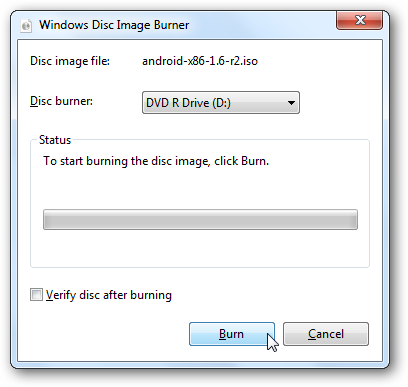
Using Android-x86 On Your Computer
Now you’re ready to run Android on your netbook, laptop, or even a full desktop computer. Simply reboot your computer with the USB drive, and select to boot from it. Not all computers will automatically boot from a USB device, so you may have to press F2, F10, or another key, depending on your computer, and change the Boot options in the bios.
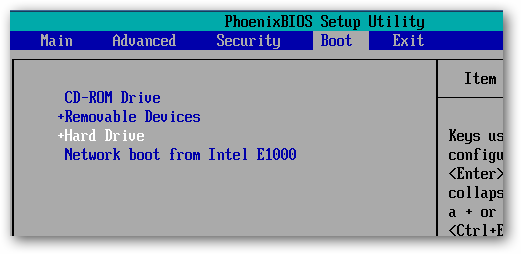
Now, when you boot from the USB drive, select Live CD – Run Android-x86 without installation.
![sshot-2010-07-21-[21-34-59]](http://www.howtogeek.com/wp-content/uploads/2010/07/sshot20100721213459.png)
You’ll see a text prompt for a few moments as Android begins to load.
![sshot-2010-07-21-[21-35-31]](http://www.howtogeek.com/wp-content/uploads/2010/07/sshot20100721213531.png)
Then you’ll see the Android boot screen, though we only saw it for a moment, as our computer booted really fast into Android.

After a couple seconds, you’ll see the Android desktop … on your netbook or computer! You can quickly access one of the apps on the home screen, or open the menu to see more options.

Click and hold to open a context menu, such as to change the background or add a desktop widget.
![sshot-2010-07-21-[21-52-49]](http://www.howtogeek.com/wp-content/uploads/2010/07/sshot20100721215249.png)
Or, press your mouse’s right button to open a menu, such as to open a new tab in the browser.

It works very good as a quick way to get online; the Android browser is actually quite capable for normal browsing, and worked very well in our tests. With a 10 second or less boot time, you may enjoy using this as an alternate to Puppy Linux or other light distros for a quick way to get online securely.
![sshot-2010-07-21-[21-52-13]](http://www.howtogeek.com/wp-content/uploads/2010/07/sshot20100721215213.png)
You can even install new applications with the included AndAppStore, though these will only be installed while this Android session is running. If you reboot your computer, you’ll only see the default applications and settings again.
![sshot-2010-07-21-[22-37-48]](http://www.howtogeek.com/wp-content/uploads/2010/07/sshot20100721223748.png)
Android x86 supports all of the hardware, including cameras and Wi-Fi, on several Netbooks and laptops; check the link below to see if yours is supported. In our test, our camera wasn’t supported, and we additionally had to connect to the internet via Ethernet since it didn’t detect our Wi-Fi card.
![sshot-2010-07-21-[22-38-13]](http://www.howtogeek.com/wp-content/uploads/2010/07/sshot20100721223813.png)
For the most part, Android was very responsive, but anything that would fade out the desktop such as opening a dialog box or a menu would run very slowly and even make the mouse feel jerky. Additionally, we couldn’t get it to boot on our desktop with an AMD processor. You could install Android to your hard drive, but we wouldn’t recommend it considering the limitations and issues it has. But, it is very fun to play with from a flash drive or memory card, and you may even feel adventurous enough to try installing it. Be warned, though; this isn’t for the weak of heart!
Conclusion
If you’re curious about how Android works and would like to try it out on a real machine, this is a great way to see how fast a mobile OS can be on a netbook or desktop. We wish it was more stable and could actually store programs and settings on the flash drive, but it did work as a nice substitute for Puppy Linux or other light, Live CD distros. It runs much faster on a real computer than in the emulator. Since you’re running it from a flash drive, you don’t have to worry about messing anything up, so go ahead and try it for research or fun.
Or, if you’d rather just try out Android from inside Windows, check out our articles on How to Test Drive Android in the Android Emulator and How to Enable the Android Market in the Emulator to try out the best Android has to offer.
Links
See if Your Netbook or Laptop is Fully Supported
| Similar Articles | Productive Geek Tips |
 The first USB 3.0-based external hard drives aim at eliminating the USB 2.0 bottleneck (that hovered around 30 MB/s) with enough bandwidth to outperform the fastest mechanical disks. A-Data, Buffalo, and WD do battle for maximum performance.


Universal Serial Bus – Hard disk drive – Western Digital – Hardware – Storage
The debate on who is or what makes one starship captain better than the other is pure classic geekness at its best. This week we want to know who you think is the better starship captain…Kirk or Picard.

Captain Kirk: A man of action who is not afraid to bend or break the rules and does not believe in the “no-win scenario”, James Kirk was the first student to ever defeat the Kobayashi Maru test at Starfleet Academy. He became Starfleet’s youngest captain when he received command of the Enterprise and is known for being rather possessive of the starship.
Captain Picard: He is well known for his fondness of detective stories, Shakespeare, and those ever present cups of Earl Grey tea. He holds to a high moral standard and excels at diplomacy, debate and military strategy. Captain Picard also pursues archeology as a hobby.
Let us know who you think the best starship captain is!
How-To Geek Polls require Javascript. Please Click Here to View the Poll.
| Similar Articles | Productive Geek Tips |

Windows 7: Everybody knows that you can right-click any application to launch it as administrator, but what you might not know is there’s an even quicker way you can trigger administrator mode. More »