Windows DreamScene was a utility available for Vista Ultimate that allowed users to set video as desktop wallpaper. It was dropped in Windows 7, but we’ll take a look at how to play DreamScenes in all versions of Windows 7 or Vista.
Downloading DreamScenes
First, you’ll need to find some DreamScenes to download. We’ve found some nice ones at both DreamScene.org and DeviantArt. You can find those download links at the end of the article. They’ll come as compressed files, so you’ll need to extract them after downloading.

Windows 7 DreamScene Activator
If you are running Windows 7 you can use Windows 7 DreamScene Activator. This free portable utility enables DreamScene in both 32 & 64 bit versions of Windows 7. Users can then set either MPG or WMV files as desktop wallpaper.
Download and extract the Windows 7 DreamScene Activator (link below). Once extracted, you’ll need to run the application as administrator. Right-click on the .exe and select Run as administrator.

Click on Enable DreamScene. This will also restart Windows Explorer if it is open.

To play your DreamScene, browse for the file in Windows Explorer, right-click the file and select Set as Desktop Background.

Enjoy your new Windows 7 DreamScene.
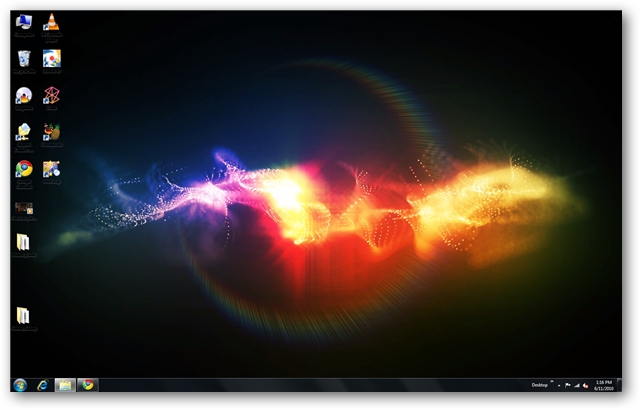
Although it says it is for Windows 7 only, we were able to get it to work with no problems on Vista Home Premium x32 as well.
![sshot-2010-06-12-[18-51-27]](http://www.howtogeek.com/wp-content/uploads/2010/06/sshot20100612185127.png "sshot-2010-06-12-[18-51-27]")
You can Pause the DreamScene at anytime by right-clicking on the desktop and selecting Pause DreamScene.

When you are ready for a change, click Disable DreamScene and switch back to your previous wallpaper.

Using VLC Media Player
Users of all versions of Windows 7 & Vista can enable a DreamScene using VLC. Recently, we showed you how to set a video as your desktop wallpaper in VLC. Since DreamScenes are in MPEG or WMV format, we will use the same tactic to display them as desktop wallpaper. We’ll just need to make a few additional tweaks to the VLC settings.
You’ll need to download and install VLC media player if you don’t already have it. You can find the download link below. Next, select Tools > Preferences from the Menu.

Select the Video button on the left and then choose DirectX video output from the Output dropdown list.

Next, select All under Show Settings at the lower left, then select the Video button on the left pane. Uncheck Show media title on video. This will prevent VLC from constantly showing the title of the video on the screen each time the video loops. Click Save and the restart VLC.

Now we will add the video to our playlist and set it to continuously loop. Select View > Playlist from the Menu.

Select the Add file button from the bottom of the Playlist window and select Add file.

Browse for your file and click Open.

Click the Loop button at the bottom so the video plays in a continuous loop.

Now, we’re ready to play the video. After the video starts playing, select Video > DirectX Wallpaper from the Menu, then minimize VLC.

If you’re using Aero Themes, you may get a pop-up warning and Windows will switch automatically to a basic theme.

If looping one video gets to be a little repetitive, you can add multiple videos to your playlist in VLC and loop the entire playlist. Just make sure you toggle the Loop button on the playlist window to Loop All.

Now you’ve got a nice DreamScene playing on your desktop. Another cool trick you can do with VLC is take snapshots of favorite movie scenes and set them as backgrounds.
When you’re ready to go back to your old wallpaper, maximize VLC, select Video and click DirectX Wallpaper again to turn it off the video background. Occasionally we were left with a black screen and had to manually change our wallpaper back to normal even after turning off the DirectX Wallpaper.

Note: Keep in mind that using the VLC method takes up a lot of resources so if you try to run it on older hardware, or say a netbook, you’re not going to get good results. We also tried to use the VLC method in XP, but couldn’t get it to work. If you have leave a comment and let us know.
While the DreamScene feature never really caught on in Vista, we find them to be a cool way to pump a little life into your desktop on any version of Vista or Windows 7.
Downloads
DreamScenes from Dreamscene.org
Windows 7 DreamScene Activator

| Similar Articles | Productive Geek Tips |
| Latest Software Reviews | Tinyhacker Random Tips |


 Well, the PS4 will, presumably, be released at some point in the future. And maybe it will be sooner rather than later. A Youtube account called SCElabs (Sony Computer Entertainment labs, I would think) has posted a pair of videos, one called “PS4 – Playstation 4 – Leaked Viral Video” and another called “PS4 – Playstation 4 – Leaked Launch Trailer,” and, for reasons that don’t need to be explained, my interest has been piqued. Hit the jump for more.


