-
Introducing Google Earth 6—the next generation of realism
(Cross-posted from the Official Google Blog)
Today we’re introducing the latest version of Google Earth, our interactive digital atlas. Now you can explore your childhood home, visit distant lands or scope out your next vacation spot with even more realistic tools.
In Google Earth 6, we’re taking realism in the virtual globe to the next level with two new features: a truly integrated Street View experience and 3D trees. We’ve also made it even easier to browse historical imagery. Over the next several days, we’ll be digging deeper into these great new features, but here’s an overview to whet your appetite.
Integrated Street View
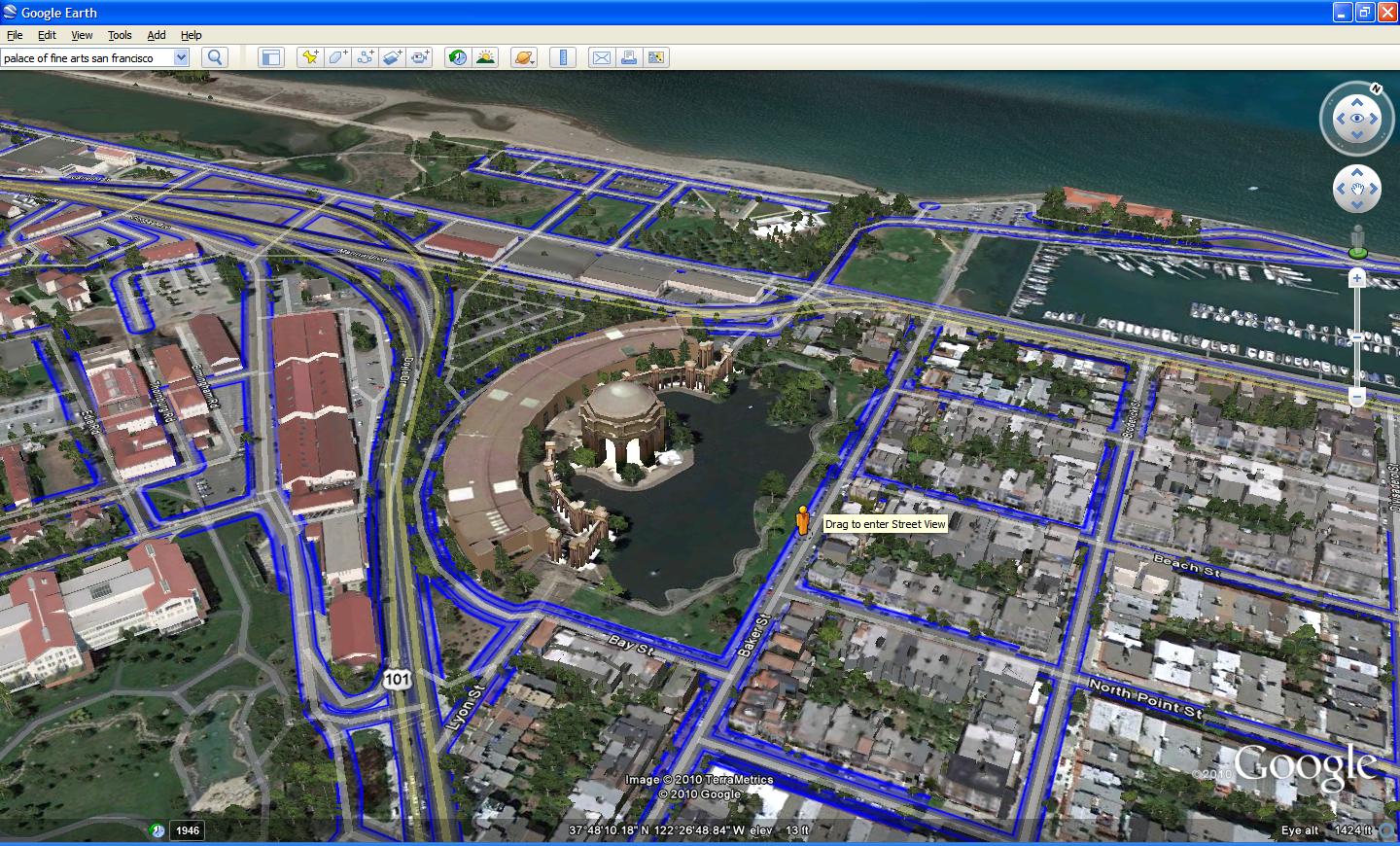
When Google Earth was first introduced, people were wowed by the ability to virtually fly from outer space right down to the roof of their house. While flying over rooftops gives you a super-human view of our world, the ground level is where we experience our daily lives. We took our first baby steps toward bringing the Google Earth experience to street level with our implementation of Street View in Google Earth in 2008, which enabled flying into Street View panoramas. In Google Earth 6, the Street View experience is now fully integrated, so you can journey from outer space right to your doorstep in one seamless flight.Now, you’ll notice that Pegman is docked right alongside the navigation controls—an ever-present travel companion ready whenever you want to get your feet on the street and take a virtual walk around. Just pick up Pegman and drop him wherever you see a highlighted blue road to fly right down to the ground. Once there, you can use the navigation controls or your mouse to look around. And unlike our earlier Street View layer, you can now move seamlessly from one location to another as if you’re walking down the street by using the scroll-wheel on your mouse or the arrow keys on your keyboard. If you want to visit somewhere farther away, simply click the “exit” button and you’ll immediately return to an aerial view where you can easily fly to your next destination.
 Drag and drop Pegman to enter Street View. The blue lines indicate where Street View imagery is available.
3D trees
I think we can all agree that our planet without trees would be a pretty desolate place. Besides the ever-important task of providing us with the oxygen we breathe, trees are an integral part of the landscape around us. In Google Earth, while we and our users have been busy populating the globe with many thousands of 3D building models, trees have been rather hard to come by. All that is changing with Google Earth 6, which includes beautifully detailed, 3D models for dozens of species of trees, from the Japanese Maple to the East African Cordia to my personal favorite, the cacao tree. While we’ve just gotten started planting trees in Google Earth, we already have more than 80 million trees in places such as Athens, Berlin, Chicago, New York City, San Francisco and Tokyo. Through our Google Earth Outreach program, we’ve also been working with organizations including the Green Belt Movement in Africa, the Amazon Conservation Team in Brazil and CONABIO in Mexico to model our planet’s threatened forests.To enjoy these leafy additions to Google Earth, make sure you turn on the 3D buildings layer on the left side panel. As a starting point, try a search for “Palace of Fine Arts San Francisco.” Once you arrive at your destination, click the zoom slider. You’ll then be taken down to the ground where you can use our new ground-level navigation to walk among the trees.
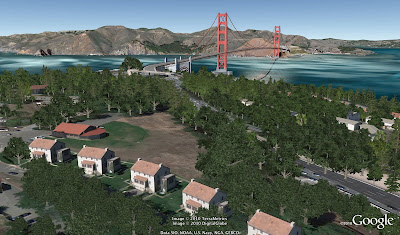 3D trees in San Francisco, CaliforniaEasy-to-use historical imagery
One of the features people told us they liked best in Google Earth 5 was the availability of historical imagery, which enables you to visually go back in time to see such things as Warsaw in 1935, London in 1945, and Port-au-Prince Haiti before and after the devastating earthquake of January 2010. But it wasn’t always obvious when historical imagery was available for a particular place, making this feature one of Google Earth’s lesser-known gems.So with this new version, we’ve made it very easy to discover historical imagery. When you fly to an area where historical imagery is available, the date of the oldest imagery will appear in the status bar at the bottom of the screen. If you click on this date, you’ll instantly be taken back in time to view imagery from that time period. You can then browse through all the historical imagery available for that location, or simply close the time control and return to the default view.
 The site of Google’s Mountain View campus in 1948
To download Google Earth 6, or to see videos of our newest features, visit http://earth.google.com.Posted by Peter Birch, Product Manager
-
Woman Registers Ownership of the Sun

The Incas and the Aztecs worshiped it. Ancient Europeans erected megaliths to it. Several civilizations based their calendars around it. Until now, however, no one has ever owned the sun.
Back in September, one Angeles Duran of Galicia, Spain took bold steps to change that. Following in the footsteps of an American man who claims to now own the moon, the 49-year-old Salvaterra do Mino resident registered ownership of the life-giving star at a notary public in her area.
The notarized document states that Duran is now the “owner of the Sun, a star of spectral type G2, located in the centre of the solar system, located at an average distance from Earth of about 149,600,000 kilometers.”
Duran plans to charge for use of the sun. She won’t take all of the money herself, though. According to AFP, half of the money will go to Spain's government, 20 percent will go to the country's pension fund, 10 percent to research, 10 percent to world hunger. The other 10 she'll keep for herself.
A lady’s gotta make a living, after all.
-
Jaguar Hybrid Concept Features Four Motors, 780 Horsepower

While electric vehicles like the Nissan Leaf and Chevy Volt tend to dominate the headlines, there’s more to the plug-in scene than small passenger cars. Like super cars, for instance. At the Los Angeles Auto Show, Jaguar showed off its new C-X75 concept, which takes plug-in cars to a whole new level.
The C-X75 features four electric motors, each providing 195 horsepower, giving the sleek car a grand total of 780 electric horsepower. But, as a hybrid, the car also features two small micro-gas turbines, which can provide upwards of 180 additional horsepower. When in electric mode, the C-X75 has a range of nearly 70 miles. When the electric battery pack runs out of juice, that’s when the gas turbines kick in.
Via PluginCars.com
-
Xbox 360 May Get Cable-Like Online Subscription Service [Microsoft]

Microsoft’s no stranger to working with TV networks, but according to Reuters they’re working on a cable-like online subscription service for the Xbox 360. More »

-
Eternal Youth Potion Discovered [Science]

Harvard University researcher Ronald A. DePinho has discovered a way to reverse age degeneration for the first time. His experiments on mice have demonstrated that you can return individuals to a younger state, with new brain growth and improved fertility. More »
-
Riders fans disappointed … again
For the second year in a row, Roughriders fans confront the pain of losing the biggest Canadian football game of the year to the Montreal Alouettes.
-
Montreal quietly celebrates Grey Cup victory
In downtown Montreal following the Alouettes’ Grey Cup victory on Sunday, there were a few celebratory car honks and cheers, but only a fraction of the throngs that jam the streets following a Canadiens playoff win.
-
Actor Leslie Nielsen dies
Canadian actor Leslie Nielsen has died at age 84 in a Florida hospital from complications from pneumonia.
-
S. Korea orders reporters off shell-hit island
South Korea’s Defence Ministry has ordered journalists to leave the front-line island of Yeonpyeong, citing high tension with North Korea as U.S.-South Korea military exercises begin.
-
VIDEO: 100 years of Rider Pride
2010 is a special year for members of the Rider Nation, who count themselves among the most ardent fans of any CFL team. Not only did their beloved Riders make it to the Grey Cup – the team is celebrating its 100th anniversary.
-
Korean war could involve Canada
If war breaks out on the Korean peninsula, Canada could become embroiled because of a half-century-old UN military alliance, federal documents reveal.
-
Brandon fans go wild for ‘Riders
Football fans in Brandon are going wild for Saskatchewan Roughriders gear heading into Grey Cup weekend.
-
Saturn’s moon Rhea may have a breathable atmosphere [Future Space Colony]

Saturn’s icy moon Rhea has an oxygen and carbon dioxide atmosphere that is very similar to Earth’s. Even better, the carbon dioxide suggests there’s life – and that possibly humans could breathe the air. More »
-
Grey Cup prediction: Riders will push to victory
There’s not a lot separating the two Grey Cup teams, but our resident CFL scribe is reluctantly picking the Saskatchewan Roughriders to defeat the Montreal Alouettes on Sunday.
-
Active Book microchip provides hope for exercising paralyzed limbs

Scientists have been experimenting with muscles and technology to solve both human and robotic mobility issues for years. Now it looks as though researchers from the Engineering and Physical Sciences Research Council have made a significant leap forward for paraplegics, thanks to a revolutionary microchip the team has dubbed “Active Book.” What’s notable about the chip is that it stimulates more muscle groups than existing technology without the need for external connections. This was accomplished via micro-packing and precision laser processing, which allowed tiny electrodes to be cut from platinum foil and rolled into a 3D book shape. These platinum foil “pages” close in around nerve roots, and are micro-welded to a hermetically sealed silicon chip. Once embedded into areas within the spinal canal, the chip can work to stimulate paralyzed muscles, implying patients could even “perform enough movement to carry out controlled exercise such as cycling or rowing.” A press release from the Council says the Active Book will begin trials sometime next year — we can’t wait to see the results.
Continue reading Active Book microchip provides hope for exercising paralyzed limbs
Active Book microchip provides hope for exercising paralyzed limbs originally appeared on Engadget on Thu, 25 Nov 2010 02:15:00 EDT. Please see our terms for use of feeds.
-
Virtual pop princess Miku to sing in English
If you’ve been waiting and praying for the day when Japanese vocalist Hatsune Miku will sing in English, well my friends, that day has finally come.
-
A silver UFO hovers quietly in the air over a Turkish city [Video]

Filled with the sound of morning birdsong, this video of a UFO over Turkey taken last week is as much a slice of Turkish city life as it is a record of possible alien incursion. More »
-
Preeceville school battles cold
With temperatures in the -15C range in Saskatchewan this week, a school in the east-central part of the province is coping the best it can with a broken heating system.