Chris Chelios was arrested and charged with driving under the influence and speeding on Dec. 28 in a Chicago suburb, it was reported on Tuesday.
25,000 join anti-prorogation Facebook group
More than 25,000 people have joined an anti-prorogation group on Facebook following Prime Minister Stephen Harper’s decision to suspend Parliament for two months until after the Vancouver Winter Olympics.
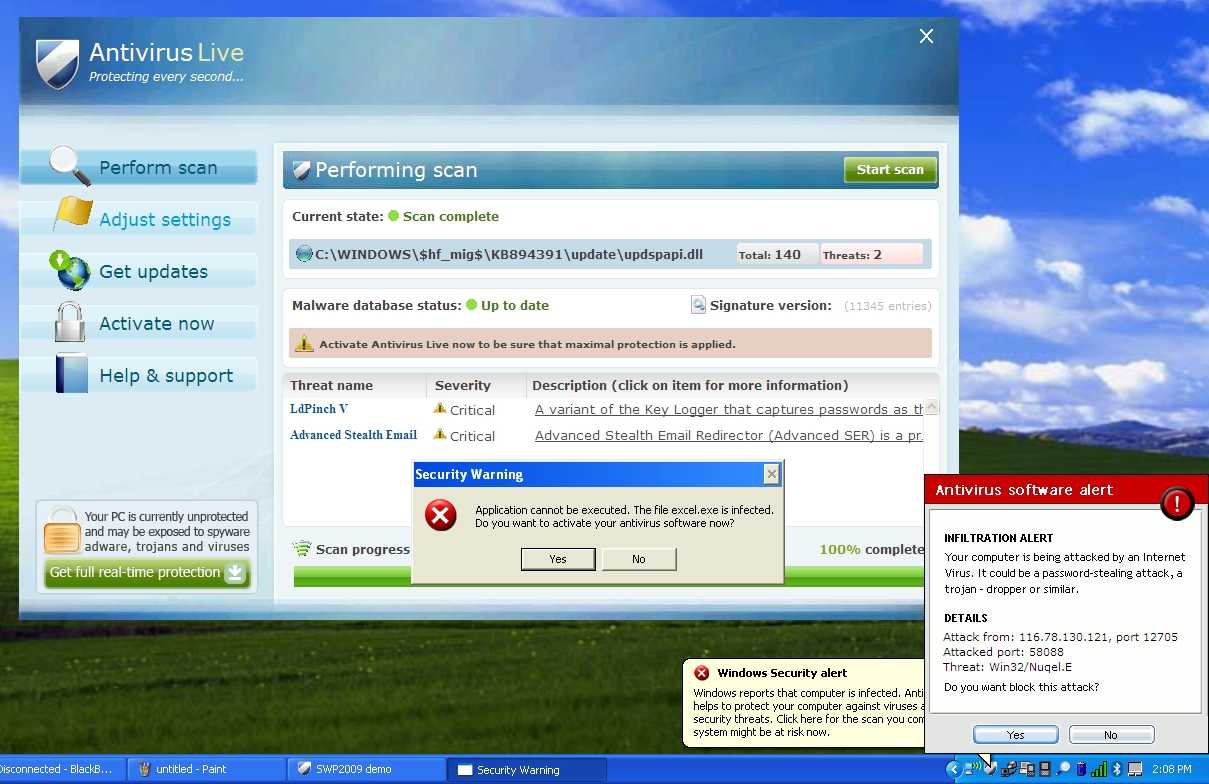
How To Remove Antivirus Live and Other Rogue/Fake Antivirus Malware
If you’ve got a PC infected by the Antivirus Live virus, you’ve got a tough job ahead of you to remove it. And we’ve got the instructions to help.
Antivirus Live is one of many fake antivirus applications that are really rogue viruses that take your computer hostage—then they tell you that your computer is infected by viruses, and you have to pay them to get rid of the fake viruses that aren’t really there. It’s a huge problem, and they are not easy to remove, because they block virtually everything you try and run, including real anti-malware tools.
Removing Rogue Fake Antivirus Infections
There’s a couple of steps that you can generally follow to get rid of the majority of rogue antivirus infections, and actually most malware or spyware infections of any type. Here’s the quick steps:
- Reboot your PC into safe mode with networking (use F8 right before Windows starts to load)
- Install SuperAntiSpyware and run it. (see our previous article on how to use it)
- Reboot your PC and go back into safe mode with networking.
- Install MalwareBytes and run it, doing a full system scan. (see our previous article on how to use it).
- Reboot your PC again, and run your normal Antivirus application (we recommend Microsoft Security Essentials).
- At this point your PC is usually clean.
Note that some malware will block you from using safe mode. That usually requires another set of steps that we won’t cover here.
Let’s Remove Antivirus Live
The first thing you’ll want to do is reboot your computer, and hit the F8 key right before Windows starts loading (you can hit it a bunch of times). Then select the Safe Mode with Networking option.

Before you do anything else, you’re going to need to fix the internet connection to work, because Antivirus Live changes IE to use a fake proxy server that prevents you from getting to anything else—and will also prevent you from installing and updating a real anti-malware software.

Now you’ll want to install SuperAntiSpyware (linked above), which you have hopefully downloaded via another computer already, but safe mode with networking should allow you to download and install it.
Once you load it up, it’s going to do some analysis…

Then you’ll see the full application screen, where you’ll want to use the Check for Updates button to make sure you have the latest definitions. Once you’ve done that, click the Scan your Computer button.

Select your primary drive at least, though you should pick all the drives, and then click the Perform Complete Scan button.

It’ll run for a long time, detect a bunch of stuff, and then you can proceed through the wizard to actually removing it all…

Once it’s all done, you can reboot the PC again (just make sure to go back into Safe Mode again).

Next you’ll want to install Malwarebytes, make sure to check the Update tab for the latest definitions, and then perform a full scan of your system.

Malwarebytes will find even more malware that SuperAntiSpyware missed (seems like you always need more than one util to get it all). Just be sure to click the Remove Selected button to get rid of the rest.

At this point you’ll want to reboot your system, and then install Microsoft Security Essentials and run another full scan. Can’t hurt to be too cautious!
Note: If you used a thumb drive at any point during this process, you should make sure and scan that as well—I’ve had viruses hop over to the thumb drive, ready to infect the next machine.
| Similar Articles | Tinyhacker – Tiny Geek Hacks |
| Latest Software Reviews | Super User Daily |
Iomega v.Clone App Portable-izes Your Entire PC [Virtualization]
 It’d be easy to get knotted up in jargon describing v.Clone, so let’s stick with the concept for now: It’s a syncable, complete image of your PC, which you can boot run from basically any other PC. And it’s free.
To anyone who’s used mainstream backup software, this probably sounds too good to be true. In a way, yes, it is. But the tradeoff is minimal, and the payoff is more than worth it. Here’s the deal:
v.Clone EMC owns Iomega, which makes portable hard drives. EMC also owns VMWare, which makes virtualization software around. v.Clone is essentially a portable installation of VMWare, meaning that you can plug your v.Clone-loaded Iomega portable HDD into most any Windows computer, run the app, and boot into your saved virtual machine. The secret, though, lies in what you're booting into—namely, a perfect copy of your main PC.

In other words, v.Clone lets you make a full copy of your primary PC—including apps, media, settings, etc—to a VMWare image, run said copy from other Windows-based computers, and upon reconnection with the primary PC, sync any changes you made while running the virtual machine back to your main PC. Likewise, any changes you've made on your host PC can be synced to your virtual machine, so your v.Clone image is more or less a virtualized, up-to-date clone of your main PC. We haven't been able to try it out yet, but Iomega assures us that the whole system isn't as ass-slow as it sounds like it could be, because the syncing process is incremental—if you only change a few things on your virtualized image, syncing it with your host PC won't take more than a few minutes.
There are a couple of catches here: the software may be called v.Clone, but it’s not creating a traditional, raw image clone. If your main PC faceplants and destroys itself, your v.Clone image will let you salvage your data, but it won’t let do a full restore, like Norton Ghost or Time Machine. And despite the fact that portable HDDs are all exactly the same, this software will only work with Iomega drives. But still, kinda genius! (If you happen to this particular brand of totally commodified product!)
v.Clone is available for owners of Iomega USB portable hard drives, including the full eGo and Prestige lines. [Iomega]

Riders GM Tillman pleads guilty to sexual assault
Saskatchewan Roughriders general manager Eric Tillman has pleaded guilty in Regina provincial court to sexual assault involving a teenage girl.
Astonishing Burj Dubai Opening Fireworks Will Boggle Your Mind [Fireworks]
Forget about any Olympics inauguration ceremonies or any Fourth of July: The Burj Dubai is the tallest building in the world, and it got the highest fireworks too for its opening ceremony. So colossal you’ll think they are destroying it.
The tower—which officially is 2717 feet tall (828 meters)—was inaugurated today, and the developers launched it with all they got. The people who attended the ceremony couldn't stop cheering in awe. I don't blame them. Watch the whole video to see the lighting effects just before the final fireworks. They look designed by aliens.
Understanding Windows 7’s ‘GodMode’ [Windows]
 Although its name suggests perhaps even grander capabilities, Windows enthusiasts are excited over the discovery of a hidden “GodMode” feature that lets users access all of the operating system’s control panels from within a single folder.
By creating a new folder in Windows 7 and renaming it with a certain text string at the end, users are able to have a single place to do everything from changing the look of the mouse pointer to making a new hard-drive partition.
The trick is also said to work in Windows Vista, although some are warning that although it works fine in 32-bit versions of Vista, it can cause 64-bit versions of that operating system to crash.
To enter “GodMode,” one need only create a new folder and then rename the folder to the following:
GodMode.{ED7BA470-8E54-465E-825C-99712043E01C}
Once that is done, the folder’s icon will change to resemble a control panel and will contain dozens of control options. I’m not sure it’s my idea of playing God, but it is a handy way to get to all kinds of controls.
I’ve asked Microsoft for more details on the feature and how it came to be. But so far, Redmond is silent on the topic.
 This story originally appeared on CNET
World’s tallest skyscraper opens in Dubai
The world’s tallest skyscraper formally opened Monday in Dubai. The Burj Khalifa is more than 160 storeys tall, rising more than 800 metres into the sky.
Kipper’s 10 Best Saves
Wallpaper Juggler Downloads and Rotates Fresh Wallpaper [Downloads]
 Windows: Whether you’ve already got a folder full of wallpaper or you’d like to find some new images for your desktop, Wallpaper Juggler can rotate and keep your backgrounds fresh.
Wallpaper Juggler is a small application that does two things: it rotates existing wallpaper in your wallpaper directory on a schedule of your choosing and it downloads new wallpaper from both Interfacelift—the winner of our Wallpaper-centered Hive Five—and Wallpaper Stock. Between the rotation of your already collected wallpaper and the infusion of new wallpaper in the size you specify from the aforementioned sites, you’ll never have to stare at a bland desktop again.
Have a favorite tool for keeping your desktop fresh? Let’s hear about it in the comments.

Cacoo Makes Diagram Creation amd Collaboration Simple – Charts – Lifehacker
If you need to make diagrams, wire frames, network charts, and more but you don’t have much experience with graphic design, Cacoo makes chart creation as simple as drag and drop.
Avatar Makes $1 Billion in 17 Days [Movies]
 Apparently, the $300-$500 million budget paid off. Right now, with over $1 billion in worldwide sales, Avatar is the third highest grossing movie of all time. It could even take down Titanic‘s $1.8 billion record. [Inquirer via Techie via boingboing]
Canadian juniors advance to gold-medal game
Defenceman Marco Scandella and his teammates made sure that Canada advanced to its ninth consecutive world junior tournament final with a 6-1 victory against a determined Switzerland team at Saskatoon’s Credit Union Centre on Sunday, setting up a date with the United States in the gold medal game.
No Conroy, Phaneuf for skills competition
First things first.
Dion Phaneuf and Craig Conroy didn’t participate in the skills competition. Both are banged-up (but both were on the premises). Cory Sarich, for what it’s worth, did take part Sunday afternoon.
No official word on any of the injured chaps.
Now, here’s how the skills contest went.
==
FASTEST SKATER
* Freddie Sjostrom — 13.589
* Mark Giordano — 13.958
* Nigel Dawes — 14.043
Note: Curtis Glencross, a two-time winner in this event (last year with the Flames, the season before with the Oilers), took a pass, citing a slight injury.
==
SHOOTING ACCURACY
* Staffan Kronwall — five pucks (to hit four targets)
* Jarome Iginla — six pucks
* Nigel Dawes — six pucks
===
HARDEST SHOT
* Jarome Iginla — 102.3 mph
* Curtis Glencross — 100.1 mph
* Robyn Regehr — 98.1 mph
===
BREAKAWAY RELAY (on Curtis McElhinney)
* Robyn Regehr — 2 for 2
* Nigel Dawes — 2 for 2
* Jay Bouwmeester — 2 for 2
===
The Flames, quite possibly with reinforcements, leave Monday morning for Nashville.
New Windows Live Messenger Wave 4 screenshots
A new group of Windows Live Messenger Wave 4 screenshots have been revealed by livesino.net, a month after Neowin originally posted the first screenshots. Since our previous post, the Windows Live team improved on the Windows 7 taskbar integration, adding in quick status markers for available, away, busy and appear offline. Windows Live Messenger Wave 4 will come with tabbed conversations, much the same way Internet Explorer 8 works. One other noticeable change is the 'x' close button at the bottom of users' chat windows, possibly allowing people to hide the advertisement. Other changes are in the "Select an Emoticon" menu, with a rearrangement of icons with Winks now included.
Fans buzzing over Oilers’ New Year’s bill
Hockey fans are buzzing about allegations that members of the Edmonton Oilers refused to pay the full cost of a nearly $17,000 night out at an upscale Calgary restaurant.
Google and HTC Working On a Chrome OS Tablet [Tablets]
 Everyone is clamoring about tablets these days—ourselves included—so it's not too surprising that Google and HTC are set to join the fray. They are reportedly working together on a Chrome OS Google Tablet.
Smarthouse, an Australian publication, reports that HTC and Google have been collaborating “for the past 18 months” and have produced “several working models of a touch tablet,” including one outfitted with Google’s Chrome OS. We wrote why a Google Tablet would be a good idea last month, and with the Apple Tablet discussion reaching a fever pitch, it’s harder and harder to get excited about a Chrome OS netbook from Google.
Having collaborated on the Nexus One, a smart phone that impressed us with its design as well as its hardware, HTC and Google partnering on a tablet seems like a promising prospect. But will it “compete head on” with Apple’s tablet as Smarthouse claims? Probably not.
From what we know, it seems like Apple is putting as much effort into their tablet’s content as they are into the gadget itself. We’ve written extensively on how an Apple tablet could redefine newspapers, textbooks, and magazines. In the last case, we’ve already salivated, more than once, over concepts for how magazines might evolve in a multi-touch future. Add that to Apple’s recent acquisition of Lala, a move that likely points to a cloud-based future for iTunes, and the reports that Apple is trying to secure TV show subscription packages for the iTunes store. Admittedly, not a whole lot is certain about Apple’s tablet. But you start looking at all of those pieces and how they might fit together around one device, you can easily envision a gadget that is focused on streaming the stuff you read, the stuff you listen to, and the stuff you watch.
It’s hard to foresee a future in which a Google Tablet tries to go head to head with Apple on the content level. That’s not to say, however, that there aren’t some compelling things that could be offered by a Google tablet. As the launch of Google’s Chrome OS made clear, they’re looking toward a future with a multitude of devices that can access the Internet quickly, cleanly, and cheaply. A Google Tablet could be just the thing to realize all of those goals. When we tried out the JooJoo tablet, we saw how a well-designed tablet for consuming web content could provide an engaging experience. A Chrome OS tablet by Google would likely work the same way, keeping typing to a minimum and offering a literal hands-on web surfing experience. [Smarthouse via Business Insider]
Ei.cfg Removal Utility Lets You Use Any Product Key With Your Windows 7 Disc [Downloads]
 Windows: Windows 7 install discs are edition-specific—if you've got a valid license key, you still need the right disc for installation. The ei.cfg Removal Utility, however, lets you create a new, universal installation ISO for Windows 7.
Although your Windows installation disc may say "Home Premium Edition," it still contains the other versions (such as Pro or Ultimate) on the disc—it just has a very small file called ei.cfg that tells the disc what version to install. The ei.cfg Removal Utility creates a new ISO of your install disc that ignores this file, thus letting you choose what edition you want when you start the installer.
While this tool is especially useful for computer technicians who have to install Windows a lot, it's also nice to have for those of us that tend to lose discs often—especially in this day and age of emailed product keys. Now, if you need to reinstall Windows but can't find your disc, you can just borrow a friend's—even if it's an edition that's different than yours. You just need let the installer know which edition matches your product key (Note: Your disc still needs to be the same kernel as your key (i.e. 32 or 64-bit).
The ei.cfg Removal Utility is a free download, Windows only, and requires a Windows 7 install disc to use. Thanks, Cody Ryan Harrod!
B.C., Sask. restrict cellphone use while driving
It’s now illegal to talk and text while driving in British Columbia, but tickets won’t be handed out for one more month.
Canada’s juniors come back to beat U.S. in shootout
Brandon Kozun scored the winner in the third round of the shootout to lead Canada to a 5-4 comeback victory over the United States at the world junior hockey championships in Saskatoon on New Year’s Eve.