An employee of a Prince Albert, Sask., school division has been suspended after being charged with two sex-related offences.
-
Apple’s iPad goes on sale internationally
Today Apple’s iPad officially goes on sale internationally in Australia, Canada, France, Germany, Italy, Japan, Spain, Switzerland and the UK. Japan was the first to receive the iPad, opening earlier this morning in a frenzy for the new gadget, as posted by the Wall Street Journal.
The device was announced…
-
Boob-Slapping Wedding DJ Didn't Get Paid for Show, Might Sue Video Maker – Urlesque Interview – Urlesque
With 2.8 million views and counting, ‘Worst Wedding DJ EVER!’ (A bit hyperbolic, but that’s beside the point) continues to make the rounds of
-
Calgary, Pittsburgh to host NHL Winter Classics
For the first time, the NHL Winter Classic will be contested in Canada and the United States, Hockey Night in Canada confirmed Thursday night.
-
Set a Video as Your Wallpaper with VLC [Video]

It won’t necessarily increase productivity, but if what you’re doing isn’t that pressing, passively watching a movie while you work can be relaxing. If you don’t have a second monitor to do it on, here’s how to put it on your desktop. More »

Video – VLC – Wallpaper – Desktop Customization – Media player -
Fring For Android Is Two-Way Video Calling From the FUTURE [Video Calling]
-
Google Buzz for mobile now available on more devices – Official Google Mobile Blog
News, features and tips from the Google Mobile team
-
"Reshare" in Google Buzz
Posted by Sam Goto, Software Engineer
The other day I posted this video to the version of Buzz we use inside of Google. A few people commented on it, 13 liked it, and 68 of my coworkers thought it was interesting enough that they wanted to share it with their own followers. Collectively, thousands of people watched it, many of whom were many degrees away from me.
For the last couple weeks we've been testing reshare — and today we’re excited to roll it out to everyone. If you don't see the "Reshare" link quite yet, hang tight. It should be on for everyone by the end of the day.
How reshare works
When you find an interesting buzz post you want to reshare, instead of copying and pasting it (and maybe attributing the original poster with an @reply along the way), you can now reshare posts with two clicks.
First, click “Reshare”:

Then type up anything you want to add and click “Post”:
Your post will include a link to the original post:
Note that this only works for public posts; private posts won’t have the reshare link since the original poster intended to limit the audience of their post.A little more background
Reshare has been one of our top user requests, so we hope we’ve made a number of you happy. We realize that just as many will likely wonder why we decided to implement it the way we did. So, here’s a bit more background for those who are curious:
- First, back to those two clicks: one click vs. two click reshare was a hard choice (I know, it doesn’t sound so hard, but we spent a lot of time on this!). Ultimately, we chose to go with two clicks because we want people to be able to reshare publicly or privately and also encourage resharers to add their own new content to the post.
- If you follow a bunch of people who all reshare the same thing, the last thing you want is for that same post to appear over and over again. When this happens, similar posts get collapsed, so you should only see each thing once.
- You’ll notice that resharing creates a new post, effectively forking the conversation. To fork or not fork was a decision we debated for a while. Ultimately, we think forked conversations help create more varied, intimate discussions around a single item. We realize people may want a non-forking version too, so we’re thinking about how to do that as well.
- When there is a chain of reshares, the names of all of the people who publicly reshare the post appear on the original item, even if they’re not directly connected to the original author. If you share something that ends up getting passed around by lots of other people, it’s pretty cool to see that.
- If you “like” a reshare, you don’t automatically also “like” the original post. Imagine what would happen if I reshare a very positive movie review and write “What a joke! This movie was terrible!” Someone who likes my post probably doesn’t want their “like” showing on the original post praising the film, too.
Overall, we’ve made a lot of progress since my original ASCII mockups…

…and after a lot of debate, we even settled on what to call it…
…but reshare is still very much a work in progress. We wanted to launch and iterate so be sure to let us know what you think in the forum or on Buzz. -
Tips & Tricks: Comments in Google documents
In April, we launched a new version of Google documents. One feature that makes collaboration easier is improved commenting.
Connecting text to note
Comments let you make suggestions about the text in your document without modifying the document itself. When you click on a comment, the text it’s referring to is highlighted. And vice-versa — when you select highlighted text in your document, we identify the associated comment.
Additionally, when you move highlighted text around within the document, the comments will follow the text and re-arrange to keep your annotations in order.
Comment on the sidelines
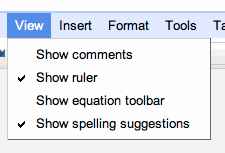
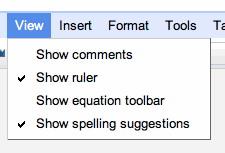
Comments live outside the margins of the editing space — but are linked to text in the document. This means you can leave notes for others without cluttering the document.We’ve also made it easier to hide comments in your document. You can show or hide all comments by checking or un-checking the Show comments menu item.
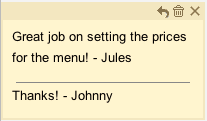
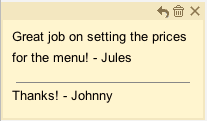
 A detailed view of the comment box
Finally, we think the comment feature will give you flexibility to work with your notes in an intuitive and user-friendly way.You can delete a comment by pressing the trash can icon above a comment. Or, you can respond to a comment by pressing the reply arrow, and it will show up just below the comment you’re responding to. You can hide a comment by marking the “X” button at the top of the comment.
Collaboration at the next level
The new version of Google documents is a built around collaboration, allowing you to work in real-time and to see what others are typing character by character. The new comment features makes it much easier to keep track of your ideas and notes while you work closely with others.To try out improved commenting and other features, you’ll need to take the new preview version of Google documents for a test drive. You can opt-in by visiting the Editing tab in the Google Docs settings.
Posted by: Edgard Lindner, Software Engineer
-
Facebook’s New Privacy Guide Explained

Responding to user backlash, Facebook today unveiled its overhauled Privacy Controls. On first look, it’s a radically different set of tools with a redesign control setup than what you’re used to. The now “classic” granular settings are still in place, but a new set of umbrella options lets you quickly change several options at once as a first line of privacy defense. The strategy appears to be centered on making users more comfortable with their sharing settings, while providing more control over their online profiles. History has shown us that Facebook changes like this are never easy, so while the changes won’t roll out for a few weeks, read on to learn how to use the new controls when they arrive.
Continue reading Facebook’s New Privacy Guide Explained
Filed under: Web, Social Networking
Facebook’s New Privacy Guide Explained originally appeared on Switched on Wed, 26 May 2010 18:40:00 EST. Please see our terms for use of feeds.
-
Sask. population could hit 1.3M in 2036
Saskatchewan’s population could grow by as much as 268,000 over the next quarter century, approaching 1.3 million by 2036, Statistics Canada projects.
-
WeTab street date pushed back to mid-September
 WeTab, WePad — whatever name you use, it’s obvious that the gang at Neofonie doesn’t exactly run the tightest ship. (And yes, we’re still feeling a little stung from the product launch, where they tried to pass off Windows 7 as Linux.) If Amazon.de is to be believed, it looks like the €460 ($566) wonder won't be available now until mid-September. This isn't exactly the sort of thing that inspires confidence in pre-order customers, but who knows? Maybe some amusing behind-the-scenes drama is unfolding as we speak. You know how we love our schadenfreude.
[Thanks, Sebastian]
WeTab street date pushed back to mid-September originally appeared on Engadget on Wed, 26 May 2010 16:54:00 EDT. Please see our terms for use of feeds.
Permalink
 Liliputing |
  TouchMeMobile | Email this | Comments
 -
The Human Scientist Infected With a Computer Virus [Mad Science]

This is Dr. Mark Gasson. He’s a human being who’s managed to contract a nasty computer virus. Don’t feel too bad for him, though: he did it to himself. More »

Computer virus – Security – Malicious Software – Viruses – Detection and Removal Tools -
Nitro PDF Reader Provides Advanced PDF Tools for Free [Downloads]

Windows: Want to create PDF files from plain documents, annotate and fill in existing PDFs, extract images, and leave notes for any PDF reader? Nitro PDF Reader does all that, and it’s a free download. More »
Nitro PDF – PDF – Data Formats – Document – Publishing -
Google Working on Voice Recognition for All Browsers [Speech Recognition]

In some ways it seemed inevitable, but in other ways, it’s still an awesome idea. InfoWorld reports that Google is building speech recognition technologies for browsers, and not just their own Chrome—all browsers, as an "industry standard." Beyond making certain searches easy to fire off with a spoken phrase, voice recognition might also give the web a whole new class of webapps that listen for audio cues. Do you want your browser to understand what you're telling it? Or is the keyboard still your preferred lingua franca for non-mobile browsing? [InfoWorld] More »
Speech Technology – Speaker recognition – Research – Google – Google Chrome -
Roughriders plates prove popular
Thousands of Saskatchewan Roughriders fans are showing their support by purchasing specialized green and white licence plates.
-
Tall tower proposal goes to Regina council
Regina city council is being asked to give its seal of approval to what could soon be Saskatchewan’s tallest building.
-
High bacterial rates found in bottled water
More than 70 per cent of bottled water samples from Canada contain bacterial rates that exceed recommended limits in the U.S., suggests a study presented at the general meeting of the American Society of Microbiology.
-
Ottawa pitches computer spam law
The federal government is re-introducing legislation to stop unwanted spam on computers and cell phones and guard against identity theft.