• Facebook Eyes Webmail With Project Titan [Facebook]

    TechCrunch reports that Facebook is working on a full webmail system to replace their current messaging platform, including full POP and IMAP support and a customized @facebook.com e-mail address. The codename for the new system: Project Titan.

    In the TechCrunch post, Arrington suggests that Facebook has been working towards a webmail service for some time, expanding their messaging platform to be searchable and allowing Facebook users to send messages directly to non-Facebook e-mail addresses. The site has also shown interest in giving its users a more accessible and more complete online identity with the recent implementation of personalized URLs and the proliferation of Facebook Connect login on third party sites.

    Project Titan would take this effort a step further, giving users a personalized username@facebook.com e-mail address and letting them access it on Facebook itself or independently via POP and IMAP. Facebook already has 175 million people logging into their site each day, but adding a true webmail solution would be a strong step in their transformation from a centralized communications hub to a broader platform for staying connected online. [TechCrunch]


  • Xbox LIVE being discontinued for Original Xbox consoles and games


    I wanted to let you know that on April 15, 2010 Microsoft will discontinue Xbox LIVE service for original Xbox consoles and games, including Xbox 1 games playable on Xbox 360. Our first step in this process will be to turn off auto-renewals for those members who only use Xbox LIVE on a v1 Xbox. While I can’t comment on the specifics, this change will allow us to continue evolving the LIVE service with new features and experiences that fully harness the power of Xbox 360 and the Xbox LIVE community. We did not make this decision lightly, but after careful consideration and review we realize that this decision will allow us unprecedented flexibility for future features. 


    Xbox LIVE general manager Marc Whitten (Gamertag Notwen) has posted this letter to the community which provides additional context.


    The best is yet to come, and we look forward to sharing more details in the near future.


  • Kovalchuk traded to Devils

    The Atlanta Thrashers traded superstar captain Ilya Kovalchuk to the New Jersey Devils in a five-player blockbuster late Thursday.

  • Google Map Buddy Generates High Resolution, Full Size Area Maps [Downloads]

    Want a wall-sized satellite view of your neighborhood? A full-page street map of the town you’re visiting? Google Map Buddy, a free, portable map maker, grabs data from Google Maps and arranges it exactly how you want it.

    When you un-zip and run Google Map Buddy, it asks you to choose your Google Map nationality, then opens a browser to let you search out the location you’re looking at. Once you get there, hit “Select area,” then draw a rectangle around the area you want to capture. After fine-tuning the zoom level and hitting “Create Map Image,” Map Buddy goes to work grabbing, tile by tile, your area’s map. It generates a generally high-resolution PNG of your area, and provides the individual map tiles to keep and arrange yourself into a larger grid, if you’d like.

    The software itself can be described as "picky"—you have to "X" out any particular business or destination that pops up in a dialog box on the map, and after zooming in on the Google Map browser to your destination, Map Buddy asks you for a deeper zoom level than what you've already set. So it's not an elegant tool, exactly, but it does deliver the very printable, full-picture map of your destination.

    Map Buddy is a free download for Windows systems only, and doesn’t require installation.

    The Google Map Buddy [Augmented Reality Software via The Red Ferret Journal]


  • Thin New Film Turns Anything into a Touchscreen

    With advancements in touchscreen technology, people are rethinking how they interact with their devices. The days of using an external keyboard and a clumsy mouse could soon be long gone. According to Wired, a Portuguese company called Displax has created a thin, polymer film that can be peeled and stuck onto glass, plastic or wood surfaces — transforming basically anything (opaque or transparent, round or flat) into an interactive touchscreen.

    The film is about 100-microns thick (i.e., really, really, thin), is equipped with a grid of nanowires, can measure anywhere from 3- to 120-inches diagonally, and, most impressively, can detect movement from up to 16 fingers at once on a 50-inch screen. To do so, the film uses a technology similar to what’s used on the iPhone; which, as you probably know, is pretty darn responsive to touch. But Displax’s film can do something that even the iPhone’s screen can’t. It can detect your breath (although we’re not sure why you’d want to interact with something by blowing on a screen).

    Continue reading Thin New Film Turns Anything into a Touchscreen

    Filed under:

    Thin New Film Turns Anything into a Touchscreen originally appeared on Switched on Thu, 04 Feb 2010 06:30:00 EST. Please see our terms for use of feeds.

    Read | Permalink | Email this | Comments

  • Nanoparticles can strip out human cancer cells

    Scientists have successfully used magnetic nanoparticles to capture and remove cancer cells from human tissue.

    read more

  • Full-Color Iron Man MacBook Decal Kills Bad Guys with Branding [Iron Man]

    We’ve seen a black-and-white Iron Man MacBook decal before, but this full-color one is much more striking. Although you’ve gotta be OK with equating Apple’s logo with the powers of a superhero. Fanboys. Buy one here: [Etsy via Geeky Gadgets]


  • Flames acquire Kotalik, Higgins

    The Calgary Flames traded Olli Jokinen and Brandon Prust to the New York Rangers for fellow forwards Ales Kotalik and Christopher Higgins late Monday.

  • Windows 7 RC expiration prompts begin in two weeks

    Microsoft has issued a reminder that in two weeks Windows 7 Release Candidate (RC) users will begin receiving expiration notifications.
    Windows 7 RC does not expire until 1 June 2010 but from February 15 users will begin seeing expiration notifications in the task bar one time per day and then a…

  • Maple Leafs acquire Phaneuf in 7-player swap

    The Toronto Maple Leafs announced on Sunday that they have made a seven-player deal with Calgary, with Flames defenceman Dion Phaneuf the centrepiece.

  • Desktop Fun: Starship Theme Wallpapers

    Are you a sci-fi fan who has been looking for some great starship wallpapers for your desktop? Then you will definitely want to look through the “fleet” that we have gathered together for you today.

    Note: Click on the picture to see the full-size image—these wallpapers vary in size so you may need to crop, stretch, or place them on a colored background in order to best match them to your screen’s resolution.

    clip_image002

    clip_image004

    clip_image006

    clip_image008

    clip_image010

    clip_image012

    clip_image014

    clip_image016

    clip_image018

    clip_image020

    clip_image022

    clip_image024

    clip_image026

    clip_image028

    clip_image030

    These wallpapers not exactly what you were looking for? Not a problem…look through our other wonderful wallpaper collections to find that perfect wallpaper to brighten up your desktop. You can also find more desktop goodness in our new Desktop Fun section.

    How-To Geek Wallpaper Collections

    Got an opinion to share? Click here to join the discussion

    Similar Articles Productive Geek Tips
    Latest Software Reviews Tinyhacker Random Tips

  • Weave 1.0 Syncs Nearly Everything About Your Firefox Setup [Downloads]

    Firefox: Mozilla’s out with the 1.0 of its Weave project, and it delivers on what it first promised—quiet, complete syncing of bookmarks, passwords, preferences, history, and even open tabs. It also heralds the coming of a really cool mobile experience.

    If Weave synced your currently installed add-ons, you’d be up and running after a fresh Firefox installation in 2 minutes. As it is, Weave is still a very efficient and lightweight sync of your core Firefox experience, allowing you to maintain multiple Firefox installations across computers and operating systems. Xmarks does bookmark and password syncing too, and across other browsers, but Weave doesn't offer site "discovery" services or other value-added stuff—just a way to automatically connect your Firefox browsers, and even browsing sessions.

    That syncing of open tabs is where Firefox Mobile, just out in a third release candidate, will really shine. As Jay Sullivan told us, the idea is that the minute you step away from your desktop or laptop and wake your phone up, Firefox Mobile will pick up on the tabs you had open while you were sitting down.

    Weave syncs through Mozilla’s servers. If you’d rather sync up your passwords and bookmarks to your own hardware or cloud space, Mozilla offers instructions on setting up your own server.

    Weave 1.0 is a free download, works wherever Firefox 3.5 or higher (or Firefox Mobile) does.

    Weave Sync [Mozilla Add-Ons via Mozilla Links]


  • Fujitsu and Apple Clash Over iPad Name

    Fujitsu and Apple Clash Over iPad NameApple is developing a knack for ignoring products already on the market, and picking whatever name they choose. Back in 2007, it was the iPhone, which shared its name with (or, robbed its name from) a VoIP handset sold by Cisco Systems. Those two companies eventually reached a settlement allowing Apple to use the name, and, now, with the release of the iPad, the Cupertino lawyers will have to go back to work in a dispute with Fujitsu.

    It turns out that Fujitsu filed the name “iPad” with the U.S. Patent and Trademark Office back in 2002, but the process was held up because of a previous filing for a PIN pad of the same name by Mag-Tech. Fujitsu’s iPad is a mobile point of sale (POS) device that let retailers check inventory and make sales while on the go.

    Continue reading Fujitsu and Apple Clash Over iPad Name

    Filed under:

    Fujitsu and Apple Clash Over iPad Name originally appeared on Switched on Thu, 28 Jan 2010 16:31:00 EST. Please see our terms for use of feeds.

    Read | Permalink | Email this | Comments

  • 12 reasons why I won’t buy an Apple iPad

    By Joe Wilcox, Betanews

    Yesterday, I asked Betanews readers if they would buy and Apple iPad. You responded with a resounding, “No!” I won’t buy one either, and I’ve got 12 reasons why. I couldn’t limit the list to the usual 10. I’ve got a dozen.

    For me, there’s relief in yesterday’s iPad announcement. After nearly a month of insanity — with geekdom acting like Jesus was coming on the clouds to set up his heavenly kingdom — the aura is fading. Apple’s tablet didn’t live up to the hype or the lofty “it will change the world” expectations so many people attached to it. Some pundits called Apple’s smartphone the Jesus phone. I don’t expect that many will assign such aspirations to iPad, which isn’t the slightest bit category changing.

    I agree with Samuel Axon, who writes at Mashable: “The iPad isn’t going to be a phenomenon with either netbook users or power users. It’s not better than existing devices at anything, and it’s too expensive for most people to use it as a secondary device.” My prediction: Apple’s tablet will be Jack of trades and master of none.

    With that, I present my dozen reasons for not buying iPad, despite the allure of its pretty user interface. Perhaps as some Betanews readers asserted, iPad will be a version 3 success. That product is years away. Now to my reasons:

    1. The iPad isn’t good enough to replace smartphone or laptop. Apple’s tablet offers too much functionality that overlaps the smartphone below and laptop above. The overlap makes the $499 to $829 price hard to justify. The iPhone 3GS, many Android smartphones (like the Nexus One) and Nokia N Series handsets offer most of the important, similar capabilities, with benefit of persistent data connection. The smartphone is a device always and easily carried, while the iPad is too big for the pocket.

    A Windows laptop would offer way more functionality — and for about the same price, or even less, than iPad. Sure, iPad costs less than a Macbook or MacBook Pro, but those laptops run a real desktop operating system, while iPad packs iPhone OS. From that perspective compared to Windows laptops, iPad costs even more for much less.

    More importantly — and this should have been a separate point — there’s no multitasking. My smartphone and laptop allow background applications to run. From that perspective, iPad is functionally inferior to the two other devices.
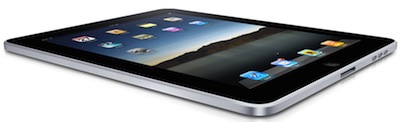
    iPad slanted2. Persistant data connection costs too much. The cheapo, 16GB model sells for $499 with 802.11n wireless. For 3G, buyers must pony up between $629 and $829 plus another $30/month to AT&T for data service. Well, there's a 15-buck plan for 250MB of data. Amazon's Kindle and Barnes and Noble Nook ebook readers come with free 3G service. Sure, iPad does so much more, but the user not only pays about twice as much for the device but $15 or $30 month, instead of nothing. The bigger question: Why pay for two 3G services — smartphone and iPad? My answer is none.

    3. Web experience is inferior to other devices in its size class: Apple’s promotional Website claims that iPad is “the best way to experience the Web.” But the device doesn’t support Adobe Flash, for starters, and that means the experience is no better than iPhone or iPod touch and less than comparably sized PC slates or netbooks running desktop or desktop-class browsers. Hell, my smaller Nokia N900 smartphone, with 800 x 480 screen resolution, packs a full Mozilla browser that runs Flash.

    4. Screen resolution is inadequate: iPad’s native screen resolution is only 1028 x 768. That’s simply too little for the size and price, particularly when many PC slates, netbooks or laptops offer higher screen resolution for about the same price. Pixel density is 132 per inch. By comparison, my N900 is 267 pixels per inch — granted with only 800 x 400 display. But iPad ships with a LED display, for which I want more ppi, not less.

    5. Aspect ratio is 4:3 in a 16:9 world. Widescreen everything is today’s video consumption standard. But iPad’s aspect ratio takes you back to the last decade. My smartphone not only displays video in 16:9 ratio, it shoots photos that way, too.

    6. It’s nothing more — and some things less — than a big iPhone (without cellular voice) or iPod touch. Like its small siblings, iPad runs iPhone OS, accesses iTunes Store and built-in App Store, displays photos, plays movies and music, etc., etc., etc. OK, so there is iWork and bigger screen. I’m not pining for the differences.

    7. There’s no camera. But there should be two, one pointing outwards for taking photos and supporting applications and another inward facing for video conferencing. Camera is one of the greatest utilities on most portable devices, whether cell phones, laptops or even netbooks. Camera already is important on cell phones for using third-party services like Amazon product search, barcode search and location informational services.
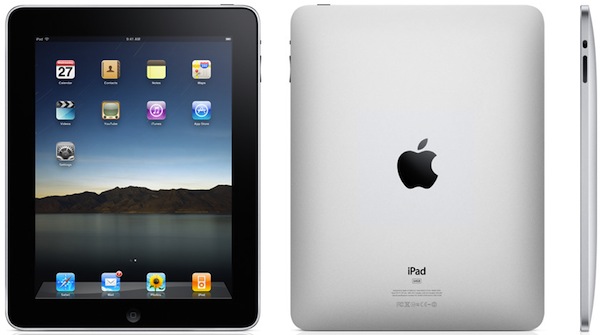
    iPad front-back

    8. Connectivity options are limited without paying more money. In the Apple world of giving users less they pay more to get what they need. The iPad uses the same connector as iPhone or iPod touch, and Apple ships the same USB cable as comes with the smaller devices. There’s no HDMI port or any other useful one. It’s either pay Apple more for the connectors — gasp, even for a digital camera — or make do with wireless options, which should be good enough for printing but not connecting to projectors or TVs.

    9. Accessories tell the real story — iPad isn’t good enough at any of its price points. Reiterating #8, iPad demos well as a slick tablet, but to use many of its features users will need to pay more to Apple for accessories, like the aforementioned camera connectors (there are two) and the keyboard dock. During yesterday’s iPad launch event, Apple CEO Steve Jobs emphasized the ease of using the virtual keyboard like a real one. But writing for Gizmodo, John Herrman asserts: “The iPad’s onscreen typing solution Isn’t a solution at all.” The thumbs are important for typing on smartphones, but iPad’s virtual keyboard needs to be more touch-type ready. Hermann writes: “Seriously, this thing’s got its own version of iWork — you’re supposed to type on it. That explains the giant hardware keyboard attachment, I guess!”

    10. The iPad requires a Mac or PC. That USB connector comes with iPad for a reason. The tablet would make more sense as a standalone device connecting to cloud services. In #1, I dinged iPad for not being a smartphone or laptop replacement. Sadly, that’s by design.

    11. There’s no GPS on three models — not without 3G radio. No-3G limits the device’s mapping capabilities and its ability to spatially orientate for using augmented reality applications. The accelerometer and compass are OK — as they are on iPod touch — but 3G makes a big difference when also orienting location. GPS is available on three 3G iPad models, but buyers will pay more for the device and for monthly data service fees.

    12. It’s a closed system. Actually it’s a step backwards. Apple has brought back the onerous developer non-disclosure agreement. Apple had lifted NDAs for App Store, but they’re b-a-a-a-ck! At a time when Google and Nokia are pushing open-source operating systems and mobile applications stacks, Apple’s approach ranks of last-century software development practices. We’ve been there with Microsoft. Must we trade Microsoft closed for Apple closed? Something else: Everything is tied to iTunes Store, which is as closed as Apple is secretive about new products.

    Copyright Betanews, Inc. 2010


    Add to digg
    Add to Google
    Add to Slashdot
    Add to Twitter
    Add to del.icio.us
    Add to Facebook
    Add to Technorati


  • Is the iPad Apple’s iFail?

    Whilst the dust settles on Apple’s recently announced iPad, it seems the hype has died down and everyone has an opinion on Apple’s latest creation. At Neowin we’ve been mulling over the announcements and have a few thoughts and feelings about Apple’s new iPad.
    What is it?
    As…

  • How To Setup a USB Flash Drive to Install Windows 7

    If you have a netbook and would like to upgrade it to Windows 7, you may be wondering how to do it without a clunky external DVD Drive. Today we show you how to install Windows 7 from a USB flash drive.

    Installing Windows 7 from a flash drive is essentially the same as installing it from a DVD. Most of the work is setting up your flash drive so it becomes a bootable device with the OS on it. Here we will take a look at a couple of utilities that will allow you to easily create a bootable USB drive and copy Windows 7 to it. 


    Note: You’ll need a minimum of a 4GB flash drive to dedicate to the installation files.

    Windows 7 USB/DVD Download Tool

    If you have an ISO image of Windows 7, using Microsoft’s free utility is a quick and easy option to get the image on your USB flash drive. It requires XP SP2 or higher and if you’re using an XP machine you’ll need .NET Framework 2.0, and Microsoft Image Mastering API V2…both of which can be downloaded from the link below. It seemed to work best if I formatted the flash drive as NTFS before using the download tool. But that could be because of the flash drive I used…your mileage may vary.

    10win

    It’s a pretty straight forward process, first browse to the location of your Windows 7 ISO file and click Next.

    1 dlt 

    Select USB device…this also helps you burn the ISO to DVD as well if you need that option.

    2 dlt

    Choose your flash drive and click Begin copying.

    3 dlt

    Now just wait for the process to complete. The drive will be formatted and files copied to the flash drive.

    6 dlt 

    When the process is finished you will be able to see the files on the flash drive as you would if you opened the installation disc. Now you can start the installation on any computer that allows you to boot from a USB drive.

    7 dlt 

    WinToFlash

    If you want to transfer a Windows 7 installation disc to USB…another super easy utility to use is WinToFlash. Just follow through the straight forward wizard, and you’ll be ready to install Windows 7 from your flash drive in no time.

    1win2 

    The neat thing about this utility is it also offers different advanced features and tasks for other versions of Windows too.

    9win

    It’s as easy as choosing the location of the Windows installation disc and the USB drive. Where in this example the DVD is drive (E:) and the flash drive is (F:). They recommend to turn off your Antivirus to increase the process speed, but we had MSE running on our machine and it didn’t seem to affect performance at all.

    3win3

    Next, you’ll need to agree to the Windows 7 EULA and hit continue.

    4win2 

    Now just wait until the drive is formatted and the files are transferred over to the USB drive. The amount of time it takes will vary between systems. In our test it took around 10 minutes to complete over to an 8GB flash drive.

    5win2

    That’s it! Now the drive is ready so you can install Windows 7 on your netbook or any other computer that supports booting from a USB drive.

    7win2 

    Conclusion

    WinToFlash is still in Beta and doesn’t require installation to use. Microsoft’s tool apparently became Open Sourced recently, requires installation, and a few other requirements like .NET Framework. Both of these tools are free and each one works a bit differently, so you’ll need to decide which will work best in your situation.  If you don’t want to manually create a bootable flash drive and copy the install files over, then you might want to check out these extremely simple to use utilities.

    Download WinToFlash

    Download Windows 7 USB/DVD Download Tool

    Got an opinion to share? Click here to join the discussion

    Similar Articles Productive Geek Tips
    Latest Software Reviews Tinyhacker Random Tips

  • Betanews readers say ‘No!’ to Apple iPad

    By Joe Wilcox, Betanews

    Mid-afternoon today, I asked Betanews readers: “Will you buy an Apple iPad?” The responses are in, and the majority of readers say: “No!” I’m with you. Apple’s iPad does absolutely nothing to advance the tablet category. The category is part of the problem. Twenty-five days ago I asserted that the “world doesn’t need an Apple tablet, or any other.” The iPad, like other tablets, suffers the middle child syndrome. The device overlaps features of smartphone below and laptop above.

    Perhaps iPad would make more sense if it could replace either smartphone or laptop — although I expect some early adopters to try the latter. To you I say, “Good luck!” You’ll need it if for no other reasons than the virtual keyboard and limited storage — 16GB to 64GB. I don’t see these reasons as limitations on a smartphone, because it’s always carried and has constant data connection. The iPad is an extra carryall with overlapping functionality and either no constant connection or 3G service for extra $30 monthly cost. Sadly, iPad is exactly what I expected: Traditional tablet form factor with a prettier user interface. Yesterday I pined for more, but Apple didn’t deliver it.

    With that scathing introduction, I present randomly chosen Betanews reader reaction — much of it even harder than my reaction:

    Jeremy Reeves: “@Joe, If I understand correctly, you believe the iPad is a waste, to put it bluntly…I would agree there are more reasons to not buy one than to buy one. ;]”

    Taylor Wickens: “If you ducktape the keyboard that is shown with the iPad, you have a netbook. Woopty-doo. I’d rather have a full OS on a netbook with a non-ducktaped full keyboard than the iPhone OS that can only do one application at a time. The iPad is all iHype and will certainly be a niche market item before people realize how iStupid it is.”

    Roger Kay (industry analyst): “Apple may just have sailed straight into the Sargasso Sea. Meanwhile, there’s this video they should have found before naming it: http://bit.ly/95dAo0.”

    iPad Star Trekhoozdaar: “Yes, I will buy one. I’ll wait a while until the price drops $100 like Apple products always seem to do. I see people are disappointed that this device is not a laptop, I don’t think it’s intended to be. It is a really big itouch [iPod touch] with major improvements. I love my itouch. I kill time with it, look up info and email with it, read the news and sports, etc. Even listen to music. It is always with me…I don’t read ebooks today, but that seems to be the future. Several organizations I belong to want to get rid of their magazines and newsletters. I don’t want [to] carry a laptop or even a netbook around with me to read things.”

    Kelson64: “Rather pricey for something that doesn’t really do anything. The only reason I might have purchased this prodect is for the ebook capabilities (I am a very avid reader) — but I already have a Kindle, and I am beyond happy with it. Don’t get me wrong, the iPad looks really nice . I just don’t see any practical use for it. Frankly, with all of the things it is MISSING (that others have pointed out here), it just seems like a waste of money.”

    Sarah, iMensch (responding via FrendFeed): “newp.”

    Sudbury: “Why would you want to buy an iTablet? So you can show to your friends that your iPod touch is bigger than theirs? :P”

    ece:

    I always save my final judgement till I get my hand on it. But based on hardware specs, it would be a no for a few reasons:

    • No USB 2.0 support
    • No SD Card Slot
    • No Verizon support

    How does one print out a document that they developed in Pages? Do I have to e-mail the document to myself so I can print stuff out? How does one efficiently upload all the photos and video I just took from my vacation? Do I upload them to my laptop and then sync them to the iPad? I can’t switch off Verizon so I wouldn’t get 3G. As an e-reader like for text books, how heavily discounted will these text books go? I mean 3 engineering text books cost me $300 in grad school, even more in undergrad. Will the discounts on ebooks be enough to justify the cost of this as an e-reader.

    jc_lvngstn: “I don’t need a tablet, I’m immune to the hype machine, etc. And even if I DID decide I’d get a tablet, it would have to have Windows 7 on it, and support multitasking.”

    Pwnd0z3r: “Apple creates a glorified Speak’n’Spell — the Apple iMaxiPad — the sad part is that probably a lot of people will buy it because they are brain dead from watching WWE wrestling. People who buy Apple products can’t spell productivity or they wouldn’t buy them in the first place.”

    Kevin Baron:

    I like it and might just buy it. I would love to play iPhone games on a giant touchscreen. There are other perks. But playing Peggle or Bejeweled on the iPad will be pretty cool. Sure I can and do play both games on the computer and the iPhone. Among many other games. But I like the idea of a big touchscreen for gaming. That said, I do have things i don’t like. What’s the deal with no Flash? I mean will it never make it to the iPad or iPhone? I mean really this isn’t rocket science. I’ve heard the many reasons Apple might not want it on the phone. But really this is 2010, enough already. iChat would have been way cool also. Jailbreaking will give us multitasking, but really they need to give it to us at this point. It’s a toy, but one that I want.

    conan007: “I’m not clear who needs this. We already have smaller versions of iPad (i.e. iPhone), regular laptops (as light as MacBook Air), netbooks, Slate PCs (with real functioning OS), and ebooks (does iPad has e-paper screen?).”

    iPad Facebook

    OneToOne: “Apple has jumped the shark here, plain and simple. Nothing to be particularly ashamed of, it happens from time to time to those who think they are above all judgement and can do no wrong.”

    macbook: “Never… It’s a waste of money.”

    Cool Guy:

    Can someone please confirm whether the below is correct?

    • No USB slots
    • No Memory Card slots
    • No Ethernet Port
    • No Video Out
    • No multi-tasking
    • No camera
    • Not light
    • No Mac OS X
    • No optical drive

    If the above statements are confirmed then no, I wouldn’t buy one. I am a tech and I need something light and portable that I can carry with me and troubleshoot things. At the moment, I use a laptop.

    Faisal Islam: [In response to Cool Guy] “Yeah! CORRECT 100%.”

    bijuishere: “It is such a disappointment mainly because of all the big hype. No camera, no media card reader, no multitasking, no phone services, no USB ports — will wait for the 3rd gen which will do all this. Meanwhile Apple fans can have at it.”

    Copyright Betanews, Inc. 2010


    Add to digg
    Add to Google
    Add to Slashdot
    Add to Twitter
    Add to del.icio.us
    Add to Facebook
    Add to Technorati


  • Enable Firefox’s Secret Mousewheel Scrolling Acceleration [Firefox Tips]

    Windows only: If you are accustomed to scrolling quickly through long documents, there’s a secret Firefox 3.6 config setting that allows you to enable acceleration, which will scroll more quickly based on how many times you’ve scrolled.

    To tweak the acceleration for yourself, head into Firefox’s about:config page, and then filter by mousewheel.acceleration to find the two settings that apply—the mousewheel.acceleration.start setting actually enables acceleration by setting the number of times you need to scroll your mouse before the acceleration kicks in, while the mousewheel.acceleration.factor setting specifies how much acceleration to apply.

    The new mouse wheel acceleration feature is disabled by default in Firefox 3.6 because it can conflict with your mouse drivers, especially if you’ve enabled faster scrolling in the Mouse panel in Control Panel, but you can tweak the setting either way. It’s not a setting that everybody will want to apply, but if you’re unhappy with the current Firefox scrolling, you can play around with the settings to figure out your preferred level of acceleration. It only works in Firefox 3.6 on Windows, and make sure to hit the link for a full explanation on how it works.