Skip to content

.::REALITYRECALL::.

Reality Bites

  • Home
  • About
  • Contact
  • Hide GUI Bars Lets You Selectively Hide Your Firefox Interface [Downloads]

    Firefox: If you want to maximize the screen real estate you have—netbooks anyone?—you could switch to fullscreen browsing in Firefox. What if you want to keep certain elements visible while you browse? Hide GUI Bar can help.

    Hide GUI Bar is like a selective full screen mode for Firefox. You can specify which elements will be hidden and which will remain like the menu bar, navigation bar, tab bar, bookmark bar, and the status bar. Now if you need to keep the status bar visible but want the rest of the screen available for browsing, or any other combination of hidden and visible elements, you can do so.

    The default hot key is CTRL+SHIFT+A but you can alter it to any other alpha-numeric combination. Hide GUI Bars is a free extension and works wherever Firefox does. Have a favorite tool for tweaking your display, Firefox-related or otherwise, let’s hear about it in the comments.

    Hide GUI Bar [via Firefox Facts]


    January 27, 2010
  • Apple iPad Price [Apple]

    Full pricing: The 16GB, Wi-Fi-only version costs $500, while the 32GB is $600 and 64GB is $700. Pricing increases by $130 to add 3G. The Wi-Fi-only models ship in 60 days, while 3G models will ship in 90. [Apple iPad]


    January 27, 2010
  • Archos 7 Android Tablet Leaked, Featuring Webcam For Video Chat and New 7-Inch Size [Tablets]

    Archos’ first Android tablet, the Archos 5, didn’t quite live up to its promises,but a second leaked Android tablet from the French could prove more feature-some if realized, with a front-facing webcam and new 7-inch size.

    Thanks to a slip-up by the UK retailer Data-Mind, we’ve got photos and specs of the tablet, which will apparently go on sale in March for £149.99 ($242). It’ll have 8GB of onboard storage, a webcam, and 7-inch LCD screen with 800 x 480 pixels. That’s 2.2-inches more than the Archos 5, with the storage being the same.

    It’s not just hardware which will be upgraded between the models, with the software being upgraded too. Song lyrics support, and compatibility for the APE file format will be included, and ArchosFans, which were eagle-eyed enough to spot the leaked product, are speculating about the missing Archos Media Center widget from the homescreen.

    Hey, I realize it’s difficult to get excited about a non-Apple tablet today, but try and show a little enthusiasm for this potential leaked device? Hmm? [Data-Mind via ArchosFans via ArchosLounge]


    January 27, 2010
  • DéjàClick Lets You Record and Automate Browsing Activities [Downloads]

    Firefox: If you’ve ever been annoyed by having to do repetitive actions on a web site with no way to automate them, DéjàClick can help. Record and play back browser-based actions with DéjàClick and skip tedious future clicks.

    DéjàClick is a Firefox extension offered by AlertSite, a company that specializes in software designed to monitor web sites and alert the site owners if specified processes are not occurring properly—essentially using automated script "robots" to go test out things like the search function and the checkout process. DéjàClick is their free offering for non-commercial use to allow users to record their own browsing and play it back to automate processes later on.

    Any time there is an instance where you have to actually interact with the browser—as opposed to using a bookmark to jump somewhere in a site or a login tool—you can use DéjàClick to record yourself performing the actions and store that recording as a script. Every time you visit that site or interface again you can execute that script and save yourself the hassle. Check out the company site here or visit the link below to grab the extension.

    DéjàClick [via MakeUseOf]


    January 27, 2010
  • ‘Avatar’ Officially Reigns as All-Time Box Office King

    'Avatar' Officially All-Time Box Office KingMaybe spending nearly half a billion dollars on a movie isn’t such a bad idea, after all. As CBS News reports, James Cameron’s latest blockbuster ‘Avatar’ has officially become the all-time biggest box office success, dethroning, of course, the director’s own ‘Titanic,’ which kept the throne warm for more than a decade. The film has grossed a staggering $1.8 billion worldwide, and many expect it to eventually break through the once-unimaginable $2 billion ceiling.

    Cameron had initially taken a lot of criticism for the seemingly absurd sums of money he was spending on his high-tech epic. As the notoriously self-assured mastermind behind ‘Aliens’ and the ‘Terminator’ franchise explained to CBS News, though, “You learn to tune all that out and just say, ‘Wait until people see the film. Then we’ll know if we’re in trouble or if we’re in good shape.’”

    Continue reading ‘Avatar’ Officially Reigns as All-Time Box Office King

    Filed under: Audio/Video, Celebrities

    ‘Avatar’ Officially Reigns as All-Time Box Office King originally appeared on Switched on Wed, 27 Jan 2010 09:20:00 EST. Please see our terms for use of feeds.

    Read | Permalink | Email this | Comments

    January 27, 2010
  • Dell Tech Support Remotely Turns Woman’s Webcam On Without Permission [Crime]

    Dianne Annunziato is accusing a Dell technician of becoming a virtual peeping Tom during a support call by remotely turning on her webcam.

    “First, the technician started asking me what time of day it was,” she said.

    When she looked at her screen a minute later, Annunziato said she could see herself in a little box.

    “He turned on the webcam; he never asked, ‘May I? Can I?’ Not a word, he just turned it on,” she said.

    All I can say is, if I was in the woman’s place during this call, the technician would have seen some naked adult content regardless of the time of day. Fortunately, the Annunziato was wearing clothes, but she was quick to point out the problem with all of this to the technician’s supervisor.

    “I said, ‘I could have been sitting here undressed,’ and the supervisor laughed, and I just sat there in shock,” she said.

    So far, the technician's side of the story has not been heard—but Dell claims that they are currently investigating the incident. [NBCdfw via Consumerist]


    January 26, 2010
  • A&W 2 for $4 Mama Burger Commercial

    January 26, 2010
  • Will’s Wisdom

    January 26, 2010
  • Hitler Reacts to the 2009 Grey Cup

    January 26, 2010
  • Cam Janssen DRILLS Carey Price

    January 26, 2010
  • HP Slate teases us with another video appearance

    The HP Slate — has there ever been a more iconic, more groundbreaking, more life-altering device? Oh, there has? Well anyway, HP CTO Phil McKinney has been friendly enough to share some of the history behind the development of his company’s newly announced tablet, which is set for a release at some point later this year. Starting with e-reader prototypes five years ago, he tells us, HP steadily built up an idea of the sort of “rich media experience” modern consumers are lusting after. It’s only now, however, in a “perfect storm” of innovation, that HP finds itself capable of pairing the right hardware with the mainstream-friendly price point it was shooting for. Join us after the break for the full dose of education on this multitouch Windows 7 machine.

    Continue reading HP Slate teases us with another video appearance

    HP Slate teases us with another video appearance originally appeared on Engadget on Tue, 26 Jan 2010 01:03:00 EST. Please see our terms for use of feeds.

    Permalink Gear Diary  |  sourceYouTube  | Email this | Comments

    January 26, 2010
  • QMJHL suspends Cormier for rest of season

    Junior hockey player Patrice Cormier has been banned from Quebec Major Junior Hockey League play for the rest of the season, including the playoffs, the league said during a news conference Monday.

    January 25, 2010
  • SMS education courses to be offered in Canadian schools

    In a report from the Montreal Gazette, a text education course will be introduced in 100 Grade 7 classrooms across the country in a pilot program. If all goes well, a full program will be implemented this September.
    The Grade 7 teachers who have agreed to set up a pilot course…

    January 25, 2010
  • Google Reader Gets Smart, Tracks Updates on Feedless Web Sites [News]

    RSS, Atom, and other XML-formatted feeds revolutionized the way we keep up with our favorite web sites, allowing us to use newsreaders to track updates rather than bookmarks and constant refreshing. The only problem: Some sites don’t have RSS feeds.

    The Google Reader team addressed this problem today, adding a new feature to allow users to track changes to any web site—even those that don't have their own feed.

    These custom feeds are most useful if you want to be alerted whenever a specific page has been updated. For example, if you wanted to follow Google.org’s latest products, just type “http://www.google.org/products.html” into Reader’s “Add a subscription” field. Click “create a feed”, and Reader will periodically visit the page and publish any significant changes it finds as items in a custom feed created just for that page.

    Here are some more example feeds for sites without feeds that you could follow:

    • Macy’s – special offers [view in Reader]
    • NYU Computer Science homepage [view in Reader]
    • Zillow.com homepage [view in Reader]

    Granted, we’ve seen webapps that create feeds for feedless sites in the past, but the integration into a popular newsreader like Google Reader is a big step. And while most sites worth their salt have feeds coming out their ears, others—like Bill Gates' recently launched Gates Notes—still don't, making the new feature a welcome update for anyone who's dealt with this frustration in the past.

    Follow changes to any website [Google Reader Blog]


    January 25, 2010
  • Microsoft’s Silverlight Client for Facebook released

    Scott Guthrie, VP of Microsoft’s Developer Division, originally demonstrated a Silverlight client for Facebook during his PDC 2009 keynote late last year.
    Today Microsoft has made the Silverlight Client available for Windows and Mac OS X users to install. The client requires Silverlight 4 and installs a simple link to the…

    January 25, 2010
  • Make New Tabs Open at Far Right in Firefox 3.6 [Firefox 3.6]

    The official Firefox 3.6 release changed where new tabs open from clicked links—to the right of the tab they launched from. Liked it better the old way? Here's the quick fix.

    The Mozilla Links blog points out a few about:config tweaks that Firefox 3.6 users might be interested in, especially if the new version handles things a bit differently than you're used to, and you don't want to spend time getting used to the new scheme. To set new tab behavior back to its old ways—opening in the right-most slot—enter about:config into your address bar, click that you’ll be careful, then enter browser.tabs.insertRelatedAfterCurrent into the search bar. Set that value to “False,” and your new tabs will open where they used to.

    For more Firefox 3.6 tweaks, visit Mozilla Links’ post, which details tab preview behaviors in detail.

    Firefox 3.6 tips and tweak [Mozilla Links]


    January 25, 2010
  • Radio Tuna Combines Music Discovery and Internet Radio [Radio]

    If you’re looking for new music, you won’t find a shortage of music discovery services online. Almost all of them search their own music catalogs and not the vast assortment of online radio. RadioTuna brings music discovery to online radio.

    Click on the image above for a closer look.

    When you visit RadioTuna you can dive right in by searching by genre, artist, and song to begin listening. Radio stations suggested by RadioTuna are given rankings to show you how much of a certain type of music they play. You can bookmark radio stations you find and then review your listening history, see the play charts from your saved stations, and share the stations you listen to with friends through social networks like Facebook and Twitter.

    RadioTuna provides a more in-depth method for discovering music online than simply searching a directory of radio stations and hoping to find one that plays songs you’d like. You can check out RadioTuna without signing up, but saving stations and your search history requires a free login. If you have a music discovery service you can’t live without, let’s hear about it in the comments.

    RadioTuna [via MakeUseOf]


    January 25, 2010
  • Learning Windows 7: Manage Photos with Live Photo Gallery

    If you’re moving from Vista to Windows 7, you might be wondering what happened to Windows Photo Gallery, or in XP you might have used another photo manager. Today we take a look at using Windows Live Photo Gallery from the Windows Live Essentials suite.

    Windows Live Photo Gallery

    Windows Photo Gallery was included in Vista and did an adequate job handling your photo needs. If you’ve moved to Windows 7, or are just looking for a new photo management tool, Windows Live Photo Gallery is certainly worth a look. Download the Live Essentials installer and select Photo Gallery and any other app from the list of you want to use.

    Note: Keep in mind you don’t have to install them all…only the ones you want.

    1photo

    In the You’re almost done! screen, make sure to uncheck the boxes to set your search provider and homepage if you don’t want them changed.

    2photo

    After installation, to start using Live Photo Gallery click on Start and go to Windows Live \ Windows Live Photo Gallery.

    3photo

    The first time you launch it you’ll be prompted to sign in with your Windows Live account.

    4photo

    You might also want to use Live Photo Gallery to open TIF and BMP files.

    5photo

    Now you can start to view and manage your photos. If you hover the pointer over a thumbnail, you’ll get a larger view of it.

    6photo

    On the left side you’re able to browse through your picture directories, sort by date taken, and people or descriptive tags.

    8photo

    Click on an image to tag the photo with your own information or find out other photo data. It allows you to zoom in on an image, rotate them, rate a photo, start a slid show and more.

    7photo

    Another nice built in feature is being able to resize your photos. Right-click on an image in the gallery and select Resize. Now you can select between predefined sizes or your own custom size.

    19photo

    There is the ability to easily import your pictures from a camera or scanner using an easy to follow wizard.

    12photo

    You can include any folder into the gallery and monitors those folders for any new additions.

    13photo

    In Windows Live Photo Gallery Options you can specify different default actions it uses when importing pictures from different devices and media.

    14photos  

    Also, you can determine how images will be tagged, so if you have several images from a few different trips for example, they can be easily found and organized.

    15photo

    Personalize your computer by adding your Photo Gallery in as your Screen Saver.

    20photo

    You can go in and do some basic edits to photos like adjusting color effects, fixing red eye, crop and straighten photos.

    11photo

    You can make blog posts, CDs, DVDs and more with your photos from Live Photo Gallery and other Live or Windows tools.

    10post

    Live Photo Gallery allows you to publish photos to your SkyDrive, print them out, and share them with others via email.

    18photo

    It also includes the ability to save and share your images on flickr.

    16photos

    You can also find other plug-ins for it that will let you easily share your photos to other social sites like Facebook, Drupal, SmugMug, Picasa, and more.

    17photo

    Conclusion

    Windows Live Photo Gallery offers a lot of features and is much enhanced over Photo Gallery included in Vista. This should get you started using Windows Live Photo Gallery to organize, edit and share your photos in Windows 7. Of course Live Photo Gallery is not only for Windows 7 users. It will run on XP (32-bit only), Vista and Windows 7 (32 & 64 bit versions). If you’re looking for an easy to use picture manager that offers several organization and sharing features for Windows 7, Windows Live Photo Gallery does a great job.

    Download Windows Live Photo Gallery

    Windows Live Photo Gallery Plug-ins

    Got an opinion to share? Click here to join the discussion

    Similar Articles Productive Geek Tips
    • Family Fun: Share Photos with Photo Gallery and Windows Live Spaces
    • Easily Re-Size Photos in Windows Vista or XP
    • Install Windows Live Essentials In Windows 7
    • Convert Photos to Flash for Your Website
    • Work On and Enhance Your Photos with PhotoFiltre
    • Monochrome Grey Desktop
    • Get Better Functionality Stacks with no Extra Software
    • How to Find Sleep When It Escapes You
    • The Anatomy of Salary Negotiations
    • Arguing Productively Leads to a Lasting Relationship
    • Tips and Advice on Saving Money Today
    Latest Software Reviews Tinyhacker Random Tips
    • Revo Uninstaller Pro
    • Registry Mechanic 9 for Windows
    • PC Tools Internet Security Suite 2010
    • PCmover Professional
    • Download Free Audio Books from AudioOwl
    • Tiny add-on Tabberwocky replaces most of the Tab Mix Plus feature set
    • 35 Cool Pictures of Animal Photography (wallpaper worthy)
    • Convert Web Pages into a Printer Friendly Format using Clippable
    • Reorganize Your Mac Desktop with BumpTop
    • Mark Russinovich’s Blog (Blogs We Love)

    January 25, 2010
  • Learning Windows 7: Watch TV Programming Without a TV Tuner

    Even if your computer doesn’t have a TV tuner card, you can still watch broadcast television programming with Media Center in Windows 7. Today we take a look at some of the features and how to get started.

    Earlier this week in another Learning Windows 7 post, we showed you how to set up live TV in Windows Media Center (WMC). Not everyone has a TV tuner card and maybe can’t install one…in a laptop or netbook for example.

    Update: This feature may not be available in all countries. Users who are in the UK should be able to use Sky Player which integrates into WMC. If you’re in the US and don’t see this option, make sure you have all of the latest updates for WMC.

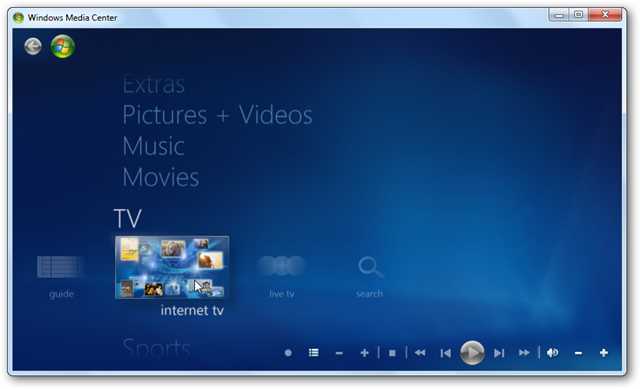
    Internet TV

    Open up WMC and scroll down to TV then over to Internet TV.

    1tv

    In the next screen, check that you accept the Terms of Service and click on Install.

    2tv

    The installation process begins…

    3tv

    Now you can begin browsing through the available programming, which varies from classics to the latest editions of your favorite news, Showtime and CBS shows.

    4tv

    Browse through Golden Globe winning shows and also Netflix (which requires a subscription).

    5tv

    Get the latest news and current events type programming such as 60 minutes and nightly news broadcasts.

    6tv

    CBS Classic is always a lot of fun too for checking out the old school shows.

    6tv

    Click on an episode to find out what it is about and its length…

    7tv

    If it’s your first time watching a show you may nee to install the latest version of Adobe Flash.

    8tv

    Now you can sit back and watch some of your favorite programming.

    9tv

    If you’re a fan of Desktop Gadgets, you can use the WMC one to scroll through shows from the gadget and launch them in WMC.

    11tv

    Conclusion

    If you’re looking to watch TV on your computer, this is yet another way of quite a few methods, including several online options such as Hulu. This method is quick to setup and allows you to watch some limited programming on demand with WMC in Windows 7. Not all programs are full episodes, but does include clips from several of them. In the future we’ll be taking a look at some other types of Internet TV and video streaming options you can incorporate into WMC.

    You might also want to check out Learning Windows 7: Setup Live TV in Windows Media Center

    Got an opinion to share? Click here to join the discussion

    Similar Articles Productive Geek Tips
    • Geek Fun: Download Favorite NBC Programs for Free
    • Weekend Fun: Watch Television On Your PC With TVUPlayer
    • Weekend Fun: Watch Television on Your PC with AnyTV
    • Friday Fun: How-To Videos Galore!
    • Learning Windows 7: Setup Live TV in Windows Media Center
    • Monochrome Grey Desktop
    • Get Better Functionality Stacks with no Extra Software
    • How to Find Sleep When It Escapes You
    • The Anatomy of Salary Negotiations
    • Arguing Productively Leads to a Lasting Relationship
    • Tips and Advice on Saving Money Today
    Latest Software Reviews Tinyhacker Random Tips
    • Revo Uninstaller Pro
    • Registry Mechanic 9 for Windows
    • PC Tools Internet Security Suite 2010
    • PCmover Professional
    • Convert Web Pages into a Printer Friendly Format using Clippable
    • Reorganize Your Mac Desktop with BumpTop
    • Mark Russinovich’s Blog (Blogs We Love)
    • A Thorough Guide to Windows 7’s Action Center
    • Beautiful Monet Windows 7 Theme
    • Block Access to a Website with the Hosts File

    January 22, 2010
  • Ballmer Desecrates MacBook Pro [Horror]

    I thought this Ballmer’s autograph on a Macbook Pro was fake, but according to this video of the big man scribbling it, it’s not. Somewhere in a dark place, Jon Ive is bracing himself and sobbing. With a British accent.

    [The Guardian]


    January 22, 2010
←Previous Page
1 … 675 676 677 678 679 … 727
Next Page→

.::REALITYRECALL::.

Reality Bites

Twenty Twenty-Five

Designed with WordPress