Skip to content

.::REALITYRECALL::.

Reality Bites

  • Home
  • About
  • Contact
  • Learning Windows 7: Watch TV Programming Without a TV Tuner

    Even if your computer doesn’t have a TV tuner card, you can still watch broadcast television programming with Media Center in Windows 7. Today we take a look at some of the features and how to get started.

    Earlier this week in another Learning Windows 7 post, we showed you how to set up live TV in Windows Media Center (WMC). Not everyone has a TV tuner card and maybe can’t install one…in a laptop or netbook for example.

    Update: This feature may not be available in all countries. Users who are in the UK should be able to use Sky Player which integrates into WMC. If you’re in the US and don’t see this option, make sure you have all of the latest updates for WMC.

    Internet TV

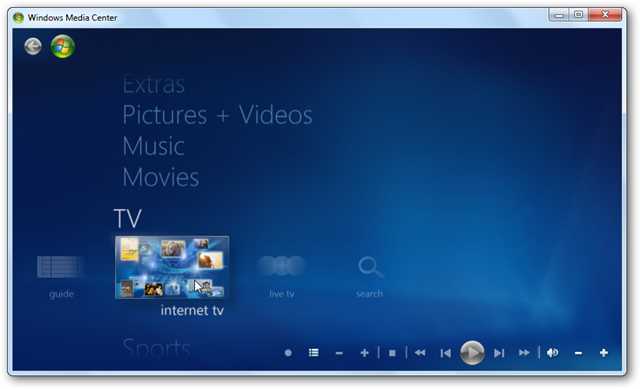
    Open up WMC and scroll down to TV then over to Internet TV.
    1tv

    In the next screen, check that you accept the Terms of Service and click on Install.

    2tv

    The installation process begins…

    3tv

    Now you can begin browsing through the available programming, which varies from classics to the latest editions of your favorite news, Showtime and CBS shows.

    4tv

    Browse through Golden Globe winning shows and also Netflix (which requires a subscription).

    5tv

    Get the latest news and current events type programming such as 60 minutes and nightly news broadcasts.

    6tv

    CBS Classic is always a lot of fun too for checking out the old school shows.

    6tv

    Click on an episode to find out what it is about and its length…

    7tv

    If it’s your first time watching a show you may nee to install the latest version of Adobe Flash.

    8tv

    Now you can sit back and watch some of your favorite programming.

    9tv

    If you’re a fan of Desktop Gadgets, you can use the WMC one to scroll through shows from the gadget and launch them in WMC.

    11tv

    Conclusion

    If you’re looking to watch TV on your computer, this is yet another way of quite a few methods, including several online options such as Hulu. This method is quick to setup and allows you to watch some limited programming on demand with WMC in Windows 7. Not all programs are full episodes, but does include clips from several of them. In the future we’ll be taking a look at some other types of Internet TV and video streaming options you can incorporate into WMC.

    You might also want to check out Learning Windows 7: Setup Live TV in Windows Media Center

    Got an opinion to share? Click here to join the discussion

    Similar Articles Productive Geek Tips
    • Geek Fun: Download Favorite NBC Programs for Free
    • Weekend Fun: Watch Television On Your PC With TVUPlayer
    • Weekend Fun: Watch Television on Your PC with AnyTV
    • Friday Fun: How-To Videos Galore!
    • Learning Windows 7: Setup Live TV in Windows Media Center
    • Monochrome Grey Desktop
    • Get Better Functionality Stacks with no Extra Software
    • How to Find Sleep When It Escapes You
    • The Anatomy of Salary Negotiations
    • Arguing Productively Leads to a Lasting Relationship
    • Tips and Advice on Saving Money Today
    Latest Software Reviews Tinyhacker Random Tips
    • Revo Uninstaller Pro
    • Registry Mechanic 9 for Windows
    • PC Tools Internet Security Suite 2010
    • PCmover Professional
    • Convert Web Pages into a Printer Friendly Format using Clippable
    • Reorganize Your Mac Desktop with BumpTop
    • Mark Russinovich’s Blog (Blogs We Love)
    • A Thorough Guide to Windows 7’s Action Center
    • Beautiful Monet Windows 7 Theme
    • Block Access to a Website with the Hosts File

    January 22, 2010
  • Ballmer Desecrates MacBook Pro [Horror]

    I thought this Ballmer’s autograph on a Macbook Pro was fake, but according to this video of the big man scribbling it, it’s not. Somewhere in a dark place, Jon Ive is bracing himself and sobbing. With a British accent.

    [The Guardian]


    January 22, 2010
  • How-to: Connect Your SkyDrive In Windows Explorer | mynetx – Windows Live Enhanced

    Your web drive SkyDrive offers 25 GB of free storage that you can use from everywhere. However, uploading and accessing its contents from your web browser can get tiring. Unless you connect Windows Live SkyDrive to Windows Explorer.

    January 22, 2010
  • Windows 7 way hotter than Vista off the line, now more popular than all OS X versions

    We learned back in November that Windows 7 was having a much (much!) better first few days in retail than Vista did when it launched, but now that the system has had a full quarter and change to make an impression, it looks as if that growth isn’t slowing down. According to new figures from Net Application, Win7 is achieving a higher level of market penetration in a faster amount of time than Vista did; after a month, Vista was stuck at 0.93 percent, while Win7 nailed the 4 percent mark. After two months, Win7 jumped to 5.71 percent, while Vista was barely over 2 percent after the same amount of time. ‘Course, the newest version of Windows had a holiday season to help it out right from the get-go, but there’s still no denying that people are flocking to the system even now. What’s most interesting, however, is that the overall market share of Windows 7 alone has now surpassed all OS X versions that are being tracked (10.4, 10.5 and 10.6), so put that in your pipe and smoke it. Smoke it long and hard.

    Windows 7 way hotter than Vista off the line, now more popular than all OS X versions originally appeared on Engadget on Thu, 21 Jan 2010 21:14:00 EST. Please see our terms for use of feeds.

    Permalink   |  sourceArs Technica  | Email this | Comments

    January 21, 2010
  • Riders promote Taman, reward Miller

    The Saskatchewan Roughriders promotoed Brendan Taman to general manager Thursday and named head coach Ken Miller their vice-president of football operations.

    January 21, 2010
  • Windows 7 growing faster than Vista, overtakes Mac OS

    Windows 7 has already managed to capture more market share than all the Mac OS versions combined, and it’s also doing far better than Vista did in its early months. Copious charts inside.

    January 21, 2010
  • Google Docs Now Allowing Any Type of File Upload [Screenshots]

    The semi-GDrive upload feature announced earlier this month has gone live, giving everyone with Google Docs a 1GB space to store, and share, files of any kind. Here’s a look at how it works.

    Log into your Google Docs account, and you should see the notification pictured above, with a more streamlined “Upload” button next to the Create New item.

    You’ll arrive at the upload page, which offers a few neat features beyond simple file choosing. Check a box, and you can automatically convert your Word and other documents to “Google Docs format,” for actual online editing abilities, or you can just keep them stored for sharing and later downloading. That’s a nice control option for those who use Google Docs as a universal file manager, but don’t always love its conversion skills with certain formats. You can also pre-place your files in particular folders for better organization.

    After uploading your files or documents, you can see what percentage of your 1024 MB, or 1 GB, you’re using, and get links to share or send those files to others, including easy-to-fill Google Contacts.

    Where did your documents go, though? They’re in the “All Items” view, and can be shared, downloaded, or renamed, just like a regular file.

    How do you like Google Docs’ file storage and sharing capabilities, compared to its many competitors? Speaking of which, it might be time to update that chart, no? Tell us how you’re finding the semi-GDrive useful, or not, in the comments.

    Uploading any file : Uploading and exporting [Google Docs Help via Smarterware.org]


    January 21, 2010
  • Aides Graffiti (NSFW)

    January 20, 2010
  • How To Remove Advanced Virus Remover and Other Rogue/Fake Antivirus Malware

    If you have a PC infected with Advanced Virus Remover, you’ll probably find that this is a tough one to get rid of. Thankfully we’ve got the instructions to help you defeat this terrible virus.

    Advanced Virus Remover is one of many fake antivirus applications like Antivirus Live, which are really just rogue viruses that hold your computer hostage until you pay the ransom money. They tell you that your PC is infected with loads of viruses, even though it’s the only virus on your computer. The biggest problem with these things is that they block you from doing almost everything—you can’t use task manager, Safe Mode, or even install a real malware removal tool.

    Advanced Virus Remover is Terrible!

    This thing just covers your PC with messages about viruses that they claim you have…

    image 

    There are popups, messages, and just dozens of windows that open…

    virus2

    Their goal, of course, is to get you to pay them.

    image 

    Advanced Virus Remover is tricky… if you open an application more than once, it’ll block you from opening it again, preventing you from installing any anti-malware tools (I tried both SUPERAntiSpyware installed edition and MalwareBytes, no luck) Note that it also changes your wallpaper. 

     image

    Advanced Virus Remover also prohibits you from heading into Safe Mode, where you at least might have a better chance of getting rid of it.

    Removing Rogue Fake Antivirus Infections (General Guide)

    There’s a couple of steps that you can generally follow to get rid of the majority of rogue antivirus infections, and actually most malware or spyware infections of any type. Here’s the quick steps:

    • Try to use the free, portable version of SUPERAntiSpyware to remove the viruses.
    • If that doesn’t work, reboot your PC into safe mode with networking (use F8 right before Windows starts to load)
    • Try to use the free, portable version of SUPERAntiSpyware to remove the viruses.
    • Reboot your PC and go back into safe mode with networking.
    • If that doesn’t work, and safe mode is blocked, try running ComboFix. Note that I’ve not yet had to resort to this, but some of our readers have.
    • Install MalwareBytes and run it, doing a full system scan. (see our previous article on how to use it).
    • Reboot your PC again, and run a full scan using your normal Antivirus application (we recommend Microsoft Security Essentials).
    • At this point your PC is usually clean.

    Those are the rules that normally work. Note that there are some malware infections that not only block safe mode, but also prevent you from doing anything at all. We’ll cover those in another article soon, so make sure to subscribe to How-To Geek for updates (top of the page).

    So, Let’s Remove Advanced Virus Remover!

    Turns out that the answer to getting rid of this virus is really simple—you’ll just need to grab the free, Portable edition of SUPERAntiSpyware, which we’ve featured as our favorite must-have spyware removal tool, and put it on a flash drive (from another computer).

    Then open it up on the PC, making sure to run the scan immediately. Don’t close it and re-open it, or Advanced Virus Remover will figure out what you’re doing and block you!

    image 

    Once it’s all done, it’ll get rid of the bad stuff.

    image

    Then you’ll be prompted to reboot, which you should probably do.

    If Advanced Virus Remover Blocks SUPERAntiSpyware

    If you have an issue running SUPERAntiSpyware, you can try and use the following technique. Open up the Windows Run box with the Win+R shortcut key, or through the start menu. Then type in the following commands, hitting enter after each one.

    taskkill /f /im winupdate86.exe

    taskkill /f /im winlogon86.exe

    Note that this may or may not help… the goal is to try and shut down the processes that are blocking you, and malware changes filenames all the time. You can also open up Windows Explorer, head into the Windows\System32 folder, and try and locate the bad processes there (hit the properties screen on some recent, odd-looking files), then use the taskkill command to get rid of them. This technique is how I usually figure out what the virus is hiding under, so I can easily kill it with just a few keystrokes.

    Cleanup the Leftovers!

    Since I never like to fully trust a single anti-malware tool, I usually run multiple passes from multiple malware removal tools. I highly recommend running a second pass with the free edition of Malwarebytes Anti-Malware. (see our previous article on how to use it).

    image

    You might notice some more messages popping up from the virus—in this case, my SUPERAntiSpyware definitions were out of date (because I wrote this article before the official portable version came out, so I was using my own hack to create a portable edition).

    Just ignore any messages, and continue with the scan, letting Malwarebytes remove everything else.

    image

    At this point you’ll want to reboot your system, and then install Microsoft Security Essentials and run another full scan. Can’t hurt to be too cautious! We also highly recommend Microsoft Security Essentials for real-time protection against these types of things.

    Note: If you used a thumb drive at any point during this process, you should make sure and scan that as well—I’ve had viruses hop over to the thumb drive, ready to infect the next machine.

    Got an opinion to share? Click here to join the discussion

    Similar Articles Productive Geek Tips
    • How To Remove Antivirus Live and Other Rogue/Fake Antivirus Malware
    • SUPERAntiSpyware Portable is the Must-Have Spyware Removal Tool You Need
    • Norton Antivirus 2010 [Review]
    • Make MSE Create a Restore Point Before Cleaning Malware
    • Secure Computing: Free Virus Protection with PC Tools Anti-Virus
    • Monochrome Grey Desktop
    • Get Better Functionality Stacks with no Extra Software
    • How to Find Sleep When It Escapes You
    • The Anatomy of Salary Negotiations
    • Arguing Productively Leads to a Lasting Relationship
    • Tips and Advice on Saving Money Today
    Latest Software Reviews Tinyhacker Random Tips
    • Revo Uninstaller Pro
    • Registry Mechanic 9 for Windows
    • PC Tools Internet Security Suite 2010
    • PCmover Professional
    • Follow Bill Gates on Twitter
    • Connect to a XP Printer from Windows 7
    • Convert Your Handwriting into a Font
    • Connect Computers via an Ad Hoc Wireless Network
    • Convert Any Webpage into a PDF using PDFMYURL
    • Watch All 66 “Get a Mac” Commercials Online

    January 20, 2010
  • 2011 Ford Mustang GT Named As Daytona 500 Pace Car

    The 2011 Ford Mustang GT is getting some major upgrades this year, including a new 5.0-liter 412-horsepower engine, and that’s enough to make it the pick for the pace car of the 2010 Daytona 500. It is the first Ford car picked to pace the race in 40 years.

    January 19, 2010
  • HP shows off ‘wall of touch’ concept, touching optional

    We’re not quite sure why HP didn’t bother setting one of these up at CES, but the company’s so-called “wall of touch” is apparently already in use by a handful of companies in prototype form, and HP has now shown it off to The Wall Street Journal. Interestingly, while you’re welcome to touch the wall all you want, you don’t actually have to, as it makes use of a camera-based system and a magnetic strip to detect where you’re pointing and when you near the wall. Of course, HP is mostly pitching this one towards companies intending to use these in public spaces (Continental Airlines has one of the first at the Houston Airport), but HP does say that if there’s enough interest it will turn it into a “mainstream product” — albeit a mainstream product that costs anywhere from “a couple thousand dollars” to $100,000 for something with more advanced features like HD video conferencing. Head on past the break for a quick video overview.

    Continue reading HP shows off ‘wall of touch’ concept, touching optional

    HP shows off ‘wall of touch’ concept, touching optional originally appeared on Engadget on Tue, 19 Jan 2010 15:20:00 EST. Please see our terms for use of feeds.

    Permalink   |  sourceWall Street Journal  | Email this | Comments

    January 19, 2010
  • Star Trek 2009 Gag Reel

    January 19, 2010
  • Read Kindle Books On Your Computer with Kindle for PC

    Do you already own a Kindle or thinking about purchasing one? To day we look at a free E-Reader app from Amazon that allows you to purchase and read books from the Kindle Store, and makes syncing your computer and Kindle easier.

    Note: Windows Only. Mac version coming soon.

    Kindle for PC

    This handy E-Reader is completely free and installs quickly.

    14kin

    Once it’s ready to go, you’re prompted to sign into your Amazon account. If you don’t have an account and don’t care to sign up for one, you can continue without registering.

    2kin

    After signing in you will see the user interface with a couple of balloon tips to get you started. The interface is very slick and intuitive compared to other E-Readers out there.

    3kin

    After you have a book loaded, you’ll get navigation controls, bookmarking, and “Go To” which lets you jump to a particular section of the book.

    4kin

    There are 10 different font sizes available.

    6kin 

    You can bookmark any page in the book as well.

    sshot-2010-01-18-[00-45-10]

    You can navigate through the pages with your mouse or simply use the arrow keys.

    8kin

    You can access the Jumplist on the Windows 7 taskbar and choose from recent books and other options.

    16kin

    Click on the Menu option on the upper right to access settings, sync items, manage your registered Kindle, and send feedback about the app.

    5kin 

    Because it’s in Beta the developers want to hear from you how they can improve it.

    18kin

    Buy and Download a Book

    To browse the Amazon store, click on Shop in Kindle Store from the Kindle for PC interface.

    12kin

    When you find something you like, click on the Buy now with 1-click button and make sure its set to deliver to your Kindle for PC.

    9kin

    Then on the order confirmation screen click on the Go to Kindle for PC button to pull up the E-reader.

    7kin

    The Home page of the Kindle comes up and you’ll see what books have been downloaded and can monitor the download progress of the one you just bought.

    11kin

    Notice in the lower left corner of the reader you’ll see that it’s synching and checking for new items.

    10kin

    Another cool thing about the Whisperync feature is it lets you go to the last page you read of a book on the PC, a kindle device, or the iPhone app. So no matter where you read your books, there won’t be the hassle of finding where you left off.

    13kin

    You can sync and check for new items at any time from the button next to the Menu.

    19kin

    Once you start getting a larger collection of books, you can sort them by Title, Author, and Most Recent.

    17kin

    It’s still in Beta, and there isn’t a search feature or the ability to make annotations yet, but overall it works pretty well and is easy to use.

    20kin

    Conclusion

    As of this writing it will run on XP, Vista, and Windows 7 but they have a Mac version on the way. Amazon does say the ability to create notes, search, and rotate images in the near future. Another thing to mention is it can make use of the Windows Touch feature in Windows 7, so if you have a touch screen laptop it essentially turns it into a free Kindle too. If you’re holding off on buying a Kindle and want to get a feel for how it all works, Kindle for PC is a good way to get started.

    Download Kindle for PC Beta

    Got an opinion to share? Click here to join the discussion

    Similar Articles Productive Geek Tips
    • How To Read Comic Books On Your Computer
    • Great Geek Sites – Part Two
    • Make Outlook 2007 Mark Items as Read When Viewed in Reading Pane
    • PCmover Professional [Review]
    • Week in Geek – The Free Swag Geek Contest Edition
    • Monochrome Grey Desktop
    • Get Better Functionality Stacks with no Extra Software
    • How to Find Sleep When It Escapes You
    • The Anatomy of Salary Negotiations
    • Arguing Productively Leads to a Lasting Relationship
    • Tips and Advice on Saving Money Today
    Latest Software Reviews Tinyhacker Random Tips
    • Revo Uninstaller Pro
    • Registry Mechanic 9 for Windows
    • PC Tools Internet Security Suite 2010
    • PCmover Professional
    • Split MP3 Files online Using MP3Cut
    • SUPERAntiSpyware Portable Edition Handles Spyware Like a Pro
    • Connect Two Computers using a Crossover Cable
    • MS SEO Toolkit
    • Enhance Windows Explorer with Advanced Filtering & Search
    • Replace Windows Task Scheduler with Python

    January 19, 2010
  • RMR: A Message From Transport Canada

    January 18, 2010
  • Yawnlog Tracks Your Sleep Habits, Helps You Pinpoint Problems [Health]

    Sometimes the best way to find behavior patterns is to plot them out on a graph. Yawnlog helps identify your sleep problems by displaying your snooze data in chart-form.

    To get started with the web-based sleep tracking service, sign up for a free account. You can start entering sleep data right away, including backdating entries to include info from nights past. Record the approximate time you fell asleep, the time you woke up, and the quality of your sleep each night; Yawnlog will do the rest. You can even add notes to each entry if you want to keep track of variables like how medication you’re taking might be affecting your slumber.

    Yawnlog gives you an overview of your daily and average sleep debt (if any), as well as an average of how much you sleep per night and how close you are to meeting your nightly sleep goals. To see how your numbers compare, Yawnlog lets you connect with other users so you can see how much sleep time you get compared to your friends. You can make your profile and data public so others can find you, or mark it private so it’s accessible only to you.

    Yawnlog isn’t as robust as some of the other sleep tracking apps we’ve mentioned, but it’s a great way to get some insight into what affects your sleep and what kinds of overall slumber habits you’re developing.

    Yawnlog [via Fried Beef]


    January 18, 2010
  • Xbox Live May Kill Cable With Live Streaming Sports From ESPN [Xbox Live]

    While you never necessarily needed cable, the one gap in internet video service has always been the lack of live sports. According to the NY Times, Microsoft and Disney are looking to change that, bringing ESPN to your Xbox Live.

    Xbox Live users can already access dated content via Netflix, but this move towards live streaming would be a major one towards killing off cable once and for all. Especially since it targets a dedicated audience (sports fans) that has significant overlap with Xbox Live’s built-in gaming community.

    The set-up would be similar to that of ESPN 360, which is already available from some ISPs. It would be based on a per-subscriber fee, and would include live streams of sporting events and possibly also interactive games that incorporate the ESPN brand. We’ll update with more details if and when they’re available. [NY Times]


    January 18, 2010
  • Now You Can See Through Buildings Like Batman Bin Suparman [Augmented Reality]

    Taking a hint from how the F-35 demon helmet maps multiple video feeds into a 3D space, a Carnegie Mellon University team has created an augmented reality car system to see through any massive obstacle. The objective: Avoid car collisions.

    The system takes video from two cameras and mixes them into one, creating the illusion of being able to see through any object. A video processing system compares the feed from one of the cameras—installed in the car—to the other camera—installed on a street. By identifying common points between the two sources, the software can distort the street camera's video feed to match the driver's view. The matching perspective video gets projected onto the windshield, allowing the driver to see through walls in a natural, seamless way.

    The Carnegie Mellon team, lead by Yaser Sheikh, thinks that the system could be easily implemented by tapping into the CCTV camera networks available in most major cities.

    I’m glad to see that someone is thinking about making CCTV useful for everyone. On the other side, I wonder why people spend time creating these absurdly useful, accident-preventing augmented reality systems, instead of working in making a software like iNaked (NSFW) a reality. Get on the with the program, people. You need to get your preferences right. [New Scientist—Thanks Jimmy Flores]


    January 17, 2010
  • “Legion” Trailer HD

    January 16, 2010
  • “The Book of Eli” Trailer #2 HD

    January 16, 2010
  • “Cop Out” Trailer HD

    January 16, 2010
←Previous Page
1 … 677 678 679 680 681 … 728
Next Page→

.::REALITYRECALL::.

Reality Bites

Twenty Twenty-Five

Designed with WordPress