Upload Documents to Google Docs With One Click

Google Docs is a great solution for saving and sharing documents online, but browsing to the site every time is time consuming. Here we look at a Desktop Gadget that lets you upload files with a simple drag & drop.

Install and Upload Docs with the Cloud Drive Gadget

Head to the Cloud Drive gadget download site (link below), and click Download to get started.

sshot-2010-08-12-[11]

This is a 3rd party gadget, so you’ll be asked to verify you want to download it.  Click Install to go ahead and download it.

sshot-2010-08-12-[12] 

Once the Gadget is downloaded, run and install it as normal.

sshot-2010-08-12-[14]

The gadget should appear on your desktop as soon as you install it and you can add it from the gadget gallery as well.

sshot-2010-08-12-[98]

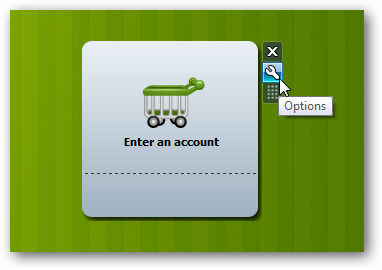
You’ll need to add your Google account info before you can upload files.  Click the gear button to open the Options pane.
image

Now enter your Google account info, and click Ok.  You can also enter an Advanced Key for more features such as previewing your recently uploaded files and one-click access to the document you just uploaded; to get one, you’ll need to make a donation at the developer’s site.

image

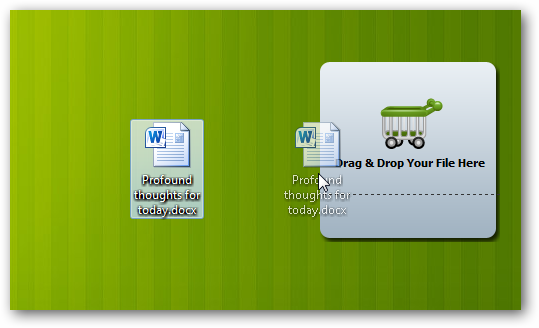
You’re now ready to add files to Google Docs.  Simply drag any document you want to upload and drop it on the gadget.
image

The gadget will now change to show that it’s uploading your file.

sshot-2010-08-12-[13-53-53]

The Gadget will let you know when the upload is finished.  Uploading most documents only took a few seconds in our tests.  Since you can just drag and drop the documents into the gadget, it’s almost as easy as saving a file on your computer or putting it in your Dropbox.

sshot-2010-08-12-[13-53-21]

You’ll be able to see your document in Google Docs ready for you to edit online or share with others.  As usual, Google docs will lose some formatting from Word, but this is the same regardless of how you upload documents.

sshot-2010-08-12-[101]

Conclusion

This little desktop gadget makes it very simple to add your documents to Google Docs.  It’s much quicker and easier than logging in to the Google Docs dashboard to upload files, so it should make it easier to keep your files online if you prefer Google’s web apps.  Since it’s just a desktop gadget, it’s also less resource intensive than many other desktop Google Docs solutions.

If you’re a command line geek, you might also be interested in our article about Using Google Services Via Command Prompt; you can even upload documents to Google Docs this way.  Or you could try Mounting Google Docs in Explorer so you can save files directly to Google Docs just like any other folder.

Links

Download the Cloud Drive gadget

Get More Info From the Developer’s Site

Got an opinion to share? Click here to join the discussion

Similar Articles Productive Geek Tips

Internet Explorer 9 Beta launching September 15th, might enter a beauty pageant

Once again, the whispers were true. Microsoft has proudly announced on this fine day that September 15th will mark the official launch of the Internet Explorer 9 Beta, but details beyond that are scant. We do know that the Big M will hold a gala in San Francisco to celebrate “The Beauty of the Web,” and once it hits the tubes, you’ll need either Vista or Windows 7 to use it (sorry, XP loyalists). ‘Course, it remains to be seen if IE can catch up to Chrome and Firefox in the technical department, but at least you can start preparing your existing squeeze for somewhat of a letdown next month. Let ’em down easy, okay?

Internet Explorer 9 Beta launching September 15th, might enter a beauty pageant originally appeared on Engadget on Thu, 12 Aug 2010 16:54:00 EDT. Please see our terms for use of feeds.

Permalink   |  sourceBeauty of the Web  | Email this | Comments

Microsoft Adaptive Keyboard prototype debuts at center of UIST Student Innovation Contest

No, it’s not the mystery device that Microsoft has been teasing as of late, but we have a feeling that plenty of folks will be wishing that the company’s so-called “Adaptive Keyboard” was it. Unfortunately, it’s just a prototype, and Microsoft apparently has no plans to turn it into an actual product. It will, however, be landing in the hands of a few lucky students participating in this year’s UIST Student Innovation Contest, who will be given free reign to do whatever they like with the keyboard and possibly be rewarded with a $2,000 or $500 prize for their hard work. As for the keyboard itself, it’s basically Microsoft’s take on something like the Optimus Maximus, and consists of a large touchscreen display on top that “extends” to the keys below — opening up a whole range of possibilities for different configurations and other shenanigans (no further technical details just yet, unfortunately). Head on past the break for a pair of demo videos and, if you’re a student, hit up the source link below for the complete contest details — act fast though, the deadline for applications is August 17th.

Continue reading Microsoft Adaptive Keyboard prototype debuts at center of UIST Student Innovation Contest

Microsoft Adaptive Keyboard prototype debuts at center of UIST Student Innovation Contest originally appeared on Engadget on Thu, 12 Aug 2010 16:02:00 EDT. Please see our terms for use of feeds.

Permalink   |  sourceMicrosoft, UIST Student Innovation Contest  | Email this | Comments

Windows Live Essentials 2011 beta 2 due next Tuesday

Microsoft is planning to release beta 2 of Windows Live Essentials 2011 next Tuesday.

According to sources familiar with Microsoft’s plans, the software giant will be issuing a second beta update to address a range of issues found in the recent public beta. The beta will also include updated program icons…

Firefox 4 Beta 3 Adds Windows 7 Touch Support, JavaScript Speed-Ups [Updates]

Windows/Mac/Linux: It’s not on the official Mozilla servers yet, but a third beta of Firefox 3 is offered up at Softpedia, and likely on a few Mozilla mirrors. The most notable new feature is support for Windows 7’s touch interface, along with some JavaScript engine improvements. If you’re in need of extension support in this latest beta, here’s how to make your add-ons install anyway. [via Download Squad] More »


Apple iOS 4 upgrade breaks car stereo connectivity

Over on the Apple Support forums, we’ve noticed a large amount of users saying that their car stereos are no longer working with Apples iOS 4. update. Users report that after updating an iPhone (or iPod) to iOS 4, plugging the phone into the cars integrated stereo create errors indicating…

University of Calgary succeeds in building a neurochip out of silicon, human brain cells

Scientists at the University of Calgary have teamed up with the National Research Council Canada to put a network of human brain cells on a microchip — in effect creating a (tiny) brain on a chip. Until now, when scientists wanted to monitor brain cells, they could only monitor one or two simultaneously, but with this new neurochip, large groups of cells can be placed on the chip and observed in detail, as they go about their business “networking and performing automatic, large-scale drug screening for various brain dysfunctions,” according to PhysOrg. But that’s just the beginning! This sort of advance could someday lead to neurochip implants for driving artificial limbs, treatments for strokes and brain trauma, and more. The Globe and Mail even mentions the possibility that living neurons could be combined with silicon circuits to create an “organic computer.” From that point it’s only a matter of time before you’re jacking into cyberspace with your Dixie Flatline ROM.

University of Calgary succeeds in building a neurochip out of silicon, human brain cells originally appeared on Engadget on Tue, 10 Aug 2010 19:43:00 EDT. Please see our terms for use of feeds.

Permalink   |  sourcePhysOrg  | Email this | Comments

Samsung’s Galaxy Tab said to be debuting at IFA next month

We’d already heard that Samsung’s 7-inch Android-based tablet (apparently known as the Galaxy Tab) would be rolling out sometime in the third quarter of this year, and it looks like we now also know when it’ll be making its official debut. According to South Korea’s JoongAng Daily, an unnamed “high-ranking official” at Samsung has confirmed that the device will be officially unveiled at IFA, which kicks off September 3rd in Berlin. No more new details beyond that, unfortunately, but previous reports have suggested that the device will match its smartphone counterpart with an AMOLED display, and boast some decent specs across the board, including Android 2.2, a 1.2GHz Cortex A8 processor, 16GB of on-board memory, and both WiFi and 3G connectivity.

Samsung’s Galaxy Tab said to be debuting at IFA next month originally appeared on Engadget on Tue, 10 Aug 2010 18:37:00 EDT. Please see our terms for use of feeds.

Permalink OLED-Display.net  |  sourceJoongAng Daily  | Email this | Comments

HP tells employees webOS tablet coming Q1 2011

We’ve been trying to find out when HP would launch a webOS tablet since the company first bought Palm, and we’re now hearing from several trusted sources that it’ll be calendar Q1 2011. We’re told Personal Systems Group VP Todd Bradley mentioned the date during an all-hands employee meeting yesterday, and that the project is indeed known internally as “Hurricane.” (We’re assuming this is what that PalmPad trademark filing was for, but we can’t confirm that.) Shipping a killer tablet would be one way to change the subject from ex-CEO Mark Hurd’s recent troubles, we suppose — but we’re definitely wondering if HP is actually going to support three different tablet operating systems after it launches the Windows 7-based Slate for the enterprise and the Android-based Zeen e-reader tablet for consumers as well. We’ll see — Q1 could be mighty interesting.

HP tells employees webOS tablet coming Q1 2011 originally appeared on Engadget on Tue, 10 Aug 2010 13:47:00 EDT. Please see our terms for use of feeds.

Permalink   |   | Email this | Comments

Updates to Contacts and a (slightly) new look for Gmail

Posted by Benjamin Grol, Product Manager

We’re constantly reviewing user feedback about Gmail, and for a while now the number one request has been for a better contacts experience. You’ve asked us to generally make Contacts easier to use, as well as for specific improvements like sorting by last name, keyboard shortcuts, and custom labels for phone numbers. So, by popular request, we’re happy to announce that an overhauled version of Gmail Contacts will be rolling out today.

Contacts now works more like the rest of Gmail, so if you know how to use Gmail, now you should automatically feel comfortable in Contacts too. And you’ll see a bunch of the features you’ve requested, including:

  • Keyboard shortcuts (go to Contacts and hit “?” for the full list)
  • Sort by last name (look under “More actions”)
  • Custom labels for phone numbers and other fields
  • The ability to undo changes you’ve just made
  • Automatic saving
  • Structured name fields, so you can adjust titles, suffixes, and other name components
  • A bigger, more prominent notes field


While we were at it, we also improved our layout and made it easier to get to Contacts and Tasks. You’ll see these links are now up at the top left corner of your account (along with a link for “Mail” that takes you back to your inbox).


If you’re not interested in Contacts or Tasks, you can hide these links by clicking near the right edge of “Mail.” Overall, there’s now a smaller header area that puts the first message in your inbox about 16 pixels higher on the screen than before.

If you use Google Apps, you won’t see these updates to Contacts quite yet. We’re actively working on making domain-specific features work well in the new interface and plan to make this new version of Contacts available to Google Apps customers too.

Please keep the feedback coming, we are always working hard to make Contacts, and all of Gmail, better.

Blockbuster including games in its by-mail rentals

It’s almost inspiring, the way that Blockbuster bravely marches on, despite such moves as boning Total Access and cutting back on its new movie purchases. And the latest bid for relevance? If you’re receiving your, um, “blockbusters” via snail mail you’ll soon be able to add your Xbox, PlayStation, and Wii games to the mix (and by “soon,” we mean “now”). Ready to add the latest installment of Splinter Cell to your copy of The Bucket List? Well, you should probably get out of the house more. Or you can click the source link to get started.

[Thanks, Kevin]

Blockbuster including games in its by-mail rentals originally appeared on Engadget on Tue, 10 Aug 2010 10:19:00 EDT. Please see our terms for use of feeds.

Permalink   |  sourceBlockbuster  | Email this | Comments

Is Microsoft quietly opening up a Kinect beta program?

Well what do we have here? It appears our friends over at Joystiq have received word from diligent tipsters that Microsoft’s Connect customer feedback service is sending out Kinect beta program invites. Details are predictably sparse, but naming ironies aside, the note does specify that chat will be limited only to those involved in the preview program. While this isn’t really surprising given the context, Joystiq surmises that this choice clarification could hint invitees will have the chance to sample the video chat app available through the Kinect’s new dashboard, which was shown off at E3. Unfortunately, Ballmer and crew have yet to lend any official credence to these murmurs, though apparently the email address behind these notes is valid. It’s also not that outrageous to imagine Microsoft wanting to spin Kinect’s wheels in the wild before releasing it to the unwashed gaming masses on its official November 4th launch date. Considering the program would have to put hardware in the hands of testers though to pull something like this off, we’re counting on more than a few overly excited gamers shining additional light on the situation should things get serious.

Is Microsoft quietly opening up a Kinect beta program? originally appeared on Engadget on Tue, 10 Aug 2010 05:51:00 EDT. Please see our terms for use of feeds.

Permalink   |  sourceJoystiq  | Email this | Comments

Arbitrator rejects Kovalchuk’s contract

Ilya Kovalchuk is once again an unrestricted free agent being pursued by the Devils after arbitrator Richard Bloch rejected the 27-year-old Russian winger’s epic 17-year, $102-million US contract, signed last month with New Jersey.