Skip to content

.::REALITYRECALL::.

  • Home
  • About
  • Contact
  • Early Word On District 9

    Yesterday there was a screening for the new Sci-Fi flick “District 9″ held at Comic Con (one of the only reasons I almost went this year). The film is directed by Neill Blomkamp who was originally supposed to helm the “Halo” movie project until the plug got pulled.

    I’ve now talked to, emailed or texted with 6 friends who were at that screening… and they all seem to have the exact same opinion: It’s great.

    A couple of them caution that a SMALL part of it is the normal hysteria people have about a movie they see at a “special exclusive” screening like this and it is NOT the next Sci-Fi masterpiece… BUT… even they said there is no denying it is a truly great film.

    Soul Video (who as you know is my regular guest on the podcast) was there and told me it is the best film of the year so far… better than Star Trek and better than UP.

    I was already curious to see this film… now I’m flat out dying to see it.

    If it really is as good as my friends are saying it is…. get ready for Halo…. unless the film flops financially.

    July 24, 2009
  • Watch TV On Your PC with FreeZ Online TV

    You don’t have to wait until you’re home on the couch to to stare blankly at a television screen and channel surf.  FreeZ Online TV is a free application that allows you to surf over 500 online channels and live broadcasts from around the world.

    During installation you might want to make sure you don’t install their toolbar.

    1nstall toolbar

    When you first launch FreeZ TV you are presented with what looks to be the starting button.  However, this is just an advertisement that will launch your browser and take you to another online TV service.

    first start avoid button

    On the left side of the screen is a menu of the available channels separated into different categories.

    menu

    It uses Windows Media Player where you can control the play with the familiar control bar.

    player

    Right click anywhere on the video screen to get to menu commands and other options.

    sshot-2009-07-13-[17-07-08]

    Overall this is a simple online TV application and some channels don’t seem load but it is something interesting to do to take your mind off work.  If you’re looking for a light application to watch TV on your computer you might want to check it out.

    freez_tv

    Download FreeZ Online TV

    Similar Articles Featured Wiki Articles
    • Weekend Fun: Watch Television on Your PC with AnyTV
    • Geek Fun: Download Favorite NBC Programs for Free
    • Weekend Fun: Watch Television On Your PC With TVUPlayer
    • Weekend Fun: Watch Online Videos With Babelgum
    • Geek Fun: Use Double Vision to Stealthfully Watch Television at Work
    • Windows OS Code Names
    • Get Diablo II Working on Windows Vista
    • Why Codec Packs Are Bad
    • Easter Eggs
    • Tweaking a Dedicated Virtual Web Server
    • Disable Smart Quotes in Word 2007
    Latest Software Reviews Quick Linux Tips
    • AnyBizSoft PDF to Word 2.0
    • BitDefender 2009
    • Audio Dedupe
    • Cheetah DVD
    • Copy Just the Last Two Days of Files to Another Directory
    • Fixing Authentication refused: bad ownership or modes for directory
    • Mounting a Shared VirtualBox Folder from an Ubuntu Guest
    • Change the Hostname on a Redhat Linux Machine
    Geek Arcade Popular Forum Threads
    • Mad Monday
    • Desktop Tower Defense Pro
    • Frantic
    • Boxhead: The Zombie Wars
    • One CD-ROM listed as multiple drives
    • (Solved) – Converting Files Using Command Prompt Help
    • External hard drive just came up ‘unformatted’ but I have 100+ gigs of data HELP
    • burn files to dvd to watch on dvd player

    July 24, 2009
  • Xbox Division Records Second Profitable Year in a Row

    For those Microsoft investors who once wanted to shut down the Xbox business, we have one thing to say you were wrong!

    July 23, 2009
  • Disable Automatic Web Page Refreshing [Firefox Tips]

    Firefox only (Win/Mac/Linux): Have you ever noticed how some web sites automatically reload the page every minute or two? It’s frustrating, unnecessary, and thankfully can be easily disabled in Firefox.

    While there could be some valid reasons for reloading the page, most of the time it's just a way to artificially increase pageviews—at the cost of your bandwidth and CPU cycles. To disable the automatic refresh, you can type about:config into the location bar, and then filter by the following setting:

    accessibility.blockautorefresh

    Once you’ve found it, simply double-click on the key to change the value to false true, and web pages won’t be able to reload the page. If you have the setting enabled but you’d like to make a single page refresh automatically, you can use the previously mentioned ReloadEvery extension. Thanks, Wilhelm!


    July 23, 2009
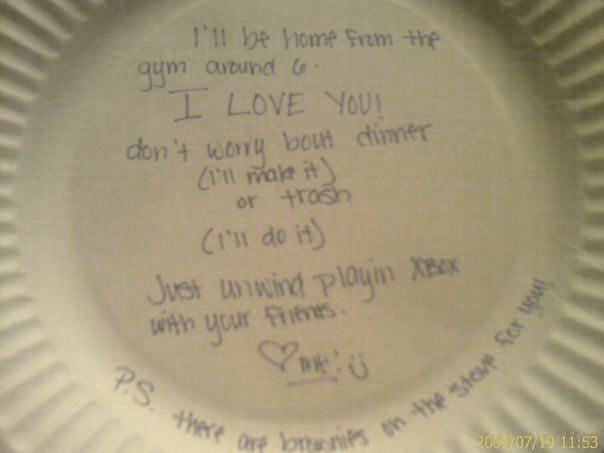
  • Girlfriends of the World, Take Note!

    Girlfriend

    July 23, 2009
  • How to Master Text Highlighting with Your Mouse [Mouse Tips]

    Depending upon the font size of a document and your hand-eye coordination, it can be difficult to position the mouse cursor exactly where you want it when selecting text. Here’s how to quickly select text blocks with minimal fuss.

    Photo by quinn.anya.

    You may have been using some of these text-selection tricks ever since you fired up a computer with a mouse, but chances are you’ll find something below that you didn’t know before.

    Select By Words Instead of Characters

    Instead of simply clicking and dragging your mouse, double-click the first or last word you want to highlight and hold down the mouse button on the second click; then just drag the mouse as usual when selecting text and voilà—you're selecting whole words rather than individual characters.

    I’ve tested this method with Firefox, Internet Explorer, Microsoft Word, Wordpad, and Notepad—but it's probably an OS default, since it works in virtually any program I can think of. You can get Word to do the same thing by default—without double-clicking—via the Edit tab in the Options dialog, but it's an all or nothing affair. The option is checked by default; turning it off gives you greater flexibility for text selection once you know this trick.

    Select Whole Paragraphs or Documents

    Most applications will also select an entire paragraph with a triple-click. Similar to the above method, if you triple-click before dragging the mouse, only whole paragraphs will be highlighted. This can be a quick way to select an entire document by triple-clicking the first paragraph and dragging down to the last.

    More Selection Options Using Word

    While the above tips work most anywhere, Word seemingly has no end of different ways to select text. Here are just some found by experimenting with different key combinations while clicking and/or dragging with the mouse:

    • Shift+click: Select from the current caret position to the mouse cursor location
    • Alt+double-click: Select from the beginning of a word to the mouse cursor location
    • Alt+click-and-drag: Select a rectangular block of text
    • Ctrl+click: Select an entire sentence; once one sentence has been selected this way, Shift+click or Ctrl+click-and-drag can be used to expand the selection to multiple contiguous sentences

    If you’ve got your own text selection tricks, share them in the comments.


    July 23, 2009
  • Female Cats Are Right-Pawed, Males Are Lefties

    Female cats tend to use their right front paw while male cats prefer their left.

    July 23, 2009
  • Microsoft confirms Windows 7 is done

    Microsoft officially signed off on Windows Vista SE 7 and released the
    code of the software to manufacturing. The RTM code will be available
    for select customers and developers beginning on August 6, while the
    general public will have to wait until October 22. Windows Server 2008
    R2 reached the RTM phase as well and will be “available on or before
    that date.”

    July 22, 2009
  • The Goods: Sex To Sell Cars


    The Goods: Sex To Sell Cars – Watch more Funny Videos

    July 21, 2009
  • ‘Storm Chasers’ Go Inside Tornado

    July 21, 2009
  • Amazing Volleyball Rally

    July 21, 2009
  • Five Minutes Back

    See more funny videos and funny pictures at CollegeHumor.
    July 20, 2009
  • World’s Fastest Everything

    July 20, 2009
  • Crazy Car Accident At Intersection


    Crazy Car Accident At Intersection – Watch more Funny Videos

    July 20, 2009
  • 5AM and Too Much To Drink

    July 9, 2009
  • Office 2010: The Movie

    July 9, 2009
  • District 9 New Trailer 2

    July 8, 2009
  • Train vs. Tornado

    July 8, 2009
  • Dallas Police Chase Ends In Nasty Crash 6-29-09

    July 8, 2009
  • President Interrupted By ‘Duck Ringtone’ During Speech

    July 8, 2009
←Previous Page
1 … 710 711 712 713 714 … 726
Next Page→

.::REALITYRECALL::.

Reality Bites

  • Blog
  • About
  • FAQs
  • Authors
  • Events
  • Shop
  • Patterns
  • Themes

Twenty Twenty-Five

Designed with WordPress